In the dynamic world of digital and print design, Adobe's Creative Cloud suite stands as the industry standard, offering a powerful arsenal of tools to bring creative visions to life. Among its most prominent applications are Adobe Illustrator and Adobe InDesign, each boasting a distinct purpose and a loyal user base. While both are integral to the design process and share seamless integration, understanding their core functionalities and optimal use cases is crucial for any designer aiming for professional results. This article delves deep into the intricacies of Adobe Illustrator vs. InDesign, exploring their fundamental differences, key features, and the scenarios where each application truly shines.

Understanding the Core of Vector vs. Layout Design
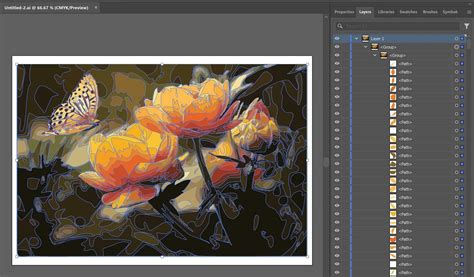
At the heart of the distinction between Adobe Illustrator and InDesign lies their fundamental approach to design. Adobe Illustrator is a robust, vector-based graphic design software. This means that graphics created in Illustrator are built using mathematical equations that define points, lines, and curves. This vector-based nature is a significant advantage, as it allows designs to be scaled infinitely without any loss in quality or sharpness. When you create a logo in Adobe Illustrator, for instance, you benefit from this scalability, ensuring it looks pristine whether it's printed on a business card or displayed on a massive billboard. Illustrator offers a vast array of tools and features that empower designers to bring their creative ideas to life, including essential tools like pen tools for creating precise paths and shapes, as well as anchor points and path manipulation tools for controlling curves and angles.
In stark contrast, Adobe InDesign is a leading desktop publishing software specifically engineered for creating and designing layouts for various print and digital media. Its primary focus is on page layout and typography, enabling designers to arrange and manipulate text, images, graphics, and other visual elements within a document to create professional publications. While InDesign can handle graphics, its strength lies in assembling and refining existing assets into cohesive and aesthetically pleasing layouts, rather than creating them from scratch.
Adobe Illustrator: The Virtuoso of Vector Graphics
Adobe Illustrator has become a standard tool in the design industry due to its robust features and versatility. Its vector-based nature is its defining characteristic. Designers can use it to create captivating illustrations, develop intricate typography, and design professional logos. The software offers a vast array of tools that empower designers to bring their creative ideas to life.
Key Applications of Adobe Illustrator:
- Logo Design: Illustrator's vector editing capabilities make it ideal for creating scalable and intricate logos with precise control over shapes, lines, and typography. A logo designed in Illustrator can be resized for everything from a favicon to a giant banner without pixelation.
- Illustration: Artists and illustrators rely on Illustrator to create digital illustrations, character designs, and artwork, leveraging its extensive range of drawing tools and brushes. The ability to create complex, layered artwork with precise control is invaluable.
- Typography: Illustrator's advanced typographic features allow designers to experiment with typography, create custom fonts, and design visually appealing text layouts. This includes fine-tuning individual letterforms and creating unique typographic treatments.
- Icon Design: The foundation of icon design is in the design of small and identifiable symbols representing a particular action, object, or idea. Illustrator's precision is paramount for creating clear and scalable icons for user interfaces and branding.
- Print Design: Illustrator's support for CMYK color space, Pantone swatches, and print-ready file formats makes it suitable for designing materials such as posters, flyers, business cards, and packaging. Its ability to manage spot colors and ensure accurate color reproduction for print is critical.
Adobe InDesign: The Maestro of Layout and Publishing
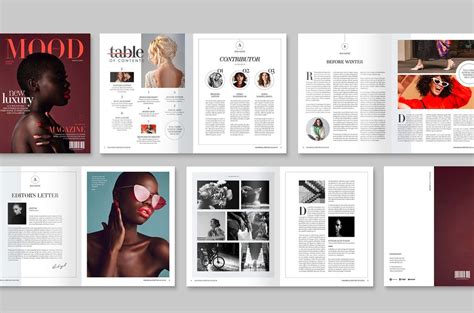
Adobe InDesign is an industry-standard software for creating professional publications. Its primary features revolve around layout design and typography, offering precise control over page elements. This allows designers to arrange and manipulate text, images, graphics, and other visual elements within a document to produce polished and professional outputs.
Key Applications of Adobe InDesign:
- Multi-Page Documents: InDesign excels at handling documents with multiple pages, such as books, magazines, brochures, and annual reports. Its Master Pages feature allows for consistent design elements like page numbers, headers, and footers to be applied across an entire document.
- Typography Control: InDesign provides advanced tools for managing text, including paragraph and character styles, text formatting options, hyphenation, and justification. This ensures consistency and aesthetic appeal in lengthy text-heavy documents.
- Layout and Design: The software offers precise control over the placement and arrangement of text and images, allowing for sophisticated and visually engaging layouts. Tools like grids, guides, and the ability to create text wrap around objects are essential for professional design.
- Interactive Documents: InDesign can be used to create interactive PDFs and digital publications with features like hyperlinks, buttons, and animations, expanding its utility beyond traditional print.
- Integration with Other Adobe Apps: InDesign seamlessly integrates with other Adobe Creative Cloud applications, such as Photoshop and Illustrator, enabling users to easily import and edit graphics and images within their layouts.
The Crucial Intersection: When to Use Which Tool?
While both Illustrator and InDesign are powerful, they serve distinct purposes. Choosing the right tool for the job can significantly impact efficiency and the final output's quality.
- Use Illustrator for: Creating logos, icons, illustrations, custom typography, and any graphic element that needs to be infinitely scalable without loss of quality. It's the go-to for brand identity elements and complex vector artwork.
- Use InDesign for: Laying out multi-page documents like books, magazines, brochures, and interactive PDFs. It's ideal for projects where precise text formatting, page flow, and the integration of various design assets are paramount.
- Use Photoshop for (as a comparison): Editing and manipulating raster images (photographs), creating digital paintings, and designing web graphics that don't require infinite scalability. Photoshop works at the pixel level, making it perfect for detailed image retouching and compositing.
The Adobe Trinity in Action:
The "Adobe Trinity" - Illustrator, Photoshop, and InDesign - is the gold standard for professional design. Understanding their individual strengths allows for a synergistic workflow.
- Illustrator is the virtuoso of vector graphics, enabling designs to be infinitely scalable while maintaining crisp lines and vibrant colors. This agility makes Illustrator the go-to for responsive web design and high-quality print pieces. Its variable fonts feature empowers designers to fine-tune typography with precision, ensuring that the message is just as impactful as the imagery. Illustrator’s canvas is a playground for artists and illustrators who create intricate vector images that stand alone or integrate seamlessly into larger designs.
- Photoshop, when images speak louder than words, is the orator. Renowned for its meticulous image manipulation tools, Photoshop provides the pixel-level precision that breathes life into photographs and digital art. Whether retouching a portrait to perfection or creating a digital painting, Photoshop’s brushes and blending modes offer the creative freedom to explore a world of visual storytelling.
- InDesign reigns supreme in layout and publishing. As the industry-leading software, InDesign is at the heart of print and digital media design, weaving together text and visuals into harmonious layouts. From business cards to interactive online documents, InDesign’s toolkit is unmatched in creating sophisticated text and visual arrangements. The software’s paragraph styles are indispensable for maintaining textual consistency, a testament to InDesign’s focus on precision and aesthetics.
Photoshop vs Illustrator vs InDesign vs Premiere Pro – Which Adobe App Should You Learn First?
Seamless Integration and Collaboration within Creative Cloud
A significant advantage of both Illustrator and InDesign is their seamless integration within the Adobe Creative Cloud ecosystem. This allows for a fluid workflow where assets created in one application can be easily imported and utilized in another.
- Cross-Platform Compatibility: Both Illustrator and InDesign offer cross-platform compatibility, allowing users to seamlessly transfer their work between different operating systems (Windows and macOS).
- Integration with Adobe Creative Cloud: Being part of the Creative Cloud suite ensures smooth integration with other Adobe applications. For instance, vector graphics created in Illustrator can be placed into InDesign layouts, and Photoshop files can be similarly incorporated.
- Cloud-Based Collaboration: Adobe Creative Cloud offers cloud-based collaboration features, enabling users to share their Illustrator and InDesign files with team members or clients. This facilitates real-time feedback and collaborative design processes.
- Creative Cloud Libraries: These libraries act as a centralized repository for designers to store and access frequently used elements like logos, color palettes, and graphics. This fosters collaboration, allowing team members to update and use shared assets in real-time, ensuring a unified creative vision across different mediums.
- File Exchange: Illustrator graphics saved as layered PDFs can be finely tuned within InDesign, providing the power to adjust layer visibility for various illustration variations. When Photoshop files are imported into InDesign, they retain their color profiles and text wrapping options, thanks to paths, masks, or alpha channels, demonstrating the thoughtful integration of Adobe’s software arsenal.
Subscription Models and Accessibility
Adobe offers various pricing options for its Creative Cloud subscription, which includes Adobe Illustrator and InDesign, among other software applications. This subscription-based pricing model ensures that users have access to the latest updates and features, as well as ongoing support from Adobe.
- Creative Cloud All Apps: This plan provides access to the complete Adobe Creative Cloud suite, including Illustrator and InDesign, along with other applications such as Photoshop, Premiere Pro, and more.
- Creative Cloud for Teams: This plan caters to businesses and organizations with multiple users, including collaboration and administrative tools. Pricing is typically based on a per-user annual subscription.
- Individual App Subscriptions: Users can also subscribe to individual applications like Illustrator or InDesign if they only require specific tools.
While Adobe has moved to a subscription model, there are ways to access older, yet still professional-grade, versions of the software. Searching on platforms like eBay for versions prior to the Creative Cloud era (e.g., CS series up to CS6) can be an option for those on a tighter budget, though it's crucial to seek reputable sellers.
Mastering the Tools: Training and Efficiency
The journey to mastering Adobe's suite of creative tools is both an art and a science. Adobe provides a comprehensive library of online tutorials and guided materials for learners of all levels. Furthermore, customizing workspace layouts to suit specific project needs can significantly streamline the design process, enhancing productivity. For those aiming for peak efficiency, learning keyboard shortcuts is essential, allowing designers to navigate the Adobe Creative Suite with agility and reduce the need for constant tool switching.
In essence, Adobe Illustrator and InDesign are not mutually exclusive but rather complementary powerhouses. Illustrator excels in the creation of scalable vector artwork, forming the foundation for logos, illustrations, and branding elements. InDesign then takes these elements, along with text and photographic assets, and orchestrates them into compelling layouts for both print and digital media. By understanding their distinct roles and leveraging their seamless integration, designers can unlock a more efficient and effective creative workflow, producing professional-grade results across a vast spectrum of projects.
tags: #adobe #illustrator #vs #indesign