The digital art landscape has revolutionized the way we create, offering a cleaner, more versatile alternative to traditional mediums. Gone are the days of messy oils and smelly turpentine! Welcome to the world of digital painting. Corel Painter, a powerful and sophisticated software, stands at the forefront of this revolution, enabling artists to craft stunning, painterly style digital paintings from scratch. Whether you're a seasoned traditional artist looking to translate your skills into the digital realm or a complete beginner eager to explore the vibrant world of digital art, this guide will provide you with the foundational knowledge and advanced techniques to unlock your creative potential within Corel Painter.
Understanding the Corel Painter Ecosystem
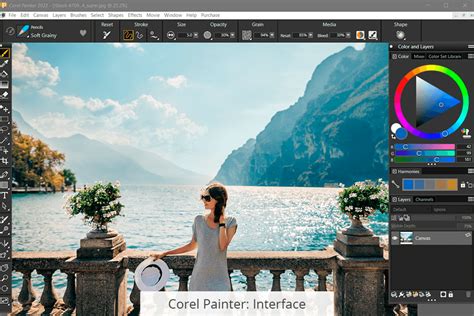
Corel Painter is renowned for its ability to mimic traditional art materials and techniques with unparalleled fidelity. It offers a vast array of brushes, media types, and customization options that cater to a wide spectrum of artistic workflows. The software is designed to empower artists to achieve fantastic results by applying their years of experience in the digital world, making it accessible even for those new to digital painting.
Setting Up Your Digital Canvas
The first step in creating any digital artwork is setting up your canvas. In Corel Painter, this involves understanding the various options available in the New Image dialog. You can choose the document's dimensions, color background, paper type, and recommended resolution for print or web. This initial setup is crucial for ensuring your artwork meets your intended output requirements. For instance, selecting the appropriate paper type can significantly influence how your digital brushes interact with the canvas, mimicking the texture and feel of real-world surfaces.
Navigating the Painter Toolbox
Painter's toolbox is a treasure trove of creative instruments. Each tool is designed to replicate a specific artistic function, from the broad strokes of a palette knife to the delicate lines of a fine brush. Understanding what each tool can be used for is key to efficient and effective artwork creation. Painter Master Elite Cher Pendarvis provides expert insights into the Painter toolbox, detailing the purpose and application of each instrument.
The Art of Brush Selection and Customization
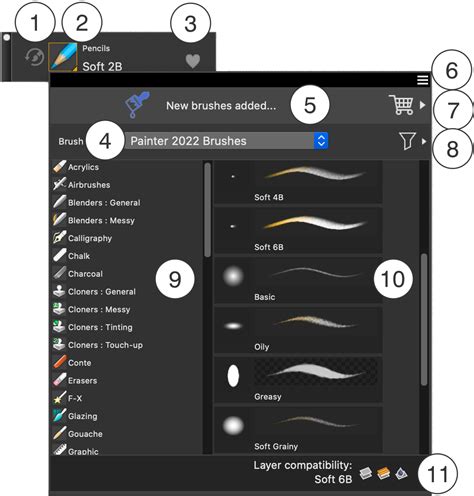
The Brush Selector in Corel Painter is where the magic truly begins. Here, you can explore different media types, including dry, wet, and blending media, each offering a unique painting experience. The software boasts an extensive library of brushes, but for those with particular workflows or specific aesthetic goals, the ability to find and save custom brushes is invaluable. This allows for a highly personalized painting experience, ensuring that the tools at your disposal perfectly match your creative vision.
Harnessing Brush Dynamics: Pressure, Tilt, and More
A significant advantage of digital painting in Corel Painter lies in its ability to leverage the full potential of pressure-sensitive drawing tablets. You can take advantage of the power of pressure, tilt, bearing, and rotation control of Painter’s brushes for the most impressive and nuanced painting results. These dynamic controls allow for a level of expressiveness that closely mimics traditional brushwork, enabling subtle variations in line weight, opacity, and color application based on how you hold and move your stylus.
Mastering Color Selection and Harmony
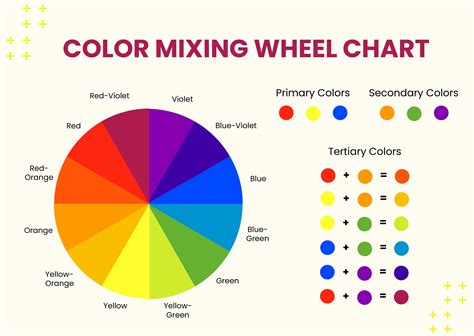
Selecting the perfect colors is fundamental to any painting. Painter offers a sophisticated suite of color tools, including the Color Wheel, Mixer Palette, and color sets and harmonies. Painter Master Elite Cher Pendarvis introduces these tools, guiding users through selecting, adjusting, sampling, cloning, and mixing colors. The new harmonies, such as complementary, light monochromatic, and dark monochromatic options, dynamically create balanced color swatches from your chosen color, simplifying the process of achieving harmonious palettes.
Advanced Techniques and Workflow Optimization
Once you have a grasp of the foundational elements, Corel Painter offers numerous avenues for enhancing your workflow and pushing the boundaries of your creativity.
The Power of Layers
The Layers panel is a cornerstone of digital art, and Corel Painter provides robust tools for managing them. Layers allow you to organize your painting, experiment with different effects, and make non-destructive edits. Improved contextual menus, information dialogs, layer adjuster options, and easy access to commands significantly enhance the ease of use when working with layers.
Customizing Your Workspace and Palettes
To speed up your Painter workflow, creating a custom palette is highly recommended. This allows for quick access to your most frequently used brushes, materials, and even menu commands, streamlining your creative process and reducing the time spent searching for tools. Customizing your workspace is quite simple and will give you the optimal interface for your painting style.
Photo Artistry: Transforming Images into Paintings
Corel Painter excels at photo art. You can learn how to paint your first photo using the tools in the Photo Art palette, which includes options for cloning, auto-painting, and restoring photographic details. The software's AI Auto-Painting presets leverage Corel ML and the Apple Vision Framework technology to intelligently paint details, generating natural-looking paintings with a greater sense of depth and focus. By painting with more detail in the areas of interest and using larger, more gestural strokes in the background, the results more closely resemble what a trained artist can achieve. Choose from 10 new AI Styles to experience auto-painting with stunning artistic results.
Sketching and Reference Integration
When working from reference, Painter provides tools to facilitate freehand sketching. The Reference Image panel allows you to set up a reference image, enabling you to sketch directly over it or use it as a guide for your painting.
Adding Depth with Lighting and Texture
To add that extra flair to your painting, Painter Master Elite Cher Pendarvis shows you how to apply lighting and surface texture to your canvas. These elements can dramatically enhance the realism and visual appeal of your digital artwork.
Exploring Specialized Brushes and Effects
Corel Painter's extensive brush library includes specialized tools for unique effects and artistic styles.
Image Hose and F-X Brushes
Discover how to create a simple nozzle for an Image Hose brush that paints with images instead of color. Additionally, add some cool effects to your digital art with Painter’s F-X brushes, learning about their different variants and how to customize them.
Fluid Paint and Oil Brushes
This tutorial series introduces you to Painter’s Fluid Paint brush controls and shows you how to customize other brushes to use Fluid Paint. You can also explore Painter’s Oil brush categories, delving into the various qualities, properties, and settings for many of the brushes.
Sumi-e Watercolor and Mixed Media
Learn about the new Sumi-e Watercolor brushes and the new ability to mix dry media with watercolor to create stunning paintings that are not possible in the traditional world or in previous versions of Painter. Easily find, filter, and favorite beloved brushes from within the Brush Selector, including Painter’s Watercolor Compatible brushes, allowing you to paint with dry media types on Watercolor layers to achieve mixed-media looks.
Workflow Examples and Master Demonstrations
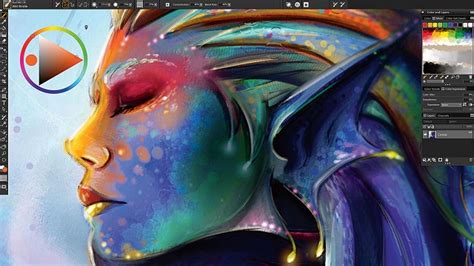
Numerous tutorials and webinars feature Painter Master Elites, offering step-by-step guidance and invaluable tips from seasoned professionals.
Illustrative Techniques and Character Design
Award-winning artist Justin Buus shares his top tips and techniques for harnessing the illustrative power of Painter to create his whimsical artwork. Painter Master Harvey Bunda demonstrates his techniques for creating an epic character, while concept artist Magdalena Proszowska gives an in-depth look at the tools and techniques she uses to create captivating characters.
Landscape and Environmental Painting
Painter Master Melissa Gallo shows you how to create a landscape painting from a reference photo using just one brush. For environmental artists, Davey Baker shares his techniques and tips for creating environment designs in Painter. Painter Master Aaron Rutten presents a landscape painting demonstration using the new Thick Paint Compatible brushes.
Portraiture and Figurative Art
Painter Master Elite Collin Chan teaches fundamental painting techniques for creating fine art portraits from scratch. Elite Painter Master Marilyn Sholin demonstrates her techniques for painting soft and gentle portraits and creating backgrounds. Isis Sousa shares her secrets of the important fundamentals for painting realistic skin and hair - from color to texture.
Forensic Art and Reconstruction
In a unique application of digital art, forensic artist Natalie Murry demonstrates the real-life forensic art of reconstructing a face from a skull. She also teaches how to accurately portray a subject’s ancestry and how facial muscles work and change during the aging process.
Emulating Traditional Styles: Bob Ross and More
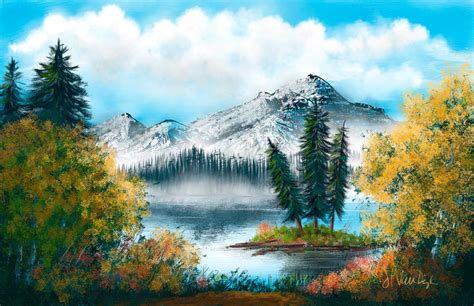
Ease into using Painter and the Bob Ross approved Mystic Mountain brush pack and become absolutely addicted to digital art. Follow step-by-step instructions to paint Bob Ross masterpieces like "Winter Splendor," "Blue Moon," "Campfire," "Shades of Grey," and "Sunset Aglow." These tutorials demonstrate how to fill the canvas with color, lay down ethereal light, craft frosted foliage, and create rock formations and misty water.
Performance Enhancements and User-Requested Features
Corel Painter is continually evolving, with each update bringing performance enhancements and new features based on user feedback.
Streamlined Brush Management
Quickly choose most used brush sizes from Painter’s new library. Easily add, reorder, delete, and change size previews to accommodate your workflow. Enjoy new and enhanced brushes in Painter’s streamlined library. Easily find, filter, and favorite beloved brushes from within the Brush Selector.
Improved Layer Functionality
Learn how to use the layer enhancements in Painter 2020 to access commands right from the panel and avoid accidentally painting on hidden layers. See how to paint on any layer type right from the New Image dialog plus take advantage of many other user-requested layer improvements.
Enhanced Color Selection Tools
Painter 2020 makes color selection a breeze, with 6 new color harmonies and a new Temporal Color Wheel menu with left-handed mode and other options. Learn how to use Painter’s color selection tools: the Color Wheel, Mixer Palette, and color sets and harmonies to create the ideal color palette.
Revamped Property Bars and Palettes
Learn how to use Painter 2020’s revamped property bars, flyouts, and palettes for brushes and tools to put the most important controls at your fingertips. This ensures that essential controls are readily accessible, further optimizing your painting workflow.
Integrating with Other Tools and Platforms
Corel Painter can be effectively integrated with other creative tools and platforms to enhance your digital art workflow.
Mac Workflow Enhancements with Sidecar
Improve your overall Mac workflow in big ways! Use Sidecar on macOS to use your iPad as a secondary display that mirrors your Mac desktop. This provides a larger canvas and a more intuitive way to interact with Painter.
AI Auto-Painting with Apple Vision Framework
Enjoy AI Auto-Painting presets that leverage Core ML and the powerful new Apple Vision Framework technology. These features determine areas of focus in a photo and intelligently paint details, generating natural-looking paintings with a greater sense of depth and focus.
Keyboard Shortcuts for Efficiency
To further speed up your painting workflow, it's beneficial to learn helpful keyboard shortcuts. A comprehensive list of known keyboard shortcuts for Corel Painter can significantly reduce the time spent navigating menus and executing commands.
Conclusion
Corel Painter is more than just a piece of software; it's a comprehensive digital art studio that empowers artists of all levels to explore their creativity. From its intuitive interface and vast brush library to its advanced AI features and seamless integration with other platforms, Painter offers an unparalleled digital painting experience. By delving into its features, practicing with its tools, and learning from the expertise of master artists, you can embark on a journey to create stunning digital masterpieces that rival traditional art in their beauty and expressiveness. The world of digital painting is vast and exciting, and Corel Painter is your ultimate companion in navigating its creative frontiers.