The desire for powerful, flexible design tools on portable devices is a growing trend, and for vector graphics enthusiasts, the question of Inkscape's presence on the iPad is a common one. While Inkscape itself doesn't offer a native application for iPad, various workarounds and alternative software have emerged, catering to the need for professional vector editing on Apple's popular tablet. This exploration delves into the current landscape, examining the possibilities and limitations of using Inkscape-like functionalities on an iPad, and introduces compelling alternatives that are specifically designed for the mobile creative workflow.

The Quest for Inkscape on iPad: Unofficial Avenues and Their Caveats
For users who have always had a fantasy about a web app for Inkscape, or who wish to organize a sort of "Inkscape University," the absence of a direct iPad application can be a significant hurdle. While there isn't an official Inkscape program for iPad-type tablets, some users have investigated third-party solutions that aim to bring desktop applications to mobile environments. These often involve cloud-based services or remote access tools.
One such avenue explored is the use of services like Online App Box or AlwaysOnPC. The premise behind these platforms is to allow users to run desktop applications, including Inkscape, through a web browser or a remote connection on their tablet. However, based on user experiences and observations, the reliability and security of such services can be questionable. For instance, a site like Online App Box, with its "atrocious grammar and poor site design," can be a common earmark for malware and is generally not recommended. While AlwaysOnPC might present a less "sketchy" appearance, it's still crucial for users to "do their homework before using it." These platforms essentially attempt to bridge the gap by enabling the use of applications not natively designed for tablets, but they come with inherent risks and potential performance limitations.
It's important to understand that these methods are not official Inkscape releases and are essentially workarounds. They might offer a way to access Inkscape's functionality, but the user experience, performance, and stability can vary significantly. The grammar and design of a website are often indicators of the overall professionalism and trustworthiness of the service offered. Therefore, caution is advised when considering such unofficial routes for accessing Inkscape on an iPad.
Understanding Inkscape: A Powerful Desktop Vector Editor
Inkscape is a professional, free, and open-source vector graphics editing platform. It is widely used to create logos, illustrations, diagrams, and infographics. The program's robust feature set makes it a popular choice for designers across various disciplines. Inkscape supports a wide range of file formats, including SVG, AI, EPS, and PDF, offering powerful tools that are comparable to those found in commercial software like Adobe Illustrator.
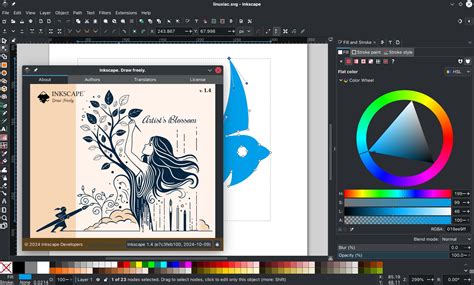
The software is available for Windows, macOS, and Linux, positioning it as a universal solution for designers working on different operating systems. From a system resource perspective, Inkscape is not considered a particularly "heavy" program, especially when contrasted with its commercial counterparts. It is designed to run stably even on computers with average specifications, making it accessible to a broader range of users.
However, a key point of distinction is that Inkscape does not officially have a full version for smartphones or tablets. While there might be third-party SVG viewers or remote solutions that allow some level of interaction with Inkscape files on mobile devices, these are not the same as a native, fully functional application. For users who are accustomed to Inkscape's desktop environment and wish to replicate that experience on a mobile device, or for those who are not ready to invest in a powerful computer, exploring cloud-based solutions or dedicated mobile vector editors becomes a more practical approach.
Exploring Inkscape's Core Functionality: Bezier Curves and Path Effects
A fundamental aspect of vector graphics editing, and a core feature of Inkscape, is the manipulation of paths and nodes, particularly through the use of Bézier curves. When creating a shape with the Bézier or Pencil tool in Inkscape, understanding how to form smooth curves and sharp corners is crucial for achieving desired results.
If you click with the Pen/Bézier tool, it creates corner nodes, which result in sharp corners. Conversely, if you click-drag with the tool, it generates a smooth node, which is the method for creating Bézier curves "on the fly." This distinction is vital for precise control over the shape of your vector objects.
Furthermore, Inkscape offers powerful features like Path Effects, which can dynamically alter paths. Sometimes, users might encounter unexpected behavior with shapes not filling as expected. In such instances, a helpful troubleshooting step is to navigate to Path -> Remove Path Effect. This action can often resolve issues by simplifying the path and removing any lingering effects that might be interfering with the fill.
When creating a new path with the Bézier or Pencil tool, it's also important to ensure that the 'shape' setting in the tool control bar at the top of the interface is set to 'None'. This setting helps to ensure that the path is treated as a standard, editable path rather than being constrained by predefined shape parameters, which can affect how fills are applied. These details, while specific, highlight the depth of control Inkscape offers to its users.
Linearity Curve: A Modern Inkscape Alternative for iPad
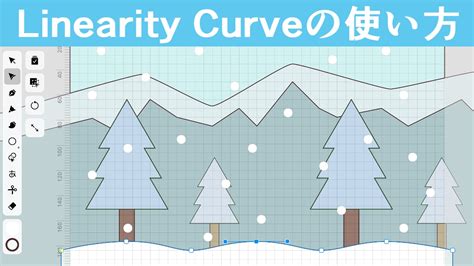
While the absence of a native Inkscape app for iPad is a notable gap, the design landscape has evolved, offering powerful and intuitive alternatives. Linearity Curve, formerly known as Vectornator, has emerged as a leading Inkscape alternative, specifically designed to cater to modern workflows and optimize the user experience on Apple devices, including the iPad.
Why Choose Linearity Curve Over Inkscape for Mobile Design?
Linearity Curve is engineered with a focus on providing a seamless and powerful vector design experience on Mac, iPad, and iPhone. Its primary advantage lies in its user-centric design.
A Sleek, Intuitive Interface
One of the most significant differentiators of Linearity Curve is its "sleek, intuitive interface." This user-friendly and easy-to-navigate UI "drastically reduces the learning curve for new users," making it an "ideal tool for solo designers and creative teams of all skill levels." Unlike Inkscape, which can present a steeper learning curve for beginners, Linearity Curve is "specifically designed to help new users get up to speed quickly." Its interface, coupled with an "extensive library of templates and tutorials," simplifies the creation of "high-quality vector design and art with minimal training or experience." Whether a user is a seasoned professional or just starting out, Linearity Curve's tools and resources are geared towards elevating their designs.
Design Anywhere & On the Go
Inkscape's functionality is largely confined to desktop environments, making it "pretty limiting when it comes to using a third-party stylus." Linearity Curve, on the other hand, is built for mobility. Users can "choose your creative weapon" and "create seamlessly across your Mac, iPad, or iPhone, using whichever device you feel most comfortable with." This ability to "design on iPad, iPhone, or Mac" offers unparalleled flexibility. Crucially, Linearity Curve is "optimized for Apple Pencil," ensuring a natural and precise drawing and editing experience for iPad users.
Integration with the Apple Ecosystem
For users already invested in the Apple ecosystem, Linearity Curve "feels at home." The interface is described as "sleek and powerful," and the overall experience is "inspired and alive." It is positioned as "a true Inkscape alternative designed for Apple users," leveraging the strengths of Apple's hardware and software integration.
Enhanced Importing and Asset Management
A significant drawback of Inkscape is its limited support for importing files from other popular design software. Inkscape "doesn't support third-party document importing for file types like Figma, Illustrator, or Sketch." Linearity Curve addresses this by supporting "all of these file formats," aiming to "make your work as easy as it gets."
Furthermore, Linearity Curve boasts an impressive asset library. It offers "over 80k free integrated libraries" of royalty-free icons and Apple SF Symbols, which can be directly used in designs. This is a stark contrast to Inkscape, which "doesn't have an integrated library of vector content." This extensive library significantly streamlines the design process by providing readily available graphic elements.
Cloud Solutions and Browser-Based Inkscape
For those who are keen on using Inkscape specifically but want to access it on devices like an iPad, Chromebook, or Android, cloud-based solutions offer a viable, albeit indirect, path. These services allow users to run Inkscape through their web browser, effectively bringing the desktop application to a mobile interface.
Aristeem: A Cloud Solution for Mobile Inkscape Access
Aristeem is presented as an "optimal solution" for users who want to work with professional programs like Inkscape on a mobile device or who are not ready to invest in a powerful computer. It functions as a cloud solution that makes Inkscape accessible for iPad, Chromebook, or Android devices, essentially providing an "online Inkscape solution." This approach circumvents the need for a native installation and allows users to leverage Inkscape's extensive capabilities remotely. While Inkscape itself is "not considered a heavy program," large or complex projects can still demand significant system resources. Cloud solutions like Aristeem can alleviate these demands by offloading the processing to powerful remote servers.
RollApp and Browser-Based Inkscape
Another option for browser-based Inkscape access is through platforms like rollApp. This service makes Inkscape available "on rollApp’s cloud (enjoy drawing on iPad) and in the Chrome Web Store (perfect for Chromebook owners)." This means users can experience Inkscape directly within their web browser, without the need for any local installation. For working with files, these browser-based solutions often allow users to connect their cloud storage accounts, such as Google Drive, Dropbox, and Box, enabling seamless file management "right through your browser." This integration makes it convenient to save, access, and share projects created with Inkscape online.
The utility of browser-based Inkscape is broad, ranging from "creative art and web graphics to technical diagrams and navigation development." For individuals accustomed to the workflows of Adobe Illustrator or CorelDraw, Inkscape's capabilities are quite similar. It utilizes the Scalable Vector Graphics (SVG) file format, supporting many advanced SVG features like markers, clones, and alpha blending. However, its primary focus remains on core vector graphics editing capabilities, including transparency, gradients, node editing, and pattern fills. Inkscape can store graphics in a vector format but also import and display bitmap images, adding to its versatility.
Comparing Inkscape and Linearity Curve: Key Differentiators
When evaluating vector design software, particularly for mobile use, a direct comparison between Inkscape and a leading alternative like Linearity Curve reveals distinct strengths and weaknesses.
Core Functionality and Target Audience
Inkscape, as a professional vector graphics editor, is renowned for its powerful and comprehensive toolset, appealing to experienced designers and those who prioritize a free, open-source solution. Its depth of features, while extensive, can also contribute to a steeper learning curve for newcomers. Inkscape is a desktop-centric application, and its integration with mobile workflows is indirect, relying on workarounds.
Linearity Curve, conversely, is purpose-built for modern, cross-device workflows, with a strong emphasis on user-friendliness and accessibility, especially for iPad users. Its "sleek, intuitive interface" is designed to "reduce the learning curve," making it an attractive option for beginners and intermediate users who want to create high-quality vector art efficiently. While it offers professional-grade tools, its design philosophy is geared towards a more streamlined and integrated experience, particularly within the Apple ecosystem.
Platform Availability and Mobile Optimization
Inkscape is a universal desktop solution, available on Windows, macOS, and Linux. It lacks any official mobile or tablet application. Any use on an iPad would necessitate remote access or cloud-based browser solutions.
Linearity Curve, on the other hand, is designed to "work on Mac, iPad, and iPhone." It offers a truly native experience on these platforms, with specific optimizations for touch input and the Apple Pencil. This "design anywhere" philosophy is a fundamental advantage for mobile creatives.
Feature Set and Ecosystem Integration
Inkscape excels in its raw feature set, offering advanced SVG capabilities, extensive node editing, and a vast array of effects. However, it lacks integrated asset libraries and has limited support for importing files from competing professional software like Figma or Sketch.
Linearity Curve compensates for Inkscape's limitations in these areas. It provides "over 80k free integrated libraries" of icons and symbols, significantly speeding up the design process. Crucially, it offers "endless third-party importing options," supporting file types from Figma, Illustrator, and Sketch. This interoperability is a major benefit for designers working in collaborative environments or migrating between different software.
Conclusion: Choosing the Right Tool for Your Mobile Vector Design Needs
The landscape of vector graphics design on the iPad has evolved significantly. While Inkscape remains a formidable and indispensable tool for desktop users, its absence of a native iPad application means that users seeking mobile vector editing capabilities must look to alternatives or workarounds.
For those who prioritize a seamless, intuitive, and mobile-first experience, Linearity Curve stands out as a compelling Inkscape alternative. Its user-friendly interface, optimization for Apple Pencil, cross-device functionality, and robust asset management make it an excellent choice for designers on the go. The ability to import files from other popular design software further enhances its appeal in professional or collaborative settings.
For users who are specifically attached to Inkscape and wish to access its full desktop power on an iPad, cloud-based solutions and browser-based platforms like Aristeem and rollApp offer viable, though less integrated, options. These workarounds can provide access to Inkscape's extensive features, but users should be aware of potential performance limitations and the inherent trade-offs compared to a native application.
Ultimately, the choice between exploring Inkscape through workarounds or embracing a dedicated mobile vector editor like Linearity Curve depends on individual priorities, workflow requirements, and the desire for a truly integrated mobile design experience. The growing capabilities of tablet-based design software mean that powerful vector creation is no longer confined to the desktop.