In the realm of Artificial Intelligence (AI) and machine learning (ML), particularly within image processing and computer vision, a fundamental tool for object detection is the bounding box. AI and machine learning employ various digital methods and tools meant to assist with image annotation, and using bounding boxes is one of the most prevalent. Let's delve deeper into what a bounding box, or bbox, truly is and its multifaceted applications.
What is a Bounding Box in Image Processing?
A bounding box, often abbreviated as bbox, is essentially a rectangle defined by a set of coordinates. These coordinates, typically an x (or longitude) and y (or latitude) pair, outline the spatial position of a specific item within an image. Its primary function in image processing is to precisely determine where an object is located. The coordinates are generally established by defining the upper-left-hand corner and the lower-right corner of the image.
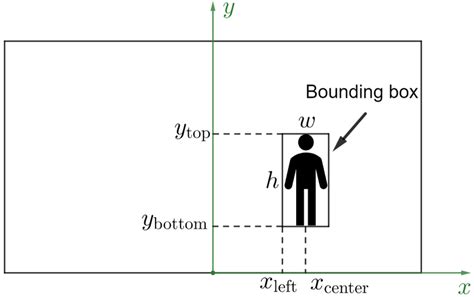
The dimensions of a bounding box are not fixed; they vary dynamically based on the width and height of the item being enclosed. For instance, the bounding box around a car will naturally differ in size from one drawn around a bicycle. A data annotator manually draws these bounding boxes on individual images or on each frame within a sequence of images. Once these boxes are drawn, a machine learning algorithm can be trained to perform object detection, learning to identify and locate these bounding boxes in new, unseen images. For smaller objects, a minimum bounding box is crucial, requiring a minimum width and height to ensure accurate detection.
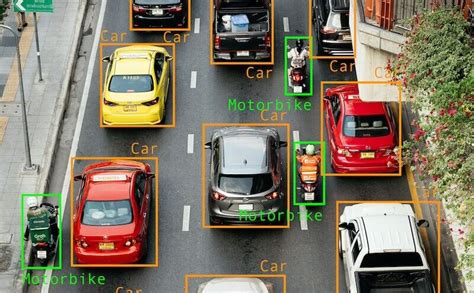
After the bounding boxes are drawn, an annotator typically assigns a label to each box, identifying the object it encloses. This labeling process makes the objects quickly recognizable by both humans and the AI models being trained. Often, different labels are assigned distinct colors, further enhancing visual recognition and differentiating between various object classes.
The Purpose and Functionality of Bounding Box Annotation
The bounding box technique serves numerous functions, but its most significant utility lies in object detection. Through the specific settings applied when annotating boxes on a provided set of images, computer vision algorithms are trained to instantly recognize elements that resemble previously supplied references. These recognized elements are then displayed on the screen, often highlighted with their assigned colors.
The accuracy of a machine-learning-powered object detection algorithm is not solely dependent on the dimensions of the polygon that surrounds an element. It also shows improved performance when a wide array of object categories are included in the training data. The more references a machine learning system is provided with, the better it becomes at analyzing and understanding the visual information it needs to process. This method is widely deployed across various applications and is supported by numerous software platforms.
Image classification vs Object detection vs Image Segmentation | Deep Learning Tutorial 28
Key Applications of Bounding Box Technology
The object detection technology powered by bounding boxes is instrumental in a multitude of fields:
- Self-Driving Cars: Cameras and AI systems in autonomous vehicles utilize bounding boxes to identify and track other vehicles, pedestrians, traffic signals, and obstacles, playing a critical role in accident prevention.
- Insurance Claims: In the event of an accident, bounding boxes can help insurance companies analyze images or video footage to determine the cause and identify damaged components.
- Agriculture: Companies and farmers employ this technology to detect the presence of pests or diseases on their crops, enabling timely intervention and improved yields.
- Healthcare: In medical imaging, bounding boxes can assist in detecting and monitoring the progression of bacteria or viruses, or identifying anomalies in scans.
- eCommerce: Online retailers use object detection to enhance customer experience, for example, by enabling visual search functionalities or automatically tagging products in images.
While companies predominantly use bounding boxes for object detection, the technique also finds application in various computer settings and software for tasks such as transforming, aligning, scaling objects, or modifying their orientation. Bounding boxes remain one of the most popular and recognized tools in image processing for image and video annotation projects.
How Bounding Boxes Facilitate Object Detection
Image processing techniques are a primary driver behind the continuous improvement of computer vision and the innovation of AI-based technologies. From self-driving cars to facial recognition, computer vision applications are at the forefront of advancements in image segmentation and processing. However, image detection and annotation processing are not as simple as merely drawing rectangles around objects.
The Mechanics of Bounding Boxes
A bounding box functions as an imaginary rectangle that serves as a reference point for object detection. It effectively creates a "collision box" for an object within the context of image processing projects. Data annotators meticulously draw these rectangles over images used for machine learning, outlining the object of interest by defining its X and Y coordinates. This process simplifies the task for machine learning algorithms, enabling them to more easily locate specific objects, determine potential collision paths, and conserve valuable computing resources by focusing processing power.
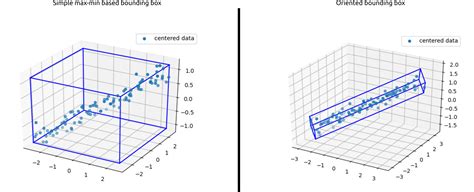
Bounding boxes, or their more advanced variant, rotating bounding boxes, are among the most widely adopted image annotation techniques in deep learning. To understand how object detection works in relation to bounding boxes, it's essential to view object detection as comprising two core components: object classification and object localization. In essence, for an AI to detect and target an object in an image, it must first understand what the object is and then where it is located during the machine learning image processing phase.
Consider the example of self-driving cars again. An annotator will draw bounding boxes around other vehicles and label them. This action trains a computer vision model's algorithm to understand the visual characteristics of vehicles. By annotating objects such as vehicles, traffic signals, and pedestrians, autonomous vehicles are enabled to navigate busy streets safely. Self-driving car perception models rely heavily on bounding boxes to achieve this critical functionality.
The Nuances of Bounding Box Accuracy and Annotation Quality
It is crucial to acknowledge that a single bounding box, while fundamental, does not guarantee a perfect prediction rate. The effectiveness of object detection is influenced by several factors, and the quality of the annotation process is paramount.
The "Garbage In, Garbage Out" Principle
For professionals working in the AI industry, the adage "garbage in, garbage out" is exceptionally pertinent. Feeding a system inaccurate or poorly prepared training datasets is one of the most effective ways to undermine segmentation techniques and compromise the success of a computer vision project. Misaligned bounding boxes can introduce significant errors into an algorithm, requiring considerable time and effort to diagnose and rectify. This is precisely why many AI companies opt to outsource image and video annotation to professional annotators. Artificial intelligence learns from the data it is given; teaching it incorrect lessons through flawed segmentation algorithms can have detrimental consequences. Relying on robust video and image annotation solutions is therefore essential.
Accessing the right tools, employing effective image processing techniques, and utilizing appropriate segmentation algorithms, often with the assistance of expert annotators, can significantly improve model performance.
Understanding Bounding Box Coordinate Formats
Bounding box annotations can be represented in various coordinate formats, each with its specific structure and application. Understanding these formats is vital for accurate data processing and model training.
Absolute and Normalized Coordinates
One common representation is the absolute coordinate form. Here, the values directly correspond to the pixel dimensions of the image. For example, a bounding box might be represented as ["bin", 8.9, 275.3, 867.5, 964.0]. In this format, (8.9, 275.3) would represent the top-left corner's (x1, y1) coordinates, meaning the corner is 8.9 pixels from the left edge and 275.3 pixels down from the top edge. The subsequent values often represent the bottom-right corner's (x2, y2) coordinates or the width and height.
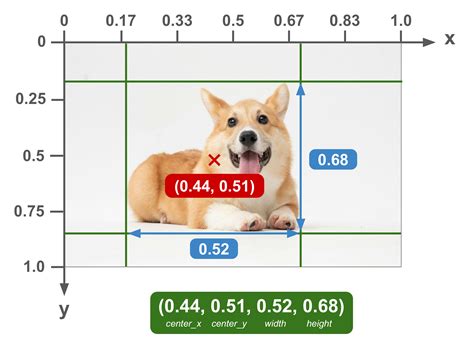
A related format is the normalized coordinate form, where values are scaled to fall within the range of [0, 1]. These values are proportions of the image's total width and height. Using the same example, a normalized representation might look like ["bin", 0.009, 0.215, 0.904, 0.753]. Here, (0.009, 0.215) for (x1, y1) signifies that the top-left corner is located at 0.9% of the image width from the left and 21.5% of the image height from the top. This format is particularly useful for models that need to be invariant to image resolution.
Common Bounding Box Representations
Several common formats are used to describe bounding boxes:
- XYXY (or x1, y1, x2, y2): This format describes the top-left corner coordinates
(x1, y1)as well as the bottom-right corner coordinates(x2, y2)of the box. - XYWH (or x1, y1, width, height): This format specifies the top-left corner coordinates
(x1, y1)along with thewidthandheightof the target box. The bottom-right corner(x2, y2)can be derived by adding the width and height to the top-left coordinates:(x1 + width, y1 + height). - CXCYWH (or centerx, centery, width, height): This format defines the bounding box by its center coordinates
(center_x, center_y)along with itswidthandheight.
It's important to note that the specific format can vary between different tools and platforms. Always consult the documentation for the software or library being used to ensure the correct box format is applied. Even seemingly minor discrepancies in box format can be the difference between a functional model and one that fails to perform.
Data Structure Examples
Bounding box annotations are often stored in structured formats like JSON. A typical JSON annotation might include information such as:
image_path: The path to the image file.file_name: A unique identifier for the image, useful for database storage.readme: Optional descriptive information about the image format or annotation.annotations: A list containing dictionaries for each bounding box annotation. Each dictionary might include a UUID for the annotation, coordinates, and the class label.
For example, an annotation might be structured as:
{ "image_path": "/path/to/image.png", "file_name": "unique_image_id.png", "readme": "Demo image for displaying box formats.", "annotations": [ { "uuid": "annotation_uuid_1", "label": "bin", "coordinates": { "x1": 8.9, "y1": 275.3, "x2": 867.5, "y2": 964.0 } } ]}Alternatively, annotations might be provided in simpler text file formats, with one annotation per line.
Practical Implementation and Tools
When working with bounding boxes in image processing, various programming tools and libraries can be utilized. For instance, in Python, libraries like OpenCV and Pillow (PIL) are commonly used for image manipulation and drawing.
- PIL.ImageDraw.rectangle: This function from the Pillow library is useful for drawing rectangles, and it typically expects box coordinates in the XYXY format.
- matplotlib.patches.Rectangle: The matplotlib library offers
Rectanglepatches, which can be defined by an anchor point (e.g., the top-left corner) and its width and height. This is convenient when working with XYWH-like data.
When visualizing images and their bounding boxes using matplotlib, one can display images with matplotlib.pyplot.imshow, draw rectangles with matplotlib.patches.Rectangle, and add text labels with matplotlib.pyplot.text. It's important to remember that coordinates in plots are often listed in (x, y) format, with the x-value preceding the y-value.
Challenges and Considerations in Bounding Box Annotation
While bounding boxes are a powerful tool, their effective use involves addressing certain challenges. One such challenge arises in animation software like After Effects when dealing with imported assets. If an asset from Photoshop, saved as a PNG, is imported into After Effects and is not perfectly centered within its original canvas, its bounding box in After Effects will encompass the entire canvas size (e.g., 1080x1080 pixels). This can lead to issues when trying to center the asset within a composition, as the "center anchor point in layer content" command will center the large bounding box, not the actual visible content of the PNG, potentially resulting in off-center placement and undesirable wobbling during animation, especially when rotating.
To address this, tools like the "Pan Behind" tool in After Effects can be used to manually reposition the anchor point to the desired center of the object within the layer. However, for complex or irregularly shaped objects, manual eyeballing can lead to slight inaccuracies, causing the aforementioned wobble.
A more robust solution often involves importing Photoshop PSD files directly into After Effects with the "Composition â Retain Layer Size" option. This preserves the original layer sizes and positions from Photoshop, allowing for more accurate centering and manipulation within After Effects. Alternatively, creating a separate composition where layers are perfectly centered before pre-composing them for use in the main composition can also mitigate these issues.
The core principle remains that the accuracy and utility of bounding box annotations are directly tied to the precision and care taken during the annotation process, whether performed manually by human annotators or as part of a broader image processing workflow.