Adobe Photoshop has long been the undisputed industry standard for image editing and graphic design. However, the evolution of digital workflows and the increasing demand for accessibility have paved the way for a more streamlined, web-based iteration: Photoshop Online. This version brings many of the core features of its desktop counterpart directly into your browser, offering unparalleled flexibility and ease of use for creators of all skill levels. With the integration of powerful AI tools, Photoshop Online is not just a convenient alternative but a significant leap forward in how we create and manipulate visual content.

Instant Access and Streamlined Interface
One of the most significant advantages of Photoshop Online is the immediate accessibility it provides. Gone are the days of mandatory downloads and lengthy installations. Photoshop Online allows users to start creating instantly, directly from their web browser, eliminating the need to install software on their computer. This is particularly beneficial for users of devices like Chromebooks or for those who frequently work across different machines. The browser-based app offers a clearer, more streamlined interface compared to the desktop version. Adobe has intentionally simplified the user experience, with toolbars primarily geared towards common workflows such as image reproduction and object selection. For beginners, the full names of tools are displayed, making it immediately clear what each function does, thus reducing the initial learning curve. This simplified approach doesn't alienate experienced users; they can disable this view to revert to a more familiar interface if they prefer.
The Power of Firefly-Powered AI: Generative Fill and Expand
At the forefront of Photoshop Online's capabilities are its next-generation AI tools, powered by Adobe Firefly. These features, including Generative Fill and Generative Expand, represent a paradigm shift in image manipulation. Users can now transform their images by simply describing their desired changes in text prompts. Want to extend a sky, add elements to a background, or remove unwanted objects with precision? Generative Fill and Expand can achieve this in seconds, seamlessly integrating new imagery that matches the original's lighting, perspective, and texture. This allows for creative exploration at the speed of imagination, enabling users to dream up ideas and bring them to life through intuitive text-to-image generation. The AI's ability to understand and execute complex edits based on natural language commands democratizes advanced image manipulation, making it accessible to a broader audience.
Expand Any Photo with AI Generative Expand in Photoshop
Enhanced Collaboration and Workflow Integration
Photoshop Online is designed to foster seamless collaboration. Users can easily share their projects by generating links, allowing collaborators to view, comment on, and even make basic modifications to the files, regardless of whether they possess a Photoshop subscription. This feature streamlines feedback loops and team-based projects. Furthermore, the integration between Photoshop Online and the desktop version is robust. Documents are saved as cloud documents, meaning work initiated online can be effortlessly opened and continued in the desktop application, and vice versa. This ensures a fluid workflow, allowing creators to switch between environments without losing progress or creative momentum. Work is automatically saved to cloud documents, providing peace of mind whether switching browser tabs or applications.
Core Editing Tools and Accessibility for All Levels
While the online version prioritizes simplicity and speed, it doesn't compromise on essential editing functionalities. Photoshop Online offers a wide array of streamlined, easy-to-access tools for photo editing and design. Users can perform core edits like quick adjustments, enhance details and colors, retouch images, and add text and shapes. Features such as Quick Actions provide automatic enhancements and access to predefined lighting and colorimetry parameters. The Layers and Properties panels function similarly to their desktop counterparts, offering familiar control over image composition. This blend of core functionality and intuitive AI assistance makes Photoshop Online a versatile web app designed for creators of all skill levels, from beginners exploring their first edits to seasoned professionals needing a quick, on-the-go solution.
What's Missing and Future Development
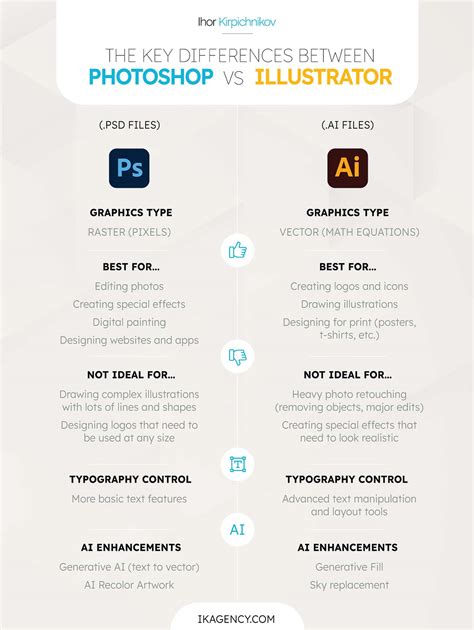
Despite its impressive capabilities, Photoshop Online is not a complete replacement for the desktop version. Certain advanced tools are currently absent, including the patch tool, pen tool, and polygonal lasso. Smart objects are also not supported at this time. Adobe has indicated that these omissions are temporary and that it is actively working to integrate more features into the online version. This phased approach allows for continuous improvement and adaptation to user needs. For tasks requiring these specific advanced tools, users can seamlessly transition to the desktop application, knowing that their cloud-saved work is readily available. The focus remains on making the online experience increasingly robust while maintaining its core advantages of speed and accessibility.
Understanding the Subscription Model and Generative Credits
Photoshop Online is accessible as part of any existing Photoshop subscription, including the single-app plan, the Creative Cloud photography plan, or the Creative Cloud all-apps plan. Adobe has not introduced a separate, reduced web-only subscription option or a free/freemium tier like it offers with Adobe Express or Lightroom Mobile. For those without a subscription, a seven-day free trial is available, allowing exploration of all Photoshop versions. A notable change for the AI-powered features is the introduction of "generative credits." While initially included, from November 1st, features like Generative Fill and Generative Expand will operate on a credit system, similar to other AI art generators. The specifics of this system are still being clarified, and Adobe acknowledges that its complexity may initially be a point of confusion for some users.
Ethical AI and Content Credentials
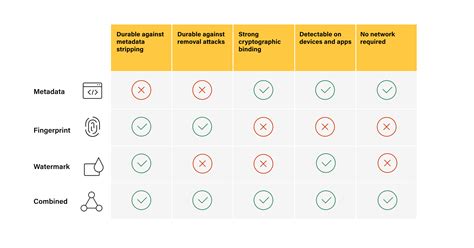
Adobe's commitment to ethical AI is a cornerstone of Photoshop Online's development. The integration of Adobe Firefly ensures that all AI-generated content comes with Content Credentials. This feature provides a digital audit trail, transparently detailing how and when AI was used in the creation process. This transparency is crucial for artists and creators seeking recognition and for maintaining honesty in creative work. Adobe has trained its AI models using responsibly sourced data, including art contributed by artists, ensuring that the AI learns from high-quality, ethically curated material. This approach not only reflects best practices but also sets a precedent for the future of AI in creative tools, emphasizing responsible data use and creator recognition.
The Future of Design on the Web
Photoshop Online represents a significant evolution in digital design, bringing professional-grade editing tools and cutting-edge AI capabilities directly to the web browser. Its intuitive interface, powerful generative AI features, seamless collaboration tools, and commitment to ethical AI make it an indispensable asset for modern creators. Whether you're a seasoned professional needing a flexible tool for on-the-go edits, or a beginner looking for an accessible entry point into the world of image manipulation, Photoshop Online offers a powerful, convenient, and innovative solution. It redefines what's possible in browser-based editing, empowering users to create stunning visuals anytime, anywhere, without compromise. The ongoing development promises even more features, further solidifying Photoshop Online's role in the future of creative workflows.