In the ever-evolving landscape of digital content creation, the ability to present visually appealing photos and videos is paramount. For aspiring and active social media content creators, influencers, and even casual users seeking a polished aesthetic, achieving professional-looking results quickly can be a challenge. This is where tools like FLTR come into play, offering a streamlined approach to photo and video editing through the application of pre-designed filters, commonly known as presets. FLTR provides a massive library of professionally designed presets that allow users to apply aesthetic filters to their photos and videos with a single tap. While its core function integrates with Adobe Lightroom, the app also includes its own lightweight photo editor, offering a versatile solution for a wide range of users.

Understanding the Power of Presets
At its heart, FLTR is built around the concept of presets. These are essentially pre-configured editing settings - adjustments to exposure, contrast, saturation, color balance, and more - that can be applied to an image or video with a single click. This bypasses the need for users to possess advanced photo editing skills or spend considerable time manually tweaking individual parameters. The appeal lies in its ability to consistently deliver a specific aesthetic, from warm, vintage tones to cool, modern looks, enabling users to develop a cohesive visual identity across their content. FLTR excels at demonstrating value and providing choice. The onboarding flow is a great example, using a series of before-and-after visuals to immediately show what the app can do. This immediate visual feedback is crucial for users to grasp the transformative potential of the presets.
Navigating the FLTR Library: Choice and Organization
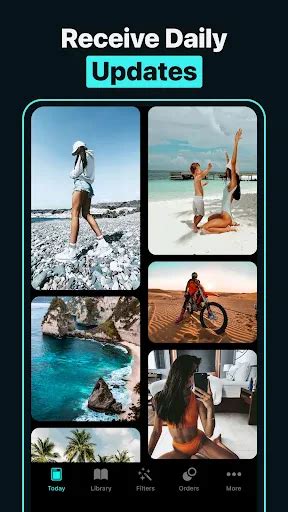
One of FLTR's significant strengths is the sheer breadth and accessibility of its preset library. The main library is highly browsable, with presets organized by tags like '#winter' or '#fashion'. This meticulous organization makes it remarkably easy to find a specific look or to explore new styles that align with a particular theme or mood. Whether a user is looking for a bright and airy preset for summer photos, a moody and dramatic filter for fashion shots, or a cozy, warm tone for winter landscapes, the tagging system allows for efficient discovery. This variety caters to diverse creative needs and helps users quickly pinpoint the exact aesthetic they envision for their content.
The FLTR User Journey: Onboarding and Conversion
FLTR employs a freemium model, which is a common strategy in app development, but it implements a sophisticated subscription funnel designed to guide users towards conversion. The initial onboarding experience is particularly well-crafted. During onboarding, it presents a paywall with three clear options: a monthly subscription, an annual subscription (offered at a significant 75% discount), and a one-time lifetime purchase. This tiered pricing structure appeals to different user commitments and budgets.
Crucially, if a user hesitates at this initial paywall, the app intelligently presents a secondary offer. This secondary offer is a 7-day free trial. This is a smart tactic to convert users who may not be ready to commit to a purchase immediately. By offering a risk-free trial period, FLTR allows users to experience the full benefits of the premium features, thereby increasing the likelihood of a future subscription. This approach acknowledges that building trust and demonstrating value over time can be more effective than immediate hard selling.
SaaS Marketing Funnel: Converting Free Trials to Paying Customers
Target Audience and Accessibility
The primary audience for FLTR is clearly defined: aspiring and active social media content creators, influencers, and casual users who desire a trendy, polished aesthetic for their photos and videos. The app particularly appeals to those who may not possess advanced photo editing skills but are keen to achieve professional-looking results with speed and ease. The intuitive nature of applying presets democratizes high-quality visual editing, making it accessible to a broader demographic. It empowers individuals to elevate their online presence without needing to invest years in mastering complex software.
Potential Friction Points and Areas for Improvement
Despite its strengths, FLTR does present a few potential friction points that could hinder the user experience for some. The core preset functionality relies on users having the separate Adobe Lightroom app installed. This dependency can be a point of friction or confusion for users who are not already familiar with or do not wish to install Adobe Lightroom. While the app includes a tutorial at 02:15 that helps to clarify this integration, it does add an extra step to the overall process, which might deter users seeking a completely self-contained editing solution.
Furthermore, when users attempt to request a custom preset, the error message encountered for an oversized file, observed at 07:25, is abrupt. This message could be more user-friendly. Instead of a blunt notification, the app could offer more constructive guidance, such as suggesting file compression techniques or providing clearer instructions on acceptable file sizes and formats upfront. This would prevent user frustration and improve the success rate of custom preset requests.

The In-App Editor: An Underutilized Asset?
FLTR also includes its own lightweight photo editor. While functional, this built-in editor could be highlighted more prominently. Currently, the emphasis is heavily on the Lightroom integration. Positioning the in-app editor as a standalone, convenient tool for quick edits or for users who prefer not to use Lightroom could broaden FLTR's appeal and utility. Making its features more discoverable and showcasing its capabilities could encourage more users to leverage it, thereby offering a more comprehensive editing experience within the FLTR ecosystem itself.
Beyond the Basics: Personalization and Creative Expression
FLTR's utility extends beyond mere filter application. The mention of personalizing one's iPhone Home Screen and adding more creativity to a profile suggests a deeper integration with user customization desires. This points to FLTR's role in helping users curate a distinct digital identity. By offering a consistent and aesthetically pleasing set of tools, FLTR empowers users to express themselves more effectively online, transforming their social media feeds into curated galleries that reflect their personal brand or artistic vision.
The payment structure, including the Apple ID charge and automatic renewal, is standard for subscription services. However, the clarity around cancellation policies - requiring at least 24 hours before the end of the current period - is crucial for user transparency and satisfaction. The prompt to rate the app and ask questions signifies a commitment to user feedback and continuous improvement, vital for retaining users in a competitive market.
The Technical Foundation and Compatibility
For users on Apple devices, FLTR requires iOS 16.0 or later for iPhones and iPadOS 16.0 or later for iPads. This indicates that the app is built using modern development frameworks and leverages the latest features available on these operating systems. Such requirements ensure optimal performance and access to advanced functionalities, while also implicitly setting a baseline for the device capabilities of its target users.
Conclusion of Functionality
In summary, FLTR offers a compelling solution for individuals seeking to enhance their photos and videos with professional-grade aesthetics. Its extensive library of easily discoverable presets, coupled with a well-designed onboarding and subscription model, makes it an attractive option. While the reliance on Adobe Lightroom and certain aspects of its user interface could be refined, the app's core value proposition - delivering polished visual content with minimal effort - remains strong. The inclusion of an in-app editor and the potential for deeper personalization further solidify FLTR's position as a valuable tool in the modern digital creator's arsenal. The ability to "Get free trendy presets for Lightroom by FLTR!" further underscores its commitment to providing accessible creative enhancements.