The XP-Pen Shortcut Remote is a compact and powerful tool designed to streamline your digital creation process. Whether you're a digital artist, video editor, or even a gamer, this device offers a customizable and efficient way to access your most frequently used shortcuts, freeing you from the constraints of a traditional keyboard and enhancing your overall productivity.
Revolutionizing Control: The Physical Dial and Programmable Keys
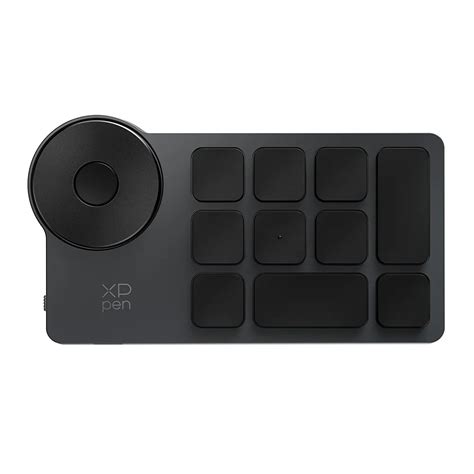
At the heart of the XP-Pen Shortcut Remote lies its 4-direction programmable physical dial. This intuitively designed dial offers a satisfying tactile experience with a precise click feedback for every 1/24th rotation. This allows for fine-tuned adjustments, such as zooming in and out of your canvas, rotating your workspace, or adjusting brush sizes with remarkable accuracy. The "right amount of damping for incredible fingertip inspiration" ensures a comfortable and controlled rotating experience, allowing your creative flow to remain uninterrupted.
Complementing the dial are 10 custom keys, each programmable to your specific needs. Through the intuitive driver settings, you can assign a wide array of shortcuts to these keys, with support for previewing your assignments. This ensures that you always have the most relevant and efficient shortcut combination at your fingertips, whether you're turning the dial right, left, up, or down. The "one-handed design for easy control" further emphasizes its ergonomic approach, allowing for seamless operation without disrupting your creative posture.
Unlocking Unprecedented Productivity: Customizable Shortcuts
The XP-Pen Shortcut Remote truly shines in its ability to customize your workflow. With 10 keys and the capacity to program 4 distinct sets through the driver, you can create up to 40 unique shortcuts. Switching between these sets is as simple as pressing a single key, enabling you to adapt your controls on the fly for different applications or tasks. This versatility makes the Shortcut Remote a powerful productivity tool, extending its utility beyond creative endeavors to encompass study, work, and even gaming.
The driver settings offer a straightforward way to program your keys. You can "program the keys at ease (through driver settings) and support preview," ensuring that each assignment is precisely what you intend. The driver comes with "plug-and-play default settings," offering a functional starting point for immediate use. However, the true power lies in the customization, allowing you to "program the way you like."
Tactile Precision: Scissor-Switch Keys for Responsive Input
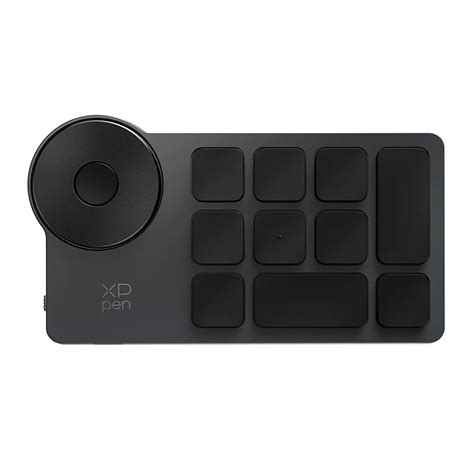
The physical keys on the XP-Pen Shortcut Remote are engineered with scissor switches, providing a "tactile and responsive keystroke" experience. These switches, located beneath the isolated keycaps, significantly reduce key travel, leading to faster typing and quieter operation. This translates to a more comfortable and efficient typing experience, even during extended work sessions. With a "long lifespan of over 5 million keystrokes," these keys are built to endure "years of heavy use," ensuring the durability and longevity of the device.
Flexible Connectivity: Wired or Wireless Freedom
The XP-Pen Shortcut Remote offers the flexibility of both wired and wireless connections to suit your preferences and workspace. You can connect wirelessly via Bluetooth 5.0 or a Bluetooth dongle, enjoying "stable and fast transmission within a maximum distance of 3-5 meters." For those who prefer a direct connection or are working in environments with potential Bluetooth interference, a wired connection via a USB-C cable is also supported, adapting to "different scenarios."
Enduring Power: The 1000mAh Battery
Powering your productivity for extended periods is a large 1000mAh battery. This robust battery ensures that the Wireless Shortcut Remote "lasts up to 300 hours on a full charge." Furthermore, its impressive standby time of "up to 10 months" means it's always ready to go when inspiration strikes, eliminating the anxiety of a dead device during critical moments. This "power you for days on end" capability makes it an ideal companion for creators on the move.
Compact Design, Ergonomic Comfort
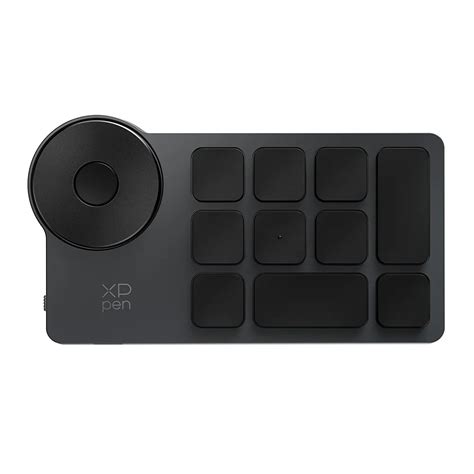
The "compact size for one-handed control" is a defining feature of the XP-Pen Shortcut Remote. With a "thin profile and weighs only 75g," it's exceptionally easy to hold and operate with just one hand. This allows for greater freedom of movement and a more relaxed posture while creating. The "classic black design" not only exudes professionalism, fitting seamlessly into any workspace, but also features a special coating on the keycaps and dial that is "resistant to sweat and stains," maintaining its aesthetic appeal over "years of use."
Beyond its compact form, the remote boasts an "ergonomic design for touch typing." A subtle "little dot protruding on the middle key" aids in easy identification and access without the need to look, catering to both left-handed and right-handed users and making "fast faster."
Intuitive Software: The Redesigned Driver
The accompanying driver for the XP-Pen Shortcut Remote has been thoughtfully redesigned with a "pleasingly simple and easy to interact with" user interface. Users can choose between the "Full version" and "Separated version" of the driver, ensuring optimal compatibility and performance with their specific setup. The driver allows for deep customization, enabling users to "unleash your creativity without limits."
A significant feature of the driver is its ability to "save locally" custom settings. This means you can "save custom driver settings in your computer and the Wireless Shortcut Remote," and then "apply the settings to different devices without programming again." This functionality is particularly useful for users who work across multiple machines. The driver also supports "Import" and "Store" functions for settings, although these are "supported only via wired connection."
How to install/set up the driver of AC 19 Shortcut Remote (win 10)
Broad Compatibility: Works with Your Favorite Software
The XP-Pen Shortcut Remote is designed to be an "incredible efficiency booster, working with various software for drawing, 2D/3D design, video/audio editing, and more." Its wide compatibility ensures that it seamlessly integrates into your existing creative ecosystem, regardless of your preferred applications. This makes it a versatile tool that can adapt to a multitude of creative needs.
Addressing User Concerns: Troubleshooting the Wheel Functionality
While the XP-Pen Shortcut Remote is designed for intuitive use, some users may encounter specific issues. One reported problem involves difficulties setting the wheel for "increase/decrease brush size" shortcuts, with the wheel instead continuing to zoom or pan the canvas. This suggests a potential conflict in shortcut assignments or a driver configuration issue.
To address this, several steps can be taken:
- Verify Driver Installation: Ensure the latest version of the XP-Pen driver is correctly installed and that no other tablet drivers are conflicting. Uninstalling previous tablet drivers before installing the XP-Pen driver is often recommended.
- Check Application-Specific Settings: The driver allows for application-specific customizations. It's crucial to ensure that the brush size shortcut is correctly assigned within the driver settings for the specific art application being used. Sometimes, the application itself might have default shortcuts that override the remote's settings.
- Confirm Shortcut Conflicts: Double-check that the desired shortcut for brush size (e.g., a specific key combination) is not already assigned to another function within the driver or the art software.
- Reset to Defaults: As a troubleshooting step, consider resetting the remote's settings to their default values through the driver and then re-applying the custom shortcut for brush size.
- Consult Support: If the issue persists, reaching out to XP-Pen customer support or consulting community forums for similar reported issues and solutions can provide further assistance. The user manual also provides a comprehensive FAQ section that may offer solutions to common problems.
The XP-Pen Shortcut Remote aims to simplify the creative process, and with a bit of configuration, it can become an indispensable part of your digital toolkit. The ability to consolidate frequently used commands into a single, accessible device significantly reduces the physical strain and cognitive load associated with complex software, allowing creators to focus more on their art and less on navigating menus and keyboard shortcuts.