Adobe Fonts, formerly known as Typekit, has revolutionized how designers access and utilize typography within their creative workflows. Since its official rebranding in October 2018, Adobe Fonts has undergone significant enhancements, transforming from its previous iteration into a more robust and versatile service. This evolution has removed previous limitations such as desktop sync limits, the distinction between web-only and desktop fonts, and pageview restrictions, offering users unparalleled freedom in font selection and application. The quality and breadth of the font collection available through Adobe Fonts have seen a dramatic improvement over the years, making it an indispensable resource for professionals and enthusiasts alike.
The Evolution from Typekit to Adobe Fonts
Typekit was initially launched as an independent webfont service in 2009, quickly gaining traction for its curated selection of high-quality fonts. Adobe recognized its potential and acquired the service in 2011, integrating it into its growing ecosystem. The transition to Adobe Fonts in 2018 was more than just a name change; it represented a strategic shift to align the typography service more closely with the broader Creative Cloud suite. This rebranding brought about numerous enhancements. All previous standalone Typekit plans were retired, simplifying the access model. For longtime Typekit customers, the name change might have initially seemed peculiar. However, from the perspective of new users, particularly those already invested in other Adobe products, the Adobe Fonts branding makes intuitive sense, positioning it as a native typographic resource within the Adobe environment.
The former limitations of Typekit have been entirely abolished. Previously, there were "web-only" fonts that could not be used in desktop applications. This distinction is no longer present; all fonts available through Adobe Fonts can be used across both web and desktop platforms. The previous limitation on the number of desktop fonts a user could sync simultaneously has also been removed. While it was once possible to exceed this limit without repercussions, the current system allows for unlimited desktop synchronization. Furthermore, the tiered plans that previously imposed limits on monthly pageviews for web usage have been retired. This comprehensive overhaul ensures a seamless and unrestricted font experience for all Creative Cloud subscribers.
Accessing the Adobe Fonts Library: The Creative Cloud Connection
A key aspect of Adobe Fonts is its integration with Adobe Creative Cloud. Adobe Fonts is not available as a standalone product, unlike its predecessor Typekit. To access the extensive Adobe Fonts library, a subscription to Creative Cloud is necessary. This subscription provides designers with access to a powerful suite of industry-standard software, including Photoshop, Illustrator, After Effects, and InDesign, among others. Crucially, Adobe Fonts is included for free with all Creative Cloud plans, meaning there's no additional cost to leverage this vast typographic resource. For those primarily interested in fonts, the Creative Cloud Photography Plan, priced at approximately $10 per month, offers an inexpensive gateway to the entire Adobe Fonts library without requiring a subscription to the more comprehensive collection of Adobe apps. This makes high-quality typography accessible even to those on a tighter budget.
Navigating Font Variations and Usage Rights
It's important to note that the font names displayed within the Adobe Fonts service might sometimes differ slightly from their common usage or historical names. For instance, the version of Gill Sans available on Adobe Fonts is known as Gill Sans Nova. While efforts are made to maintain an up-to-date collection, the availability of specific fonts on the service can change at any time.
The licensing for Adobe Fonts is generous, covering both personal and commercial use for fonts in active use. This means you can use the fonts in any desktop program, such as Adobe Photoshop, to create images or vector artwork, which can then be used for any purpose. This extends to creating digital designs or print work for your own use or for client projects. Fonts are powerful tools for everyone, whether you're a beginner working on a one-off project or a full-fledged graphic designer. However, some exclusions apply, particularly when using fonts within mobile or desktop applications, where specific licensing terms might need to be considered.
Integrating Adobe Fonts with Photoshop
Photoshop, a cornerstone of digital design, seamlessly integrates with fonts activated through Adobe Fonts. When you activate a font from the Adobe Fonts library via Creative Cloud, it becomes available within Photoshop and other Adobe applications. Photoshop utilizes fonts that are activated on your computer's system. For example, if one user creates a document using a specific font and shares it with a friend whose computer does not have that font installed, the friend might see a substitute font, leading to unexpected visual changes. Adobe Fonts eliminates this problem by providing a centralized, cloud-based library of fonts that are readily accessible across your devices and applications.
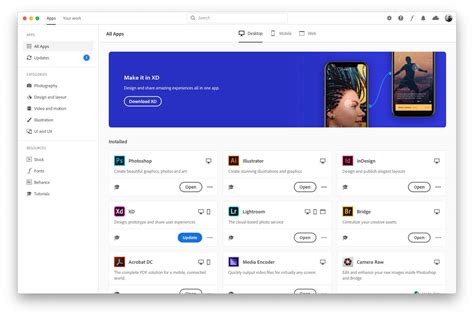
The process of adding fonts to Photoshop has become remarkably straightforward. All fonts that are currently active through Creative Cloud are accessible in the "My Adobe Fonts" section of your user profile. This section allows you to manage your current and previously installed fonts. When you decide to deactivate fonts, you have two options: you can use the "Deactivate" switch next to a font family name to remove all its styles, or you can deactivate individual font styles. Adobe keeps a record of fonts you've previously used in the "Previously Active" tab, which can be helpful for recalling or reactivating fonts for future projects.
How to Activate Adobe Fonts
Troubleshooting Font Activation and Display Issues
Occasionally, users might encounter issues with fonts not appearing or activating correctly in Photoshop. A common first step is to click the "Retry" button within the Creative Cloud app to attempt re-activating the fonts. It's also possible that the version of a font available through Adobe Fonts is more recent than one you might have previously installed manually.
If a font still isn't appearing, it might be necessary to manage your system's font cache. On macOS, the default font manager is Font Book. On Windows, you can access the font management through the Control Panel, by clicking on "Fonts." As a troubleshooting step, you can copy the font file from the Fonts folder to another location to create a backup, and then delete it from the Fonts directory. After this, try reactivating the font through Adobe Fonts.
Some applications, including Adobe Acrobat and Microsoft Office, do not automatically update their font menus when new fonts are added to the system. For these applications, it is necessary to restart them before the newly activated fonts become available in their respective font lists. This ensures that the program refreshes its font cache and recognizes the newly available typefaces.
Font Pairing Strategies and Alternatives
When it comes to pairing fonts effectively within your designs, Adobe Fonts offers a wealth of options. Many "superfamilies" are available on Adobe Fonts, meaning they comprise a wide range of weights, widths, and styles that are designed to work harmoniously together, making pairing straightforward. For those seeking curated inspiration, Adobe also provides "Type Pairing Lookbooks," which offer hand-selected palettes of typeface pairings.
While Adobe Fonts provides a premium selection, it's worth considering alternatives for different project needs and budgets. Google Fonts is Google's free webfont hosting service, offering a vast collection of 100% free and open-source fonts. However, the quality and selection on Adobe Fonts are generally considered superior, which is to be expected from a paid service. Many fonts available on Google Fonts may have a limited number of styles and lack the advanced OpenType features often required for professional typography. For projects with very limited budgets, Google Fonts is a perfectly viable option. Nevertheless, if the budget allows, investing in Adobe Fonts will generally yield better design results due to the higher quality and more extensive features of the available typefaces.
Understanding Font Availability and Updates
The landscape of fonts is dynamic, and the availability of certain typefaces on Adobe Fonts can change. While the service strives to maintain a comprehensive and up-to-date collection, users should be aware that font offerings can be added or removed. This underscores the importance of checking the "My Adobe Fonts" section regularly to manage your activated fonts and stay informed about new additions.
The most commonly used fonts in Photoshop, such as Arial, Calibri, Verdana, Times New Roman, and Georgia, are often referred to as "web-safe" fonts. This designation comes from their widespread availability on most computers and devices, ensuring consistent display across different platforms. Other frequently used fonts in Photoshop include Helvetica, Tahoma, and Trebuchet MS. While these are staples, the power of Adobe Fonts lies in its ability to introduce a much broader and more diverse range of high-quality typography into your design process, moving beyond the limitations of standard system fonts and elevating the visual impact of your work.
The ability to use fonts activated through Adobe Fonts in any desktop program, including Photoshop, allows for immense creative flexibility. Whether you are designing a logo, a website layout, a social media graphic, or a print advertisement, the vast library of Adobe Fonts ensures you have the perfect typeface to convey your message and aesthetic. The integration with Creative Cloud means that as long as your subscription is active, you have continuous access to this ever-expanding collection, empowering your design endeavors with professional-grade typography.