In the dynamic landscape of digital content creation, Adobe has long established itself as a leader, offering powerful tools for both image manipulation and video editing. While the names "Photoshop" and "Premiere" might sound similar and are often associated with professional creative workflows, they serve distinct purposes and cater to different needs within the broader Adobe ecosystem. This article delves into a detailed comparison of Adobe Photoshop and Adobe Premiere Pro, examining their core features, primary uses, and the unique advantages each brings to the table for creators, from hobbyists exploring their photography ambitions to seasoned professionals aiming to captivate audiences.
Understanding the Core Purpose: Image Editing vs. Video Editing
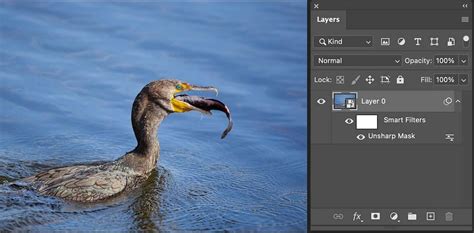
At their heart, Adobe Photoshop and Adobe Premiere Pro are designed for fundamentally different media. Photoshop is the industry-standard software for image editing, graphic design, and digital art. Its power lies in its ability to manipulate raster images with unparalleled precision, allowing users to retouch photographs, create intricate digital paintings, design graphics for print and web, and much more. It utilizes a layer-based system, which is crucial for providing depth and flexibility in manipulating individual elements of an image without affecting others.
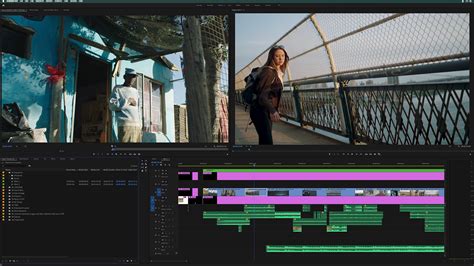
Conversely, Adobe Premiere Pro is a professional-grade video editing software. Its primary function is to assemble, edit, and refine video footage. Premiere Pro provides an intuitive yet powerful environment for working with clips, applying transitions, incorporating visual effects, adjusting audio, and ultimately exporting a polished video product. It is the go-to tool for filmmakers, content creators, advertisers, and anyone involved in producing video content.
Navigating the Adobe Ecosystem: Photoshop and Premiere Elements
Adobe's commitment to catering to a diverse user base is evident in its "Elements" line of software. Recognizing the evolving capabilities of smartphone cameras and the rise of platforms like Instagram, Adobe has introduced enhanced versions of its core products for a broader audience. Among these are Photoshop Elements and Premiere Elements.
Photoshop Elements is a scaled-down, more accessible version of the full Adobe Photoshop. It is designed for users who require fewer features and less complex options than the professional-grade Photoshop. While it still offers robust photo editing capabilities, it comes with certain limitations. For instance, Photoshop Elements does not support all the advanced color modes found in Photoshop, specifically lacking Duotone, CMYK, Lab, and Multi-channel modes. It primarily works with RGB, Grayscale, Bitmap, and Indexed color modes. Furthermore, Photoshop Elements lacks 16-bit support, which can result in a loss of functionality for certain advanced selection and brush-based tools, as well as shape tools.
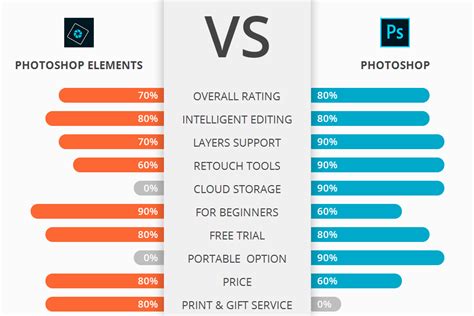
Premiere Elements, similarly, offers a more streamlined video editing experience compared to Premiere Pro. It provides essential tools for cutting, trimming, adding titles, and applying basic effects, making it suitable for users who want to create home movies or simple online videos without the steep learning curve of professional software.
Adobe Photoshop: The Master of Still Imagery and Graphic Design
Adobe Photoshop's prowess extends far beyond simple photo retouching. Its comprehensive feature set makes it indispensable for a wide array of creative and professional activities.
Key Features and Uses of Adobe Photoshop:
- Image Retouching and Manipulation: From subtle enhancements like color correction and blemish removal to dramatic alterations like compositing multiple images, Photoshop offers an exhaustive toolkit. Tools like the Clone Stamp, Healing Brush, and Content-Aware Fill allow for seamless removal of unwanted elements or restoration of damaged photos.
- Graphic Design: Photoshop is a cornerstone for graphic designers. It is used to create logos, brochures, posters, social media graphics, website layouts, and virtually any visual asset for print or digital media. The ability to work with vector shapes and integrate them with raster images provides immense flexibility.
- Digital Painting and Illustration: With its powerful brush engine and support for graphics tablets, Photoshop is a favored tool for digital artists and illustrators. It allows for the creation of intricate digital paintings, concept art, and character designs.
- Web and UI Design: While specialized tools exist, Photoshop has historically been used for designing user interfaces (UI) and user experiences (UX) for websites and applications, allowing designers to mock up entire digital products.
- Content Curation and Management: Photoshop can assist in preparing images for various platforms, ensuring they are optimized for web use, social media, or print. Its integration with other Adobe products like Adobe Bridge can aid in managing large libraries of assets.
- Advertisement and Marketing: Photoshop plays a critical role in creating compelling visual advertisements across all mediums. It enables the enhancement of product photography, the creation of eye-catching banners, and the development of marketing collateral that grabs attention and drives customer engagement.
- Social Media Management: For businesses and individuals managing their online presence, Photoshop is essential for creating visually appealing posts, stories, and banners that align with brand identity and capture audience interest.
History of the Pixel as Fast As Possible
Adobe Premiere Pro: The Maestro of Motion and Narrative
Adobe Premiere Pro is the industry benchmark for professional video editing. It empowers creators to transform raw footage into compelling stories.
Key Features and Uses of Adobe Premiere Pro:
- Non-Linear Video Editing: Premiere Pro's core strength lies in its non-linear editing capabilities. This means editors can access and arrange video clips in any order, making revisions and adjustments with ease. The timeline interface allows for precise control over every frame.
- Multi-camera Editing: For projects involving multiple camera angles, Premiere Pro offers robust multi-camera editing features, allowing editors to switch between sources seamlessly, mimicking a live broadcast or creating a dynamic cinematic feel.
- Advanced Color Correction and Grading: Beyond basic adjustments, Premiere Pro provides sophisticated tools for color correction and grading. This includes curves, color wheels, HSL secondary adjustments, and Lumetri Color, enabling editors to establish a specific mood, enhance visual consistency, or create a cinematic look.
- Audio Editing and Mixing: Integrated audio tools allow for precise audio editing, noise reduction, equalization, and mixing of dialogue, music, and sound effects. This ensures that the soundtrack complements the visuals effectively.
- Visual Effects and Motion Graphics: While not a dedicated VFX program like After Effects, Premiere Pro integrates seamlessly with it. It offers a range of built-in effects, transitions, and titling options, and allows for the import of motion graphics created in After Effects, enabling sophisticated visual storytelling.
- Workflow Management: Premiere Pro is designed to handle complex projects and large media files efficiently. It supports a wide range of video formats and codecs, and its project management features are crucial for collaborative environments and large-scale productions.
- Video Advertising and Content Creation: Premiere Pro is the primary tool for editing commercials, promotional videos, explainer videos, and any form of video content used for marketing and advertising. It aids in acquiring customers by creating engaging narratives that resonate with target audiences and improving digital presence through polished video content.
- Documentary and Film Production: From independent films to major studio productions, Premiere Pro is used for editing narrative features, documentaries, and short films, providing the tools to craft compelling stories with visual and auditory precision.
Licensing and Cost Considerations
The financial aspect of adopting these powerful tools is also a significant consideration. Adobe offers its software through subscription models, primarily via the Adobe Creative Cloud.
The Adobe Creative Cloud Photography plan is a popular option for photographers, offering both Photoshop CC and Lightroom desktop and mobile for a competitive monthly fee, typically around $9.99 per month. This plan provides access to the full, professional versions of these applications.
Adobe Photoshop Elements, on the other hand, is sold as a perpetual license, meaning you purchase it once and own it indefinitely. The cost is typically around $79.99 as an upgrade for existing users or $99.99 for a new purchase. This makes it a more budget-friendly option for individuals who do not require the extensive feature set of Photoshop CC.
Adobe Premiere Pro is available as part of various Creative Cloud subscriptions, including the All Apps plan or a dedicated Premiere Pro single-app plan, which are priced higher than the Photography plan due to the advanced nature and broader scope of professional video editing software.
It's important to note that Photoshop Elements is multi-platform as of version 9, meaning a single purchase allows installation on either Windows or Macintosh operating systems, or both, without the need for separate licenses.
Choosing the Right Tool for Your Needs
The decision between Photoshop and Premiere Pro, or their Elements counterparts, hinges entirely on the type of content you intend to create and your level of expertise.
If your creative pursuits revolve around still images, graphic design, digital painting, or web graphics, Adobe Photoshop (or Photoshop Elements for a more introductory experience) is your primary tool. Its ability to manipulate pixels with incredible detail and its vast array of design features make it unparalleled in the realm of static visuals. For those aspiring to become professional photographers or graphic designers, mastering Photoshop is not just beneficial; it's a fundamental requirement to elevate their work and achieve that sought-after "wow factor."
Conversely, if your ambition lies in storytelling through moving images, creating video advertisements, producing films, or developing online video content, Adobe Premiere Pro is the software you need. Its intuitive timeline, robust editing tools, and professional finishing capabilities are designed to bring your visual narratives to life.
For individuals just starting out or those with simpler needs, the "Elements" versions of both Photoshop and Premiere offer a more accessible entry point. However, as creative ambitions grow and the demand for professional-level output increases, the full Creative Cloud versions of Photoshop and Premiere Pro become essential investments for any serious digital content creator. Understanding these distinctions ensures that you select the right tool to effectively realize your creative vision and achieve your professional goals.