Adobe Photoshop, a name synonymous with professional image manipulation for decades, has made a significant stride into the mobile realm with its iPhone application. This is not merely an iteration but a reimagining of Photoshop's capabilities, tailored for the user who increasingly creates and edits on the go. The Photoshop app for iPhone offers a compelling blend of free, accessible tools and powerful, subscription-based features, all wrapped in an intuitive interface designed to be both beginner-friendly and robust enough for seasoned professionals.
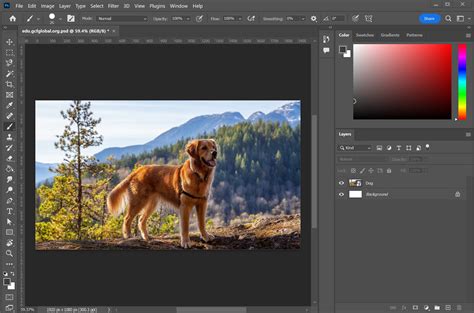
The Core of Photoshop: Free Features for Everyday Creativity
At its heart, the free version of Photoshop on iPhone provides a surprisingly comprehensive suite of tools that empower users to transform single photos or blend multiple images into cohesive designs. Whether you are just getting started with image editing or are a seasoned Photoshop user, the mobile app makes it easier than ever to achieve your creative vision.
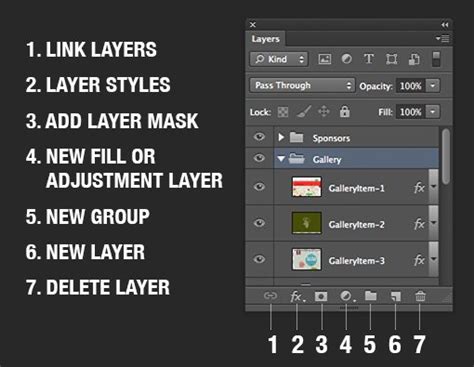
One of the most significant free offerings is the ability to work with layers. This fundamental concept of Photoshop, allowing for non-destructive editing and complex compositions, is largely intact on the mobile app. Users can utilize non-destructive adjustment layers, as well as empty layers, fill layers, type layers, and image layers. While not all layer blend modes are available in the free version, key modes like "Normal," "Screen," and "Multiply" are present, enabling a good degree of creative control over how layers interact.
Making selections is another crucial free capability. The app provides tools such as "Tap to Select," a quick select brush, a lasso tool, and rectangular and elliptical shape tools, allowing users to isolate specific parts of an image for targeted edits. This precision is essential for refining details and achieving professional-looking results.
For basic image enhancement, limited retouching is available. The "Spot Healing" tool, useful for removing small blemishes or distracting elements, is offered for free, serving as a compelling preview of the app's retouching potential. While more advanced retouching tools require a subscription, the free offering is a great starting point for many common editing needs.
The painting and drawing tools are also largely intact in the free version. Users can doodle directly onto their images, adjust brush settings, and utilize the eyedropper tool to seamlessly match brush colors to existing elements within the photo. This makes the app a versatile tool for adding artistic touches or making subtle manual adjustments.
Essential for any photo editing workflow are crop and rotate tools. These are freely available, offering the ability to adjust aspect ratios, straighten images, and even select presets optimized for various social media platforms. This ensures that your images are perfectly framed for their intended destination.
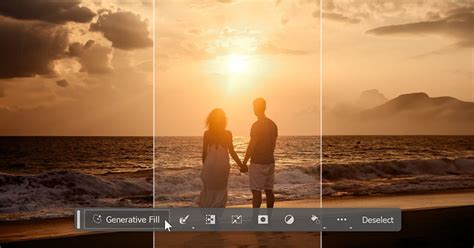
A notable inclusion in the free tier is Generative Expand, a powerful AI-driven feature that allows users to "uncrop" a photo, using AI to intelligently fill in the extended areas. This is an incredible tool for re-framing shots or creating wider vistas. However, it's important to note that the free version comes with 10 generative credits per month. Each use of Generative Expand, including regenerating an unsatisfactory result, counts against this limit.
For photographers who shoot in RAW format, the inclusion of a mobile Camera RAW interface is a significant advantage. Users can open and edit RAW files directly on their iPhone, with access to familiar sliders and tools for comprehensive image processing.
Finally, the free version offers 5 GB of cloud storage, allowing users to save their projects in progress and access them across devices. However, the free version's export capabilities are limited to PNG file types.
Unlocking Advanced Capabilities: The Photoshop Mobile Subscription
For those seeking to push their creative boundaries further, a Photoshop mobile subscription unlocks a wealth of advanced features and resources. This tiered approach ensures that users can access the tools they need without being overwhelmed by complexity.
A major draw for subscribers is the full access to layer blend modes. While the free version offers a few essential modes, the subscription unlocks a comprehensive library of blend modes (e.g., "Dissolve," "Color Burn," "Overlay," "Luminosity"), which are critical for creating sophisticated composites and visual effects.
Certain selection tools are also reserved for subscribers, including the "Object Select Tool" and "Magic Wand." These tools offer more automated and precise selection capabilities, significantly speeding up complex editing tasks.
The retouching tools are where the subscription truly shines. While "Spot Healing" is free, more powerful tools like the "Clone Stamp" and other advanced retouching features, designed to tackle more significant imperfections, require a paid plan. The "Lighten and Darken" tools (equivalent to "Dodge and Burn" on desktop) are also included for subscribers.
Users who frequently employ AI-powered edits will benefit from more than 10 generative AI tasks per month. The subscription elevates the monthly generative credit limit to 100 for the Photoshop Mobile subscription, or a substantial 500 for the Creative Cloud Photography 1TB plan. This allows for extensive experimentation with Generative Fill and other AI features.
Cloud storage is also significantly expanded with a subscription. While the free tier offers 5 GB, subscribers gain access to much larger storage capacities, depending on their chosen plan. For instance, Photography Plan subscribers receive 1 TB, while the Creative Cloud All Apps plan provides 100 GB.
Furthermore, subscribers gain the convenience of auto-save and the ability to export in multiple file types. Beyond PNG, subscription plans allow for saving in JPEG, PSD, and TIFF formats, with options to choose file size and quality.
Bridging the Gap: Features Exclusive to Desktop Photoshop
While the mobile app is remarkably capable, it's important to acknowledge that certain advanced features remain exclusive to the desktop version of Photoshop. These are often complex tools that either require a larger screen real estate or are deeply integrated into a more extensive professional workflow.
Tools like Content-Aware Fill and Content-Aware Move, which intelligently fill or move selected areas based on surrounding pixels, are powerful desktop-only features. Similarly, the extensive filters menu, including Neural Filters, Blur Gallery, and Sharpening tools, is not present on the mobile app.
The Liquify tool, essential for subtly altering shapes and forms within an image, is another feature that remains on the desktop. This is often used for tasks like smoothing out clothing wrinkles or refining facial features.
Many of the side workspaces found in desktop Photoshop, such as the History panel and Histogram, are absent from the mobile app due to screen limitations. While basic undo/redo functionality exists, the detailed history tracking is not available.
Advanced selection capabilities like "Select Subject" and "Select Sky" are also desktop exclusives. While the mobile app has robust selection tools, these automated, intelligent selections are a hallmark of the desktop experience.
For graphic designers, several key tools are missing from the mobile app, including the Pen and Path selection tools, and the CMYK Color Mode. Working with a wide array of file types is also more comprehensive on the desktop, with the mobile app supporting a more limited range even in its paid version.
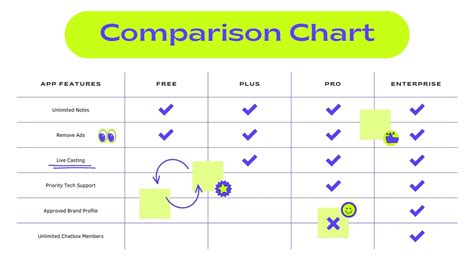
The Verdict: Is Photoshop for iPhone Worth It?
The Photoshop app for iPhone represents a significant achievement in bringing professional-grade image editing to a mobile platform. For many users, the free version offers a robust set of tools that far surpass what was previously available in mobile editors. It serves as an excellent entry point for those new to Photoshop and a convenient tool for existing users who need to make edits on the go.
While it doesn't replace the full power and precision of the desktop application, especially for complex, multi-layered projects, the mobile app is far more than a simplified companion. The free tier provides genuine Photoshop capabilities, making it a compelling option for everyday photo enhancement and creative exploration.
For those who require more advanced features, the subscription model offers a clear path to unlocking greater creative potential, including more comprehensive retouching, advanced layer controls, and significantly more AI capabilities. The seamless integration with Photoshop on the web further enhances the cross-platform creative workflow, allowing users to start a project on their iPhone and seamlessly continue it on their computer.
The Photoshop app for iPhone is a testament to Adobe's commitment to making its powerful tools accessible to a wider audience. It's a versatile, capable, and increasingly indispensable tool for anyone looking to edit and design with precision and creativity, no matter where they are. The ongoing updates and improvements, including the AI Assistant beta, suggest a future where mobile creative workflows become even more powerful and intuitive.