The digital world is in constant flux, and with it, the way we acquire and use software. For years, Adobe Photoshop Elements has stood as a beacon for users seeking powerful yet accessible photo editing tools without the commitment of a recurring subscription. However, recent updates, particularly the introduction of a three-year license model for versions like Photoshop Elements 2025 and 2026, signal a significant shift. This new licensing structure, while offering a defined period of access, prompts a closer examination of what "one-time purchase" truly means in today's software ecosystem.
The Three-Year License: A New Paradigm for Elements
The core of the recent discussion revolves around the licensing for Adobe Photoshop Elements and its companion, Premiere Elements. Previously, a "one-time purchase" implied indefinite ownership of that specific version. Now, Adobe is introducing a three-year license. As articulated by Adobe, "The license is for a full 3-year term, with no monthly or annual recurring subscription fees required. The license is non-renewing - it expires 3 years after redemption, at which time the Editor will no longer be accessible, but the Organiser will continue to be accessible indefinitely."
This means that while you are not locked into a continuous subscription, your access to the full editing capabilities of the software is time-limited. After three years, the "Editor" component will cease to function. However, the "Organiser," a crucial tool for managing and sorting photos, will remain accessible. This distinction is vital for users who valued the permanence of their software investment.
The Appeal of Perpetual Ownership: A Shifting Value Proposition
For many, the primary allure of Adobe Elements, in contrast to the flagship Creative Cloud suite, was precisely this aspect of perpetual ownership. In an era dominated by subscription models, Elements offered an attractive alternative for both photo and video editing. This one-time purchase model provided a sense of security and control, allowing users to decide when and if they wanted to upgrade, rather than being compelled to do so by subscription renewals.
The criticism often leveled at digital licenses and subscriptions centers on the lack of choice. When users are forced to upgrade before they are ready, it can feel like their hard-earned money is being taken prematurely. The traditional one-time purchase model offered a clear path: buy it, own it, and use it as long as it serves your needs.
Navigating the Three-Year Term: Pros and Cons
The three-year term, while a departure from true perpetual ownership, does offer several potential advantages. Three years is a substantial period in software development. By 2028, for instance, a user still engaged with Elements 2025 would likely be contemplating an upgrade to newer features and technologies. Furthermore, the non-renewing nature of the license is a significant positive for those who dislike automatic renewals. As Adobe states, "the license is non-renewing." This allows users to make a conscious decision about purchasing the latest edition when their current license expires, avoiding the potential for unexpected charges.
However, this "lukewarm" licensing model begs the question: why has Adobe opted for this particular payment plan? The immediate gains for Adobe are not entirely clear, nor are the potential losses. It represents a compromise, perhaps an attempt to bridge the gap between traditional perpetual licenses and the subscription-driven Creative Cloud.
The Ubiquity of Subscriptions: A Sign of the Times
The shift towards time-limited licenses for software like Adobe Elements can be seen as a reflection of broader trends in digital consumption. Over a decade ago, when Adobe introduced Creative Cloud, the subscription model was far less prevalent. Today, subscriptions are ubiquitous. Streaming services have revolutionized audio and visual entertainment, gaming consoles are increasingly moving away from physical media, and subscription boxes deliver everything from personal care items to pet food.
People are becoming accustomed to purchasing digital products through recurring payments or defined access periods. While some, like the author of the original article, still cherish physical media - owning Blu-rays, CDs, vinyl, and books, and opting for devices with disc drives - the convenience and inevitability of digital media are undeniable. This shift in consumer behavior likely influences how software companies structure their offerings.
Digital Licenses and the Illusion of Ownership
Even with traditional "one-time purchases" of digital media, the concept of true ownership can be ambiguous. A close examination of the terms and conditions for many digital media purchases reveals a complex web of licensing agreements. These agreements often contain strict stipulations against content distribution and can, in practice, limit the user's control over the media they have paid for. Anecdotes of users losing access to digital media they believed they owned are not uncommon, reinforcing the idea that digital purchases are often more akin to extended licenses than outright ownership.
Therefore, Adobe Elements' three-year license might not be an anomaly but rather a symptom of this evolving digital landscape. It signals a move towards a more standardized approach where even traditionally "perpetual" software offerings are adopting time-bound access models.
Core Functionality and Features of Photoshop Elements & Premiere Elements 2026
Regardless of the licensing model, the core value proposition of Adobe Photoshop Elements and Premiere Elements lies in their powerful and intuitive tools for creative individuals. These software packages are designed to make photo and video editing accessible to a broad audience, from beginners to those with more advanced needs.
Photo Editing Capabilities
Photoshop Elements offers a robust suite of features for enhancing and manipulating photographs. Users can:
- Generate New Content: Utilize generative AI to create entirely new images and backgrounds, or seamlessly add elements to existing photos. This powerful AI capability allows for creative freedom in reimagining visual content.
- Automated Enhancements: Rely on AI and automation for tasks such as erasing distractions, replacing backgrounds, retouching faces, and adjusting colors. These features streamline the editing process, saving time and effort.
- Guided Edits: Learn essential photo editing techniques through 59 Guided Edits. These step-by-step tutorials cover a range of adjustments, including fixing color and lighting, improving composition, and applying unique effects. This feature is invaluable for users looking to build their skills.
- Creative Effects: Enhance pictures with a wide array of effects, text overlays, and graphics. Animation options also allow for dynamic and engaging visual presentations.
- Organization: Effortlessly organize photo libraries with quick import from popular cloud services. Automatic sorting and backup, along with automatic tagging, curation, and face recognition, ensure that photos are easy to find and manage.

Video Editing Capabilities
Premiere Elements complements Photoshop Elements by providing intuitive video editing tools:
- AI-Powered Video Editing: Leverage AI to easily enhance video footage, trim and adjust clips, and apply artistic effects.
- Creative Enhancements: Amplify the action in videos with transitions, motion titles, text, music, animations, and color grading presets.
- Specialized Editing: Edit and enhance 360° and VR videos, and create stop-motion movies for unique storytelling.
- Showcasing Work: Present photos and videos in engaging formats like Photo Reels, Highlight Reels, collages, and slideshows. Access to thousands of free Adobe Express templates further simplifies the creation of social posts, videos, and posters.
Premiere Elements 2023 - Tutorial for Beginners [ COMPLETE ]
Modes of Editing: Catering to All Skill Levels
A key strength of both Photoshop Elements and Premiere Elements is their tiered approach to editing, accommodating users of all experience levels:
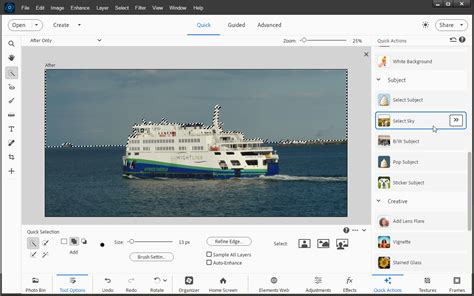
- Quick Mode: Designed for rapid, straightforward edits. This mode offers a simplified interface and essential tools for making quick adjustments.
- Guided Mode: Provides step-by-step instructions for specific editing tasks, much like the Guided Edits for photos. This is ideal for users who want to learn and achieve specific results without extensive technical knowledge.
- Expert Mode: Offers a full range of advanced tools and controls for users who require more granular control over their edits. This mode provides a professional-level editing experience within the Elements ecosystem.
This multi-modal approach ensures that users can get up and running quickly and continue to build their skills as they become more proficient.
Technical Specifications and Licensing Details
For those considering a purchase, understanding the technical requirements and licensing terms is essential.
- Product Name: Photoshop Elements & Premiere Elements 2026
- Distribution Media/Method: Download
- Product Type: Software Licensing
- Software Name: Photoshop Elements
- Language Supported: English
- Operating System Supported: Mac OS, Windows
- Software Type: Graphics/Multimedia
- Bundle Software: Premiere Elements 2026
- License Information:
- License Validation Period: 3 Year
- License Details: Activation Required
The "License Validation Period" of 3 years is the critical detail, reinforcing the time-limited nature of the software access. While activation is required, the license itself is non-renewing, giving users control over whether they seek a new license upon expiration.
Conclusion: Adapting to a Changing Software Landscape
The introduction of a three-year license for Adobe Photoshop Elements and Premiere Elements represents a notable evolution in how these popular creative tools are offered. While it may depart from the traditional concept of perpetual ownership, it aligns with the growing prevalence of time-bound access models in the digital marketplace. The software continues to offer powerful, AI-driven features and caters to a wide range of user skill levels through its Quick, Guided, and Expert modes. For consumers, understanding these licensing changes is crucial for making informed decisions about their software investments in an increasingly subscription-centric world. The ability to organize photos indefinitely remains a strong point, but the editor's access is now tied to a defined term, a detail that users must weigh against the software's many creative benefits.