The landscape of professional creative software has been significantly reshaped with the recent rebrand and product relaunch of Affinity. Following its acquisition by Canva in March 2024, Affinity faced the intricate challenge of forging a new visual identity that would resonate with its existing user base while seamlessly integrating into the broader Canva ecosystem. This delicate balance was expertly navigated by Tom Carey, Canva’s creative director for Europe, in collaboration with Design by Twist. The result is a brand identity that feels both connected to Canva and distinctly independent, setting it apart from other players in the design software arena.
The strategic imperative behind this rebrand was clear: to foster a sense of belonging within the Canva family without merely becoming a diluted version of its parent company. "It needed to feel connected to Canva, because otherwise what’s the point?" Tom Carey articulates. "But it couldn’t just feel like a version of Canva. To get creatives on board, it had to feel independent and stand for something." Furthermore, the brand aimed to shed its previous "angular" aesthetic and differentiate itself from the increasingly corporate and costly nature of many professional design tools. This latter point is underscored by a significant announcement alongside the relaunch: Affinity software is now available for free.
The Playful Heart of Affinity: A New Logomark and Typeface
In a deliberate move to challenge industry conventions and embody its ethos of "for creatives, by creatives," Affinity's new brand identity embraces a sense of playfulness. At its forefront is a lowercase serif 'a' logomark and symbol, a collaborative creation with designer Rob Clarke. "There’s lots of uppercase, geometric, graphic brands in the world of software," Tom Carey observes. "We wanted to have something that felt more approachable and wonky." This design features sweeping curves, intended to symbolize the expressive nature of artists and illustrators who utilize the product, juxtaposed with sharp, precise points that pay homage to its graphic designer clientele. The successful integration of these diverse elements into a single, recognizable symbol, suitable for a row of desktop icons, was a notable achievement.
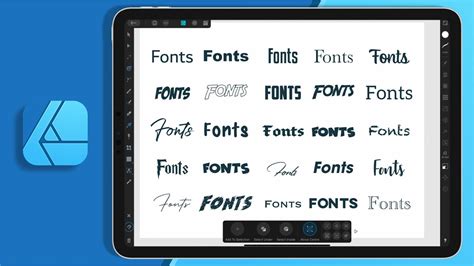
Complementing the logomark is the Affinity serif typeface, developed in partnership with Ohno, which is a bespoke adaptation of their Swear typeface. This font family is offered in six weights, providing significant versatility. "When used light and small, it’s super precise and premium; in its big, fat, expressive italic form, it looks more bold and a bit weird," Tom explains, highlighting its chameleon-like ability to convey different moods and tones.
A Witty Tone and Tactile Palette: Communicating the Affinity Ethos
The overall tone of voice adopted by Affinity is infused with wit and insider references, extending from its copywriting to innovative file naming conventions. The new file extension, ".af," is not only appended to every exported file but also woven into various tongue-in-cheek applications, such as on merchandise like a "Sketchy.af" notebook.
The color scheme further enhances this distinct personality. Eschewing a conventional monochrome approach, Affinity's palette comprises tactile, material-based colors such as charcoal, graphite, putty, and paper, all inspired by the artist's studio. A vibrant lime green is strategically employed to inject a "punch of punk," offering a lively contrast. This muted backdrop serves to accentuate the vibrant original artwork commissioned by Affinity for its products, ensuring that the creative work itself remains the central focus, aligning with the brand's core ethos. Throughout the rebrand, visitors will also encounter the brand’s six 'ethos tags,' conceived by Made By James, which encapsulate the core values driving the company.
Collaborative Design and Modular Flexibility: A Toolkit for Creatives
The development of Affinity's new identity was a deeply collaborative process, involving a panel of design professionals and an advisory board that included esteemed figures such as Debbie Millman, Eddie Opara, and Lisa Smith. With such a diverse range of perspectives, Tom Carey's strategy was to rapidly translate ideas into tangible prototypes. "I wanted to get two prototypes 'down on paper' as early in the process as possible, one that was distinctly Affinity and one that was like a pro version of Canva," he states. This approach allowed stakeholders to engage with concrete visual representations rather than abstract discussions. "Rather than people debating words on a page, like ‘it should be 70 per cent Canva or 30 per cent Canva’, I wanted to share designs early, show what that would look like, because as soon as people see stuff, they change their minds. It was a really informative exercise."
The resulting design system is characterized by its modularity and adaptability, a toolkit that Tom likens to jazz, where design elements function as instruments to be played. Drawing on past experiences, he and his team prioritized the creation of a robust brand DNA with emotional intelligence, capable of flexing and adjusting its tone to suit a wide spectrum of audiences, from typographers to illustrators.
Creative Freedom, Now Unfettered: The Power of Free Software
The relaunch is heralded by the significant declaration that Affinity software is now entirely free to use. This move directly addresses the cost barriers that often hinder individual creatives and small brands. "Creative freedom (That’s actually free)" is the powerful tagline accompanying this announcement, promising "All the design and photo editing tools you need in one app - for free." Users can download Affinity on macOS or Windows, gaining access to a comprehensive suite of tools without any financial commitment.
The Creative Software Wars: How Adobe Ruthlessly Crushed Corel & Apple
A Platform That Adapts to You
Affinity is designed to be highly adaptable, catering to individual workflows rather than imposing rigid structures. The software comes with built-in Vector, Pixel, and Layout studios, but users are not confined to these presets. Panels can be rearranged, and favorite tools can be mixed and matched to construct custom studios. Multiple setups can be saved and switched between with a single click, and these configurations can even be shared with others or downloaded from the community. This level of customization ensures that the software truly flexes to the user's workflow.
One Space to Craft It All
Affinity consolidates essential design, image editing, and layout capabilities within a single application, eliminating the need to switch between different programs. This integrated approach streamlines the creative process, allowing users to seamlessly move from crafting intricate designs to refining images and then laying out comprehensive documents, all without leaving the Affinity environment.
A Platform Built for Performance
The software is engineered to be "Ultra fast, super smooth, and incredibly precise," ensuring it can keep pace with the demands of creative professionals. Every adjustment, filter, and layer effect updates in real-time, providing immediate visual feedback. This live updating means users can see their work exactly as it will export, facilitating the achievement of pixel-perfect designs consistently.
Non-Destructive Editing for Uncompromised Creativity
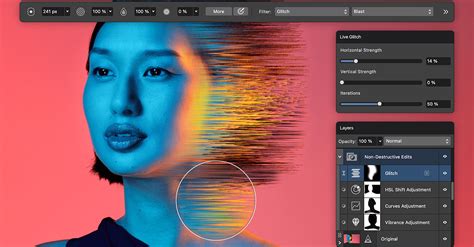
Affinity champions a non-destructive editing workflow, a critical feature for preserving the integrity of original layers and files. This approach provides the peace of mind necessary for uninhibited creative exploration, free from the constraints of "smart objects" or cumbersome workarounds. Edits can be stacked, then easily tweaked, erased, reordered, or removed without ever needing to commit to permanent changes or flatten the image.
Comprehensive Photo Editing Capabilities
From creating complex image composites to performing non-destructive RAW editing, Affinity offers a full spectrum of tools for professional photo editing. Advanced retouching features enable rapid and flawless image refinement, rendering edits virtually undetectable. The epic image compositing capabilities allow users to start with a single image and build it into a multi-layered masterpiece. Full RAW editing provides precise, non-destructive adjustments from the initial tweak to the final export. Furthermore, features like stacks, batch processing, and macros automate workflows and significantly save time, all without requiring any plug-ins.
Advanced Vector Design Tools
Affinity's vector design capabilities are robust enough to handle the creation of full UI systems, yet agile enough to facilitate the rapid sketching of logo ideas during meetings. The overall experience of designing in Affinity is described as intuitive and natural. Curve editing tools offer complete control, enabling users to sculpt every line with exceptional precision through snapping, reshaping, and flowing functionalities. The Shape Builder tool allows for the creation and customization of geometric elements using a single tool. Gradients can be crafted using Affinity’s Fill Tool to add depth, color, and texture to designs. The Image Trace feature is particularly powerful, transforming flat images into fully editable vectors in seconds, providing a clean and scalable foundation for further work.
Page Layout Powerhouse for Demanding Projects
Whether laying out a book, brochure, or a multi-section report, Affinity equips users to tackle even the most demanding publishing projects. Its layout management features include Smart Master Pages, AutoFlow, document-wide style systems, column guides, and baseline grids, all designed to keep layouts aligned, consistent, and easily editable. Advanced typography controls allow for meticulous crafting of text, with options for kerning, leading, line spacing, ligatures, artistic text, OpenType features, and variable font support. For professional printing, Affinity supports press-ready document setup with bleed and margins, pre-flight checks, PDF/X export, color control, and crop and registration marks. The data merge feature allows for the direct flow of spreadsheet or database content into designs, streamlining the creation of personalized or data-driven publications.
Seamless Import and Collaboration
Affinity welcomes existing project files, offering robust support for importing PSDs, AIs, IDMLs, DWGs, and other file types. Crucially, the structure, layers, and creative intent of these imported files are preserved. Because Affinity is free, collaborators can open and edit these files without encountering barriers, fostering smoother teamwork and project continuity.
Testimonials: Voices of the Creative Community
The impact of Affinity on the creative community is evident in the testimonials from its users. Sphelele “Ellsphee” Gumede, an illustrator, states, "Affinity continues to push boundaries and proves once again that they are way ahead of the curve. Since its inception, Affinity has been committed to supporting creatives, and these new updates and features further solidify this commitment." This sentiment highlights Affinity's dedication to empowering artists and designers.
Zero Bucks Given: The True Cost of Creativity
The message is unequivocal: Affinity is genuinely free. Users can access every tool within the Pixel, Vector, and Layout studios, along with all customization and export features, without any restrictions or hidden costs. For users with a Canva premium plan, the integration allows for the unlocking of Canva’s powerful AI tools within Affinity, further enhancing creative possibilities.
Optimized for macOS and AI Integration
Affinity is fully optimized for macOS, with every tool thoughtfully integrated to complement and enhance the creative workflow without adding unnecessary clutter. The software also seamlessly integrates with AI capabilities. Users can work within the Canva AI Studio or bring AI tools directly into Affinity's Pixel, Vector, and Layout studios for generation, adjustment, editing, and finishing without switching applications.
A significant point of emphasis regarding AI integration is user privacy and control. Affinity assures users that their content within Affinity is not used to train AI features, and the company cannot access local files. For content uploaded to Canva, users remain in control, with the ability to review and update their preferences at any time within Canva's settings.
For the Craft-Obsessed, By Those Who Respect It
Affinity's philosophy is deeply rooted in a respect for craft. "Affinity’s for people obsessed with craft, by people who respect it," the brand proclaims. Whether one geeks out on mesh gradients or simply values clean lines, Affinity is positioned as the tool for them. This ethos is further encapsulated in the tagline, "Inspired.af," and the call to action, "Stop renting software."
A Glimpse into the Future: Anticipation and Evolution
The recent period has seen a surge of anticipation surrounding Affinity's future, particularly following its acquisition by Canva. While details remain under wraps, a cryptic message from Serif on X suggested a significant announcement was planned for October 30th, stating, "We’re making space for what’s next. Totally understand the anxiety, but that's absolutely not the plan. It's a bit cryptic right now, but it'll all make sense on Oct 30! We truly do have something exciting in store!" This hints at a forward-looking vision that embraces innovation while reassuring users of the brand's commitment to its core values. The mention of AI also reflects a strategic alignment with emerging technologies, while reinforcing Affinity's belief in user choice and data privacy.
The Dual Nature of Affinity Designer: Vector and Raster Prowess
Affinity Designer stands out for its unique ability to seamlessly blend vector and raster editing capabilities within a single application. This dual nature means that many aspects of the software require a bifurcated approach to review, acknowledging the distinct functionalities and user experiences of its Vector Persona and Pixel Persona. This comprehensive coverage ensures that users understand the full breadth of what Affinity Designer offers.
Ease of Use and Learning Curve
Affinity Designer is designed to be reasonably easy to get started with, incorporating many familiar Photoshop shortcuts to ease the transition for experienced users. The program includes a comprehensive built-in help file, and online support is available through video tutorials, including a selection on YouTube, and a dedicated forum that serves all Serif Affinity branded software.
Performance and File Handling
In terms of performance, Affinity Designer demonstrates impressive capabilities. For example, standard solid and soft brushes around 600 pixels in size are handled efficiently. The Flood Fill tool, while varying slightly in its speed depending on the complexity of the area, typically fills large areas quickly. For instance, filling an 11" x 17" blank layer at 600 dpi takes approximately 5 seconds, with real-world examples often taking between 1 to 3 seconds. Even in more demanding scenarios, such as filling large brush strokes with alternating colors, the process is manageable, taking just over 30 seconds with a 60% tolerance. Working at the more common 300 dpi resolution or with smaller canvas sizes results in significantly faster fill times.
Crucially, Affinity Designer can handle exceptionally large documents. The maximum size is 426.667" x 426.667" at 600 dpi, and 853.333" x 853.333" at 300 dpi, and the software can load these maximum-sized pages without crashing or freezing, a common issue with other programs. While the resolution can be cranked up to an impressive 99999 dpi, the resulting image size is limited to 2.56" x 2.56". Page bleed can be configured from the File -> Document Setup menu after an image has been created or loaded.
Customization and Interface Flexibility
Affinity Designer offers extensive customization options for keyboard shortcuts, the Toolbar, and the Tools area. However, it's important to note that any shortcuts created in Vector mode do not carry over to Raster mode, and vice versa, requiring separate configuration for each persona. The same applies to other customizations. Double-clicking a layer allows for immediate renaming, and a right-click brings up a context-sensitive menu.
The Color window provides a comprehensive range of options, including a color wheel, sliders, boxes, tint, opacity, and an eyedropper tool. It also features an automatic color harmony palette builder, "Create Color Chord," which, when activated, generates harmony colors based on the currently selected foreground or fill color and can replace the initial colors in the Swatch palette. The Swatches panel offers a dropdown list of default and imported swatches, recent colors, and an eyedropper option. New swatches can be created, imported, or exported. Double-clicking the active color near the eyedropper opens the Color Chooser for fine-tuning. The Stroke window displays options such as Style, which can be set to a brush (e.g., Textured Line Style) and potentially used for custom effects in vector elements. The Brush window categorizes brush presets, and new brushes can be added, imported, or exported.
Vector vs. Raster Tool Specifics
Vector Persona:
- Fill Tool: This tool primarily adjusts a line or object's fill color. It has limited utility for open node shapes and lacks a true flood fill capability found in other vector software like DrawPlus, which could fill entire areas.
- Zoom Functionality: Zooming in and out is intuitive, utilizing the mouse scroll wheel while holding CTRL. However, snapping to angles is limited to 15-degree increments, which can be less than ideal for precise vector work.
Pixel Persona:
- Flood Fill: This tool offers only two options: Tolerance amount and a Contiguous (on/off) setting.
- Zoom Functionality: Similar to the Vector Persona, zooming is achieved with the mouse scroll wheel and CTRL key. The 15-degree angle snapping limitation also applies here.
Advanced Typography and Workflow Aids
Vector Persona:
- Character Window: This window provides all the expected advanced text and font options for a vector program, including kerning, leading, tracking, ligatures, and more.
- Paragraph Window: Offers control over line indent, tab stops, justification overrides, and other paragraph-level formatting.
The absence of a dedicated font favorites system, while not a critical flaw, would enhance the user experience by simplifying font selection, especially for users with extensive font libraries.
Interface and Persona Switching
Affinity Designer allows for docked or floating tools and windows, offering user choice in interface configuration. Crucially, these settings are independently configurable for the vector (Draw Persona) and raster (Pixel Persona) modes. The Guides feature is highly beneficial for page setup, with the Guides window providing excellent visibility and ease of use.
Limitations and Recommended Use
A notable limitation is the lack of certain drawing tools and aids in both vector and raster modes beyond the standard shape tools. While vector nodes can be adjusted, some tasks might become more complicated than necessary due to the absence of more specialized tools.
Affinity Designer is recommended for creating artwork that benefits from a mix of vector and raster elements, especially when equipped with the available basic tools. While the integrated Draw Persona and Pixel Persona concept is highly praised, the software may still fall short for users requiring specific, advanced options that are exclusive to dedicated, single-purpose vector or raster programs. For complex projects, users might find it necessary to utilize separate, specialized software alongside Affinity. Nonetheless, Affinity Designer is a powerful and valuable tool, particularly for adding finishing touches to many projects and for a wide range of design tasks. The software's commitment to providing a comprehensive suite of tools, including advanced features for both vector and raster work, at an accessible price point (or free, in this case), solidifies its position as a significant contender in the creative software market.