Adobe InDesign has long been a go-to software for professional designers, enabling them to create stunning layouts for print and digital media. It is a versatile and extensive application capable of designing anything from flyers to web pages. Adobe InDesign is a powerful and versatile design tool suitable for a wide range of projects, from print publications to digital content. As a desktop publishing software, it empowers users to design and publish documents across various formats, including print, digital media, and interactive platforms. Packed with a plethora of powerful tools, it can be used for anything from webpages to simple flyers.
The Core Strengths of InDesign
InDesign excels at creating multi-page layouts, such as print publications, eBooks, and presentations. It is a go-to tool for creating print publications, such as magazines, newspapers, and brochures. With the rise of digital publications, InDesign has adapted to provide support for designing eBooks, eMagazines, and interactive PDFs. Furthermore, InDesign is widely used for designing marketing materials, including flyers, posters, and business cards. Beyond these, InDesign can also be used to create professional reports, whitepapers, and presentations.
Navigating the InDesign Landscape: A Beginner's Guide
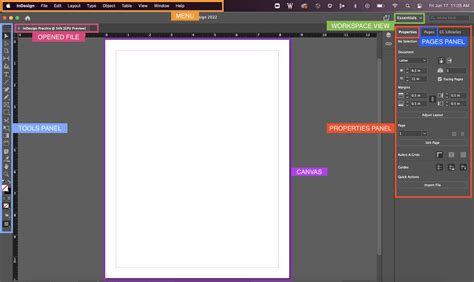
As a beginner, getting started with InDesign might seem overwhelming. To navigate this powerful tool effectively, it's crucial to first learn the interface. Familiarize yourself with the InDesign workspace, including the toolbar, panels, and menus. Once comfortable with the layout, begin by mastering the basics. This involves learning essential InDesign tools and features, such as creating text frames, placing images, and using the Selection and Direct Selection tools.
To significantly speed up your workflow, it's highly recommended to utilize keyboard shortcuts. InDesign offers numerous keyboard shortcuts that can help you work more efficiently. The best way to solidify your understanding and skills is to practice with real projects. Apply what you’ve learned by working on actual projects, such as creating a brochure or a simple magazine layout.
Advanced Features for Enhanced Workflow
Adobe InDesign provides robust support for modern graphics formats, including Scalable Vector Graphics (SVG), WebP, HIEC, and JP2K without any conversion, allowing for seamless integration of various visual assets. The software offers a range of tools for arranging and fitting objects on a page. Designers can precisely align, distribute, and space objects, ensuring a balanced and visually pleasing composition.
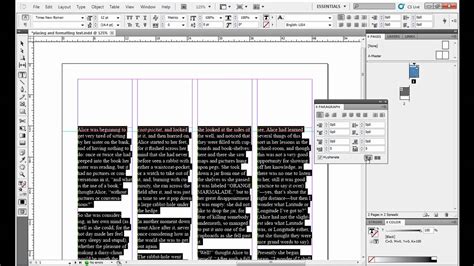
A particularly notable aspect when considering the pros and cons of Adobe InDesign is its Master Page feature. This allows designers to create a template page layout that can be applied to multiple pages, ensuring consistency across a document. Auto Style further simplifies the process of applying consistent formatting throughout a document. This feature allows designers to create and apply predefined styles to paragraphs, characters, and objects, ensuring a cohesive and professional look.
For managing content, InDesign offers Seamless Copy and Paste functionality, allowing designers to effortlessly transfer content between documents and applications. Text Frame Fitting is another valuable feature, enabling designers to automatically adjust the size of text frames to accommodate varying amounts of content. InDesign also simplifies the process of duplicating pages or spreads within a document, saving valuable time.
Extending InDesign's Capabilities
Adobe InDesign supports Unified Extensibility Platform (UXP) Scripting, allowing designers to extend the software's functionality through custom scripts and plugins. This opens up a world of possibilities for automating tasks and creating bespoke workflows.
The Publish Online feature in Adobe InDesign enables designers to publish their layouts directly to the web, transforming static designs into dynamic online experiences. Furthermore, InDesign allows designers to insert images directly into tables, making the creation of visually appealing data presentations much easier.
Integration and Comparison with Other Adobe Tools
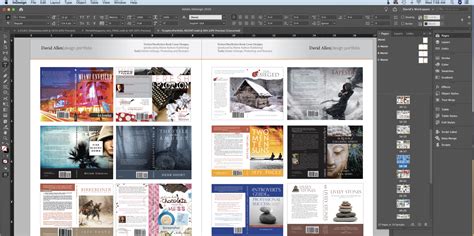
Adobe InDesign seamlessly integrates with other Creative Cloud applications, such as Photoshop and Illustrator. This integration allows for a fluid workflow, where assets can be easily shared and edited across different programs. While InDesign is a powerhouse for layout and page design, it's important to understand its strengths compared to its sibling applications. Illustrator is a vector-based application best suited for creating logos, icons, and illustrations. Photoshop is primarily focused on photo editing and manipulation. Understanding the differences between these applications will help you choose the right tool for your specific project.
For those preparing for roles involving Adobe InDesign, understanding key aspects of this powerful tool through resources like Adobe InDesign Interview Questions can be beneficial. When comparing Adobe Illustrator vs InDesign, InDesign’s search functionality stands out as a powerful tool for managing and navigating complex layouts and documents. InDesign allows users to search for specific text within published documents, including interactive PDFs and EPUBs. This feature enables efficient content retrieval and ensures users can quickly locate specific information within the published document.
Staying Current and Engaged
Adobe continuously updates its software, adding new features and enhancements. To stay at the forefront of design possibilities, it's essential to stay up-to-date with these changes. Engaging with fellow InDesign users through online forums, social media groups, and local meetups can provide valuable insights, support, and inspiration.
Unlock your creative potential by investing in your skills. Gaining a competitive edge with Adobe Training can elevate your design capabilities. Whether you’re a seasoned designer or just starting, understanding key Adobe InDesign features and techniques, such as how to add fonts to Adobe InDesign, makes this software indispensable for creating professional and impactful designs across a multitude of platforms.