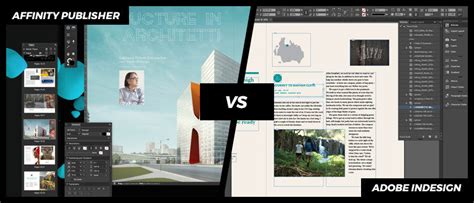
In the realm of desktop publishing, the choice between software packages can significantly impact workflow efficiency, creative output, and budgetary considerations. For years, Adobe InDesign has reigned as the industry standard, a powerful and versatile tool for professionals and enthusiasts alike. However, a strong contender has emerged, challenging InDesign's dominance: Affinity Publisher. Developed by Serif, a British software company acquired by Canva in March 2024, Affinity Publisher, along with its siblings Affinity Designer and Affinity Photo, has matured significantly, addressing early limitations and offering a compelling alternative. This article delves into a detailed comparison of Affinity Publisher and Adobe InDesign, exploring their features, performance, user experience, and overall value proposition to help you determine which platform best suits your needs.
Understanding the Landscape of Desktop Publishing Software
For individuals and organizations engaged in creating professional layouts for print and digital media, selecting the right software is paramount. While word processing applications like Microsoft Word or Apple Pages are excellent for content creation, they often fall short when it comes to the nuanced demands of precise design and layout. This is where dedicated desktop publishing (DTP) software comes into play.
Adobe InDesign has long been the benchmark in this category. Its comprehensive feature set and deep integration within the Adobe Creative Cloud ecosystem have made it the go-to choice for many. However, the subscription-based model of Adobe products, while offering continuous updates and access to a vast array of tools, can represent a significant ongoing expense, particularly for those who don't require the full suite of Adobe applications or use them only intermittently.
Affinity Publisher, on the other hand, has rapidly gained traction by offering a powerful, feature-rich alternative with a distinctly different pricing model: a one-time purchase. This has made it particularly attractive to freelancers, small businesses, and individuals looking for professional-grade DTP capabilities without the recurring subscription fees.
Affinity Publisher: A Modern Contender
Affinity Publisher, released as part of the Affinity suite, aims to provide a streamlined and intuitive publishing experience. It is designed to work seamlessly with Affinity Designer (for vector graphics) and Affinity Photo (for raster image editing), allowing users to switch between applications to refine different aspects of a project without losing the continuity of the file. This integrated approach is a key differentiator, enabling a fluid workflow where a layout can be designed in Publisher, images retouched in Photo, and vector elements manipulated in Designer, all within a unified environment.
One of the most significant advancements in Affinity Publisher has been the evolution of its Asset Manager. Early versions struggled with the inability to list assets alphabetically, making it cumbersome to find specific graphics or text blocks. This issue has been resolved, allowing for much more efficient management of reusable content.
Key Features and Workflow in Affinity Publisher
- Integrated Workflow: The "StudioLink" feature is a standout advantage, allowing users to access the full functionality of Affinity Photo and Affinity Designer directly within the Publisher interface. This eliminates the need to constantly switch between applications, significantly speeding up the workflow for tasks involving image editing or vector manipulation.
- Sections and Master Pages: Affinity Publisher offers an intuitive system for managing document sections, which simplifies the control of page numbering, headers, and footers. The approach to Master Pages is also considered by some users to be more straightforward than in InDesign, especially for editing master elements on individual pages.
- Styles Management: Applying and editing styles in Affinity Publisher is often described as feeling more akin to working in Microsoft Word, but with greater clarity and conciseness. The software handles the editing of large quantities of text through styles efficiently, without the performance degradation that can sometimes occur in other applications.
- Performance: Affinity Publisher is built on a more modern codebase and is optimized for contemporary platforms, including Apple's ARM-based processors and iPads. This often translates to faster performance, especially when handling large and complex documents, compared to older, more resource-intensive applications.
- Asset Management: The improved Asset Manager, with its alphabetical listing capabilities, significantly enhances the organization and retrieval of reusable design elements.
Affinity Publisher's Unique Strengths
For users focused on book interiors or simpler layouts, Affinity Publisher can feel more intuitive and faster to use than InDesign. The speed at which content, spreads, and master page layouts are updated is notable. Furthermore, the ability to edit the master layer on an individual page is a simple yet powerful feature once discovered.
Adobe InDesign: The Established Standard
Adobe InDesign has been the industry-standard for professional page layout for decades. Its comprehensive suite of tools, deep integration with other Adobe Creative Cloud applications (such as Photoshop, Illustrator, and Acrobat), and robust feature set make it the preferred choice for complex publishing projects, intricate typography, and professional print production.
Key Features and Workflow in Adobe InDesign
- Extensive Typography Controls: InDesign offers unparalleled control over typography, essential for complex layouts, fine-tuning text for readability and aesthetic appeal, and managing sophisticated font systems.
- Robust Integration: Seamless integration with Adobe Photoshop and Illustrator allows for efficient image editing and vector graphic creation without leaving the InDesign environment, though it typically requires separate application instances.
- Professional Print Preparation: InDesign provides advanced options for color management, preflight checks, and exporting print-ready PDFs, ensuring high-quality output for professional printing.
- Interactivity and Multimedia: For digital publications, InDesign supports the embedding of multimedia files, creation of hyperlinks, bookmarks, and even the construction of fillable forms, offering a high degree of interactivity.
- Accessibility Features: InDesign facilitates the creation of accessible PDFs by allowing export to tagged PDFs, which is crucial for compliance and broader content reach.
- Industry Recognition and Compatibility: Its widespread adoption means that InDesign files are universally recognized and supported within the design and publishing industries, ensuring smooth collaboration and file exchange.
InDesign's Enduring Advantages
The learning curve for InDesign might be steeper, but once mastered, its power and depth are undeniable. For large-scale projects, intricate designs, and workflows that rely heavily on the Adobe ecosystem, InDesign remains a formidable tool. The ability to create fillable PDF forms directly within InDesign streamlines production workflows for many businesses.
Direct Comparison: Affinity Publisher vs. InDesign
When directly comparing Affinity Publisher and Adobe InDesign, several key areas emerge:
Pricing and Licensing
This is perhaps the most significant differentiator.
- Affinity Publisher: Available as a one-time purchase. Users can buy individual applications or opt for the Affinity V2 Universal License, which grants access to Publisher, Designer, and Photo across all supported platforms (macOS, Windows, iPadOS) for a single price. This model offers substantial long-term cost savings compared to subscriptions. As of August 15, 2024, buyers could purchase Affinity software for $83 (US), half the usual price of $165 US.
- Adobe InDesign: Exclusively available through Adobe's Creative Cloud subscription model. This means a recurring monthly or annual fee. Various bundles are offered, including single-app subscriptions or the full Creative Cloud suite, which includes access to Adobe Fonts, cloud storage, and numerous other applications. While this provides continuous access to the latest features and updates, it represents an ongoing financial commitment.
User Interface and Learning Curve
- Affinity Publisher: Often praised for its intuitive interface, which borrows familiar elements from InDesign, making the transition smoother for experienced users. The "Personas" feature, similar to workspaces in Adobe apps, allows for dedicated modes for different tasks. The learning curve is generally considered more accessible, especially for those new to DTP.
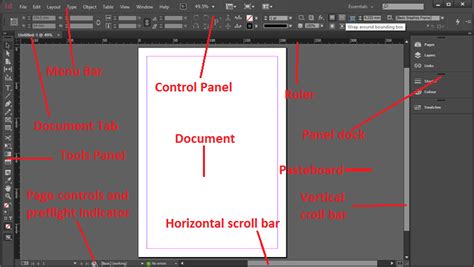
- InDesign: Has a well-established and highly customizable interface that seasoned designers are very familiar with. While it offers extensive toolsets, the learning curve can be steep, particularly for beginners. The introduction of features like the Properties panel and rich tooltips aims to streamline the user experience, though some find these additions intrusive or less intuitive.
Feature Set and Functionality
Both applications offer a comprehensive set of tools for page layout.
- Text Flow and Linking: While InDesign's text flow is highly refined, Affinity Publisher has improved its capabilities, though it requires a specific action like 'shift+click' for "autoflow" to link text frames across spreads.
- Styles: Both programs offer robust paragraph and character styling. Affinity Publisher's style management is noted for its efficiency in updating large text blocks.
- Importing Files: Affinity Publisher can open InDesign (INDL) files, but the user data indicates that "quite a few things moved around or went missing altogether" in tests. It can also open PDFs, but manually inserted hyphens can cause issues when reflowing text. InDesign, of course, natively handles its own INDD files.
- Integration with Other Software: Affinity Publisher's biggest advantage here is StudioLink, allowing seamless integration with Designer and Photo. InDesign requires switching between applications, though Adobe's Creative Cloud offers extensive integration between its own suite.
- Tables and Footnotes: Affinity Publisher makes table creation and editing more accessible with on-page options. For footnotes and endnotes, users may need to implement workarounds, as direct automated support can be limited compared to InDesign.
- Interactivity and Accessibility: InDesign clearly leads in this area, offering extensive options for multimedia embedding, form creation, and exporting tagged PDFs for accessibility. Affinity Publisher currently lacks direct support for creating accessible PDFs.
- Document History: Affinity Publisher offers the ability to save document history with the file, a feature not present in InDesign.
Performance and System Requirements
- Affinity Publisher: Generally performs better on modern hardware, especially systems with Apple's ARM-based processors and iPads. Its newer codebase is optimized for efficiency, leading to faster rendering and smoother operation, particularly with large documents.
- InDesign: Being an older application, it can be more resource-intensive and may exhibit slower performance on older hardware or when dealing with very complex documents. However, it is highly optimized for a wide range of systems.
Compatibility and Ecosystem
- Affinity Publisher: While it integrates tightly with Affinity Designer and Photo, its broader ecosystem is smaller. However, it has a strong focus on supporting industry-standard file formats and can import many file types, including some from Adobe.
- InDesign: Benefits immensely from the vast Adobe ecosystem, including Adobe Stock, Adobe Fonts, and seamless integration with other Creative Cloud applications. This makes it highly compatible within professional design studios and agencies that are heavily invested in Adobe products.
Affinity Publisher as an InDesign Replacement?
The question of whether Affinity Publisher can replace Adobe InDesign depends heavily on individual needs and workflows.
For many DIY book designers, freelancers, and small businesses, Affinity Publisher presents a potent and affordable alternative. Its user-friendly interface, integrated workflow with other Affinity apps, and significantly lower cost of entry make it a compelling choice for laying out print books and ebooks. The ability to achieve professional results without a recurring subscription is a major draw.
However, for professionals working on large, complex projects, requiring advanced typography control, extensive interactivity, precise print production checks, or seamless integration with a wider Adobe-centric workflow, Adobe InDesign may still be the preferred, if not essential, tool. Its robust feature set, industry-standard status, and advanced accessibility options are difficult to match.
The acquisition of Serif by Canva also introduces a new dynamic. While the core Affinity applications remain distinct, this integration could lead to future developments and potential synergies within Canva's broader design ecosystem.
Ultimately, both Affinity Publisher and Adobe InDesign are powerful desktop publishing tools. Affinity Publisher has undeniably matured into a viable competitor, offering significant advantages in terms of cost and integrated workflow for many users. Adobe InDesign, while maintaining its position as the industry standard, continues to offer unparalleled depth and professional features for the most demanding publishing tasks. The decision hinges on a careful evaluation of your specific requirements, budget, and existing software ecosystem.