The landscape of video editing is constantly evolving, driven by the demand for faster workflows and more engaging content. For creators working with DaVinci Resolve, a powerful yet often complex editing suite, the introduction of AI-powered tools has been a significant boon. Among these innovations, AutoCut has emerged as a game-changer, promising to streamline repetitive tasks and unlock new levels of creative freedom. This tutorial explores how AutoCut can be leveraged within DaVinci Resolve to dramatically enhance editing efficiency.
The Challenge of Manual Editing in DaVinci Resolve
DaVinci Resolve, renowned for its professional-grade color correction, visual effects, and audio post-production capabilities, offers an incredibly deep feature set. However, for many content creators, particularly those focused on YouTube, vlogs, or social media, the sheer volume of manual editing required can be a significant bottleneck. Tasks such as removing silences, cutting out filler words, and trimming unwanted pauses, while crucial for pacing and viewer engagement, can consume an inordinate amount of time.
Many users have expressed the sheer exhaustion of this process. As one user noted, "For each of my YouTube videos, I used to spend over an hour removing all the silences." This sentiment is echoed across the creative community, highlighting a universal need for more automated solutions. The traditional editing process, especially within a comprehensive software like Resolve, often involves painstakingly scrubbing through footage, marking in and out points, and making individual cuts. This can transform what should be a creative endeavor into a tedious, time-consuming chore.
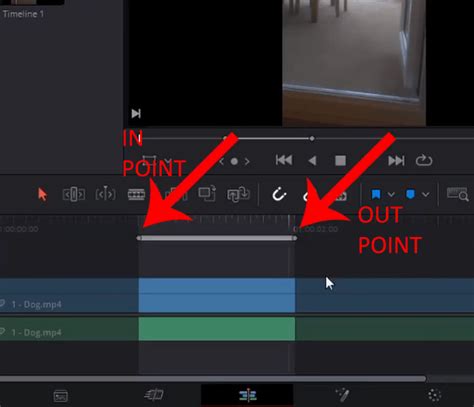
The problem is exacerbated by the nature of spoken word content. Whether it's a podcast, an interview, or a monologue, natural speech is rarely perfectly concise. Pauses, "ums," "ahs," and stumbles are common. While these elements are natural in conversation, they can disrupt the flow and pacing of a video, leading to viewer disengagement. The manual removal of these elements requires a keen eye for detail and a significant investment of time, often taking hours for a single hour of footage. This is where tools like AutoCut begin to shine, offering a powerful antidote to the traditional editing grind.
Introducing AutoCut: AI-Powered Efficiency
AutoCut is an innovative tool designed to automate many of these time-consuming editing tasks. At its core, AutoCut leverages artificial intelligence to identify and remove silences, filler words, and other undesirable segments from video footage. This not only speeds up the editing process but also helps maintain a professional and polished final product.
The testimonials from users of AutoCut consistently highlight its time-saving capabilities. "Using auto cut has made my editing come from 6 hours to about 30 minutes," states one user, underscoring the dramatic reduction in editing time. Another user exclaims, "It already saved me about 7 hours." This significant time saving allows editors to shift their focus from repetitive tasks to more creative aspects of their work. As one user put it, "It helps me focus on creativity instead of spending hours on repetitive tasks." This sentiment is crucial; by offloading the mundane, AutoCut empowers creators to invest their energy where it matters most - in storytelling, visual aesthetics, and overall creative direction.
The practical benefits are clear: reduced turnaround times, increased output, and a more enjoyable editing experience. For professionals and hobbyists alike, AutoCut presents a compelling argument for integrating AI into their workflow. The promise is not just about speed, but about a fundamental shift in how video editing is approached, moving from laborious manual manipulation to intelligent automation.
Key Features and Their Impact on Workflow
AutoCut is not a one-trick pony. It offers a suite of features designed to enhance video editing efficiency, particularly within environments like DaVinci Resolve. While the provided information primarily focuses on its integration with Premiere Pro, the underlying AI principles and workflow benefits are directly transferable and highly sought after by DaVinci Resolve users.
Automatic Silence and Gap Removal
This is perhaps the most celebrated feature of AutoCut. The AI intelligently analyzes the audio track of a video to detect periods of silence or extended pauses. It then automatically removes these segments, creating a tighter, more dynamic edit. This is particularly valuable for spoken-word content, where long silences can lead to viewer drop-off. The accuracy of this feature is frequently praised. Diego Alves notes the "accuracy is amazing, and it keeps my content looking sharp and professional." This precision ensures that the automatic cuts don't disrupt the natural flow of speech or create jarring edits.
Filler Word Identification and Removal
Beyond simple silences, AutoCut can also be configured to identify and remove common filler words such as "um," "uh," "like," and "you know." This further refines the edit, making the final output more concise and professional. Harry Nash highlights this by mentioning, "I typically record for about 1 hour and I’m always having issues with speaking perfectly throughout the whole video." AutoCut directly addresses this common challenge.
Auto Zoom and AI Editing
While not explicitly detailed for DaVinci Resolve, the mention of "Auto Zoom and AI editing" in the context of Premiere Pro suggests broader intelligent editing capabilities. In DaVinci Resolve, an AI-driven "Auto Zoom" could potentially analyze footage to identify key subjects and automatically create dynamic zooms or reframes, adding visual interest without manual keyframing. This kind of feature would be a significant time-saver, especially for social media content that benefits from dynamic visuals.
Auto Captions and Auto Profanity Filter
The inclusion of "Auto Captions" and an "Auto Profanity Filter" points to AutoCut's versatility. Auto captions are essential for accessibility and for viewers who watch videos with the sound off. An AI-powered captioning system can significantly reduce the time spent transcribing and syncing text. Similarly, an automated profanity filter can quickly scan and flag or remove inappropriate language, saving editors from having to meticulously listen through entire projects for such content. These features demonstrate AutoCut's potential as an all-in-one solution for streamlining post-production tasks.
AutoCut's Potential Integration with DaVinci Resolve
While the provided testimonials and descriptions heavily feature Premiere Pro, the underlying technological principles of AutoCut are highly relevant to DaVinci Resolve users. The desire for an extension that offers similar AI-powered automation in DaVinci Resolve is palpable. One user explicitly states, "I've been waiting for this extension on DaVinci Resolve for years!" This indicates a strong demand and a clear market for such a tool within the Resolve ecosystem.
The core functionality of AutoCut-analyzing audio to intelligently cut content-can be implemented as a plugin or an extension within DaVinci Resolve. The process would likely involve:
- Audio Analysis: AutoCut would analyze the audio waveform of selected clips or an entire timeline.
- Silence and Filler Word Detection: Using AI models, it would identify segments to be removed based on user-defined parameters (e.g., minimum silence duration, list of filler words).
- Automated Cutting: The tool would then automatically create edit points and remove the identified segments, propagating the timeline accordingly.
- User Customization: Crucially, users would need control over the sensitivity of the AI, allowing them to fine-tune the results. Options to review and manually adjust the AI-generated cuts would also be essential for professional workflows.
The benefits for DaVinci Resolve users would be immense, mirroring those experienced by Premiere Pro users:
- Drastic Time Savings: Eliminating hours of manual silence removal.
- Improved Pacing: Creating tighter, more engaging video content.
- Focus on Creativity: Freeing up editors to concentrate on storytelling, color grading, and sound design - areas where DaVinci Resolve truly excels.
- Increased Competitiveness: As one user noted, "Editors who use AI work faster, more efficiently, and become far more competitive."
The "practical and very fast program for cutting and subtitles" description by Waldenio Junior perfectly encapsulates what a DaVinci Resolve version of AutoCut could offer. The integration of such tools is not just about convenience; it's about democratizing professional editing by making advanced automation accessible.
DaVinci Resolve's Built-in Editing Innovations
While AutoCut as a specific Premiere Pro extension might not be natively available in DaVinci Resolve, it's important to acknowledge that DaVinci Resolve itself has been continuously innovating its editing capabilities, particularly with the introduction of the "Cut Page." This page is designed for speed and efficiency, offering features that address some of the pain points that AI tools like AutoCut solve.
The Cut Page in DaVinci Resolve is a testament to the software's commitment to faster editing workflows. It introduces several innovations that can streamline the editing process:
- Source Tape: This feature allows users to visually scroll through all their clips in the media pool as a single "tape" in the viewer. This eliminates the need to hunt through bins and dramatically speeds up shot selection. As described, "With source tape, you no longer have to waste time hunting through bins to find the clip you need."
- Dual Timeline: The Cut Page features a dual timeline system. The upper timeline shows the entire program, while the lower timeline provides a zoomed-in view of the editing area. This eliminates the need for constant zooming and allows for simultaneous viewing of the overall structure and detailed edits. This design is "perfect for a dedicated hardware controller and the search dial allows fast scrolling for editing and trimming."
- Smart Indicator and Smart Insert: The "smart indicator" highlights where edits will occur, reducing the need for manual placement of in and out points. The "smart insert" function automatically inserts clips at the nearest edit point, rippling the timeline to accommodate the new footage. This offers a level of automation for clip placement.
- Automatic Trim Tools: The Cut Page intelligently selects trim tools based on mouse position, allowing for incredibly fast and intuitive trimming. The "A/B trimmer" in the viewer provides a graphical interface for precise frame-accurate edits.
- Sync Bin: For multi-camera shoots, the Sync Bin allows for non-real-time multi-cam editing, enabling editors to select the best cutaway shots more efficiently than traditional multi-cam features.
10 | DaVinCi Resolve | Tips that make your editing workflow Faster | tips and tricks
While these features offer significant speed improvements, they still largely rely on user interaction. The "automatic scene cut detection" mentioned in one of the provided texts, which simplifies the XML workflow for colorists by detecting edits in a rendered movie, hints at the kind of AI-driven analysis that AutoCut provides, but applied in a different context. The desire for an extension that performs the content cutting based on audio analysis, rather than just scene cut detection, remains strong.
The Future of Editing: AI and DaVinci Resolve
The convergence of powerful editing software like DaVinci Resolve and intelligent AI tools like AutoCut represents the future of video production. The ability to automate tedious tasks not only saves time but also lowers the barrier to entry for aspiring editors and content creators. It allows for a more iterative and experimental approach to editing, where creators can quickly generate multiple versions or explore different cuts without committing hours to each.
The demand for a DaVinci Resolve version of AutoCut is a clear indicator that the industry is moving towards more intelligent, AI-assisted workflows. As AI technology continues to advance, we can expect even more sophisticated tools that can assist with tasks ranging from content summarization and highlight generation to advanced pacing analysis and even script-based editing.
For DaVinci Resolve users, staying abreast of these developments is key. While native AI-powered cutting tools might not be fully integrated yet, the principles behind AutoCut-efficiency, automation, and intelligent analysis-are already being addressed by Resolve's innovative Cut Page. Furthermore, the growing ecosystem of plugins and extensions means that powerful third-party solutions like AutoCut could become a reality for DaVinci Resolve users in the near future.
The promise of AutoCut is not to replace the editor, but to augment their capabilities. It's about freeing up human creativity by handling the repetitive, time-consuming aspects of the editing process. This allows editors to focus on the artistic nuances, storytelling, and emotional impact of their work, ultimately leading to better-quality content produced more efficiently. The journey from manual cuts to AI-assisted editing is well underway, and tools like AutoCut are paving the way for a more streamlined and creative future in video editing, a future that DaVinci Resolve users are eager to embrace.