Procreate, the powerful digital art application for iPad, offers a vast and ever-expanding universe of brushes, each designed to unlock unique creative possibilities. For both seasoned professionals and budding digital artists, navigating this extensive toolkit can be both exhilarating and overwhelming. This guide delves into the core of Procreate's brush library, highlighting essential tools for sketching, inking, and adding texture, while also exploring highly recommended custom brush packs that can elevate your artwork to new heights. Understanding the nuances of these brushes is key to developing a personal artistic style and achieving professional-quality results.
Getting Started: The Foundation of Digital Painting
The journey into digital painting with Procreate often begins with the software's default set of tools. While it might seem counterintuitive to start with what might feel "clunky" or "limiting," these generic brushes are incredibly versatile. The key lies in mastering their fundamental functions.
A prime example is the generic painting round brush. This foundational tool, when utilized by simply varying its size or opacity, can yield astonishingly diverse results. Many artists find immense satisfaction and artistic growth by first becoming proficient with this basic brush before venturing into more specialized options. This process not only builds a strong understanding of digital painting mechanics but also fosters a deeper appreciation for the subtle control that can be achieved with digital tools.
Once comfortable with the default brushes, the next logical step is to explore the preferences of each brush. Procreate provides extensive customization options, allowing you to tweak parameters like shape dynamics, grain, stabilization, and jitter. Learning to adjust these settings to match your desired aesthetic is crucial. For instance, the Procreate Pencil is an excellent default option for sketching, offering a natural pencil-like feel. Similarly, the Syrup Brush, found within the inking set, is a favorite for its clean lines and responsive pressure sensitivity, making it ideal for creating varied line weights.
Essential Sketching Brushes: Laying the Groundwork for Your Art
The initial sketch is the bedrock of most digital illustrations, even the most rudimentary ones. Having the right sketching brush can significantly impact the workflow and the overall feel of the final piece.
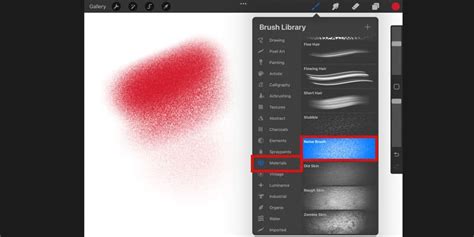
One of the most highly recommended free brushes built into Procreate is Peppermint. Located in the "Sketching" section of the brush library, it has become a go-to for many artists, including those who prefer to sketch in a bright red ink for enhanced visibility. This preference for a distinct sketching color allows for easier differentiation between the initial lines and subsequent layers.
Another surprisingly effective sketching tool, particularly for hand-lettering, is Soft Pastel. This free, built-in brush is a mono-weight brush, meaning its line thickness remains consistent regardless of the pressure applied. This characteristic is invaluable when aiming for uniformity in letterforms, providing a clear preview of how the final, filled-in letters will appear. The consistency offered by mono-weight brushes prevents unintended variations in stroke width, ensuring a cleaner and more predictable outcome during the initial design phase.
Mastering Inking Brushes: Defining Your Lines
Inking is often the stage where an illustration gains its structure and definition. The choice of inking brush can dramatically alter the final aesthetic, from crisp and clean to textured and organic.
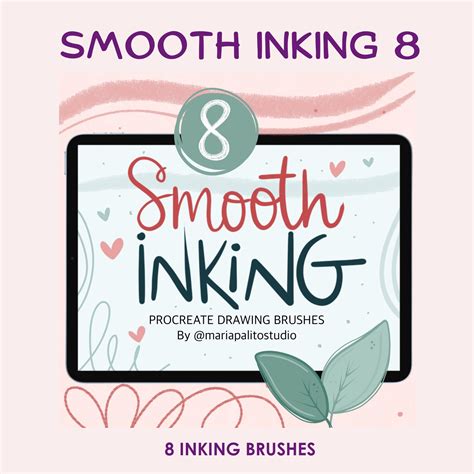
The Syrup Brush, already mentioned for its versatility, continues to be a standout built-in inking option. Its ability to produce a crisp edge while still allowing for subtle variations in line weight based on pressure makes it a favorite for foundational linework. This responsiveness is critical for achieving a dynamic and professional look.
For those seeking more character in their lines, custom brushes offer a wealth of possibilities. The Crispy Inker from True Grit Texture Supply is a prime example. This brush excels at laying down solid color with a pleasing texture at its edges, making it particularly effective for illustrating organic elements like fur or hair, as demonstrated in various Skillshare classes. The inherent texture adds a tactile quality that can bring illustrations to life.
When a subtler texture is desired, the Smooth Filler from Faber Co. is an excellent choice. It provides a refined textured feel without the pronounced edges of the Crispy Inker, offering a balanced approach to linework.
Another highly regarded inking brush is Messy Monoline by Lisa Glanz. This brush is celebrated for its unique and captivating texture, adding a distinctive character to strokes. Many artists find that brushes from Lisa Glanz, often available for purchase or as generous free gifts with course enrollments, are indispensable in their digital toolkit.
Embracing Texture: Adding Depth and Dimension
Texture is a transformative element in digital illustration, capable of elevating simple designs into visually rich and engaging artworks. Procreate's brush library, both built-in and custom, offers numerous ways to incorporate texture.
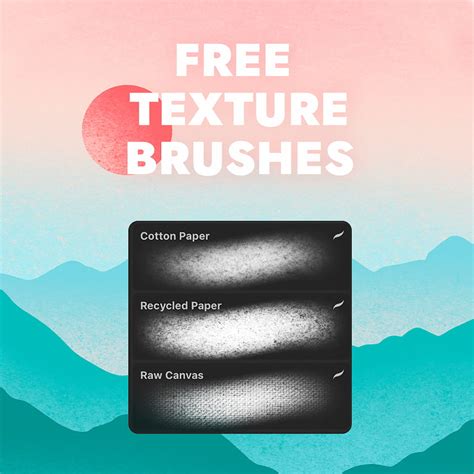
Lisa Glanz is a prolific creator of textured brushes, and her Build Up - Splatter brush is a testament to her skill. This bold brush can add a playful and dynamic element to illustrations, injecting life into otherwise flat compositions. Its impact is particularly noticeable when used to enhance patterns, as seen in examples where its addition transforms a design from mundane to exciting.
Another artist-favorite for texture is Gouache Soft Grain. Suggested by fellow artist Maja Faber, this brush has become a staple for many, offering a versatile way to add a soft, painterly texture that mimics traditional gouache. Its unexpected effectiveness quickly turned it into a frequently used tool.
For background textures or unique fills, Roasted Stamp by Lisa Glanz is a standout. It's part of her "Delicious Texture" brush pack, offering a range of rich textural options. When a more subtle background texture is desired, Salt Shaker, also by Lisa Glanz, is an excellent choice for building dimension and making illustrations "pop."
Exploring Custom Brush Packs: Curated Collections for Specific Needs
Beyond the individual brushes, numerous curated brush packs offer comprehensive toolkits for specific artistic styles or needs. These collections often bundle a variety of brushes designed to work harmoniously, streamlining the creative process.
For artists focusing on lettering and calligraphy, several packs stand out:
- The KickOff is lauded for its comprehensive approach, providing not only custom brushes but also a valuable workbook for hand-lettering.
- The Grid Builder and its companion, The Letter Builder, are essential for creating structured lettering, offering customizable grid templates for precise letterform construction.
- Snooze's brush packs, such as the one offering a vast amount of outlined brushes with 3D effects and shadows, are ideal for artists interested in stylized lettering.
- Lisa Glanz's CalligraFUN brush pack aims to make lettering enjoyable with a variety of custom brushes.
- Blackletter Dry Brushes for Procreate and The Ultimate Gothic Calligraphy Brush Toolkit are specifically designed for the intricate beauty of gothic and blackletter calligraphy, offering textured dry brushes and educational components.
- The Ultimate Lettering & Calligraphy Procreate Kit and The Procreate Lettering Toolkit are extensive mega packs, offering hundreds of custom brushes that can keep artists busy for months.
- DK's brush pack 3.0 is praised for its smooth, precise, and enjoyable inking experience, reflecting years of expertise in custom calligraphy brush creation.
- Devbrushes for Procreate is a consistently updated series, with Devbrush 5.0 being the latest iteration for iPad lettering enthusiasts.
- Rough & Raw and The Lettering Brushes for Procreate are excellent for adding a modern, dynamic feel to brush calligraphy.
- The Duo Lettering pack offers a unique approach by allowing artists to write letter skeletons that can then be filled and decorated, bridging traditional and digital techniques.
- The Brush Calligraphy Procreate Pack is specifically fine-tuned for beginners, ensuring an easy writing experience.
- The Procreate Lettering Starter Pack includes not only various brushes but also a valuable 10-part workbook.
- The Rough Pack 2 by Snooze One is celebrated for its exceptionally rich and high-quality textures.
- The Procreate Spray Brush V3.0 caters to those who enjoy a rough street or graffiti art style.
- The MegaPack for Lettering boasts a massive 53 brushes for a wide range of calligraphy styles.
how to make a procreate calligraphy brush in 2 minutes
Beyond lettering, other specialized brush categories are crucial for diverse artistic pursuits:
- Pencils, Pens & Ink Brushes: Collections from RetroSupply, such as their standard pencil pack mimicking graphite looks, their pen set capturing the spirit of classic illustrators, the "secret weapon" Broken Inker set for comic book styles, the Dead Pen kit for hand-drawn art, and the Spaceranger pack for mid-century pencil illustrations, provide authentic analog textures and feels.
- Halftone Brushes: RetroSupply's ColorLab Comic Color Kit and the DupliTone Halftone Pack enable the creation of vintage comic book and magazine ad aesthetics, offering pressure-sensitive and distressed halftones.
- Chalk Brushes: The DryGoods essential chalk brush collection captures the varied wear and tear of old chalkboard signs, providing authentic chalk textures.
- Watercolor Brushes: RetroSupplyâs Loteria Procreate brush pack offers a no-mess approach to watercolor, emulating textures, washes, and soft edges.
- Engraving Brushes: These brushes bring back the intricate line work seen in historical documents, using pressure-sensitive and IndustryPress brushes to add detailed engraved effects.
- Shade, Depth & Texture Brushes:
- Cross-Country Cross Hatchers make it easy to add shade and depth with closely spaced lines.
- The Texture Brush Pack offers mid-century travel brochure-inspired textures for nostalgic ads.
- Gouache Shader Brushes provide a rich collection for detailed illustrations, mimicking gouache.
- Drunk Sailor Stippling Brushes offer precise control for stippling, pointillism, and dot art.
- RetroGrain Shading Brushes replicate the grain and shading seen in antique catalogs and archival materials.
- Lo-Fi Subtle Grain & Noise Brushes create the grittiness of well-loved comics and soft ink textures.
- Edge & Fold Distressed Brushes emulate distressed textures like smashed edges, paper creases, and water stains.
- The Mid-Century Dry Brush Pack provides essential brushes to emulate the look of mid-century commercial artists.
Other notable custom brush creators and their offerings include:
- HABOOK Paint Brushes for Procreate, featuring textured and hard brushes that offer precise edge control.
- Marc Brunetâs Starter Brush Pack, with the standout "Texture Comb" brush, ideal for stylized grass and foliage.
- emilyamiao's Procreate brushes, favored by a Story Artist at Walt Disney Animation Studios for line art, sketching, and detailed work.
- Mattâs Sketching Procreate brush set and his highly acclaimed watercolor brush set, known for their texture and semi-transparency, allowing for nuanced paintings.
The vast landscape of Procreate brushes is a testament to the platform's power and flexibility. Whether you're starting with the default tools, exploring free built-in options, or investing in custom brush packs, the key to unlocking your artistic potential lies in experimentation and practice. By understanding the unique characteristics of each brush and how they can be manipulated, artists can develop a personalized workflow and create truly remarkable digital art. The journey of discovering and mastering Procreate brushes is an ongoing one, filled with continuous learning and creative exploration.