DaVinci Resolve has established itself as a cornerstone of modern post-production, offering a comprehensive suite of tools for editing, color correction, visual effects, motion graphics, and audio post-production within a single, elegant application. Its ability to handle projects from initial media ingest to final delivery has made it the go-to solution for professionals in feature films, television shows, streaming, commercials, and documentaries. The software's intuitive yet powerful interface allows for a seamless workflow, enabling users to maintain camera original quality throughout the entire process. This integrated approach is a significant advantage, eliminating the need to learn and switch between multiple applications, thereby fostering a more efficient and creative environment. DaVinci Resolve's commitment to empowering creators is further exemplified by its free version, which provides access to professional-grade tools, making it an accessible entry point for aspiring editors, colorists, and sound engineers. For those seeking to push the boundaries of their craft, DaVinci Resolve Studio unlocks an even more expansive set of features and capabilities.
The Speed Editor: Revolutionizing the Editing Workflow
The DaVinci Resolve Speed Editor is a specialized hardware control panel meticulously designed to enhance the editing experience, particularly when paired with the Cut page of DaVinci Resolve. This innovative device moves beyond traditional mouse-driven editing, offering tactile, physical controls that deepen the user's connection to the timeline and their media. The core of the Speed Editor is its machined metal search dial, which features a soft rubber coating for optimal grip and precision. This dial provides an exceptionally accurate method for searching and positioning within the timeline, creating a sensation akin to physically holding and manipulating the edit.
Unlike software-only solutions, the Speed Editor's physical controls allow for a more intuitive and rapid workflow. The machined metal search dial, with its weighted feel, can be spun rapidly for quick navigation up and down the timeline. However, its functionality extends far beyond simple playback control. By engaging the dedicated trim buttons, the search dial transforms into a powerful live trimming tool. This allows editors to make precise adjustments to edit points in real-time, a process that is significantly faster and more accurate due to the dial's size and tactile feedback. This dynamic shift in the search dial's function represents a fundamentally new and efficient way to approach editing and trimming.
The design philosophy of the Speed Editor prioritizes essential editing functions, featuring only the specific keys required for a streamlined workflow. This minimalist approach reduces clutter and ensures that frequently used commands are readily accessible. For instance, the "space bar" style playback button is strategically positioned for easy thumb access, allowing for instant start and stop control. The "Source Tape" function, a modern reimagining of linear tape-based editing, allows users to effortlessly scroll through all their media using the search dial, with the current clip visually highlighted in the bin. This eliminates the time-consuming process of constantly clicking and dragging clips that is often associated with traditional media organization in editing software, making it ideal for fast-paced work such as TVCs, news, promos, and training videos.
DaVinci Resolve Speed Editor | Long Term Review 2023
Entering and exiting points are among the most frequently used functions in editing. Recognizing this, the Speed Editor incorporates large, tactile "In" and "Out" point buttons that can be easily located by feel, even during intense editing sessions. This is particularly beneficial for two-handed editing, where one hand manages transport controls while the other marks in and out points and executes edits. The ability to quickly scroll with the search dial and place these points anywhere on the timeline, followed by immediate access to edit function buttons, creates an exceptionally fluid editing process.
The editing functions themselves have been optimized to leverage the speed and efficiency of keyboard-based input. Intelligent editing tools, such as "Smart Insert," utilize an on-screen "smart indicator" on the timeline to determine the correct insertion point, often negating the need to manually set in and out points within the timeline itself. This allows editors to remain focused on the source tape, visually browsing and continuously adding clips without disruptive context switches. Functions like "Append to End" facilitate rapid edit construction by adding selected clips to the timeline's conclusion. "Ripple Overwrite" offers an extremely quick method for replacing existing shots, while "Place on Top" functions similarly to traditional edit modes, layering clips over the background. For multi-camera shoots, "Source Overwrite" allows for the seamless addition of cutaway shots, automatically synchronizing clips based on timecode and placing them on an upper layer.
The Speed Editor's trimming capabilities are equally transformative. The large search dial, combined with dedicated trim buttons, allows for frame-accurate adjustments. Trim modes such as "Trim In" and "Trim Out" enable precise manipulation of clip boundaries relative to transitions, while "Roll" offers frame-accurate adjustment of transition points. "Slide" functions allow for the adjustment of a clip's position within its existing in and out points, affecting either the source clip or the destination clip. "Transition Duration" provides direct, real-time control over the length of an effect at an edit point. The ability to instantly apply and toggle transitions like dissolves with dedicated buttons further streamlines the workflow, allowing editors to quickly add or remove effects as they navigate the timeline.
The compact design of the Speed Editor replaces the large QWERTY keyboard with a focused set of essential editing controls. Some of these enhanced function keys offer dual capabilities, activated by a press-and-hold or double-press action, maximizing functionality within a smaller footprint. The strategically placed "Escape" key, for instance, is easily accessible for reversing actions, such as returning to a multiview from the sync bin. The sync bin itself offers a modern approach to multi-camera editing, presenting synchronized clips in a familiar multiview interface for quick cutaway selection. Audio level adjustments are also streamlined; holding the "Audio Level" key and manipulating the search dial allows for rapid audio mixing. The prominent red "Full Screen" button provides quick access to a client-friendly presentation view, while the "Transition" button allows for the application of custom transitions. "Split" offers instant cutting at the playback point or removal of existing splits, and "Snap" provides subtle, non-magnetic snapping for a more refined timeline interaction. "Ripple Delete" efficiently removes clips and closes gaps, and the camera number section enables live override functionality, allowing for real-time camera switching during playback, akin to a production switcher.
DaVinci Resolve Studio: Unlocking Professional Power
While the free version of DaVinci Resolve offers an impressive array of features, DaVinci Resolve Studio represents the pinnacle of post-production capability, designed for professionals who demand the highest levels of performance, quality, and creative control. DaVinci Resolve Studio significantly expands upon the free version's capabilities, particularly in areas of resolution, frame rate, GPU acceleration, and advanced creative tools.
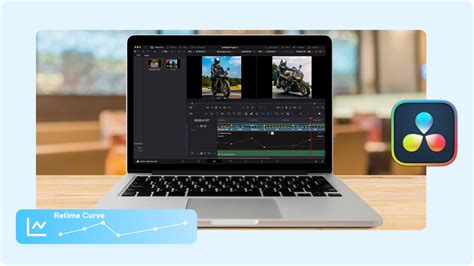
One of the most significant advantages of DaVinci Resolve Studio is its support for higher resolutions and frame rates. It can handle projects up to 120 frames per second (fps) at a staggering 32K resolution. This immense capability is crucial for high-end productions, virtual production, and future-proofing content for emerging display technologies. The software also leverages the power of multiple GPUs, enabling real-time playback of professional 10-bit formats and providing accelerated hardware decoding and encoding for H.264 and H.265 codecs. This translates to smoother performance, faster rendering, and the ability to work with demanding professional media formats without compromise.
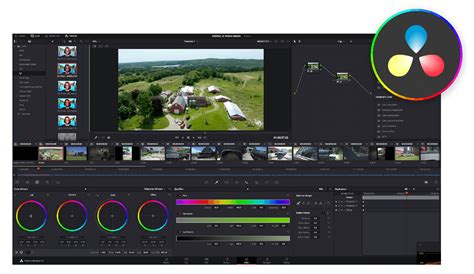
DaVinci Resolve Studio is replete with advanced creative tools that empower artists to achieve unparalleled results. The DaVinci AI Neural Engine, a core component of the Studio version, utilizes state-of-the-art deep neural networks and machine learning to power a host of exclusive features. This includes facial recognition for automatic bin population based on detected individuals, "Super Scale" for high-quality image up-rezzing from HD to 4K and 8K, and "Speed Warp" retiming with advanced optical flow for exceptionally smooth and clear speed changes. The AI Neural Engine also provides incredibly high-quality de-interlacing, "Magic Mask" for precise object isolation and tracking, "Smart Reframing" to adapt content for different aspect ratios, "Object Removal," and "Scene Cut Detection."
The realm of visual effects and motion graphics is significantly enhanced in DaVinci Resolve Studio with over 40 additional GPU and CPU accelerated Resolve FX. These plugins offer a vast array of creative possibilities, including effects for lens flares and reflections, analog damage simulation, sharpening, and more. Image restoration tools for dirt removal, dust busting, and de-flickering are included, alongside sophisticated "Face and Beauty" tools for retouching. The "Film Look Creator" allows for the application of cinematic color looks, film stocks, halation, grain, gate weave, and split toning. For more complex tasks, "Patch Replacer" enables cloning and painting out unwanted elements, and an "Object Removal" plugin can eliminate entire objects from a scene.
Audio post-production is elevated with DaVinci Resolve Studio's comprehensive suite of immersive audio tools. This includes support for high-resolution 3D audio, enabling work with spatial formats and the import/export of advanced IAB and ADM files. Object-based formats like Dolby Atmos and MPEG-H are fully supported, allowing for dynamic audio object panning to create realistic, scalable aural experiences. Ambisonics are supported up to 5th order. The Studio version also offers Dolby Atmos master production import from immersive files, with the ability to decompose them into original elements, and supports adding audio to video via IMF containers for multiple simultaneous audio deliverables.
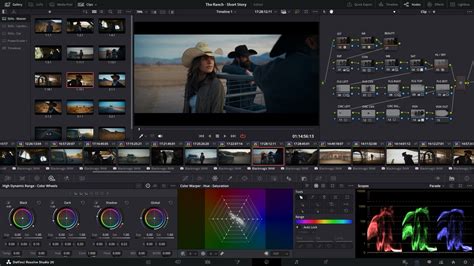
Color grading capabilities are further augmented in DaVinci Resolve Studio. It provides advanced HDR tools, including Dolby Vision and HDR10+ grading and rendering. The software includes a lens correction feature for analyzing and correcting spherical lens distortion and other aberrations. Its HDR scopes are capable of detailed analysis of ST.2084 and HLG images. For stereoscopic 3D projects, DaVinci Resolve Studio offers a complete set of tools for editing and grading. Furthermore, DaVinci color transformation scripts, which are GPU accelerated code snippets that perform complex image transformations, are supported, along with Python and LUA scripting APIs for workflow integration and custom encoding options.
Collaboration is a key strength of DaVinci Resolve, and the Studio version enhances this with robust workflow and media asset management integration, along with remote scripting API and rendering/encoder plug-in support. Remote monitoring allows clients to view a real-time feed on various devices with extreme high quality. The "Clone Palette" ensures data integrity during media card backups, and video outputs can be streamed to remote client monitors via DeckLink hardware. The "Deliver Page" offers granular control over all encoding options and formats, featuring a render queue for exporting multiple jobs efficiently.
DaVinci Resolve Studio 20, for example, introduces over 100 GPU and CPU accelerated Resolve FX, building upon the existing library with new effects like background defocus for portrait shots and enhanced film look creation. Improvements extend to face refinement tools, skin refinements, sub-pixel animation, and directional blur controls. The AI Neural Engine's capabilities are continuously expanded, offering features like AI-driven noise reduction (temporal and spatial), text-based editing, magic mask, film grain, and optical blur.
The DaVinci Resolve ecosystem extends beyond software to include a range of specialized hardware designed to complement the editing and grading experience. The DaVinci Resolve Editor Keyboard, a full-sized QWERTY keyboard with color-coded keycaps, is designed for editors who spend extensive hours at their workstations. Color panels, such as the compact Micro Color Panel, the versatile Mini Panel, and the professional Advanced Panel, offer precise control over color grading parameters, enabling the creation of unique looks that are difficult to achieve with a mouse and keyboard alone. Fairlight hardware consoles, developed in collaboration with sound engineers, provide intuitive, task-based controls that act as a natural extension of the software, streamlining audio mixing workflows. These range from the portable Desktop Console to multi-bay Fairlight Studio Consoles.
In essence, DaVinci Resolve, with its robust free version and the immensely powerful DaVinci Resolve Studio, alongside specialized hardware, offers a complete, scalable, and professional post-production solution. The Speed Editor, in particular, dramatically alters the editing paradigm by prioritizing tactile control and efficiency, making it an indispensable tool for editors seeking to maximize their speed and creative output.