DaVinci Resolve stands as a singular, revolutionary force in the realm of digital content creation, uniquely consolidating professional editing, advanced color correction, immersive visual effects, and comprehensive audio post-production into a single, cohesive software application. This unified approach eliminates the need to juggle multiple, disparate programs, streamlining the entire post-production workflow and allowing creators to transition seamlessly between disciplines with just a click. Whether you're a seasoned professional in Hollywood or an emerging filmmaker, DaVinci Resolve for PC offers an unparalleled suite of tools designed to elevate your projects from concept to final delivery.
The Core Philosophy: Integration and Efficiency
At its heart, DaVinci Resolve is built on the principle of integration. Unlike many other software suites where editing, color grading, VFX, and audio are siloed into separate applications, Resolve brings them all under one roof. This fundamental design choice is key to its efficiency. Editors can instantly move between editing, color, effects, and audio, a fluidity that significantly accelerates the post-production process, especially for projects with demanding, tight deadlines. This is not merely a convenience; it's a paradigm shift in how post-production can be approached, allowing for rapid iteration and creative exploration without the friction of software switching.
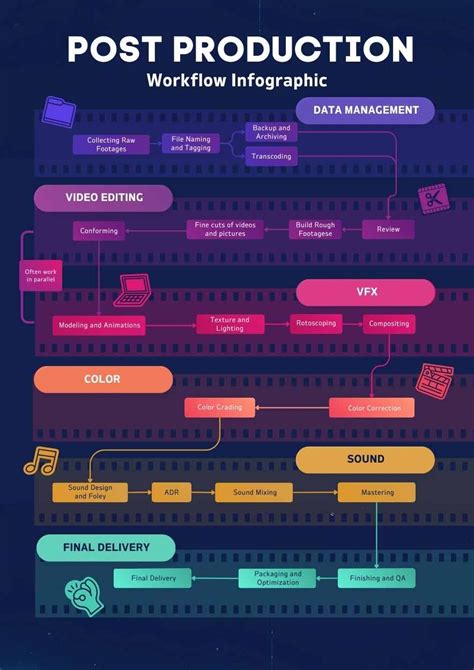
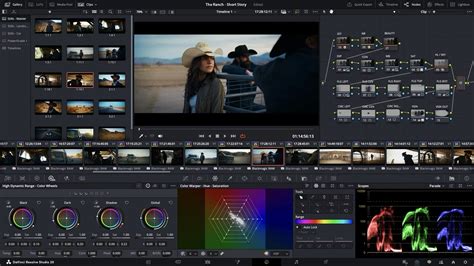
The software is meticulously structured around task-specific workspaces, referred to as "pages." Each page is a dedicated environment optimized for a particular stage of the post-production workflow. The Cut and Edit pages are engineered for video editing, offering robust tools for assembling and refining sequences. For those requiring spectacular visual flair, the Fusion page provides a true 3D workspace packed with over 250 tools for creating feature-film quality visual effects and stunning motion graphics. The Color page is where DaVinci Resolve's legendary color correction and grading capabilities truly shine, offering advanced HDR primary color grading tools, unlimited secondary corrections, power windows, and sophisticated tracking. Finally, the Fairlight page transforms Resolve into a full-blown digital audio workstation (DAW), equipped with high-performance, multi-track, sample-level editing and mixing capabilities. Media management and final export are handled efficiently through the Media and Deliver pages, respectively.
Mastering the Edit: Speed and Precision
For editors facing the pressure of rapid turnarounds, DaVinci Resolve offers two distinct editing environments: the Edit page and the dedicated Cut page. The Edit page provides a familiar, traditional nonlinear editing experience, complete with a dual-timeline design and a comprehensive set of tools suitable for larger, more complex projects like feature films, television shows, and documentaries. Its drag-and-drop functionality, context-sensitive automatic trimming tools, and customizable keyboard shortcuts are designed to maximize editing speed. Furthermore, it boasts a vast library of titles, transitions, and effects, alongside robust media management and timeline organization tools.
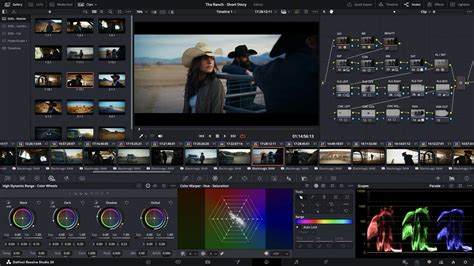
The Cut page, on the other hand, is a streamlined alternative specifically engineered for speed. Its interface is intuitive and designed for rapid learning, making it ideal for projects with extremely tight deadlines. Features such as "source tape," "dual timelines," "fast review," and "smart editing tools" empower editors to work faster than ever before. The "sync bin" and "source overwrite" tools are particularly effective for quickly editing multi-camera programs, making it an excellent choice for documentaries, live broadcast editing, and replay workflows. The "Multi Source" feature allows editors to view all live cameras or clips with common timecode in a multiview screen, enabling quick shot selection and editing directly to the timeline, even while cameras are still recording. Every action on the Cut page is designed to be immediate, ensuring creators spend more time editing and less time navigating complex menus.
The Art of Color: Hollywood's Favorite Tool
DaVinci Resolve's reputation was built on its unparalleled color correction and grading capabilities, a legacy that continues to be a cornerstone of the software. The Color page is an advanced workspace that has been instrumental in shaping the visual aesthetics of countless high-end feature films and television shows. It offers a comprehensive suite of tools that cater to both novice and expert colorists. Primary control sliders provide an intuitive entry point, allowing users familiar with image editing software to easily adjust fundamental parameters like contrast, temperature, midtone detail, and saturation.
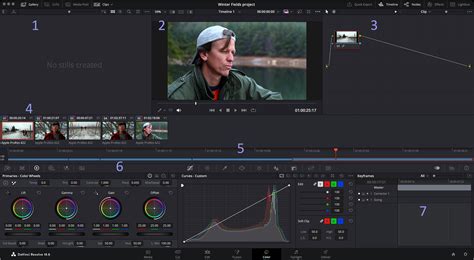
Beyond the basics, Resolve Studio unlocks advanced HDR primary color grading tools, an unlimited number of secondary corrections, and powerful "power windows" for isolating and manipulating specific areas of an image. The software's sophisticated tracking capabilities ensure that these adjustments remain precisely in place as the footage moves. Version 20 of DaVinci Resolve Studio introduces significant updates to the Magic Mask and Depth Map tools, further enhancing precision and creative control. The Color Warper now includes Chroma Warp for nuanced color adjustments, and the new Film Look Creator allows users to easily apply cinematic looks by emulating film properties such as halation, bloom, grain, flicker, gate weave, and vignetting. The DaVinci Neural Engine also contributes to the color workflow with features like Auto Color and Color Matching, which intelligently analyze footage to achieve consistent looks.
Visual Effects and Motion Graphics: The Fusion Powerhouse
The Fusion page within DaVinci Resolve is a dedicated environment for creating sophisticated visual effects and broadcast-quality motion graphics. It employs a node-based workflow, which is widely recognized for its efficiency and clarity in managing complex visual compositions. Unlike layer-based systems, nodes allow for a more intuitive and visually organized approach to building effects, where each node represents a specific operation or tool.
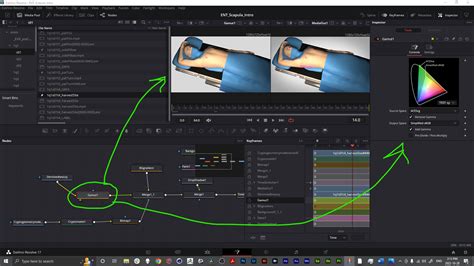
Fusion provides an extensive collection of over 250 2D and 3D tools, enabling artists to craft anything from intricate visual effects to dynamic animated titles and immersive 3D particle systems. The page is equipped with advanced animation curve and keyframe editors, facilitating the creation of incredibly organic and realistic motion. Key features include point, planar, and 3D camera tracking, rotoscoping, keying tools for photorealistic compositing, and a 3D particle system for generating complex visual elements like smoke, fire, and explosions. DaVinci Resolve 20 enhances Fusion with a deep image compositing toolset, multi-layer pipelining for OpenXR, and support for VR 180. New toolsets include vector warping, advanced multi-layer compositing workflows, and the MultiPoly tool, which consolidates all masks into a single list for more efficient rotoscoping. Furthermore, the integration of uVolume allows for the direct import of volumetric VDB files into Fusion, eliminating time-consuming conversion processes and offering creative control over effects like smoke and fire.
Audio Post-Production: The Fairlight Advantage
The Fairlight page transforms DaVinci Resolve into a fully-fledged digital audio workstation (DAW), offering a comprehensive suite of tools for professional audio post-production. It is designed for high-performance, multi-track, sample-level editing and mixing, capable of handling up to 2,000 tracks in real-time with extensive effects processing.
Fairlight provides advanced ADR (Automated Dialogue Replacement) and Foley tools, along with support for sound libraries. Audio and video scrollers are included for quickly syncing sound to picture, complemented by a scrolling timeline for precise editing. The page also offers a robust selection of Fairlight FX plugins, including essential tools like a hum remover, de-esser, and reverb. DaVinci Resolve 20 introduces AI-powered audio tools, such as the AI Audio Assistant, which analyzes audio and intelligently creates a professional mix. IntelliTrack AI allows for motion tracking to automate audio panning, and the Music Editor can automatically adjust track lengths. For mixing and mastering, Fairlight supports stereo, 5.1, 7.1, and immersive 3D audio formats, including 5th order ambisonics. The integration of Fairlight hardware consoles, designed in collaboration with sound engineers, further streamlines workflows by providing tactile control over the software's extensive audio features.
Collaboration and Cloud Workflows
DaVinci Resolve is engineered not only for individual power but also for seamless collaboration. DaVinci Resolve Studio is the world's only solution designed for multi-user collaboration, allowing editors, assistants, colorists, VFX artists, and sound designers to work concurrently on the same project. This real-time, simultaneous collaboration eliminates the need for cumbersome file imports, exports, or project translations, significantly reducing the risk of errors and lost work.

The integration of Blackmagic Cloud facilitates remote collaboration through cloud-based workflows. Project libraries can be hosted on the DaVinci Resolve Project Server in the cloud, enabling teams to work together from different locations. The "Organizations" app within Blackmagic Cloud allows larger companies to define a single organizational structure, create groups or teams, and share projects efficiently with an entire group rather than individually. This system also simplifies license management for companies. Furthermore, the Blackmagic Proxy Generator App automates the creation and management of proxy files from camera originals, accelerating editing workflows by converting new media into H.264, H.265, or ProRes proxies. This focus on collaborative and cloud-based workflows makes DaVinci Resolve an ideal solution for modern, distributed production teams.
DaVinci Resolve Studio vs. Free Version
Blackmagic Design offers both a free version of DaVinci Resolve and a paid, professional-grade version called DaVinci Resolve Studio. The free version is remarkably powerful and capable, providing access to the core editing, color, Fusion, and Fairlight pages. It supports virtually all 8-bit video formats at up to 60fps and resolutions as high as Ultra HD (3840 x 2160). This makes it an accessible entry point for aspiring editors and filmmakers.
DaVinci Resolve FREE or PAID? Explaining 7 differences to help you choose.
DaVinci Resolve Studio, however, unlocks a significantly expanded feature set and enhanced performance. It supports resolutions greater than ultra-high-definition (up to 32K) and frame rates over 60 FPS (up to 120 FPS). Crucially, the Studio version includes the DaVinci Neural Engine, which powers advanced AI tools like facial recognition, speed warp, and intelligent audio assistance. It also offers dozens of additional Resolve FX, temporal and AI spatial noise reduction, text-based editing, Magic Mask, film grain, optical blur, and more. For professionals working on demanding projects, the added resolution support, frame rate capabilities, and advanced AI and FX tools in DaVinci Resolve Studio are indispensable.
System Requirements and Performance
While DaVinci Resolve is a powerful application, its performance on a PC is heavily dependent on the hardware. For optimal performance, especially when utilizing advanced features like Fusion or high-resolution footage, robust system specifications are recommended. A decent multi-core CPU, a minimum of 16GB of RAM (32GB or more is preferred for complex projects, especially those involving Fusion), and a dedicated GPU with at least 4GB of VRAM (8GB or more is highly recommended) are essential.
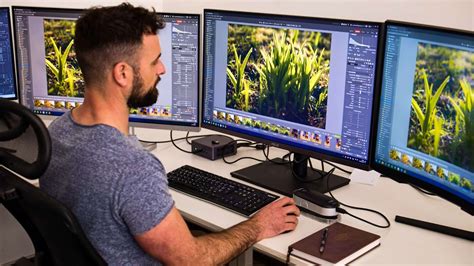
To maximize performance on less powerful systems or to optimize workflows, DaVinci Resolve offers several helpful strategies. Optimizing media by converting it to an editing-friendly codec, utilizing proxy files for smoother playback during editing, lowering the timeline resolution, and enabling Render Cache can significantly improve responsiveness. DaVinci Resolve 20.3, for instance, maintains project library compatibility with DaVinci Resolve 19.1.4, ensuring a smoother transition between versions. General performance and stability improvements are a constant focus for Blackmagic Design, with updates frequently addressing these areas.
The Future of Post-Production
DaVinci Resolve continues to evolve, with each new version introducing groundbreaking features and AI-powered tools. DaVinci Resolve 20, for example, brought over 100 new features, including AI IntelliScript for creating timelines from text, AI Animated Subtitles, and AI Multicam SmartSwitch for automatic camera angle selection. The ongoing development in areas like deep image compositing, multi-layer pipelining, and advanced AI functionalities underscores Blackmagic Design's commitment to pushing the boundaries of what's possible in post-production. The softwareâs adaptability, comprehensive feature set, and commitment to innovation solidify its position as a leading solution for creators on PC, offering a powerful and accessible path to professional-grade results.