The digital landscape of image formats is constantly evolving, with new technologies emerging to offer enhanced compression and quality. Among these, the WebP format, developed by Google, has gained significant traction due to its ability to deliver smaller file sizes compared to traditional formats like JPEG, without compromising visual fidelity. However, the very ubiquity that makes older formats like JPG so prevalent also necessitates the ability to convert newer formats like WebP into more universally compatible alternatives. This is where a robust and efficient WEBP to JPG converter becomes an indispensable tool for a wide range of users, from casual photographers to professional web developers.
The Need for WEBP to JPG Conversion
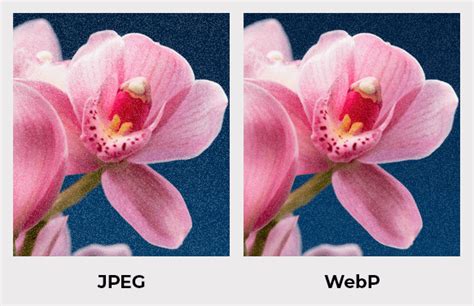
WebP, often pronounced "weppy," is a modern image format that supports both lossy and lossless compression. Its primary advantage lies in its efficiency; it typically produces files that are 25-35% smaller than equivalent JPEG images at the same visual quality. This efficiency is crucial for web performance, as smaller image sizes lead to faster loading times, improved SEO rankings, and a better user experience.
Despite these advantages, WebP is not yet universally supported. While adoption is growing, many older software applications, devices, and online platforms may not natively recognize or display WebP files. This lack of universal compatibility is the primary driver for needing to convert WebP images to JPG.
Key reasons for converting WebP to JPG include:
- Wider Compatibility: JPG is supported by virtually all image viewers, editors, operating systems, and older software that may not recognize WebP. This ensures that your images can be easily accessed and displayed across a multitude of platforms.
- Editing Requirements: Some desktop or mobile image editing applications might not fully support WebP. Converting to JPG ensures seamless editing with a broader range of tools.
- Specific Platform Needs: Certain online services, forms, or applications may specifically require images in JPG format and will reject WebP files. This is a common hurdle when uploading images to specific websites or submitting them for particular purposes.
- Legacy Systems: Working with older systems or sharing images with users on outdated software might necessitate converting to a format they can easily open and view.
Streamlining the Conversion Process: Online Tools at Your Service
Fortunately, the process of converting WEBP to JPG has become remarkably simple and accessible, largely due to the availability of powerful online conversion tools. These platforms eliminate the need for installing any software or plugins, offering a convenient and often free solution for immediate conversion needs.
One such comprehensive tool is Pixelied. It positions itself as an ultimate image conversion tool that can instantly convert from WEBP to JPG for free, crucially without any dip in image quality. The platform provides a simple and convenient interface to handle media files, offering the ability to change from WEBP to JPG and even edit photos right after conversion. This all-in-one approach saves users time and effort by consolidating multiple steps into a single workflow.
The process with Pixelied is designed for ease of use, typically involving just a few steps:
- Upload your WEBP file(s): This can be done by clicking a 'Choose Files' button or by dragging and dropping the image(s) into a designated area.
- Start Conversion: Once the files are uploaded, a click on 'Start Conversion' initiates the process for all selected files.
- Download the files: After the conversion is complete, users can download their newly converted JPG images by clicking 'Download All' or 'Download JPG' next to each file.
- Edit Converted Images: Optionally, users can further refine their images using Pixelied's photo editing toolkit, which allows for cropping, resizing, background removal, adding captions, and much more.
WEBP to JPG Converter by SysTools | How to Convert WEBP to JPG | Best WEBP to JPEG Conversion Tool
Batch Conversion: Efficiency for Large Volumes
For users dealing with numerous WEBP files, the ability to perform batch conversions is paramount. Manually converting hundreds or thousands of images one by one would be an incredibly tedious and time-consuming task. Online converters that support batch processing, such as Pixelied and AnyWebP, address this challenge effectively.
Pixelied's unique batch conversion feature allows users to convert files in bulk in no time. Regardless of the number of images processed simultaneously, the tool is designed to retain the original image quality, ensuring the most natural outcome. This is particularly beneficial for website owners who need to optimize large image libraries for broader compatibility.
AnyWebP is another platform that excels in this area. It offers a super-fast speed to process hundreds of WebP images at one time. The process is described as fast, reliable, and professional. For site owners with thousands of images waiting for conversion, AnyWebP provides a significant time-saving solution by allowing users to drag and drop all images and click 'Start All' to convert them immediately. This client-side processing ensures that even with large batches, the performance remains high.
Beyond Conversion: Comprehensive Image Editing Capabilities
Many modern online conversion tools go beyond simple format changes, integrating comprehensive photo editing suites. This allows users to not only convert their images but also enhance them before or after the conversion process.
Pixelied, for instance, offers a comprehensive photo editing toolkit that is straightforward and saves users time and frustration. Features include cropping, rotating, resizing, merging, flipping, and straightening pictures with just a few clicks. This integrated approach transforms the tool from a mere converter into an all-in-one design suite.
Canva's free WEBP to JPG converter also emphasizes this integrated editing capability. Before converting, users can adjust brightness, saturation, contrast, add photo frames, apply filters, or edit text. They can crop, flip, and rotate images, and with the Pro version, even utilize features like Magic Switch to resize images. Once converted to JPG, these enhanced images are ready for a wide array of digital and print projects, from posters and invitations to social media posts.
Understanding the Technology: Client-Side vs. Server-Side Processing
A crucial distinction between different online conversion tools lies in their processing methods: client-side versus server-side.
Client-side processing, as employed by tools like AnyWebP, means that all image decoding, conversion, and encoding operations are executed locally on the user's device. This is powered by modern browser APIs and JavaScript pipelines. The primary benefits of this approach are enhanced privacy and security, as no images are transmitted to external servers. This also allows for offline-capable conversion after the initial page load. AnyWebP explicitly states that "All processing is performed locally in the browser using client-side technology, with no file uploads, no server processing, and no data storage."
Server-side processing, on the other hand, involves uploading files to a server for conversion, and then downloading the converted files. While this can sometimes offer more powerful processing capabilities, it raises privacy concerns, as your files are handled by a third-party server. Tools like Pixelied, while not explicitly detailing their processing method in all their descriptions, emphasize security and privacy, stating that converted images are removed from their servers after 24 hours and that they never handle or store user pictures. CloudConvert, another popular conversion service, highlights its ISO 27001 certification and commitment to user privacy, assuring that their systems never have access to user files.
The choice between client-side and server-side processing often depends on individual priorities. For users who prioritize absolute privacy and offline functionality, client-side solutions are often preferred. For those who require a broad range of advanced conversion options or are less concerned about server-side handling (provided the service has strong privacy policies), server-side tools can also be effective.
Technical Aspects: Compression and Quality
The conversion from WebP to JPG involves understanding the underlying compression techniques. JPG, or JPEG (Joint Photographic Experts Group), is a file format that uses lossy image compression. This technique can reduce image size significantly, typically by a ratio of 10:1 to 20:1, without a noticeable degradation in image quality for most visual content.
WebP, as mentioned, also uses lossy compression, but it often achieves even better compression ratios than JPEG for equivalent visual quality. When converting WebP to JPG, the goal is to minimize any potential loss of quality during the JPG compression step. Many converters offer settings to control the JPG quality, allowing users to find a balance between file size and visual fidelity. Setting the JPG quality slider to a higher value (e.g., 90-100) during conversion can minimize compression artifacts and preserve detail, though it will result in a larger file size compared to lower quality settings.
For instance, some tools allow users to set the image quality to 100% to convert files without compression, or at least with minimal compression. This ensures that the visual integrity of the original WebP image is maintained as closely as possible in the resulting JPG file.
The Future of Image Conversion
As image formats continue to evolve, the demand for versatile and efficient conversion tools will only grow. The ability to seamlessly transition between formats like WebP and JPG is essential for maintaining digital workflows, ensuring broad accessibility of visual content, and optimizing online performance. Online converters, with their ease of use, accessibility, and increasingly integrated editing features, are at the forefront of this evolving landscape, empowering users to manage their image assets effectively in an increasingly complex digital world.
The continued development of these tools, focusing on speed, quality preservation, user privacy, and expanded functionality, will be key to meeting the ongoing needs of creators and consumers of digital imagery. Whether for personal projects, professional endeavors, or web optimization, mastering the WEBP to JPG conversion is a fundamental skill in today's digital environment.