The landscape of professional photography is constantly evolving, with mobile workflows becoming increasingly integral to the creative process. Capture One, a name synonymous with high-quality RAW conversion and robust editing capabilities, has ventured into this mobile realm with its iPad application. This review delves into the features, functionalities, and limitations of Capture One for iPad, aiming to answer whether this portable version is a worthy addition to the workflow of existing Capture One Pro users or a compelling entry point for newcomers.
Navigating the Interface and Image Management
Upon launching Capture One for iPad, users are greeted with a familiar interface, a thoughtful design choice that aims to minimize the learning curve for those accustomed to the desktop version. The main menu presents all your images, neatly divided into captured, imported, and deleted categories, allowing for easy selection and rearrangement. Below these, collapsible menus for "Import," "Cameras," and "Albums" provide organized access to essential functions.
A hallmark of Capture One has always been its customizable layout, and the iPad version echoes this philosophy. Users have the flexibility to position tools on either the right or left side of the screen, and can choose to display or hide the histogram and exposure warnings. The ability to seamlessly transition between landscape and portrait orientations is a significant advantage, allowing images to fill the screen more effectively. A simple double-tap on an image hides the browser, enabling a full-screen, immersive viewing experience.
Importing images offers two primary routes: "Photos" and "Files." The "Photos" option directly accesses your iPad's photo library, while "Files" is the gateway for importing from external sources or cloud storage. For users seeking to bring their existing Capture One cataloged images to the iPad, a notable limitation exists: the app currently cannot view or edit images already residing in desktop catalogs. This absence is a significant drawback for those who envisioned a seamless workflow of culling and performing initial edits on their iPad, especially during tethered shoots where full-resolution files are stored on a MacBook. While Capture One for iPad allows images to be added to the app first and then pushed to the cloud for desktop access, the reverse - viewing desktop cataloged images on the iPad - remains an unmet expectation.
Tethering and Camera Control: A Mixed Bag
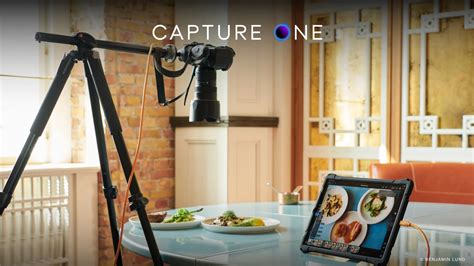
Tethering is a cornerstone of professional photography workflows, and Capture One for iPad offers compatibility with a wide array of cameras, with a comprehensive list available for reference. In testing, the app proved reliable for tethered capture with a Canon 5D Mark III via a cable. Wireless tethering is also supported for numerous camera models.
However, a significant disappointment for users accustomed to the desktop version is the lack of camera control through the iPad app. While the app excels at importing and organizing images, it does not permit users to change camera settings such as aperture, shutter speed, or ISO directly from the iPad. This absence is particularly felt when shooting with the camera positioned high on a tripod, where remote control is invaluable. The absence of live view, a feature present in the desktop application, further curtails the hands-on control photographers might expect. It is hoped that future iterations will address these omissions, bringing the iPad experience closer to its desktop counterpart.
Editing Experience: Styles, Presets, and Manual Adjustments
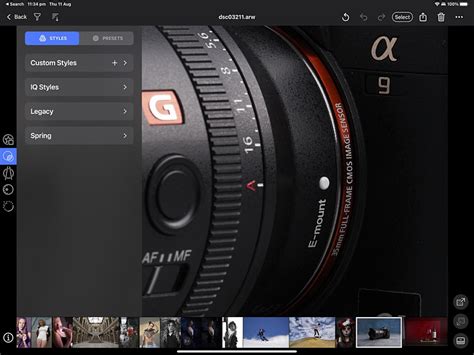
The editing interface on Capture One for iPad places a strong emphasis on "Styles" and "Presets," positioning them prominently in the menu. While these offer a fun and quick way to experiment with different looks, the reviewer expresses a preference for manual editing. The central menu is dedicated to composition, offering tools for cropping, rotating, and correcting keystoning.
The fourth menu down is where the core manual editing takes place. Here, users can adjust white balance, exposure, and add clarity. The HDR menu allows for adjustments to highlights and shadows, with options for dehazing and adding vignetting. The Color Editor, a standout tool in the entire Capture One ecosystem, is also present and functions effectively on the iPad.
Despite the presence of these powerful tools, the editing menus are generally more basic than those found on the desktop version, suggesting a design philosophy geared towards new Capture One users or those seeking a streamlined editing experience. A key frustration for existing users is the inability to access styles and presets saved on their desktop application. The app does allow users to save custom presets and styles created within the iPad app, but the lack of synchronization with desktop assets is a significant oversight. Editing itself is described as smooth and responsive, with an innovative dial-based approach that allows for quick adjustments using both hands. However, the initial learning curve for these rotary dials can be steep, as the direction of adjustment may not be intuitively mapped for all users; rotating counter-clockwise increases values, which can be counter-intuitive.
Cloud Transfer and Sync: A One-Way Street
Capture One's proprietary cloud transfer system is designed for ease of setup, allowing users to back up albums to the cloud and access them from their desktop for continued editing. However, a significant caveat exists: this feature is exclusively compatible with the latest two versions of Capture One Pro (versions 22 and 23 at the time of writing). Users running older versions, such as version 21, will not be able to utilize this functionality without updating.
The cloud sync operates strictly in one direction: from the iPad app to the desktop. This means that images can be imported into the iPad app, pushed to the cloud, and then downloaded to Capture One's desktop applications. This contrasts with the more versatile two-way sync offered by competitors like Adobe Lightroom, where files added to a collection can be synced across devices seamlessly. The current one-way synchronization, coupled with a limit of 1,000 images per cloud transfer, makes it less ideal for photographers who prefer to manage their entire catalog centrally or who work with very large volumes of images. The absence of a direct way to push images from the desktop app to a cloud folder viewable on the iPad further limits its utility for comprehensive workflow integration.
Feature Set and Limitations: What's Missing?
While Capture One for iPad offers a solid foundation, several features present in the desktop version are conspicuously absent. Beyond camera control and live view, the inability to view camera and lens model data for imported files is a notable omission. The watermarking capabilities are also restricted; users can only apply text-based watermarks with limited font options, lacking the flexibility to use graphic files or logos. Furthermore, the option to save export presets is unavailable, necessitating manual configuration each time. Bulk exporting is also not supported, a significant inconvenience for efficient workflows.
The app also lacks features that would enhance its utility for specific photographic genres. For instance, there is no option to use graphic files or logos as watermarks, and the ability to add text watermarks is limited to a single existing font. The absence of auto keystone correction or auto horizon leveling in the geometry tools is also a missed opportunity.
Target Audience and Future Potential
Capture One for iPad is priced at $4.99 per month, a subscription fee that applies even to existing Capture One Pro users, though the company has indicated that subscription bundles for Pro users are in development. The app is free to download, allowing users to explore its capabilities before committing to a subscription.
The application is best suited for individuals who need to capture images on the go and perform quick edits, with the intention of completing the final adjustments on a desktop version of Capture One. It also presents a budget-friendly introduction to the Capture One ecosystem for those who already own an iPad and are looking for a powerful mobile editing solution without the initial investment in desktop software.
For professional photographers who rely heavily on tethering, camera control, and seamless cloud synchronization, the current version of Capture One for iPad may fall short of expectations. The limitations in syncing with existing desktop catalogs and the one-way cloud transfer are significant hurdles. However, the app demonstrates considerable potential. With ongoing updates and feature additions, Capture One for iPad could evolve into an indispensable tool for mobile photographers. The promise of new tools, increased power, and a more integrated workflow suggests a bright future for this portable iteration of Capture One.
The recent updates, such as Analog Conversion for film negatives, Retouch Masks, and enhanced Session management, indicate a commitment from Capture One to expand the capabilities of its mobile offerings. These advancements, coupled with ongoing support for new camera models and improved masking tools, suggest that the iPad application is on a trajectory to become a more comprehensive and indispensable part of the Capture One ecosystem. As the platform matures, it is likely to address many of the current limitations, further solidifying its place as a valuable tool for photographers on the move.