For many new users venturing into the realm of digital art, a significant question arises: which version of Clip Studio Paint should they choose - Pro or EX? Both are exceptionally powerful and feature-rich software designed for creating paintings, illustrations, manga, and comics, yet they possess distinct differences that cater to varying user needs and project scopes. Understanding these distinctions is crucial for making an informed decision and ensuring you invest in the tool that best aligns with your creative aspirations and budget.
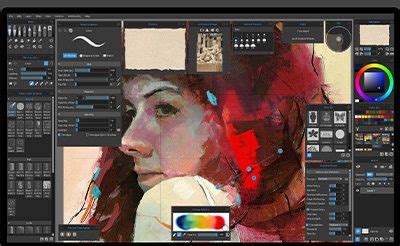
Clip Studio Paint, often abbreviated as CSP, is a well-regarded name in the digital art community, known for providing top-tier services for digital painting and illustration. While both the Pro and EX versions are excellent, their functionalities diverge in several key areas. A notable aspect of CSP's pricing model is its one-time payment option, allowing users to acquire the software outright without recurring subscription fees, making it an attractive choice for those who prefer perpetual ownership. This guide aims to dissect the differences between Clip Studio Paint Pro and EX, helping you select the best option and potentially save on your purchase.
Understanding the Core Offerings of Clip Studio Paint
Clip Studio Paint is fundamentally a software suite engineered to empower digital artists. It offers a robust set of tools and features that can elevate the creation of digital art, from intricate illustrations to detailed comic book pages and even full-fledged animations. The core strength of CSP lies in its versatility and its ability to adapt to different artistic workflows.
Clip Studio Paint Pro: A Solid Foundation for Individual Creations
Clip Studio Paint Pro is often positioned as a comprehensive solution for individual artists and those focused on single-page creations. It is designed to be accessible, making it a strong contender for beginners and intermediate users alike. The software is lauded for its ease of use and its ability to facilitate the creation of stunning digital paintings, character art, concept designs, and standalone illustrations. A significant advantage of Pro is its affordability compared to the EX version. However, its primary limitation lies in its single-page management capability, which can be a constraint for projects that inherently involve multiple pages.
The Pro version is ideal for character art, concept art, and illustrations. It includes animation tools that allow for the creation of flipbook-style animations of up to 24 frames (approximately 3 seconds at 8 frames per second). While these animation tools are capable of bringing illustrations to life, they are somewhat limited compared to the full suite offered in EX. Furthermore, the Pro version has restrictions regarding print and export functionalities when dealing with multi-page projects, which is a critical consideration for comic and manga artists.
Clip Studio Paint EX: The Professional's Choice for Complex Projects
Clip Studio Paint EX is engineered with the professional user in mind, offering advanced features and capabilities that streamline workflows for more complex and demanding projects. Its standout feature is its robust multi-page management system. With EX, artists can effortlessly manage numerous pages simultaneously, making it the superior choice for creating comic books, manga, fanzines, and other multi-page publications. The [Story] menu in EX is a powerful tool for managing comic or manga files composed of multiple pages. It allows users to control page display, add pages, organize story information, and more.
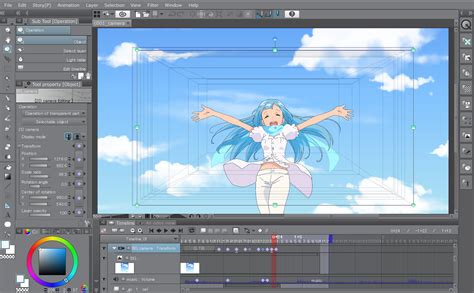
EX also provides enhanced tools for comic creation, including specialized webtoon canvas creation, page splitting, and advanced multi-page management features. For those involved in animation, Clip Studio Paint EX is built with professional-grade animation functionality, enabling the creation of animations used in broadcast productions. It offers a full animation suite without frame restrictions, allowing for more extensive and complex animated projects.
Furthermore, EX unlocks advanced features such as 2D/3D LT conversion, line extraction, batch text editing with the story editor, and specialized features for webtoon creation and animation production. It also supports exporting in PDF format, which is crucial for professional printing workflows.
Key Differentiating Features: Pro vs. EX
The divergence between Clip Studio Paint Pro and EX becomes most apparent when examining their feature sets, particularly concerning multi-page management, animation, and advanced workflow tools.
Manage Multiple Pages
This is arguably the most significant differentiator.
- Clip Studio Paint Pro: Manages a single page at a time. This is suitable for standalone illustrations or single-panel comics.
- Clip Studio Paint EX: Offers comprehensive multi-page management. This is essential for creating comic books, manga, graphic novels, and any project that spans multiple pages. The "Manage works" window allows for an at-a-glance overview of all project pages, enabling easy addition, reordering, and conversion of single pages into double-page spreads.
Vector Lines and Scalability
Both versions support vector layers, which are crucial for creating clean, scalable artwork.
- Both Pro and EX: Offer vector layer editing. Vector images within these layers can be scaled up or down without any loss of image quality, ensuring sharp lines at any size. This is a fundamental advantage over raster-based editing for line art.
Pens, Brushes, and Customization
A vast array of customizable tools is a hallmark of Clip Studio Paint.
- Both Pro and EX: Provide a wide selection of pens, brushes, airbrushes, and markers. Users can extensively customize these tools to suit their specific artistic style and needs. The software also allows users to import and utilize amazing brushes created by other artists worldwide, significantly enhancing the quality and diversity of their work. Upgrading to PRO or EX can further enhance brush capabilities.
Animation Tools
While both versions offer animation features, EX provides a more complete experience.
- Clip Studio Paint Pro: Includes animation tools capable of creating flipbook-style animations of up to 24 frames. This is sufficient for short animated sequences or bringing illustrations to life with subtle motion.
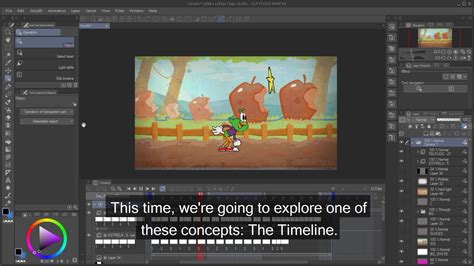
- Clip Studio Paint EX: Grants access to the full animation suite, which is used in professional broadcast animation. This version removes frame restrictions, allowing for more extensive and complex animated projects. It also provides tools like the Toei Animation Digital Exposure Sheet for detailed timeline editing.
Print and Export Capabilities
Export options differ, especially for multi-page documents.
- Clip Studio Paint Pro: Generally does not allow print and export for multi-page projects in the same way EX does. Its export options are more geared towards individual image files.
- Clip Studio Paint EX: Supports exporting works in PDF format, which is vital for professional printing. It also allows works created as a fanzine to be output directly to a printing vendor for professional printing. Furthermore, works created in Clip Studio Paint can be exported in Kindle format, allowing saved files to be published as e-books (EPUB data).
Advanced Workflow and Conversion Tools
EX offers specialized tools that significantly speed up certain professional workflows.
- Clip Studio Paint EX: Features 2D/3D LT conversion, which allows for the conversion of 2D and 3D layers into line drawings and tones, separating them into different layers for easier editing. It can extract outlines from a selected layer, and offers enhanced 3D layer editing, including the "All Sides View" palette for viewing 3D materials from four directions simultaneously. The ability to extract lines and tones onto different layers makes modifying lines and changing tone settings much more efficient.
Frame Division and Comic Tools
For comic creators, EX offers superior frame management.
- Clip Studio Paint EX: Is equipped with specialized webtoon canvas creation, page splitting, and multi-page management tools. The built-in frame tool allows for easy division of frames, and the "Divide frame border tool" enables the creation of complex frame shapes with simple cursor dragging. Speech bubble customization, including tail direction, thickness, and color, is also highly refined.
My Top 11 Reasons Why I Use Clip Studio Paint Vs. Other Art Software
Similarities Between Clip Studio Paint Pro and EX
Despite their differences, Pro and EX share a common foundation of powerful creative tools. These similarities ensure that regardless of the version chosen, users are working with a high-quality digital art application.
- Customized Tools: Both versions offer a high degree of customization for tools, allowing artists to tailor their brushes and pens precisely to their liking.
- Vector Layer Editing: As mentioned, both support vector layers, ensuring scalable and crisp line art.
- Palettes: A comprehensive set of palettes for managing layers, colors, tools, and more is available in both versions, providing an organized workspace.
- Airbrush, Pens & Markers: A rich library of essential drawing tools is present in both Pro and EX, covering a wide range of artistic needs.
- Filters: Both versions include a variety of filters to add special effects to artwork. Filters like the Chromatic Aberration Filter, Noise Filter, and Pencil Drawing Filter are available. Upgrading to PRO or EX can unlock even more advanced drawing and line editing powers.
- 3D Drawing Figures: Both versions include 3D drawing figures that can be used as references for poses and proportions, helping artists tackle difficult anatomy and master facial balance.
- Basic Animation Features: Even the Pro version includes animation features, allowing for the creation of short animated sequences.
Cost and Value Proposition
The pricing structure of Clip Studio Paint Pro and EX reflects their differing capabilities.
- Clip Studio Paint Pro: Costs $49.99 for a one-time purchase. This makes it a very reasonable and budget-friendly option for individuals, students, and hobbyists who primarily create standalone artwork or shorter animations. It offers excellent value for its price, packing in a wealth of features for digital painting and illustration.
- Clip Studio Paint EX: Costs $219 for a one-time purchase. While significantly more expensive than Pro, this price point reflects the advanced, professional-grade features it offers. For comic artists, manga creators, animators, and professionals working on multi-page projects, the investment in EX can be justified by the time saved and the enhanced workflow capabilities. The advanced functions and specialized tools found in EX are hard to find in the Pro version, making it a worthwhile upgrade for those who genuinely need them.
Who is the Winner? Pro vs. EX
The "winner" between Clip Studio Paint Pro and EX is entirely subjective and depends on the individual user's needs, budget, and project scope.
Clip Studio Paint Pro is often considered the winner for beginners and budget-conscious users. It offers an incredibly rich set of features for digital painting, illustration, and even basic animation at an accessible price point. It carries all the worthy features for digital painting and art creation, making it an excellent choice for those who want to start their digital art journey without overwhelming complexity or cost. By utilizing a Clip Studio Paint Coupon Code, users can further reduce the cost.
Clip Studio Paint EX is the clear winner for professionals and those engaged in multi-page projects or advanced animation. Its superior multi-page management, professional animation suite, and specialized comic/manga tools make it indispensable for these workflows. The ability to manage entire projects, export to print-ready formats, and utilize advanced conversion tools significantly enhances productivity and output quality for serious creators.
For users unsure about which version to commit to, Clip Studio Paint often offers trial periods or promotional campaigns, such as the one that allowed users to try EX features until January 19, 2021. This provides an opportunity to experience the full capabilities of EX before making a final decision. If after a trial or campaign, a user wishes to switch back to PRO, the option is usually available.
Ultimately, the best version of Clip Studio Paint is the one that best serves your specific creative needs. Whether you are a hobbyist creating personal illustrations or a professional working on a graphic novel, understanding these distinctions will guide you to the most suitable and cost-effective choice.