A robust graphics software can be a game-changer for artists, not by doing the creative work itself, but by significantly streamlining the artistic process. It offers tools and functionalities that make certain tasks easier and less tedious, ultimately boosting productivity. For those working with digital art, particularly in illustration, comics, and animation, Clip Studio Paint (CSP) for Windows stands out as a powerful and versatile solution. This article delves into some of its most impactful features, offering insights into how they can accelerate your workflow and enhance your creative output.
The Power of Layer Color and Workflow Segregation
One of the most common frustrations for digital artists occurs when sketch lines and final inks end up on the same layer. This can lead to significant rework if you later decide to adjust the sketch or clean up linework. Clip Studio Paint addresses this with its intuitive "Layer Color" feature, a simple yet effective tool for preventing such errors while maintaining flexibility.
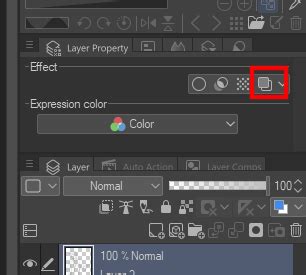
When enabled in the Layer Property palette, under the "Effect" heading, the Layer Color option assigns a distinct hue to the entire layer. By default, this is a non-photo blue, mimicking the traditional digital artist's trick of using blue pencils for sketching. This visual cue immediately alerts you if you're working on the wrong layer, as any new marks made will appear in the designated layer color, regardless of your selected brush color. For instance, if your sketch layer is set to blue, and you begin inking, those ink lines will appear blue. If you accidentally start inking on the blue sketch layer itself, the blue ink lines will be immediately apparent against your intended ink color, preventing the costly mistake of permanent linework being applied over editable sketches.
While a "Lock Layer" function can prevent edits to a sketch layer, the Layer Color method offers a more fluid workflow. It allows for immediate switching back to the sketch layer to make on-the-fly adjustments without the interruption of unlocking and relocking the layer. This seamless integration of error prevention and workflow fluidity is a prime example of how CSP empowers artists to work more efficiently. The ability to customize layer colors further enhances this by allowing for easy differentiation between multiple layers, ensuring that your artistic process remains organized and error-free.
The Subview Palette: Your Digital Reference Hub
Maintaining consistency, especially with character designs or complex scenes, can be a demanding aspect of the artistic process. The Subview Palette in Clip Studio Paint serves as an invaluable tool for managing reference materials, thereby saving time and ensuring accuracy. Nested with the Navigator in the default workspace, this palette allows users to load multiple images, which can then be easily browsed, rotated, and zoomed.
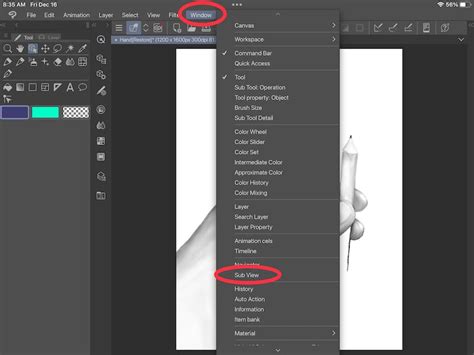
This functionality is particularly useful for keeping character model sheets readily accessible. By having them within the Subview palette, artists can ensure their characters remain on-model throughout a project. Furthermore, the ability to directly select colors from these reference images within the Subview palette significantly speeds up the process of applying flat colors. Whether you're working on a long-running comic series, a graphic novel, or even just a series of illustrations featuring recurring characters, the Subview palette acts as a centralized, easily accessible repository for all your visual aids. This includes not only character designs but also photographic references for anatomy, environments, or props, all within arm's reach of your canvas.
Harnessing the Power of Clip Studio Assets and Brush Customization
Clip Studio Paint is renowned for its highly customizable brush engine, capable of emulating a vast array of traditional media, from watercolors to oil paints. For artists who don't have the time or inclination to painstakingly create brushes from scratch, the integrated Clip Studio App offers a solution. This platform functions as a virtual software launcher, file organizer, tutorial hub, and, most importantly, a marketplace for user-created assets and brushes.
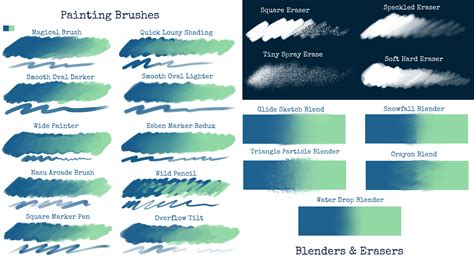
Accessing the Clip Studio App from your computer's program settings and navigating to "Clip Studio Assets" opens up a library of downloadable content. A robust search bar allows users to quickly find specific brush types, patterns, or textures, while browsing recent uploads offers opportunities for discovery. While many assets are available for free, some premium items can be purchased using "Gold," an in-application currency that can be bought with real money. This ecosystem provides access to an almost limitless supply of brushes that can simulate traditional media, as well as specialized pattern brushes for elements like lace, ruffles, or shoelaces. These pattern brushes can transform time-consuming tasks, such as drawing intricate fabric details, into a swift and effortless process with just a few stylus strokes. The availability of such a vast and easily accessible library significantly reduces the time spent on creating or searching for the perfect brush, allowing artists to focus more on the act of creation itself.
Streamlining Comic Production with Story Files (EX Version)
For users of Clip Studio Paint EX, the "Story File" feature is a monumental time-saver, particularly for those engaged in creating comic series, graphic novels, or any project involving multiple sequential pages. A Story File acts as a master file that manages individual page files within a larger narrative. This allows artists to view all pages of a story at a glance, open and edit them, add new pages, delete unnecessary ones, and even reorder entire scenes or pages with remarkable ease.
The ability to see the entire story at once is invaluable for evaluating pacing and narrative flow. During the editing phase, users can effortlessly move pages and scenes around to refine the storytelling, correct pacing issues, or experiment with different narrative structures. This feature is instrumental in ensuring that the final product is not only visually cohesive but also narratively compelling. Beyond comic creation, artists can leverage Story Files to create digital sketchbooks, offering a dynamic way to organize and revise their work without the constraints of a physical medium. The efficiency gained from managing an entire project within a single Story File cannot be overstated, making it a critical tool for sequential art creators.
Custom Workspaces: Tailoring Your Interface for Maximum Efficiency
Clip Studio Paint's interface is a marvel of customization, allowing users to tailor nearly every aspect to their individual needs and preferences. The ability to create and save custom workspaces is a powerful feature that significantly streamlines the artistic workflow. Palettes can be moved, docked, undocked, closed, or temporarily hidden, providing a clean and focused working environment. Tools on the toolbar can be added or removed, ensuring that frequently used commands are always at your fingertips.
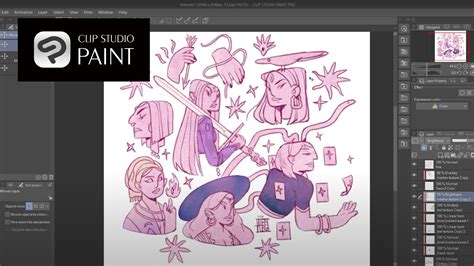
This level of personalization means you can create distinct workspaces optimized for different stages of your creative process. For example, you might have a dedicated workspace for sketching, another for inking, and a third for coloring. Alternatively, you could set up specialized workspaces for comics versus illustrations. This adaptability is crucial for reducing the time spent navigating menus or searching for tools. For left-handed artists, or those using a tablet with a specific screen orientation, custom workspaces are particularly beneficial. By arranging frequently used palettes and tools on the side of the screen that offers the most comfortable reach, artists can minimize physical strain and reduce the time spent repositioning their hands, leading to a more comfortable and productive drawing session. The principle is simple: adapt the software to your workflow, rather than forcing yourself to work around the software's default layout.
The Evolution of Clip Studio Paint: Versions and Licensing
Clip Studio Paint has seen continuous development, with significant updates introducing new features and refining existing ones. As of recent updates, such as Ver. 4.0 and the subsequent Ver. 5.0, the software has introduced advanced functionalities like "Puppet Warp" for transforming drawings, enhanced filter previews for color correction, precise object snapping, and improved 3D modeling capabilities. Ver. 5.0, in particular, has focused on drawing performance, introducing "Smart Shape" for clean lines and shapes, enhanced blur and watercolor edge quality, and faster rendering.
The licensing structure for Clip Studio Paint has also evolved. While perpetual licenses (one-time purchase) for Windows and macOS have been a long-standing option, Celsys has also introduced subscription-based plans, offering monthly or annual payments. This provides flexibility for users to manage their spending or opt for cost savings. For existing perpetual license holders, an "Update Pass" is available, allowing them to access all new features and updates released throughout a year at a reasonable price, without needing to purchase a new perpetual license.
Users who purchased older versions of perpetual licenses (e.g., Ver. 1, 2.0, or 3.0) can typically upgrade to newer versions at a discounted rate. However, direct upgrades from very early versions to the latest may not always be available, sometimes requiring incremental upgrades through intermediate versions. For instance, a Ver. 1 perpetual license user might need to upgrade to Ver. 2.0, then Ver. 3.0, and so on, to reach the latest version as a perpetual license. Alternatively, purchasing an Update Pass is often the most cost-effective way for users of older perpetual licenses to access the newest features and ongoing updates. It's important to note that while .clip files are generally backward compatible, elements created with newer features in a later version might not be fully editable when opened in an older version of Clip Studio Paint.
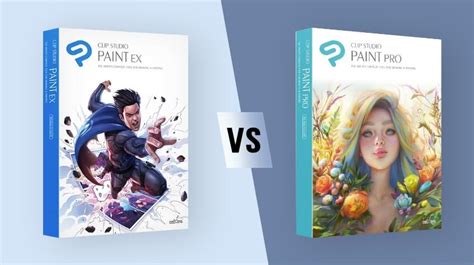
The software is offered in two main editions: Clip Studio Paint PRO, which is ideal for general illustration, and Clip Studio Paint EX, which includes additional features tailored for comic artists, manga creators, and animators, such as the aforementioned Story File functionality. Both versions are available through various licensing models, including perpetual licenses and subscription plans, catering to a wide range of user needs and budgets.
Understanding Clip Studio Paint's Editions and Licensing Options
Clip Studio Paint caters to a diverse user base with its two primary editions: PRO and EX. The PRO version is a powerful tool for illustrators, concept artists, and designers, offering a comprehensive suite of drawing, painting, and design features. The EX version, on the other hand, builds upon the PRO edition by including advanced features specifically designed for comic artists, manga creators, and animators. These EX-exclusive features include the Story File management system for handling multi-page projects, as well as enhanced animation capabilities for creating more complex 2D animations.
When it comes to acquiring Clip Studio Paint, users have several options, primarily revolving around perpetual licenses and subscription plans. Perpetual licenses represent a one-time purchase, granting the user ownership of that specific version of the software indefinitely. However, to access major new versions and updates released after the initial purchase, users typically need to buy an "Update Pass" or purchase discounted upgrade licenses. This model offers long-term value for those who prefer to own their software outright.
Subscription plans offer a more flexible approach, with options for monthly or annual payments. These plans provide continuous access to the latest version of Clip Studio Paint, including all new features and updates released during the subscription period. For users who prefer to pay as they go or want to ensure they always have the most up-to-date software, subscription plans can be an attractive choice. There are also special rates available for existing perpetual license holders looking to switch to a monthly plan for multiple devices.
For companies and educational institutions, Clip Studio Paint offers volume licenses. These licenses are designed for large-scale deployment, often including support for remote working and learning environments. They can be managed centrally through a license management platform, simplifying administration and implementation for organizations.
The introduction of the Update Pass has been a significant development for perpetual license users. This add-on allows users to gain access to all new features and updates released throughout a specific period (typically a year) for a considerably lower cost than purchasing a full new perpetual license. This provides a cost-effective way for perpetual license holders to stay current with the software's advancements.
It is important for users to be aware of the upgrade paths and compatibility. Files created in newer versions of Clip Studio Paint may not be fully editable in older versions, although they can generally be opened. For users with very old perpetual licenses (e.g., Ver. 1), direct upgrades to the latest version might not be available, often necessitating a series of incremental upgrades or the purchase of an Update Pass. The decision between a perpetual license, a subscription, or an Update Pass depends on individual usage patterns, budget, and the desire to have the most current features.
Clip Studio Paint GOLD and Clippy: Community and Asset Economy
Clip Studio Paint fosters a vibrant community through its asset marketplace and in-application currency systems. "GOLD" is a point-based currency used to purchase premium materials, brushes, and other assets from Clip Studio Assets. This system allows creators to monetize their digital creations, providing a steady stream of high-quality, user-generated content for the entire community. GOLD can be purchased using credit cards or PayPal, and can even be sent as a gift to fellow artists, encouraging collaboration and support within the user base.

Complementing GOLD is "Clippy," a reward system that incentivizes community engagement. Users earn Clippy tokens by participating in various activities, such as uploading their own creations to Clip Studio Assets or engaging with the platform. Clippy tokens can be stored in a user's wallet and can be exchanged for prizes, offering tangible rewards for contributions to the Clip Studio ecosystem. The longer a user remains an active member and contributor, the more Clippy they tend to receive each month. This dual system of GOLD for purchasing and Clippy for earning creates a dynamic economy within Clip Studio Paint, enriching the user experience and promoting a collaborative creative environment.
The Advantages of Digital Art with Clip Studio Paint
Transitioning to digital art, or simply enhancing one's existing digital workflow, offers numerous advantages, particularly when utilizing a program like Clip Studio Paint. Unlike traditional art, where mistakes can be costly and time-consuming to correct, digital art software provides unparalleled flexibility. The ability to undo actions, duplicate layers, and make precise edits means that experimenting with different compositions, colors, or details is no longer a daunting prospect.
For instance, if an artist realizes a character's head is disproportionately small or their legs are too short after hours of work, traditional methods would necessitate extensive erasing or starting over. In Clip Studio Paint, such errors can be rectified quickly. The "Puppet Warp" feature, introduced in Ver. 4.0, allows for the transformation of drawings almost like a puppet, offering precise control over distortions and reshaping. Furthermore, the ability to mirror an image horizontally is a simple yet incredibly effective tool for checking proportions and the alignment of facial features. This quick check can reveal subtle imbalances that might otherwise go unnoticed.
Color selection and experimentation are also vastly improved with digital tools. The concept of layers, fundamental to digital art, allows each element of a drawingâhair, eyes, clothingâto be isolated on its own layer. This means an artist can effortlessly try out different hair colors, from blonde to brown to vibrant green, or experiment with various skin tones and clothing palettes, all without affecting other parts of the artwork. This layer-based approach to color management is a significant time-saver and creative enabler.
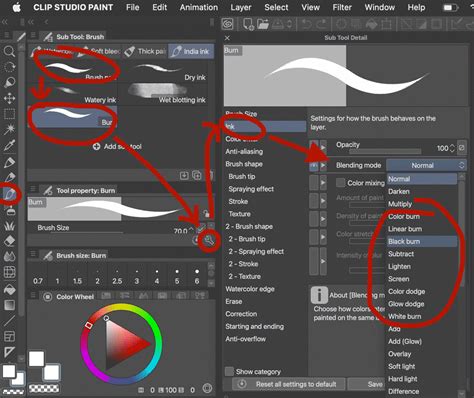
Special effects that can be challenging or time-consuming to achieve with traditional media, such as glows, special lighting effects, or intricate textures like fabric patterns, are made considerably easier in Clip Studio Paint. For example, a subtle glow can be created by using a layer set to an "Add (Glow)" blending mode and applying a soft airbrush. Textures, like denim or lace, can be applied using pre-made patterns from Clip Studio Assets, often with simple blending modes like "Soft Light" to integrate them seamlessly with the artwork. This dramatically speeds up the process of adding detail and visual interest, especially when working under deadline pressures.
The worry of consuming expensive art supplies is also eliminated in the digital realm. While traditional artists might hesitate to experiment with precious paints or pencils, digital artists can explore endlessly with their software tools without fear of running out of digital ink or color. This freedom encourages experimentation and reduces the anxiety associated with potentially "wasting" materials. For those who enjoy the idea of a sketchbook but want more flexibility, Clip Studio Paint EX's Story File feature allows for the creation of digital sketchbooks that can have an unlimited number of pages, easily reordered or deleted, offering a risk-free environment for practice and ideation.
Ultimately, both traditional and digital art have their unique strengths and weaknesses. The choice of medium often comes down to personal preference and the specific demands of a project. However, Clip Studio Paint provides artists with a powerful and versatile toolkit that significantly enhances efficiency, enables greater creative freedom, and minimizes the frustration of common artistic challenges, allowing them to focus more on bringing their visions to life.