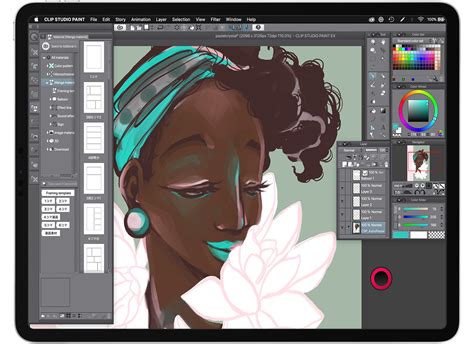
Clip Studio Paint (CSP), a powerhouse for digital art creation, has long been a favorite among comic artists, manga creators, illustrators, and animators. Recognizing the diverse needs and financial flexibility of its user base, Celsys, the developer of CSP, offers a variety of monthly usage plans. These plans provide artists with the flexibility to access the full capabilities of CSP across multiple devices without the commitment of a large upfront purchase. This article delves into the intricacies of these monthly plans, exploring their structure, benefits, and how they cater to different user profiles.
Understanding the Need for Flexible Licensing
The traditional software model often involves a significant one-time purchase, which can be a barrier for many aspiring or even established artists. Liz Staley, a long-time user and author of several books and video courses on Clip Studio Paint, notes that "Sometimes it can be hard to come up with a big sum of money to buy software with all at once." This is where subscription-based models, like CSP's monthly plans, become invaluable. They democratize access to professional-grade art software, allowing artists to "use CSP across multiple devices" and adapt their software usage to their evolving workflow. The flexibility extends to device compatibility, with plans designed for Windows, macOS, iPad, iPhone, and even Android devices.
Navigating Clip Studio Paint's Subscription Tiers: PRO and EX
Clip Studio Paint is offered in two primary versions: PRO and EX. The choice between these two often dictates the user's primary artistic pursuit.
Clip Studio Paint PRO
The PRO version is generally considered the entry-level professional tier, well-suited for illustrators, concept artists, and designers who require robust drawing and painting tools. It offers a comprehensive suite of features for creating digital art, including advanced brush engines, vector layers, perspective rulers, and a wide array of editing tools. For many digital painters and general illustrators, the PRO version provides all the necessary functionality to produce high-quality work.
Clip Studio Paint EX
The EX version builds upon the PRO version, adding features specifically tailored for more complex projects, particularly those involving extensive page counts or animation. Its key advantage lies in its enhanced comic and manga creation capabilities, offering unlimited page management for multi-page projects. EX also includes advanced features for animation, such as a higher frame rate limit and more robust timeline management. This makes it the preferred choice for comic artists, manga creators, and animators who need to manage large projects efficiently.
Clip Studio Paint vs Photoshop — What Actually Matters for Artists
The Architecture of Monthly Plans: Devices and Payment Options
Clip Studio Paint's monthly plans are structured around two key variables: the number of devices you wish to use the software on and your payment frequency (monthly or annually). This allows for a highly customizable experience, ensuring you only pay for what you need.
Device Count Options
- Single Device Plan: This plan allows you to use CSP on one designated device. This could be your Windows PC, macOS computer, or iPad. It's an ideal option for artists who primarily work on a single workstation or tablet.
- Dual Device Plan: For artists who utilize two devices, such as a desktop computer and a tablet, the dual-device plan offers the convenience of using CSP on both. This could be a Windows PC and an iPad, or a macOS machine and an Android tablet.
- Premium Plan: This plan is designed for users who require the most flexibility, allowing access to CSP on up to four devices. This is perfect for professionals who juggle multiple devices, including desktops, laptops, and tablets, across different operating systems.
Payment Flexibility: Monthly vs. Annual
- Month-to-Month: This option offers the ultimate flexibility, allowing you to pay on a rolling monthly basis. It's perfect for artists who want to try out the software, have variable income, or prefer not to commit to a long-term subscription.
- Annual Payment: Opting for an annual payment plan typically offers significant cost savings, with discounts of up to 51% compared to paying monthly. This is a great choice for users who are confident in their continued use of CSP and want to maximize their budget.
Bonuses and Incentives for New Subscribers
Celsys often sweetens the deal for new users to encourage adoption of the monthly plans. A common incentive is the "Clippy" bonus, which can be used to purchase materials from Clip Studio Assets.
The Clippy Bonus Explained
- What is Clippy? Clippy is a form of in-app currency, essentially points, that can be used to acquire various digital assets available on Clip Studio Assets. These assets can range from brushes and textures to 3D models and character references, all of which can enhance your creative workflow.
- Eligibility: New, first-time subscribers to the monthly or annual plans are typically eligible for this bonus. However, users in the free trial period are not eligible.
- Distribution: Annual plan users usually receive their Clippy bonus at the start of their first subscription payment. The offer is generally available for users who subscribe to specific Clip Studio Paint annual/monthly plans.
- Where to Use Clippy: Clippy can be applied to official Clip Studio materials and IC SCREEN Digital materials found on Clip Studio Assets. You can even filter your searches within Clip Studio Assets to specifically find materials that can be purchased with your bonus.
It's important to note that the three-month free offer, often associated with new subscriptions, is typically not available to users who are taking advantage of special rates for existing perpetual license holders.
Special Rates for Existing Perpetual License Holders
For users who already own a perpetual license of Clip Studio Paint for PC or Mac, Celsys offers special rates to extend their usage to other devices. This allows long-time users to "branch their CSP usage out to other devices and break free of their desk!"
How to Access Special Rates
To take advantage of these discounted rates, users generally need to:
- Visit a specific promotional page or link provided by Celsys.
- Locate and click on a "Get the Special Rate" button.
- This action will prompt your browser to request permission to open the Clip Studio application.
- Within the Clip Studio app, you will be presented with license options for the special rate.
- Review your purchase details and enter your payment information to complete the subscription.
As mentioned, users opting for these special rates are typically not eligible for the introductory three-month free period.
Understanding Clip Studio GOLD
While Clippy is a promotional bonus, Clip Studio GOLD is a direct purchase currency for Clip Studio Assets.
- Value: 100 GOLD is equivalent to 100 JPY, which is approximately 1 USD.
- Purchase Methods: GOLD can be purchased using a credit card or a PayPal account.
- Gifting: The GOLD charge code can also be sent as a gift to fellow creators, making it a convenient way to support or collaborate with others.
Volume Licenses for Businesses and Educational Institutions
Clip Studio Paint also caters to organizations with its volume licensing options. These licenses are designed for companies and educational institutions, providing features that support remote working and learning environments.
- Device Flexibility: Volume licenses allow usage across up to two devices per person, which can include computers, tablets, or smartphones.
- Centralized Management: A key benefit is the ability to manage all licenses from a single platform. This significantly reduces the administrative workload for IT departments and facilitates smooth, large-scale implementations across an organization.
- Remote Access: The licensing structure is optimized for remote access, ensuring that students and employees can utilize the software effectively regardless of their physical location.
Clip Studio Paint for Galaxy: A Specialized Offering
For users of Samsung Galaxy devices, Clip Studio Paint offers a specialized version.
- Availability: Clip Studio Paint for Galaxy can be downloaded from the Galaxy Store.
- Initial Offer: New users often receive a complimentary six-month period of use.
- Continued Use: After the free period concludes, users can opt for a monthly plan that suits their preferred devices (Galaxy, Windows, macOS, iPad, iPhone) and payment structure.
- S Pen Integration: A significant advantage for Galaxy tablet users is the seamless integration with the S Pen. This allows for drawing directly on the screen with pressure sensitivity, offering a natural and intuitive digital art experience.
Upgrading Perpetual Licenses: A Path to Modern Versions
Celsys provides various upgrade paths for users holding older perpetual licenses of Clip Studio Paint. These upgrades are often offered at discounted rates, making it more economical to transition to the latest versions of PRO and EX. The upgrade paths are clearly defined based on the version of the perpetual license owned (e.g., Ver. 2.0, 3.0, 4.0) and the desired target version (PRO or EX).
For instance, a user with a PRO Ver. 4.0 perpetual license might have several options:
- Upgrade to PRO Ver. 5.0.
- Upgrade to EX Ver. 4.0.
- Upgrade to EX Ver. 5.0.
The specific upgrade path and pricing can vary, and it's often recommended to check the official Clip Studio Paint website for the most current and cost-effective options. In some cases, especially for older versions, purchasing a new perpetual license for the latest version might be more economical than a series of upgrades.
For example, the provided text indicates:
- "For PRO: If you want PRO Ver. 5.0 perpetual license, purchase a new PRO Ver. 5.0 license for the best deal!"
- "For EX: Upgrade your license to Ver. 2.0, then Ver. 3.0, then Ver. 4.0, and finally to Ver. 5.0 for the best deal."
These examples highlight the importance of understanding the specific upgrade tree to achieve the best value.
The Role of Monthly Plans in Workflow Flexibility
Subscription plans are not just about financial flexibility; they are also about adapting to modern creative workflows. The ability to switch between devices, whether it's a powerful desktop for detailed work and a tablet for on-the-go sketching, is crucial for many artists. Monthly plans facilitate this fluidity, allowing artists to "switch from device to device without having to switch programs." This adaptability is essential for artists who are "always on the go!"
Managing Your Subscription and Account
To purchase and manage any of these subscription plans, users are required to create a free Clip Studio account. This account serves as a central hub for:
- Managing active monthly plans.
- Updating payment information.
- Downloading purchased assets and materials.
- Accessing features like posting "Tips" for the community.
The account management system ensures that users have full control over their subscription, from making changes to canceling if necessary.
Conclusion: A Plan for Every Artist
Clip Studio Paint's monthly usage plans represent a significant step towards making professional-grade digital art tools accessible to a broader audience. By offering a tiered system based on PRO and EX versions, flexible device counts, and convenient payment options, Celsys empowers artists to choose a plan that perfectly aligns with their budget, workflow, and creative ambitions. Whether you're a seasoned professional looking to expand your device usage, a student exploring digital art, or a hobbyist seeking a flexible solution, Clip Studio Paint's monthly plans provide a robust and adaptable pathway to unlock your creative potential. The added incentives like Clippy bonuses and special rates for existing users further enhance the value proposition, making Clip Studio Paint an even more compelling choice in the competitive landscape of digital art software.