Capture One has established itself as a premier photography software suite, renowned for its superior image quality, precision editing capabilities, and industry-leading tethering support. Originally developed by the camera manufacturer Phase One, the software division was spun off in 2019 to form Capture One A/S, now majority-owned by the private equity firm Axcel. This evolution has allowed Capture One to focus intently on refining its powerful tools for professional photographers, offering unparalleled control over RAW image files and streamlining the entire post-production process.
Unlocking Advanced Image Quality and Control
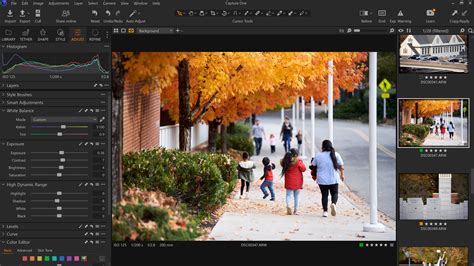
At its core, Capture One excels in its RAW conversion capabilities, providing custom support for RAW files from an extensive range of over 650 cameras. This deep integration ensures that photographers can achieve the most accurate and true-to-life colors right out of the camera. The software's renowned RAW conversion engine, coupled with hand-calibrated color profiles, delivers exceptional results, particularly for skin tones, which are rendered with natural, flawless accuracy. This is crucial for portrait and fashion photographers who demand the highest fidelity in their work.
The precision editing tools within Capture One are designed for photographers who require granular control. Its unrivaled color editor allows for fine-tuning of every detail, ensuring stunning, lifelike results. Photographers can achieve precise control over highlights and shadows in any lighting condition, and intuitive sliders for hue, saturation, and luminance offer a comprehensive suite of adjustments. This level of control extends to custom camera profiles, which are tailored to specific camera models, maximizing the potential of each image.
Seamless Tethering for Studio and On-Location Shoots
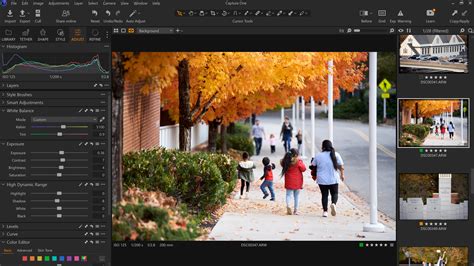
Tethering has long been a cornerstone of Capture One's appeal, offering remote camera control and instant image review directly on a computer. This capability is particularly vital for studio work, where immediate feedback on lighting, composition, and focus is essential. Capture One offers tethering support for over 200 cameras, enabling photographers to fire the shutter, adjust settings, and review images in real time. This eliminates the need for heavy laptops during shoots, as cameras can be tethered directly to an iPhone or iPad.
Revolutionizing Mobile Workflow with Capture One Mobile
The introduction of Capture One Mobile marks a significant advancement, allowing photographers to tether their camera directly to an iPhone or iPad, either wired or wirelessly. This empowers professionals to shoot, review, and showcase their images on location, impressing clients and ensuring the perfect shot is captured. The mobile app provides a subset of features from the desktop version, including RAW conversion, hand-calibrated colors, and quick editing capabilities. Photographers can turn RAWs into near-final images instantly, making quick edits and auto-applying looks as they shoot. This accelerates client feedback during the session and streamlines the workflow considerably.
The mobile experience is further enhanced by the ability to AirDrop favorite presets and Styles or create custom ones. These can be applied with a single tap, alongside features like auto-creating complex masks, correcting perspective, and straightening shots, offering a truly free editing experience on the go. Compatibility extends to iOS 17.0 or later for iPhone and iPadOS 17.0 or later for iPad, and even visionOS 1.0 or later for Apple Vision.
Enhanced Organization and Collaboration
Capture One's commitment to efficient workflow extends to its organizational tools. Sessions and Catalogs provide intuitive file management, simplifying the process of handling large volumes of images, whether for a single project or hundreds. Nested folders within Sessions help users stay organized, and the ability to track selections makes culling through large shoots a more pain-free experience. Previews load quickly, further speeding up the review process.
Capture One Live, a cloud-based collaboration platform, revolutionizes real-time feedback. Teams and clients can share shots instantly, providing comments, star ratings, and color tags, all consolidated in one place, regardless of their location. This real-time collaboration ensures everyone is on the same page, leading to more efficient project completion.
Advanced Features and Future Developments
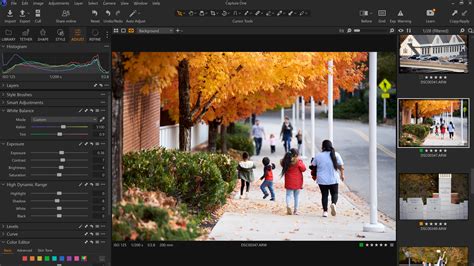
Capture One continuously evolves, with regular updates introducing new features and improvements. Recent releases have seen enhancements to tethering with Fujifilm and Sony cameras, support for new camera models like the Fujifilm GFX-100S II and Fujifilm X-T50, and the introduction of AI-powered features. AI masking, for instance, automatically detects subjects or backgrounds, significantly reducing the time spent on tedious masking tasks. The ability to match any look by instantly applying the style of a reference image in a single click further streamlines the editing process, ensuring cohesive and professional results.
The software also supports 14-bit RAW files for OM System cameras, underscoring its commitment to broad camera compatibility. For users with demanding workflows, such as those involving multi-row panorama photography with high-resolution backs like the Phase One IQ250, Capture One's robust processing power and file handling capabilities are essential. The software is available for macOS and Microsoft Windows, with specific product variants like Studio and Enterprise offering specialized features for professional studios and teams.
Hardware Considerations for Optimal Performance
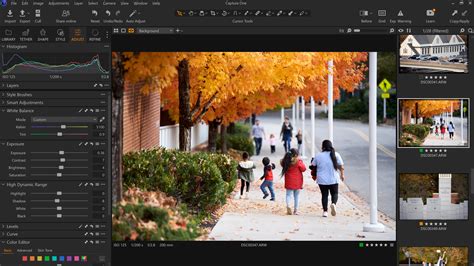
For users like those planning to upgrade their Apple hardware, understanding the performance demands of professional photography software is key. While video software often benefits from more CPU cores, photography software like Capture One tends to profit more from fewer CPU cores with higher clock speeds per core. For users working with 4K+ monitors and large files, opting for Apple Silicon Macs with Pro or Max chips is recommended, as they handle 4K editing efficiently. Apple Silicon Macs’ unified memory architecture, where RAM is shared between the CPU and GPU, further contributes to faster, smoother interactions and reduced CPU/GPU load. SSE4.2 CPU instruction set is a requirement for most recent versions, and all releases from Capture One 21 (14.2.0) onwards provide native support for Apple Silicon Macs, with previous versions running via Rosetta 2 emulation.
Licensing and Accessibility
Capture One Pro is available through both subscription models and a one-time purchase ("perpetual license"), offering flexibility to suit different user needs and budgets. Other product variants are exclusively subscription-based. The company also offers a 7-day free trial of Capture One Mobile, allowing users to explore its powerful tools and experience the workflow from capture to delivery. Historically, Capture One also offered brand-specific versions (e.g., for Fujifilm, Nikon, and Sony cameras), but these have been discontinued, with the primary Capture One Pro now serving all users.
The data collected by Capture One may include contact information, identifiers, usage data, and diagnostics, linked to your identity. Diagnostic information not linked to your identity is also collected. The seller for the mobile application is Capture One A/S, with the app size being 1.1 GB.
Capture One's dedication to providing a stable, reliable, and powerful platform for photographers worldwide solidifies its position as an indispensable tool in the modern imaging landscape. From its advanced RAW processing and meticulous color control to its seamless tethering and collaborative features, Capture One empowers photographers to create, refine, and deliver their best work from anywhere.