CorelDRAW is a name synonymous with professional graphic design, offering a robust suite of tools for vector illustration, page layout, typography, and image editing. While historically associated with Windows, CorelDRAW has embraced the macOS ecosystem, providing a powerful and native experience for Mac users. This article delves into the extensive features and capabilities of CorelDRAW for Mac, exploring what makes it a compelling choice for a wide range of creative endeavors.
Unleashing Vector Illustration Prowess
At its core, CorelDRAW excels in vector illustration. The software is equipped with powerful vector illustration tools that empower users to transform basic lines and shapes into intricate and complex works of art. Whether you're creating logos, icons, complex illustrations, or detailed technical drawings, CorelDRAW provides the precision and flexibility needed. The ability to manipulate paths, nodes, and curves with granular control ensures that your designs are scalable without any loss of quality. This is particularly crucial for applications like branding and signage, where designs need to be reproduced at various sizes. The software’s intuitive tools make it accessible for beginners while offering advanced functionalities for seasoned professionals.
Mastering Page Layout and Document Design
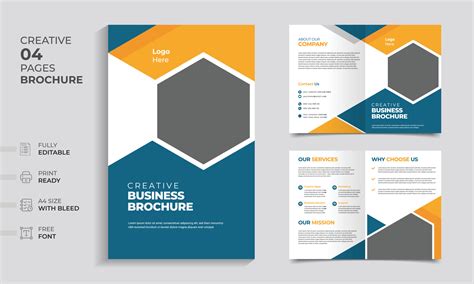
Beyond single illustrations, CorelDRAW offers comprehensive tools for page layout, making it an ideal solution for designing multi-page documents. Users can create professional-looking brochures, newsletters, magazines, e-books, and other print or digital publications. The software provides a robust set of tools for arranging text and images, managing grids and guides, and ensuring precise alignment. This allows for the creation of visually appealing and well-organized layouts that effectively communicate information. The ability to work with multiple pages within a single document streamlines the design process for complex projects, ensuring consistency and efficiency.
Typography: Fine-Tuning Every Letter
Typography is a critical element of graphic design, and CorelDRAW provides extensive control over text. The software allows users to arrange type with the power to tailor the font, size, spacing, shadows, contours, and more. A standout feature is its responsive fine-tuning of fonts with variable font support, enabling designers to achieve nuanced typographic treatments. This level of control is essential for creating impactful headlines, legible body text, and expressive typographic art. Whether you're a brand designer crafting a unique typographic identity or a publisher ensuring readability across a document, CorelDRAW's typography tools are designed to meet demanding requirements.
Color and Transparency: Adding Depth and Dimension
The effective use of color and transparency can dramatically enhance the visual appeal of any design. CorelDRAW makes it easy to apply color to fills and outlines, offering a vast spectrum of options. Furthermore, users can manipulate an object's transparency, creating subtle effects or dramatic blends. The ability to fill objects with patterns, gradients, and mesh fills adds significant depth and dimension to designs. This feature is invaluable for creating realistic textures, complex backgrounds, and eye-catching visual elements that stand out. The powerful color management engine, coupled with free integrated access to Pantone® color libraries, is a significant advantage for print professionals who require accurate color reproduction.
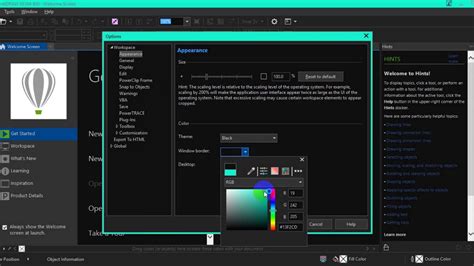
Glow Effect | Glow Effect in CorelDraw | CorelDraw Tutorial 1
Styles and Consistency: Streamlining Workflow
Managing styles and style sets is a key feature that boosts productivity and ensures consistency across projects. CorelDRAW allows users to apply consistent formatting across multiple objects, produce iterative versions of designs efficiently, and format entire documents quickly and uniformly. This is particularly beneficial for large-scale projects or when working with teams, as it maintains a cohesive visual identity. By defining and reusing styles, designers can save significant time and reduce the likelihood of errors, ensuring that all elements adhere to brand guidelines or project specifications.
AI-Powered Tools: Enhancing Image Processing
In an era of rapid technological advancement, CorelDRAW integrates Artificial Intelligence to enhance its image processing capabilities. The software features AI-powered upsampling and JPEG artifact removal, allowing users to improve the quality of low-resolution images or restore compromised JPEGs. Additionally, AI-driven effects for bitmaps and vectors, along with bitmap-to-vector trace results, further augment the creative possibilities. These tools can significantly speed up workflows, particularly when dealing with scanned artwork or images sourced from various digital platforms, offering impressive fidelity in conversion and enhancement.
Extensive File Compatibility: Seamless Integration
A critical aspect of any design software is its ability to work with a wide range of file formats, ensuring seamless integration into diverse workflows. CorelDRAW offers broad file compatibility, allowing users to publish and import a variety of formats. This includes native CorelDRAW formats (CDR, CDT, CPT), as well as industry-standard files such as AI, PSD, PDF, JPG, PNG, SVG, DWG, DXF, EPS, TIFF, HEIF, and WebP. This extensive support means that CorelDRAW can easily coexist with other software in a design studio and can be used to prepare files for virtually any output medium, from web graphics to professional printing.
Native macOS Experience: Optimized Performance
CorelDRAW for Mac is built from the ground up for the macOS operating system, offering a truly native experience. This means it takes full advantage of the latest macOS technologies, including macOS Tahoe, and is optimized for the exceptional performance of Apple's M1 and M2 chips. Users can expect a responsive, smooth, and intuitive interface that feels at home on their Mac. This native integration ensures that the software runs efficiently, providing a fluid creative process without the performance bottlenecks that can sometimes plague cross-platform applications. The size of the application, 2.2 GB, indicates the depth of features it contains while remaining optimized for native performance.
Diverse Applications: What's Possible with CorelDRAW?
The versatility of CorelDRAW extends to a multitude of creative and professional fields:
Branding and Marketing
For creative professionals in advertising, publishing, and small businesses, CorelDRAW is an indispensable tool for creating stand-out brand identity assets and alluring sales tools. From designing memorable logos and cohesive brand guides to producing eye-catching marketing collateral, the software empowers users to make a strong visual impact.
Signage and Large-Format Printing
Sign makers and printers rely on CorelDRAW for its superior prepress tools and powerful color management engine. The ability to create artwork for various outputs, combined with free integrated access to Pantone® color libraries, ensures accurate and high-quality results for banners, vehicle wraps, and other large-format applications.
Apparel and Textile Design
Graphics professionals in screen printing, embroidery, and direct-to-garment printing will find CorelDRAW equips them with all the necessary tools to produce designs for the fashion industry. The precision of vector tools and the ability to manage complex color separations are crucial for apparel customization.
Retail and E-Commerce
CorelDRAW supports commerce professionals with dedicated tools for both web and print. Whether designing point-of-sale promotions, product packaging, or creating assets to enhance an online store, the software provides the means to craft compelling visual experiences that drive sales.
Illustration and Fine Art
Illustrators and artists can bridge their classic art practices with state-of-the-art vector illustration technology within CorelDRAW. This allows for the creation of beautiful, sophisticated works of art that combine the precision of vectors with the expressiveness of traditional art forms.
Subscription Model and Continuous Improvement
CorelDRAW is available through a subscription model, which ensures users always have access to the latest features, peak performance, and support for emerging technologies. Subscribers can choose between monthly and annual options, with annual plans offering additional cost savings. Subscriptions are managed through the Apple ID, and plans automatically renew unless auto-renew is turned off at least 24 hours prior to the end of the current period. This model fosters continuous improvement, with regular updates enhancing stability, performance, and introducing new functionalities based on user feedback and industry trends. The developer, Corel Corporation, states that no data is collected from this app, which is a significant consideration for privacy-conscious users.
Educational Opportunities with CorelDRAW
CorelDRAW is also positioned as a valuable tool for education, aiming to expand opportunities for learning and set a foundation for successful careers. The software offers intuitive tools, templates, and in-app learning resources, including tailored tips, tutorials, and practice projects. A handy "Learn" docker/inspector guides students on how to use tools as they are selected, providing an interactive learning experience. For academic institutions, CorelDRAW Graphics Suite offers an award-winning collection of professional-level applications for vector illustration, layout, photo editing, and typography. This comprehensive suite is suitable for various art, design, and CAD-related courses. Students and educators benefit from access to self-paced training developed by creative professionals, providing an innovative edge in their design journey. Flexible pricing options are available for students, teachers, and academic institutions, with potential savings of up to 75% off commercial pricing through special discounts.
CorelDRAW Web: Design On The Go
Complementing the desktop application, CorelDRAW Web offers browser-based vector illustration and graphic design capabilities. This allows users to design on the go, saving projects to the cloud and accessing them online from any web browser. This flexibility is invaluable for designers who need to collaborate, access their work from different devices, or work remotely.
User Testimonials and Real-World Impact
The impact of CorelDRAW is evident in the work of its users. For instance, Bitsy & Company utilizes CorelDRAW for character creation and layout to bring their graphic novels to life, inspiring and challenging cultural roots. Fahnen Eibl, a Bavarian-based company, relies on CorelDRAW to create all kinds of high-quality flags, demonstrating its capability in specialized manufacturing applications. These examples highlight the software's adaptability and its role in empowering diverse creative ventures.
CorelDRAW Graphics Suite is presented as an easy-to-learn yet powerful alternative to comparable graphic design software, offering an all-in-one design and layout solution with a native OS experience and flexible purchasing options. A library of webinars, e-books, tutorials, and other training resources is available to help users fast-track their creative talent and master the software's extensive capabilities. The commitment to providing a comprehensive learning ecosystem further solidifies CorelDRAW's position as a leading choice for graphic design on macOS.