Adobe Lightroom Classic, the cornerstone of many professional photographers' workflows, has once again seen a significant update, introducing a suite of new features and refinements designed to streamline the editing process and enhance creative control. These updates, particularly those emerging in beta versions and subsequent stable releases, signal Adobe's ongoing commitment to leveraging artificial intelligence and user feedback to evolve its flagship photo editing software. From assisted culling and advanced masking to refined dust removal and new color adjustment tools, this article explores the multifaceted additions to Lightroom Classic, examining their practical implications for photographers across various genres.
Revolutionizing Image Selection: Assisted Culling and Auto-Stacking
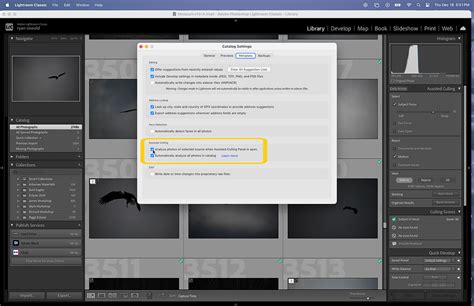
The introduction of assisted culling and auto-stacking in the latest beta versions of Lightroom Classic represents a significant leap forward in workflow efficiency, though with certain caveats. The assisted culling feature, powered by AI, aims to alleviate the often-tedious task of sifting through large volumes of images. In its current iteration, this feature is primarily geared towards portrait photography, utilizing "Subject Focus" and "Eye Focus" sliders to identify optimal shots. Early testing, as described by users, has shown promising results, accurately selecting images that align with manual culling decisions for portrait assignments. However, the current limitation to portraits means its utility is significantly reduced for photographers working with landscapes, wildlife, or event photography, where different criteria for image selection are paramount. There is a strong hope that this AI culling capability will rapidly improve and be updated to encompass all image types, ideally without requiring manual parameter adjustments. The ultimate goal is an AI that can intuitively differentiate superior images across any genre, making the process truly effortless and universally beneficial.
Complementing the assisted culling is the auto-stacking feature, which is designed to benefit photographers who regularly employ image stacking techniques, such as those used in astrophotography or for creating composite images. While this can be a considerable time-saver for users who rely on stacking, those who do not typically utilize this functionality may find this particular addition less impactful on their personal workflow.
Precision and Power in Editing: Enhanced Tools and Refinements
Several new and enhanced editing tools are at the forefront of this Lightroom Classic update, offering greater precision and creative flexibility. The updated remove tools, including an "automatic dust removal" feature, aim to simplify the cleanup of distracting elements within images. While cleaning camera sensors regularly minimizes dust spots for some photographers, the automatic dust removal can be a powerful aid. Testing with images exhibiting numerous dust spots has demonstrated its capability to identify and remove even very small particles, sometimes more effectively than manual spotting. However, as with all automated tools, a thorough review at higher zoom levels is still essential to ensure the desired outcome and to catch any elements the tool might have missed or incorrectly removed, such as debris in a river scene in one user's example.
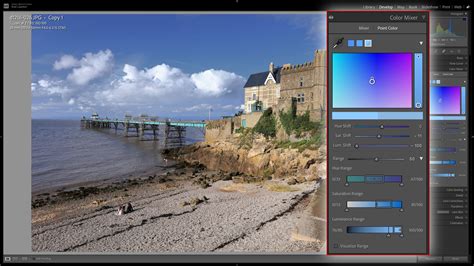
The introduction of the "Point Color Variance" tool in the local adjustments HUD is a noteworthy addition, particularly for portrait photographers. This tool allows for fine-tuning skin tones by adjusting the range of colors within a selected area. By sampling a mid-tone color on the skin and then manipulating the Variance slider, users can compress the color range, leading to smoother and more consistent skin tones. While effective when used subtly, overuse can result in an unnatural, "painted-on" appearance, underscoring the principle of "less is more" with this powerful adjustment. Careful application is key to achieving appealing results without making skin tones look artificial.
The "Enhanced Masking" capabilities, especially for landscapes, are a welcome improvement. Previous versions occasionally struggled with accurately identifying various landscape elements. The new "Natural Ground" option within Landscape masking appears to be particularly accurate, enhancing the ability to make targeted adjustments to specific parts of a scene, such as mountains or the ground. This precision is invaluable for achieving nuanced edits in complex natural environments.
Furthermore, the "improved reflections removal" feature, while not a tool many photographers might use regularly, signifies Adobe's commitment to refining existing functionalities. Its enhancement suggests that it will perform more reliably for those instances where it is needed.
Workflow and Integration: Sidecar Files, External Editing, and Performance
The update also brings changes to how Lightroom Classic handles adjustments, particularly with the introduction of new sidecar files for RAW images. When AI features like Denoise AI are applied, Lightroom now generates an additional ACR (Adobe Camera Raw) file alongside the standard XMP sidecar file. While this provides a separate record of these specific adjustments, some users express a preference for the established XMP system, finding the addition of a second file type to be potentially redundant and contributing to a more cluttered file structure within original image folders.
Significant changes have also been made to the Preferences dialogs, notably in "External Editing." New options allow for the explicit configuration of preferences for exporting both SDR (Standard Dynamic Range) and HDR (High Dynamic Range) images to external editors like Photoshop or specialized plugins such as Nik Silver Efex. This granular control over export settings ensures greater consistency and accuracy when transferring images for further processing.
What is a HDR Image in Photography?
Beyond specific features, Lightroom Classic 14.2 introduces substantial performance improvements for interactive editing tasks. These updates address previous bottlenecks, resulting in a smoother, faster, and more responsive editing experience, particularly when working with images that involve extensive edits and multiple masks. This enhanced performance directly translates to increased productivity for photographers.
Another practical enhancement is the improved catalog backup management. A new backup panel within Catalog Settings allows users to more easily access backup locations, check backup sizes, and delete older backups. Crucially, it offers the ability to remove individual backup catalog entries from the list without deleting the actual backup files from their storage location, providing more granular control over backup history.
Understanding Lightroom's Ecosystem: Classic vs. Cloud
It's important to distinguish between Lightroom Classic and the cloud-centric Adobe Lightroom. Lightroom Classic is the desktop-optimized version, ideal for photographers who prefer local storage of their photos in traditional file and folder structures. Its interface, import, organization, and editing features remain largely familiar.
Adobe Lightroom, on the other hand, is the newer, cloud-based service that synchronizes across desktop, mobile, and web platforms. This version offers the flexibility of cloud storage, but with implications for local storage. If cloud storage limits are reached, new photos might only be saved on the devices they originated from, and will no longer be automatically backed up to the cloud or synced across devices. Storage can be expanded through various subscription tiers.
A major recent development for the cloud-based Lightroom (and also available in Lightroom Classic) is the option for "Local Storage." This allows users to choose to store and work on images and videos either in Lightroomâs cloud or directly from their local drives and network storage. The "Local" tab functions as a file browser, enabling immediate editing of locally stored photos without first importing them into Lightroom or syncing them to the cloud. Photos can still be synced to the cloud for backup and cross-device availability at any time by using the "Copy to Cloud" button, with edits also syncing. This hybrid approach offers a significant degree of flexibility, catering to diverse user preferences and storage strategies.
Looking Ahead: AI, Workflow Automation, and the Future of Editing
The advancements in Lightroom Classic, particularly in AI-driven features like assisted culling, hint at a future where artificial intelligence plays an even more integral role in the photographic workflow. While the current AI culling is limited, the rapid pace of AI development suggests that more sophisticated and universally applicable solutions are on the horizon. The aspiration is for AI to not only cull images with greater accuracy across all genres but also to assist in the processing of images, learning from a photographer's established style to automatically apply edits.
This vision of AI-assisted culling and processing is already being explored by third-party software solutions like Evoto, Imagen, and Aftershoot. These platforms often target portrait and wedding photographers, offering automated culling and editing. However, their effectiveness across a wider range of photographic genres is still developing, and manual oversight remains crucial to ensure results align with the photographer's artistic intent and quality standards. The ultimate goal for many is a seamless AI-powered workflow that significantly saves time without compromising creative control or image quality.
The integration of features like "Adaptive profiles" for raw images, which assist with color, tone, and contrast adjustments, further demonstrates Adobe's push towards more intelligent and automated editing capabilities. As these technologies mature, they promise to redefine efficiency and creative possibilities for photographers.

The ongoing evolution of Lightroom Classic, with its blend of powerful new tools, refined existing features, and performance enhancements, continues to solidify its position as an indispensable application for photographers. The careful integration of AI, coupled with user-centric improvements, ensures that the software remains at the cutting edge of digital photography workflows.