The desire for a new hair color is a common aspiration, often leading to the question: "What shade would best suit me?" The process of physically dyeing hair can be a significant commitment, involving potential damage and the risk of an unsatisfactory outcome. Fortunately, advanced digital tools now offer a way to explore a spectrum of hair colors and styles virtually, before making any real-world decisions. Fotor's AI Hair Color Changer stands out as a powerful and user-friendly solution for this purpose, allowing individuals to experiment with diverse shades and even hairstyles with remarkable realism. This tutorial will guide you through the process of using Fotor's tools to achieve your desired look, from understanding the AI's capabilities to practical application.
Uploading Your Portrait: The Foundation for Virtual Transformation
The journey begins with a clear and well-lit photograph. For optimal AI accuracy, it is crucial to upload a front-facing portrait where your hair does not obscure your face. This ensures the AI can precisely identify your facial features and hair boundaries. Fotor supports common image formats such as JPG and PNG, making the upload process straightforward.

The quality of the initial image directly impacts the realism of the final result. Even lighting is key to prevent shadows from distorting hair color perception. If your current photo doesn't meet these criteria, consider taking a new one in natural daylight or under a diffused light source. Ensure your hair is pulled back sufficiently to reveal your hairline and face shape clearly, as this aids the AI in accurately mapping hairstyles and colors.
Selecting or Describing Your Vision: Unleashing Creative Potential
Once your photo is uploaded, Fotor's AI offers two primary avenues for transformation: direct selection or descriptive input.
Text-to-Style: Articulating Your Dream Hair
Fotor's generative AI model allows for unparalleled creative control through text prompts. You can type your vision, describing the desired hairstyle, color, texture, and length. For instance, you might enter "low taper fade curly hair" or "broccoli haircut in sunset copper." The AI is designed to understand these descriptions, respecting your face shape and skin tone to render a realistic transformation. This "text-to-style" feature is particularly innovative, enabling users to articulate complex or niche aesthetic preferences.
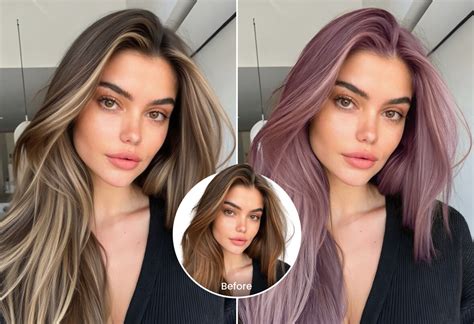
The AI's ability to interpret nuanced descriptions is a significant advantage. It goes beyond simple color changes to understand the intricacies of hairstyles. Whether you're aiming for a specific cut, a particular wave pattern, or even an unconventional color, articulating your vision clearly will yield the best results.
Unlimited Colors and Trend Library: Exploring a Universe of Options
Fotor provides access to an extensive palette of popular hair colors. You can test classic shades like blonde, black, brown, silver, and a variety of pastel hues. Beyond these staples, the "2026 Trend Library" offers instant access to the latest global hair color trends. This includes popular techniques such as money piece highlights, caramel highlights, and creamy blonde shades.
The trend library is a dynamic resource, constantly updated to reflect evolving fashion. This allows users to stay ahead of the curve and experiment with styles that are currently gaining traction in the fashion world. From subtle enhancements to dramatic makeovers, the range of available colors and styles is vast.
AI Rendering and Hyper-Realistic Results: The Magic of Technology
Fotor's AI rendering engine is the core of its transformative power. The system goes beyond merely overlaying a color; it simulates individual hair strands, natural light reflection, and realistic volume. This meticulous attention to detail ensures that the resulting image is not just a digital alteration but a hyper-realistic representation of how a new hair color or style would actually look.
The AI identifies your unique face shape-whether it’s round, square, oval, heart, or diamond-and tailors the hairstyle to complement your features. For example, oval faces are known for their versatility, capable of pulling off a wide range of styles from pixies to long waves. This personalized approach ensures that the virtual hairstyle enhances your natural appearance.
The "Nano Banana engine," as mentioned in user testimonials, is noted for its ability to render complex textures, such as defined copper curls with volume at the roots, respecting the natural flow and shape of real hair. This is a crucial distinction from less sophisticated tools that might simply "plaster" a flat wig over a user's head.
Why Choose Fotor AI Hairstyle Changer?
Fotor's AI Hairstyle Changer offers several compelling advantages for users looking to experiment with their look:
- Hyper-Realistic Rendering: As detailed above, the AI's ability to simulate hair strands, light, and volume creates incredibly lifelike results. This is essential for making informed decisions about real-life hair changes.
- Infinite Creativity: The generative AI model empowers users to go beyond pre-set options. By typing creative prompts, you can precisely control the hairstyle, color, texture, and length, bringing unique visions to life.
- Privacy First: Fotor prioritizes user privacy. Photos are processed locally whenever possible, and they are never stored without explicit permission. This ensures peace of mind for users concerned about their personal data.
- Lightning Fast: The AI haircut simulator provides instant results, allowing users to try different hairstyles online without delay. This rapid feedback loop encourages experimentation and exploration.
Real-World Testimonials: User Experiences with Fotor
The effectiveness of Fotor's tools is best illustrated by user experiences. One user, initially convinced of a platinum blonde pixie cut, was hesitant due to their stylist's concerns. After using Fotor's skin undertone analysis and experimenting with a warm honey balayage, they found a look that complemented their complexion. The AI-generated photo, so realistic that friends mistook it for a salon visit, proved invaluable in communicating their desired outcome to their stylist, leading to a highly satisfactory result.
Best HAIR COLOUR For Your Face (it's more than just SKIN TONE) Facial Features & Structure, Style
Another user, with type 3C curls, praised Fotor's text-to-style feature. Unlike other apps that flattened textured hair, Fotor's AI rendered "defined copper curls with volume at the roots" perfectly, respecting the natural curl pattern and face shape. This highlights the AI's sophisticated understanding of diverse hair textures.
Fotor's AI Color Replacer: Beyond Hair
While the hair color changer is a primary feature, Fotor's AI Color Replacer extends its capabilities to various aspects of image editing, offering a comprehensive suite of tools for digital transformation.
Replacing Colors in Images: A Versatile Tool
The AI Color Replacer can be used to change the color of any area within an image without the need to retake photos. This is achieved through a simple process:
- Upload Your Image: Begin by uploading the image you wish to modify.
- Describe or Select Area: Enter a text description of the area you want to recolor (e.g., "hair," "clothes," "background") or use quick selection options that automatically generate prompts.
- Choose Your Target Color: Select a color from the built-in palette or input custom color parameters.
- Generate and Save: Click "Generate" to instantly see the color replacement. Once satisfied, you can continue editing or download the high-quality image.
Magical AI Image Color Replacer for Portraits
This tool is particularly powerful for portraits, allowing for magical color replacements without reshooting. Key applications include:
- Hair Color: As discussed, this allows for virtual dyeing and experimentation.
- Clothing Color: Easily swap the color of any garment to perfect an outfit, design new clothing, or try on virtual ensembles.
- Accessory Color: Adjust the hues of accessories like earrings, necklaces, watches, or handbags to enhance your overall look and explore new style combinations.
- Other Elements: The tool can recolor various portrait elements, including facial makeup, eye color, eyebrow color, nail polish, tattoos, and even skin tone, offering extensive customization.
Colorize Your Photos with AI Color Replacer
Fotor's AI Color Replacer can also breathe life into old photos, sketches, and design drafts:
- Old Photos: Bring faded or black-and-white images back to life with vibrant color.
- Sketches & Drawings: Add color to hand-drawn sketches, converting them into finished artwork and digitizing creative pieces. The AI intelligently recognizes lines and applies color accurately.
- Design Drafts: Quickly colorize design drafts for architectural projects, UI interfaces, or graphic designs, providing instant previews and boosting efficiency.
Specific Applications of the AI Color Replacer:
- Logo Recoloring: Freely replace the color of logos in photos, adjusting text, patterns, or designs to enhance their visual appeal and creativity.
- Anime Image Editing: Efficiently replace colors in anime images, saving significant editing time.
Virtual Hair Color Try-On: Finding Your Perfect Shade
The challenge of choosing a hair dye color from thousands of options is a common dilemma. Fotor's virtual hair color try-on tool eliminates this guesswork.
Free Virtual Hair Color Try-On with AI
Powered by advanced AI, this tool allows users to upload a photo and virtually try on different hair colors. The process is remarkably fast, often taking only seconds.
- Hair Color Generator: An inbuilt generator provides access to a wide variety of hair dye colors, from popular shades to stylish partial highlights.
- Mobile Accessibility: The virtual hair color try-on tool is available on mobile devices through Fotor's app, enabling users to change hair color on the go.
The steps are simple: click "Get Free Hair Color Try On," upload your selfie, choose or describe your desired hair color, and let the AI generate the preview. You can then preview, download, or share your virtual hair color transformation.
AI Hairstyle Changer and Face Swap Tools
In addition to hair color, Fotor offers tools to experiment with hairstyles:
- AI Hairstyle Changer: This tool allows users to try on different virtual hairstyles before committing to a haircut. A variety of options, including short hair, long hair, and buzz cuts, are available.
- Face Swap Tool: Within the Face Swap tool, the "Rehair Salon" feature provides a series of hairstyle templates for users to experiment with.
By combining the hair color changer with the hairstyle changer, users can achieve a complete hair makeover virtually.
Fotor's AI Capabilities: Beyond Hair Color
Fotor's suite of AI-powered editing tools extends far beyond hair color and style. The platform functions as an all-in-one AI photo editing toolbox, featuring:
- AI Photo Enhancer: Clarifies blurry photos instantly.
- AI Retouch: Achieves flawless skin.
- Text-to-Image Generation: Turns text prompts into stunning images.
- Future Baby Predictor: A feature allowing users to see potential future offspring with a partner.
Subscription and Support
Fotor Pro offers monthly and yearly subscription plans, with automatic renewal unless turned off at least 24 hours before the current subscription period ends. Users can manage their subscriptions through their iTunes account settings. For assistance or suggestions, users can utilize the "Feedback" option within the app's "Profile" section.
The Fotor app is compatible with iPhone (iOS 12.1 or later), iPod touch (iOS 12.1 or later), and Apple Vision (visionOS 1.0 or later).
In conclusion, Fotor's AI Hair Color Changer and its accompanying suite of tools provide an accessible, realistic, and creative way to explore new hair colors and styles. By leveraging advanced AI technology, users can confidently make informed decisions about their appearance, transforming their digital portraits and potentially their real-world looks with unprecedented ease and accuracy.