Procreate has long been hailed as the go-to application for digital artists on the iPad, celebrated for its intuitive interface and robust feature set. Building on this legacy, Savage Interactive introduced Procreate Dreams, an animation app designed to bring creative visions to life. This article delves into the cost of Procreate Dreams, its core functionalities, and how it empowers a new generation of animators.
The Price of Animation: Understanding Procreate Dreams' Cost
One of the most significant draws of Procreate and now Procreate Dreams is its straightforward pricing model. In an era dominated by subscription services, Procreate Dreams stands out by offering a one-time purchase. This means users pay a single fee and gain perpetual access to the app and its features, with the promise of free major feature updates.
Initially, Procreate Dreams was available for $19.99 USD. However, recent information indicates a price adjustment to $12.99 USD. This "pay once, create forever" philosophy is a cornerstone of Procreate's appeal, making professional-grade creative tools accessible without recurring financial commitments. This pricing strategy not only democratizes animation but also fosters a loyal user base who appreciate the long-term value.
Core Functionality: What Procreate Dreams Offers
Procreate Dreams is more than just an animation add-on; it's a comprehensive animation studio that fits in your pocket. It's built to be powerful yet accessible, catering to both seasoned animators and those taking their first steps into the world of motion graphics.
The Flipbook Experience: Frame-by-Frame Animation Reimagined
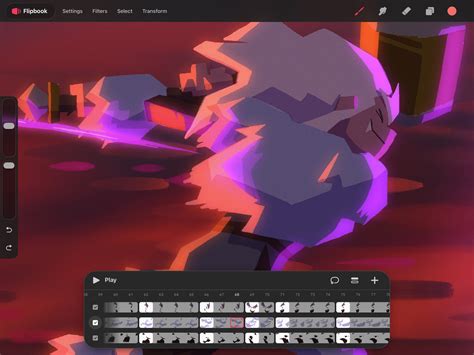
At its heart, Procreate Dreams offers a robust "Flipbook" feature, allowing artists to create traditional frame-by-frame animations. This mode leverages the familiar drawing tools and over 300 handcrafted brushes that made Procreate so popular. Users can draw each frame with beautifully textured brushes, utilizing multiple tracks for layered complexity. The inclusion of "Onion Skins" provides essential visual aids by allowing artists to reference surrounding frames, ensuring precision and fluidity in their animations. The ability to layer flipbooks with multiple tracks further enhances the depth and detail achievable.
Keyframing for Dynamic Motion
Beyond frame-by-frame animation, Procreate Dreams excels in its keyframing capabilities. This feature allows users to define specific points in time (keyframes) where their artwork or elements should undergo changes in scale, rotation, blur, and more. Procreate Dreams then intelligently interpolates between these keyframes, generating all the intermediate frames to create smooth, fluid motion and effects. This significantly streamlines the animation process, particularly for character movements, object transformations, and dynamic visual effects, making complex animations achievable with relative ease.
Importing Assets: Integrating Video and Audio
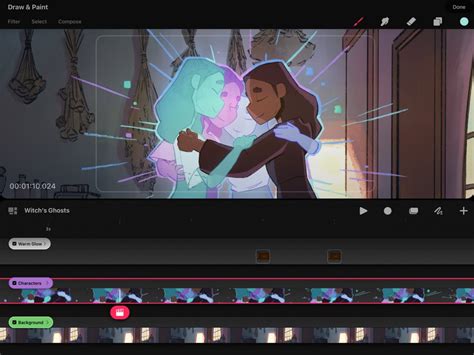
Procreate Dreams understands that not all animations are created solely from scratch. The app allows for seamless import of various assets, including audio and video files. This means users can bring their existing drawings, photos, and even video clips into the timeline to build richer narratives. Adding sound effects, atmospheric music, and dramatic voiceovers becomes straightforward, enabling the creation of more compelling and professional-looking animated stories. The app supports a range of audio, video, and image formats for import, though the highest video resolution is dependent on the iPad model.
Next-Generation Technology for a Portable Studio
The underlying technology of Procreate Dreams is designed to offer a powerful animation studio experience that is entirely portable. The app supports drawing, animating, editing, and compositing within a single environment. This integrated approach minimizes the need to switch between multiple applications, streamlining the creative workflow. The ability to work with documents up to 1M x 1M pixels, as mentioned by Michael Shaw, Chief Technology Officer at Procreate, highlights the app's capacity for high-resolution projects, even on an iPad.
Complete Beginners Guide To Procreate Dreams 2.0
Bridging the Gap: From Procreate to Procreate Dreams
For existing Procreate users, the transition to Procreate Dreams is designed to be as smooth as possible. The drawing interface, including layer tools, is remarkably similar, making it intuitive to pick up. A significant advantage is the ability to easily import any artwork created in Procreate directly into Procreate Dreams. This allows artists to bring their static illustrations to life through animation, leveraging their existing creative assets.
However, it's important to note that Procreate Dreams is a standalone application, separate from Procreate. While they share a common ethos and many design principles, some specific features found in Procreate, such as Smart Shapes and certain layer adjustments like Alpha Lock (though Alpha Lock is present in Procreate Dreams, its functionality might differ slightly or be implemented in a way that requires adjustment for users accustomed to Procreate), are either absent or implemented differently. The development team has plans for future updates, which may include features that bridge these gaps further.
Features and Capabilities: A Deeper Dive
Procreate Dreams is packed with hundreds of features, many of which are designed to enhance creative control and efficiency.
Selections and Transform Tools
The app includes advanced selection and transform tools that allow for precise manipulation of artwork. Users can make automatic selections, cut, warp, and transform drawings with improved tools. Within the "Flipbook" mode, the "Transform" tool, combined with gestures, allows for intuitive manipulation of selected areas. The "Warp Mesh" feature, for instance, allows users to add nodes on every intersection of the mesh for highly precise control over transformations.
Brush Library for Animation
The "Animation Brush Library" within Procreate Dreams offers over 100 brushes specifically crafted for animation. These brushes, in addition to the entire Procreate brush library (including any .brush files imported from Procreate), provide a vast palette for creating diverse artistic styles within animations.
Advanced Functionality and Workflow Enhancements
- Continuous Auto-Save and Undo History: Never lose artwork again with robust auto-save and an extensive undo history, providing peace of mind during the creative process.
- Color Selection: Select areas of similar color by tapping and adjusting the threshold by panning the screen, a useful tool for quick edits and color manipulation.
- Alpha Lock: Affect only the pixels already painted on a layer by turning on Alpha Lock, a familiar and powerful tool for controlled painting.
- Split Audio & Video: Import video with audio and edit them as different tracks, allowing for sophisticated synchronization and editing.
- Reverse Keyframes: A feature that allows for the reversal of keyframed animations, offering creative flexibility.
- Advanced Noise Options: Provides more granular control over noise effects, adding depth and texture to animations.
Accessibility and Inclusivity
Savage Interactive believes that art is for everyone, and this ethos extends to Procreate Dreams. The app incorporates a suite of built-in features designed to make animation more accessible. While some users have noted the lack of in-app educational materials at launch, the existence of an expansive Procreate Dreams handbook and the intuitive nature of many of its tools aim to lower the barrier to entry for aspiring animators. Features like Performance Mode, which allows real-time animation of assets and effects, exemplify this commitment to accessibility.
Addressing the "Nightmare" Aspects: Challenges and Future Development
While Procreate Dreams has been met with significant praise, its launch was not without its challenges. Some users have reported bugs and missing features that have led to a less-than-perfect initial experience. Common criticisms include:
- Missing Drawing-First Tools: Features like Quick Shapes, brush stabilization, and advanced brush customization, which are staples in Procreate, were initially absent or not fully implemented in Dreams. This can be particularly challenging for artists with shaky hands who rely on stabilization for frame-by-frame work.
- Fill Tool Issues: Some users have encountered white artifacts when using the fill tool, even with maximum tolerance, and occasional inexplicable color flooding or slow rendering.
- UI Quirks: Certain aspects of the user interface, particularly concerning frame manipulation, have been described as niggly. For instance, looping a small segment of frames might require a series of steps involving selection, grouping, copying, and pasting.
- Hidden Features: Onion skinning, a crucial tool for frame-by-frame animation, was noted as being somewhat hidden, which is surprising given its reliance on Procreate's drawing tool prowess.
- Playback Speed Control: While Performance Mode is excellent, the lack of a readily available way to change playback speed limits granular control for those performing slower, more deliberate movements.
- Missing Crucial Tools: The absence of tools like shift and trace, custom easings, layer and clipping masks, and reference layers has been highlighted as a significant drawback by some users.
The development team at Savage Interactive is aware of these issues and has outlined plans for future improvements. Michael Shaw has indicated that many of these features were challenging to implement quickly, particularly due to the app's support for extremely large document sizes. As with Procreate, Procreate Dreams is expected to receive free major feature updates, signifying a commitment to ongoing development and refinement. The excitement surrounding the app, coupled with the impressive early animations emerging from the community, suggests that Procreate Dreams is on a trajectory to become an even more formidable creative tool.
Conclusion: A Dream Worth Pursuing
Procreate Dreams, at its accessible price point of $12.99 USD (one-time purchase), offers a powerful and versatile platform for animation creation on the iPad. It successfully translates the intuitive design philosophy of Procreate into the realm of motion graphics, empowering artists with tools for frame-by-frame animation, sophisticated keyframing, and seamless asset integration. While the app's initial release presented some challenges and missing features, the ongoing development and the promise of free major updates suggest a bright future. For artists looking to explore animation without the burden of subscriptions, Procreate Dreams represents an exceptional value and a compelling creative investment. The journey from static art to dynamic storytelling has never been more within reach.