Digital collage, a vibrant and expressive art form, allows creators to weave together disparate visual elements into a cohesive and compelling narrative. This technique, rooted in the historical "cut and paste" aesthetic, has found a powerful new dimension in the digital realm. Whether you're a budding artist looking for an accessible entry point into graphic design or an experienced professional seeking to expand your creative toolkit, understanding the fundamentals of digital collage can unlock a world of artistic possibilities. This tutorial will guide you through the essential steps, from material gathering and conceptualization to execution and refinement, empowering you to craft your own unique digital masterpieces.
Building Your Visual Library: Sourcing and Inspiration
The foundation of any compelling digital collage lies in the quality and diversity of its source materials. The possibilities for gathering these visual assets are virtually endless, extending far beyond professional photography. Even seemingly unpolished phone images, when possessing an intriguing element or texture, can serve as valuable components.
For readily accessible and free stock imagery, platforms like Pexels.com and Unsplash.com offer vast libraries of high-quality photographs. However, don't limit yourself to these online resources. Actively capture your own photographs, focusing on elements that spark your interest, and integrate them into your personal digital library. Consider photographing textures that can be used as overlays to add depth and complexity to your compositions.
The web itself is an immense playground for image sourcing. If your collages are primarily for personal enjoyment, you have the freedom to explore the entirety of the internet. For those aspiring to professional graphic design or commercial use, a thorough understanding of copyright laws is paramount. Ensure you are utilizing images that you have the legal right to license. A smart strategy often employed is to experiment with watermarked images within your collage drafts before committing to purchasing them, thereby verifying their suitability and necessity for your project.
Collaboration is another avenue to explore. Reaching out to photographers whose work you admire and proposing a collaborative venture can yield unique and exclusive assets for your collages. The digital landscape truly presents the world as your oyster when it comes to image acquisition.
Beyond direct image sourcing, the web serves as an invaluable wellspring of inspiration. You might discover captivating color palettes or intriguing combinations of hues that you can then absorb and reinterpret within your own artistic endeavors.
TOP TIP: To prevent creative burnout and avoid getting lost in an endless scroll, establish a clear cutoff point for your image searching sessions. Sometimes, less truly is more. Explore the potential of the materials you already possess before embarking on extensive new searches. You can always return to collecting images once you have a foundational framework for your piece and a clearer idea of what specific elements you require. Occasionally, a highly specific search, such as for a "gold glass sphere," can yield precisely the unexpected element needed to complete a composition.
Crucially, in digital collaging, the aim is to create something entirely new from existing elements. Therefore, it is essential to cultivate a creative mindset that is not overly attached to any single image or initial composition. Don't be afraid to deconstruct and reassemble existing visual components; this transformative process is the very essence of digital collage.

Harmonizing Your Vision: Color and Lighting Consistency
Two critical elements that elevate a digital collage from a mere collection of images to a cohesive work of art are consistent color palettes and harmonious lighting.
Maintaining a Cohesive Color Palette
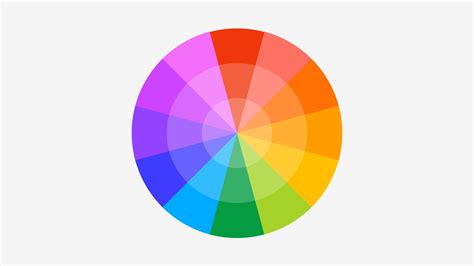
A common practice to achieve a unified aesthetic is to ensure that the saturation levels across your chosen images are relatively consistent. This can often be prepared even before the initial stages of your piece begin. While there isn't a rigid scientific method for this, a general approach involves curating a library of photographs that share a similar color intensity. For those with a penchant for vibrant and colorful styles, this might involve selecting images with intense saturation, which can be further enhanced digitally later.
An effective pre-production strategy is to build a library of photos that already possess the colors you intend to use, effectively creating a visual color palette from your materials. Alternatively, a color picker tool can be invaluable for saving specific color swatches you wish to incorporate. Pinterest can also serve as an excellent platform for creating mood boards specifically for color inspiration and application.
The overarching principle for color cohesion is repetition. Reintroducing colors across both the foreground and background elements of your collage will create a visual connection, ensuring the overall image feels unified and possesses a cohesive aesthetic.
Ensuring Consistent Lighting
Strict adherence to consistent lighting is another rule that significantly impacts the believability and integration of your digital collage. This consideration should ideally begin before you even create your canvas. The reason for this strictness stems from the potential for lighting discrepancies to create visual disharmony in digital art. For instance, if you isolate a figure illuminated by strong, hard light (casting deep shadows) and then place it against a softly lit background, the overall piece can appear less realistic and disjointed.
Selecting Your Digital Canvas: Program Choices
Once your visual materials, color preferences, and lighting considerations are in place, the next crucial step is to select the appropriate software for your digital collage creation.
The Powerhouse: Adobe Photoshop
For many digital artists, Adobe Photoshop stands as the industry standard and a program of choice for intricate image manipulation and collage creation. While it is a subscription-based service and not free, its unparalleled versatility and extensive feature set often justify the investment for those serious about their craft. A 30-day free trial is available, allowing aspiring artists to explore its capabilities before committing.
Although numerous other programs exist for image manipulation, Photoshop remains a dominant force in the field. It is worth the effort to learn its intricacies. Photoshop's capabilities are vast, but when its limits are reached, Adobe Illustrator can be brought in to complement its functions, particularly for vector-based elements.
It is important to acknowledge that Photoshop can appear intimidating to newcomers. The interface is complex, and the sheer number of tools and functions can be overwhelming. However, the key to mastering Photoshop, like any powerful software, is to simply begin experimenting. Engage with the program, take the fear out of it, and embrace the learning process. Practice is indeed the most effective teacher. It is important to note that the methods employed by any given artist, including the author of this tutorial, may not be the sole, recommended, or most efficient ways to achieve a result. Every individual develops their own unique workflows through exploration and trial-and-error.
Photoshop Basics: Selection Tools & Digital Collage
Alternative and Complementary Software
While Photoshop is a primary tool, other programs can also be utilized for digital collage. For those seeking free alternatives, options like GIMP (GNU Image Manipulation Program) offer a robust set of features comparable to Photoshop. For simpler, more template-driven collages, applications such as Canva, Google Photos, and Adobe Express provide user-friendly interfaces and are excellent for quick designs, sharing online, or printing at home. For physical projects like photo books or wall prints, services like Mixbook offer integrated design tools.
Setting the Stage: Dimensions and Resolution
Before diving into the creative process, establishing the correct canvas dimensions and resolution is a vital preparatory step that impacts the final output quality.
Canvas Size Considerations
Your digital canvas can be any size, but it's essential to be mindful of the resolution of your source images. If you are incorporating low-resolution photographs into your library, it is advisable to keep the overall dimensions of your digital collage relatively small. To avoid pixelation, it is generally recommended not to go much smaller than 10 inches in height for your artwork. While you always have the option to resize your canvas later, increasing the dimensions of an image after the fact will inevitably lead to a loss of quality.
The Importance of DPI
For optimal print quality and sharpness, it is standard practice to set the image resolution to 300 dots per inch (DPI). This ensures that your digital collage will appear crisp and detailed when printed, whether for personal enjoyment, professional presentation, or commercial purposes. Capturing everyday moments, from the scattered arrangement of paintbrushes on a table to candid snapshots of daily routines, inherently lends itself to storytelling. A photo collage allows you to layer these individual pieces into a larger, more impactful picture, highlighting rhythm, contrast, and emotion in a way that a single photograph often cannot achieve.
Think of your digital collage as a form of visual composition. You can opt for a digital approach using structured templates to achieve a clean, modern aesthetic, or you can embrace the more tactile process of digitally simulating cutting, arranging, and layering elements for a result that feels more raw and handmade. Both methodologies provide ample space for experimentation and the pushing of creative boundaries.
Crafting Your Digital Masterpiece: Step-by-Step
Digital collages are characterized by their ease of creativity. The process involves uploading, arranging, and manipulating layouts until your chosen images achieve their optimal visual impact. Hereâs a breakdown of how to build a collage that is ready for sharing or printing.
Step 1: Define Your Project's Purpose
Before commencing the design process, consider the intended outcome of your collage. If your aim is to integrate collages into physical products such as photo books, wall prints, calendars, or cards, platforms like Mixbook offer pre-defined layouts and fixed sizes, allowing you to concentrate on the creative design aspects without the added concern of dimensions.
Conversely, if your objective is to create a collage for online sharing or home printing, tools such as Canva, Google Photos, and Adobe Express provide flexible canvas sizes and a variety of export options. For those envisioning a personalized gift, framed decor, or a calendar to commemorate family memories, Mixbook simplifies the process from the outset.
Step 2: Weave a Visual Narrative
Consider your collage as a visual story. Select photographs that effectively depict the beginning, middle, and end of an event. For example, a birthday celebration could be represented by images of the morning preparations, the act of blowing out candles, and the subsequent festivities. These sequential images capture the emotional progression of an event.
Step 3: Master Layouts and Templates
The chosen layout significantly influences the overall tone of your collage. A grid structure provides a sense of order and organization, while overlapping photos can evoke a more dynamic, scrapbook-like feel.
Platforms like Mixbook offer intuitive drag-and-drop interfaces that simplify this step. You can effortlessly swap between different layouts with a single click, crop images for visual consistency, and utilize alignment tools to ensure a balanced composition. If you wish to establish a clear focal point, enlarge one particular image and allow the surrounding elements to act as a frame.
âDrag-and-drop layouts offer flexibility, but donât hesitate to modify elements as you progress. Collages are intended to evolve during their creation.ââRaffi Apelian, Senior Content Marketing Manager at Mixbook
Additional design tips to enhance your collage include:
- Balance: Integrate close-up shots with wider, more encompassing views to introduce visual variety.
- Orientation: Alternate between portrait and landscape orientations to create a sense of rhythm and visual interest.
- Composition: Employ the rule of thirds to strategically highlight important details within your images.
- Whitespace: Intentionally incorporate empty space to prevent the collage from appearing cluttered and to allow key elements to stand out.
Tools like Canva and Google Photos provide downloadable grid templates for rapid design, while Mixbook delivers a polished, print-ready finish that maintains its visual appeal whether viewed on screen or as a physical print.
Step 4: Infuse Personal Touches
Make your collage truly unique by incorporating personalized elements such as backgrounds, digital stickers, or text for dates and captions. To maintain a cohesive design, limit yourself to one or two font styles and a consistent color palette. You can also scan personal mementosâlike handwritten recipes, children's drawings, or ticket stubsâto add an extra layer of personality and sentiment.
Step 5: Review and Finalize
Before concluding your work, meticulously review the spacing, margins, and any added captions. Ensure that all photographs appear sharp, well-balanced, and appropriately positioned. If you are using a different design tool, export your collage as a high-resolution file to guarantee that it prints and shares clearly.
The Tactile Appeal: Creating a Physical Collage
For those who enjoy a more hands-on, tangible creative process, physical collages offer a delightful alternative. This approach is ideal for a relaxed afternoon of crafting or a family activity.
Step 1: Gather Your Supplies
To begin, you will need printed photographs, a reliable glue stick, scissors (consider decorative craft scissors for added flair), and a sturdy base for your creation, such as poster board or cardstock. For those who wish to embellish further, gather additional supplies like washi tape, scrapbook paper, or colorful markers.
When printing your photographs, opt for matte or lustre paper rather than glossy finishes. This choice reduces glare and makes the images easier to handle, particularly if you plan to layer, trim, or experiment with mixed-media elements.
Step 2: Select a Guiding Theme
Establishing a theme provides direction for your collage and prevents it from feeling haphazard or cluttered. Consider the narrative you wish to conveyâit could encompass anything from a seasonal event to a memorable weekend camping trip.
Once you have chosen an occasion, narrow your focus. It is often best to stick to a single story, a defined color palette, and one standout photograph to anchor the layout. Supporting images can then be used to add context and detail to the central theme.
Step 3: Arrange Before Committing
Before applying any adhesive, spread out your photos and experiment with various layouts. Begin by placing your anchor photoâthe image that most powerfully captures the essence of your theme, such as a large group shot from a family reunion.
Experiment by shifting the photos around until the collage achieves a balanced and uncrowded appearance. Once you discover a layout you are pleased with, take a quick photograph of it using your phone. This serves as a valuable reference should any elements shift during the gluing process and helps you identify areas that might require adjustment before making the arrangement permanent.
Step 4: Incorporate Extra Elements
After arranging your photographs, you can introduce a few finishing touches. These additional elements can imbue your collage with a layer of storytelling that photographs alone may not fully convey.
Potential additions include:
- Handwritten captions or brief personal notes.
- Ticket stubs from concerts, games, or significant trips.
- Children's artwork or doodles.
- Decorative paper or washi tape to create borders or accents.
To ensure your design remains cohesive, limit yourself to one or two styles of embellishments. A few thoughtfully chosen additions will enhance the impact of your collage, whereas an excess of decorative items can detract from the photographs themselves.
Step 5: Frame or Display Your Creation
Once your physical collage is complete, consider how you wish to display it. A traditional frame can lend a polished and sophisticated look, while a poster hanger offers a more modern and minimalist presentation that allows your collage to stand out in a fresh way. For a lightweight and easily changeable option, a clip frame can also be an effective choice.
Before hanging your physical collage, it is highly recommended to digitize it by scanning or photographing the finished piece. This creates a digital backup that can be reprinted, shared, or utilized in other projects without risking damage to the original artwork.
âI always recommend scanning a handmade collage before framing it. That way, you can reprint it later or even turn it into a photo book without risking the original.ââLeslie Albertson, Director of Brand and Creative at Mixbook
Inspiring Collage Ideas
Consider the moments you most cherish and wish to relive. Whether for pure enjoyment or as a meaningful gift, here are some straightforward yet creative photo collage ideas to ignite your next project:
- Seasonal Memories: Capturing your summer adventures, winter holiday recaps, or spring break photo dumps in a collage format is far more engaging than keeping them confined to your camera roll.
- Gift Ideas: Celebrate anniversaries, birthdays, graduations, or retirements with a custom collage that compiles shared memories.
- Family Photo Walls or Framed Art: Transform your favorite moments into framed prints or wall art, creating perfect home decor for staircases, entryways, and other empty spaces.
- School Projects or Kids' Art Collages: Combine their classroom projects, drawings, and other proud achievements into a single memory board or an end-of-year keepsake.
âThe most creative collages we see often combine different types of shots, like close-ups, group moments, and small details. That variety keeps the collage feeling dynamic instead of repetitive.ââLeslie Albertson, Director of Brand and Creative
Tips for Enhancing Your Collage's Visual Impact
A few astute design choices can elevate your collage art from merely pleasing to truly captivating. Even the simplest collages gain significant impact when they feel intentional. You do not need to possess the skills of a professional designer; simply keep these tips in mind as you create:
- Adhere to a Color Palette or Filter: Selecting tones that harmonize effectively helps your collage achieve a cohesive feel. Mixed media artist Rebecca Chapman suggests using the colors present in your photographs as a starting point when choosing a palette for your collage.
- Mix Close-ups with Wide Shots: Incorporating both zoomed-in details and expansive scenic views can make your collage feel more dynamic and less like a simple collection of photos.
- Avoid Clutter: While it may be tempting to fill every available space, a little breathing room allows your best shots to command their rightful spotlight.
- Reserve Space for Extras: Leaving blank areas is a fundamental design principle that contributes to a balanced collage. As designer and art educator Cookie Redding explains, âWhite space gives meaning to everything elseâ¦that feeling doesnât come from adding more. It comes from restraint.â
Preserving Memories with Mixbook
Photo collages serve as a powerful medium for preserving memories, from joyous occasions to candid, perhaps slightly embarrassing, moments. The emphasis is not on polished perfection but rather on fostering personal connection.
Transform your snapshots into a story worth sharing. Embark on your next photo book project with Mixbook. It offers a fun and straightforward way to channel your creativity and bring your cherished memories to life.
How to Make a Collage FAQ
How to make a collage of photos on an iPhone?You can utilize the iPhone's built-in tools to create quick photo grids or opt for creative platforms like Mixbook or Canva for more artistic control. Simply select your photos, choose a layout, and begin arranging them.
Can I make a photo collage on my phone?Absolutely, and it's far easier than you might imagine. Applications like Mixbook allow you to create photo collages directly from your phone, requiring no prior design expertise.
Is there a completely free collage app?Yes, there are numerous free photo editing software options available, including Mixbook, Google Photos, and Canva.