In the digital age, the ability to perfect our photographs has become an art form, and often, a necessity. Whether it's an accidental photobomber, a distracting crowd, or simply an element that detracts from the intended subject, unwanted people in the background can mar an otherwise perfect shot. Fortunately, advancements in Artificial Intelligence (AI) have brought forth powerful tools that can seamlessly remove individuals from images, transforming chaotic backgrounds into clean, focused compositions. This article delves into the world of AI-powered object and people removal, exploring how these technologies work, their applications, and the leading tools available to achieve pristine photographic results.
The Rise of AI in Photo Editing: Beyond Traditional Retouching
Historically, removing unwanted elements from a photograph was a painstaking process, often requiring specialized software like Adobe Photoshop and a significant degree of skill and time. Techniques such as cloning, healing, and content-aware fill were employed, demanding a keen eye for detail and an understanding of image composition. However, AI has revolutionized this field, offering automated solutions that are both faster and more accessible.
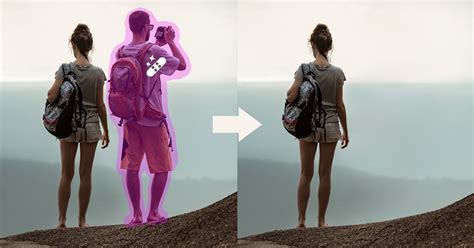
The core of these AI-powered tools lies in their ability to understand the context of an image. Instead of simply copying pixels from one area to another, AI algorithms analyze the surrounding areas, textures, colors, and lighting to intelligently reconstruct what should be behind the removed object. This process, often referred to as "inpainting," allows for remarkably natural-looking results, making it difficult to discern that an element was ever present.
For instance, tools like Adobe Firefly's Generative Remove utilize sophisticated AI models trained on vast datasets of licensed content. This training enables Firefly to not only identify and remove unwanted objects but also to fill the resulting void with plausible background elements. The process is typically straightforward: users simply "paint" over the object they wish to remove with a brush tool, and the AI handles the rest, generating a seamless replacement in a matter of seconds. This capability extends to various distractions, from unsightly trash cans and power lines to random logos, watermarks, and, crucially, people.
Similarly, Pixa's AI Background People Remover offers a user-friendly approach to eliminating unwanted individuals. By uploading an image and highlighting the people to be removed, Pixa's AI technology intelligently replaces the selected areas with what it infers should be behind them. This is particularly valuable for preserving special moments, ensuring that cherished memories are free from the clutter of strangers or unexpected photobombers, thereby keeping the focus solely on friends and family.
The Future of Object Removal: VFX + AI Workflow
Key Features and Functionalities of AI People Removers
The effectiveness of AI tools for removing people from photos hinges on several key features:
- Intelligent Object Detection: Advanced AI models can accurately identify people, even in complex or crowded scenes. Some applications, like Removex, specialize in this by detecting people first, allowing users to simply tap on the individuals they want to remove rather than meticulously drawing over them.
- Naturalistic Reconstruction (Inpainting): This is the cornerstone of AI removal. The AI doesn't just erase; it intelligently regenerates the background. This is crucial for maintaining the authenticity of the image. Tools like Fotor's AI People Remover use cutting-edge AI to accurately identify people and their surroundings, then smoothly remove them while reconstructing the missing parts with advanced inpainting techniques. This ensures the removal looks natural and high-quality.
- User-Friendly Interface: The goal of these AI tools is to democratize photo editing. Most offer intuitive interfaces where users can upload an image, use a brush tool to select unwanted elements, and click a "Generate" or "Remove" button. This eliminates the need for extensive design skills, making professional-looking edits accessible to everyone.
- Speed and Efficiency: Unlike manual editing, AI removal can often be completed in seconds. This is a significant advantage for creators, marketers, and individuals who need to process multiple images quickly.
- Versatility: While the focus here is on removing people, many of these tools can also remove other unwanted objects like text, logos, watermarks, trash cans, wires, and street signs. This makes them comprehensive photo-editing solutions. Cleanup.pictures, for example, is adept at removing text, logos, watermarks, people, and even blemishes or wrinkles.
Leading AI Tools for People Removal
Several platforms stand out in their ability to effectively remove people from photos:
Adobe Firefly (Generative Remove)
Adobe Firefly, integrated into Adobe's ecosystem, offers a powerful "Generative Remove" feature. It's designed for ease of use, allowing users to brush over unwanted elements and let the AI fill in the gaps. Firefly's generative AI models are commercially safe, trained on licensed content, ensuring responsible AI usage. It's accessible via the Firefly image editor, where users can log in with an Adobe ID. The process involves brushing over the area, adjusting brush settings, and clicking "Generate." The results can then be downloaded, copied, or shared.
Pixa (AI Background People Remover)
Pixa provides a free online tool specifically for removing people from photo backgrounds. Its AI technology detects and removes people, replacing them with what it predicts should be behind them. Pixa emphasizes preserving special moments by offering clutter-free backgrounds, ideal for wedding photos, family portraits, or travel snapshots. The process is simple: upload, highlight unwanted people, and download the edited image. Pixa is lauded by over 2 million users for its ease of use and professional results.
Fotor (AI People Remover)
Fotor offers a robust AI people remover that works online and through mobile apps for iPhone and Android. It's designed for both personal and professional use, enabling users to remove photobombers, crowds, and other distractions effortlessly. Fotor's tool reconstructs missing background parts using advanced AI inpainting techniques, ensuring a natural appearance. Beyond removal, Fotor also offers the ability to replace people with other elements by typing a description. This versatility makes it a powerful tool for creative control.
Removex
Removex is a photo editing app that specifically focuses on removing people from photos, though it can also remove objects. It distinguishes itself by detecting people automatically, allowing users to tap on them for removal, a more streamlined process than manual brushing. Removex is designed to work on a wider range of phones and is noted for handling more difficult scenes with better consistency compared to some platform-specific tools, like Apple's built-in cleanup features which may not be supported on all devices.
Cleanup.pictures
This online tool is highly versatile, capable of removing not just people but also text, logos, watermarks, defects, blemishes, and wrinkles. Cleanup.pictures utilizes AI algorithms that are described as being able to "guess what was behind" the unwanted element, offering better results than traditional clone stamp tools that require a background reference. While the free version has export limitations, a Pro version offers higher quality and unlimited processing. Their API is also available for developers.
Applications and Use Cases
The ability to remove people from photos has a wide array of applications:
- Personal Photography: Enhancing travel photos by removing crowds, perfecting family portraits by removing distracting individuals, or creating a cleaner aesthetic for social media profiles.
- Professional Photography: Wedding photographers can ensure the focus remains on the couple, portrait artists can create pristine headshots, and event photographers can produce polished images free of unwanted attendees.
- Real Estate: Removing previous occupants or unwanted objects from property photos to present a clean, impersonal space for potential buyers.
- E-commerce: Creating ideal product shots by removing distracting backgrounds or elements that detract from the product itself.
- Marketing and Advertising: Ensuring visuals are focused and impactful by removing extraneous people or objects that might dilute the brand message.
- Privacy and Anonymization: Removing individuals from sensitive images to protect their identity or comply with privacy regulations.
Considerations and Best Practices
While AI removal tools are powerful, some considerations can enhance their effectiveness:
- Image Quality: The quality of the original image significantly impacts the outcome. Higher resolution images with good lighting and clear subjects generally yield better results.
- Complexity of the Background: Removing a person against a simple, uniform background (like a clear sky or a plain wall) is much easier than removing someone from a complex, detailed scene (like a busy market or a textured wall).
- Brush Size and Coverage: For tools that use a brush, it's often recommended to use a slightly larger brush than the object being removed and to ensure complete coverage. This helps the AI algorithm better understand the area to be reconstructed. Cleanup.pictures, for instance, advises overflowing the brush area.
- LLM-Based Editors vs. Specialized Tools: Some AI editors use Large Language Models (LLMs) which regenerate the entire image. While powerful, this can sometimes alter faces, textures, and lighting in unintended ways. Specialized tools like Removex focus specifically on object/people removal, aiming for more targeted and consistent results.
- Commercial Use and Licensing: When using AI tools for commercial purposes, it's important to be aware of their terms of service and licensing. Adobe Firefly, for example, is trained on licensed content, making its outputs commercially safe. For other tools, especially those removing watermarks, ensure you have the necessary rights.
The Future of AI in Photo Editing
The evolution of AI in photo editing is far from over. We can anticipate even more sophisticated algorithms that can handle increasingly complex scenarios with greater accuracy and speed. Features like AI Expand, which smartly extends image edges for wider shots, and creative AI tools like avatar generation and face swapping, are already pushing the boundaries of what's possible. As AI continues to develop, the line between reality and digitally enhanced imagery will become even more blurred, empowering creators with unprecedented tools for visual storytelling and manipulation. The ability to effortlessly remove unwanted elements, especially people, from photographs is a testament to this ongoing revolution, making perfect images more accessible than ever before.