Adobe InDesign, a cornerstone of professional desktop publishing and page layout design, has been a leading force in the industry since its initial release in 1999. Produced by Adobe Systems, this versatile software application empowers creators to produce a vast array of printed and digital works, from intricate books and engaging magazines to impactful posters, flyers, and brochures. Its capabilities also extend to crafting content optimized for tablet devices, particularly when utilized in conjunction with the Adobe Digital Publishing Suite.
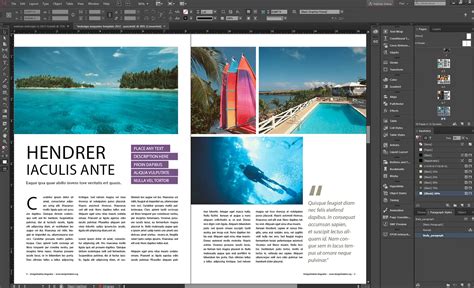
InDesign emerged as the successor to PageMaker, a product Adobe acquired through its purchase of Aldus Corporation in late 1994. This transition was pivotal, as by 1998, PageMaker had seen its dominance in the professional market wane, largely due to the superior feature sets offered by QuarkXPress, particularly its versions 3.3 (1992) and 4.0 (1996). The competitive landscape was intense; in 1999, Quark even made an offer to acquire Adobe, proposing to divest PageMaker to comply with antitrust regulations. Adobe, however, declined this offer and instead committed to developing a new, advanced desktop publishing application. Aldus had already initiated development on a successor to PageMaker, codenamed "Shuksan," which laid the groundwork for InDesign's innovative architecture.
Foundational Innovations and Early Development
From its inception, Adobe InDesign was designed to push the boundaries of digital publishing. It was the first Desktop Publishing (DTP) application to incorporate several groundbreaking features that have since become industry standards. These include robust support for Unicode character sets, enabling seamless handling of diverse languages and symbols. Its advanced typography capabilities, powered by OpenType fonts, offered unprecedented control over character spacing, ligatures, and stylistic alternates. Furthermore, InDesign introduced advanced transparency features, sophisticated layout styles, and optical margin alignment, which refines text alignment for improved visual appeal. Cross-platform scripting with JavaScript also opened new avenues for automation and customization.

The initial release of InDesign in 1999 laid a strong foundation. However, as the software evolved and introduced new functionalities, particularly with the release of InDesign CS, backward compatibility became a challenge. The program and its document format were not inherently backward-compatible with older versions. To address this, InDesign CS2 introduced the INX (.inx) format, an XML-based document representation. This innovative format was designed to facilitate backward compatibility with future versions. Indeed, InDesign CS versions updated with the April 2005 (3.1) update could read InDesign CS2-saved files exported to the .inx format. It's important to note that the InDesign Interchange format does not support versions earlier than InDesign CS.
A significant milestone in InDesign's history was its role as the first native Mac OS X publishing software. This cemented its position as a premier tool for creative professionals operating within the Apple ecosystem. With the introduction of its third major version, InDesign CS, Adobe strategically increased its distribution by bundling it with other industry-leading applications like Adobe Photoshop, Adobe Illustrator, and Adobe Acrobat, all integrated within the Adobe Creative Suite. This bundled approach offered a comprehensive design workflow and enhanced the value proposition for creative professionals.
The evolution continued with Adobe InDesign CS3 (and the corresponding Creative Suite 3) in 2007. This version was developed as universal binary software, ensuring compatibility with both native Intel and PowerPC Macs. This was a significant undertaking, occurring two years after the initial schedule for Intel-based Macs, which, while eventually beneficial, did cause some inconvenience for early adopters of Intel hardware. Generally, newer versions of InDesign can open files created by older versions, but the reverse is not typically true, underscoring the continuous advancement of the software's underlying architecture.
Advanced Typographic Control and Multilingual Capabilities
Adobe InDesign's prowess in typography is a key differentiator. The software provides designers with granular control over text, making it possible to achieve sophisticated and aesthetically pleasing layouts. Paragraph styles are a fundamental and essential tool for designers working with text in Adobe InDesign. Despite their potentially intimidating appearance, they are remarkably straightforward to operate, allowing for consistent formatting across entire documents.
How To Use Paragraph Styles (and save time) in Adobe INDESIGN // Beginner Tutorial
InDesign's commitment to global usability is evident in its extensive support for multiple languages. For designers working with languages that read from right to left, such as Arabic or Hebrew, InDesign Middle Eastern editions offer unique, specialized settings. These settings are crucial for correctly laying out text that flows from right to left. This bi-directional text flow capability applies to several object types: the story itself, paragraphs, individual characters, and tables. It enables the seamless mixing of right-to-left and left-to-right words, paragraphs, and even entire stories within a single document, a critical feature for multinational publications.
Furthermore, InDesign provides robust tools for generating tables of contents and indices. The table of contents feature can generate titles based on document structure, with support for multiple languages, ensuring that the table is sorted according to the chosen language. For indexing, InDesign allows for the creation of simple keyword indexes or more detailed indexes by utilizing embedded indexing codes within the text. While InDesign cannot insert character style information as part of an index entry-a limitation when indexing titles of books, journals, or movies, for example-its indexing capabilities are still powerful. Indices are structured to support up to four levels: the top level and three sub-levels, offering a good degree of organizational depth.
Importing, Exporting, and Complex Script Rendering
The ability to integrate with existing workflows is paramount in professional design. Adobe InDesign excels in this area through its comprehensive import and export functionalities. It can import QuarkXPress files up to version 4.1 (released in 1999), even supporting specific Arabic fonts like Arabic XT, Arabic Phonyx, or Hebrew XPressWay. This import process is designed to retain the original layout and content as accurately as possible, easing the transition for users migrating from other DTP software.
InDesign includes a robust set of over 50 import/export filters. This extensive library ensures compatibility with a wide range of file formats. Notably, it features a Microsoft Word 97-98-2000 import filter, simplifying the process of incorporating text from word processing documents. A plain text import filter is also included, offering flexibility for various text sources.
The software's capacity for complex script rendering is another significant advantage, particularly for global design projects. InDesign fully supports Unicode character encoding, which is the universal standard for representing text. Crucially, its Middle Eastern editions are specifically engineered to handle complex text layouts for Arabic and Hebrew scripts. This involves managing ligatures, contextual forms, and the right-to-left rendering order inherent to these languages, ensuring that text appears correctly and naturally.
Technical Specifications and System Requirements
To harness the full power of Adobe InDesign, understanding its technical requirements is essential. For Mac users, InDesign is designed to run on macOS 10.11 or later. The software's performance is significantly influenced by the underlying hardware. A multi-core Intel or AMD processor with 64-bit support and a clock speed of 2 GHz or faster is recommended for optimal operation.

Storage requirements are also a consideration; at least 4 GB of available hard-disk space is necessary for installation, though more is always recommended for project files and cached data. For graphics processing, InDesign on macOS leverages the GPU with Metal support, specifically benefiting from Apple's M1, M2, or M3 chips or Intel GPUs.
The analysis of these technical requirements reveals that InDesign's demands are moderate for a professional design application. The emphasis on 64-bit architecture, multi-core processors, and sufficient RAM is geared towards handling the demanding tasks inherent in complex layout design. Recommendations for SSD storage and higher-resolution displays further highlight Adobe's focus on user experience and operational efficiency.
Licensing, Support, and Compatibility
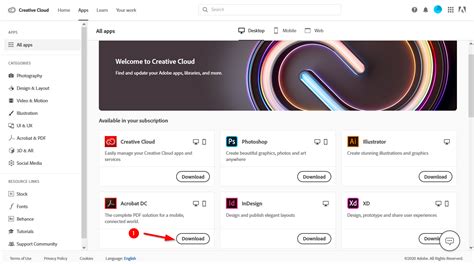
Adobe InDesign operates on a subscription-based licensing model, primarily through the Creative Cloud. This means that access to the software is typically managed through an ongoing subscription rather than a one-time purchase. This model provides users with continuous access to the latest features and updates.
Adobe generally supports the current version of InDesign and the two previous major versions. While older versions might receive critical bug fixes, they will not be updated with new features. Adobe does not typically announce specific "end of life" dates for individual InDesign versions in the same manner as hardware products.
InDesign boasts excellent support and compatibility across various platforms and operating systems. Its broad OS support and extensive language localization ensure a stable and accessible experience for a global user base. Adobe's commitment to supporting recent OS versions and providing regular updates keeps the software current and compatible with evolving hardware and software ecosystems.
Security and Performance Considerations
Security is a critical aspect of any professional software, and Adobe InDesign benefits from Adobe's robust secure development lifecycle. This includes practices like sandboxing, secure update mechanisms managed through the Creative Cloud desktop application, and regular security patches. Adobe proactively addresses any identified vulnerabilities through regular security bulletins. Users are strongly advised to keep their software updated to the latest version to mitigate potential risks.
While formal, standardized benchmark scores for InDesign are not as commonly published as they are for hardware, its performance can be analyzed based on its design and user feedback. InDesign delivers strong performance on systems that meet or exceed its recommended specifications. Its ability to leverage multi-core processors and GPU acceleration contributes to smooth operation for most professional tasks. However, resource-intensive operations, such as working with very large or complex documents, can strain less powerful systems. Continuous updates from Adobe often include performance improvements, further optimizing the software.
File opening and saving times can vary significantly depending on the complexity and size of the document. Similarly, export speeds to formats like PDF are intensive, relying heavily on CPU and RAM. The power consumption of InDesign is indirect, tied to the energy usage of the hardware it runs on.
Competitive Landscape and Overall Standing
In the competitive landscape of desktop publishing software, Adobe InDesign stands as the undisputed industry standard. Its comprehensive feature set, advanced typographic controls, and unparalleled integration within the Adobe Creative Cloud ecosystem make it an indispensable tool for designers, publishers, and marketing professionals.
Key strengths that solidify its position include its powerful layout capabilities, seamless workflow integration with other Adobe applications (Photoshop, Illustrator, Acrobat), and continuous updates that introduce new features and performance enhancements.
However, InDesign is not without its criticisms. The subscription-based licensing model is a frequent point of contention for users who prefer perpetual licenses or one-time purchases. Additionally, its resource-intensive nature means that optimal performance often necessitates modern, powerful hardware, particularly ample RAM and a fast processor.
Compared to alternatives like QuarkXPress, InDesign generally offers a more contemporary interface and tighter integration with other Adobe Creative Cloud applications. Affinity Publisher, another strong contender, is known for its perpetual license model and often impressive performance, especially in terms of speed and resource efficiency on certain tasks.
Despite these comparisons, InDesign's overall standing remains exceptionally strong. Its commitment to innovation, extensive feature set, and deep integration within the professional creative workflow ensure its continued dominance in the desktop publishing market. Its performance is robust on recommended systems, though real-world benchmarks are heavily influenced by document complexity. The software's support and compatibility are excellent, characterized by broad OS support and extensive localization, making it a reliable and accessible tool for a global user base. The security posture is high, thanks to Adobe's ongoing efforts in secure development and regular updates.
User Experience and Accessibility
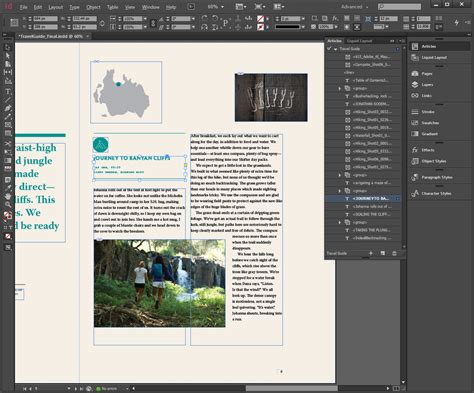
Adobe InDesign is designed with professional users in mind, offering a deep and customizable interface. For those new to the software, the learning curve can be steep, but a wealth of resources is available. Adobe provides extensive user guides, tutorials, and an active community forum where users can ask questions and share ideas. The "Adobe InDesign Community" is a valuable resource for both beginners and experienced users seeking support or inspiration.
The software's compatibility requirements, such as needing macOS 10.11 or later, ensure that it runs on reasonably modern hardware. The integration with Creative Cloud also simplifies updates and access, though it requires an internet connection for activation and use, along with an Adobe ID. It is important to note that certain virtualized or server-based environments are not supported.
The developer is required to provide privacy details with app updates, adhering to industry standards. This transparency is crucial for users entrusting their creative work to the software.
Ultimately, Adobe InDesign for Mac represents a sophisticated and powerful tool for professional layout and design. Its long history, continuous innovation, and deep integration within the Adobe ecosystem solidify its position as an industry leader, empowering creators to bring their visions to life with unparalleled precision and creative freedom.