In the realm of digital photography, the pursuit of a distinctive and polished aesthetic is paramount. Photographers, from seasoned professionals to burgeoning enthusiasts, constantly seek tools and techniques to transform their images from ordinary snapshots into compelling works of art. Among the most impactful and widely adopted of these tools are Lightroom presets. These powerful digital assets offer a seemingly magical ability to imbue photographs with a desired mood, style, and color palette with remarkable speed and ease. But what exactly are Lightroom presets, how do they function, and what role do they play in the modern photographic workflow?
The Essence of Lightroom Presets: Saved Editing Configurations
At their core, Lightroom presets are nothing more than a saved group of editing settings within Adobe Lightroom software. When a photographer meticulously adjusts sliders for exposure, contrast, color balance, tone curves, and other parameters to achieve a specific look on an image, they have the option to save that entire configuration of settings. This saved collection of adjustments is what constitutes a preset. The primary allure of presets lies in their ability to be applied to any photograph with a single mouse click, thereby saving hours of repetitive editing, especially when dealing with large batches of images from a single shoot.
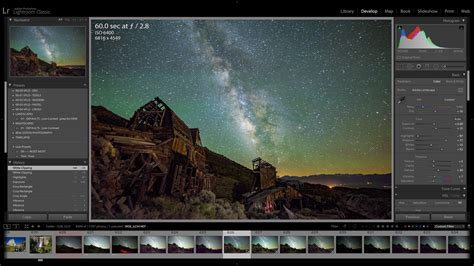
The concept of presets emerged with Lightroom itself, offering a significant advantage over manual editing. As a beta program feature, users could save their Develop Module adjustments to apply them to other images, even those not from the same shoot. This immediate and easily reversible application of edits was a groundbreaking advancement. Unlike actions in Photoshop, Lightroom presets offer a more fluid and integrated editing experience.
Where to Find and How to Utilize Lightroom Presets
The accessibility of Lightroom presets is a key factor in their widespread adoption. Photographers have several avenues for acquiring and employing these editing tools:
Creating Your Own: The most personalized approach involves developing your own presets. By editing an image to perfection and then saving those specific adjustment settings, you create a tool that embodies your unique vision. This process allows for the distillation of your creative style into a reusable asset. As you refine your editing, you can save updated versions of your custom presets, creating a library tailored to your specific needs and preferences. This is a process that can be taught and mastered, becoming a cornerstone of a photographer's workflow.
Utilizing Lightroom's Built-in Presets: Adobe Lightroom itself comes bundled with a range of default presets. These can serve as excellent starting points for learning and experimentation, offering various looks such as black and white conversions, cinematic tones, and portrait enhancements. While useful for understanding how presets function, they often lack the specificity and nuance required for consistent professional use across diverse photographic scenarios.
Purchasing Third-Party Preset Packs: The market for Lightroom presets is vast and diverse. Numerous professional photographers and editing experts have curated and sell their own preset collections. These paid packs are often designed for specific genres of photography, such as weddings, landscapes, portraits, or travel, and are built with versatility and quality in mind. They can offer a significant shortcut to achieving a professional and consistent look, allowing users to leverage the honed skills and styles of experienced artists.
Making Your Own to Sell: For those who have developed a strong and recognizable editing style, creating and selling their own preset packs can be a viable entrepreneurial venture. This allows them to share their expertise and aesthetic with a wider audience, contributing to the vibrant ecosystem of photographic tools.
The Transformative Power of Presets: What They Do
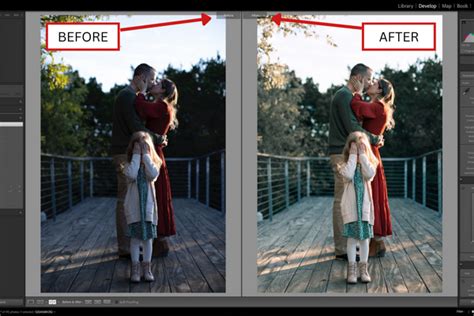
Lightroom presets are capable of performing a wide array of image transformations, fundamentally altering the mood and appearance of a photograph. Their capabilities include, but are not limited to:
- Adjusting Brightness and Exposure: Making a photo lighter and airier, or conversely, darker and moodier.
- Modifying Contrast: Increasing or decreasing the difference between light and dark areas.
- Altering Color Tones: Adding warmth, coolness, or specific color casts to an image.
- Creating Black and White Conversions: Removing all color to produce monochromatic images.
- Enhancing or Suppressing Specific Colors: Targeting and adjusting the saturation, hue, or luminance of individual colors.
- Adding a Matte Look: Softening the contrast and introducing a subtle, vintage aesthetic.
- Applying Selective Adjustments: Modifying specific areas within a photo, such as enhancing the sky or brightening a subject.
- Simulating Film Emulations: Recreating the distinct looks of classic film stocks.
Benefits and Limitations: A Balanced Perspective
The advantages of using Lightroom presets are numerous and significant, particularly for professional photographers where time is a valuable commodity.
Key Benefits:
- Speeding Up Workflow: This is perhaps the most immediate and impactful benefit. For photographers dealing with hundreds or even thousands of images, applying a base edit with a preset can drastically reduce post-production time, freeing up hours for shooting, client management, or personal life.
- Achieving a Consistent Look: Presets are instrumental in developing and maintaining a cohesive visual style across an entire portfolio or social media feed. This brand consistency is crucial for recognition and attracting clients who resonate with a particular aesthetic.
- A Starting Point for Creativity: A common misconception is that presets stifle creativity. In reality, a well-crafted preset serves as a foundation, handling the bulk of the color grading and toning. This allows photographers to focus on the finer details and creative nuances of each individual image, rather than starting from scratch every time.
- Learning and Experimentation: For beginners, presets offer an accessible entry point into photo editing. By applying and then deconstructing presets, aspiring photographers can learn how different adjustments impact an image, accelerating their understanding of Lightroom's capabilities.
However, it's crucial to acknowledge the limitations of presets:
- No One-Size-Fits-All Solution: Presets are not magic buttons. Their effectiveness is highly dependent on the original image's lighting, color, and composition. A preset designed for a bright, sunny outdoor scene might produce undesirable results on a dimly lit indoor portrait, or vice versa. The color green, for instance, will be affected differently in a forest shot than in a snowy mountain landscape.
- Requires Manual Adjustment: While presets provide a significant head start, they are rarely a final edit. Almost every preset will require some degree of tweaking to perfectly suit the individual photo. Adjustments to exposure, white balance, contrast, or specific color tones are often necessary to achieve the desired outcome.
- Static Nature: Traditional presets apply the same set of static rules to every image. They do not inherently understand the nuances of individual photos, such as the subject matter, lighting conditions, or inherent colors.
Types of Lightroom Presets: Basic, Adaptive, and Brushes
Lightroom presets can be categorized into distinct types based on how they are created and applied:
Basic Presets: These are the most common type, created and applied within the basic editing panel of Lightroom. They encompass any combination of standard editing adjustments.
Adaptive Presets: These presets are built using Lightroom's masking panel. They are designed to target specific parts of an image, such as the sky, subject, or background, allowing for localized adjustments to add a particular look or feel. While created in the masking panel, they are often applied from the basic preset panel for ease of use.
Brush Presets (Masking Tools): While the term "brushes" is still used, these are essentially presets that can be applied anywhere a mask can be utilized. They offer granular control, allowing for targeted edits on specific elements within a photograph.
Navigating the Preset Market: Free vs. Paid
When embarking on the journey of using presets, the decision between free and paid options is a common one.
Free Presets: Thousands of free presets are available online, often offered by photography blogs, YouTubers, or as promotional material for larger, paid collections. They are excellent for learning, experimentation, and understanding the fundamental principles of preset application. However, free presets can sometimes be a "one-trick pony," designed to work exceptionally well on a very specific type of image but falling apart in different conditions.
Paid Presets: Professional, paid preset collections are typically developed by established photographers who have invested significant time in refining their style and creating versatile tools. The advantages of paid presets include higher quality, greater versatility, and often, variations designed for different lighting scenarios (e.g., golden hour, overcast, indoor). Furthermore, paid collections usually come with installation guides and customer support, providing a valuable resource if issues arise.
Crafting Your Own Signature Style: The Power of Custom Presets
While utilizing presets created by others can be beneficial, the ultimate goal for many photographers is to develop a truly unique and recognizable style. Creating your own custom presets is the most effective way to achieve this. By distilling your personal creative vision into reusable tools, you move beyond adopting someone else's aesthetic and begin defining your own. These custom presets are inherently tailored to your specific camera, lenses, and shooting approach.
The process of creating a custom preset involves:
- Starting with a Good Photo: Open a well-exposed RAW image in Lightroom's Develop module.
- Editing to Perfection: Make all the necessary adjustments until you are completely satisfied with the look.
- Saving as a New Preset: Navigate to the Presets panel, click the "+" icon, and select "Create Preset."
- Selecting Settings to Include: A dialog box will appear with a comprehensive list of adjustable settings. It's crucial to choose which settings to include. Generally, it's advisable to exclude settings like White Balance, Exposure, Transform, and Lens Corrections, as these are typically photo-specific and should be adjusted manually.
- Naming and Organizing: Give your preset a descriptive name that clearly indicates its purpose or style. Organize it into a dedicated folder for easy retrieval.
By building a library of your own presets for various scenarios, you gain complete control over your editing workflow and solidify your distinct artistic identity.
The Evolution of Editing: Presets vs. AI-Powered Solutions
While traditional presets have been a mainstay for efficient and consistent editing for years, the landscape of photo post-production is continually evolving. Artificial intelligence (AI) is emerging as a powerful new frontier, offering capabilities that go beyond static, pre-defined settings.
Tools like Imagen represent the next evolution, moving beyond applying the same rules to every photo. These AI-powered solutions analyze each image individually and make intelligent adjustments based on a learned editing style. Instead of a magic button, think of it as a smarter brush, trained on your unique aesthetic.
The core of these AI systems lies in the creation of a Personal AI Profile. By submitting a substantial collection of your previously edited photos (often thousands), the AI analyzes your editing habits â how you handle exposure in challenging light, your approach to skin tones, color grading in shadows and highlights, and even cropping preferences. This profile then allows the AI to intelligently apply your style to new images.
The Future of Photo Editing!? AI vs Presets
These AI solutions integrate seamlessly with existing workflows, often operating as desktop applications that communicate directly with Lightroom, Photoshop, and Bridge. The editing process itself can be incredibly fast, with AI processing images in fractions of a second. The edits are then downloaded back into your Lightroom catalog, with all adjustments applied as if you had moved the sliders yourself.
For photographers who are newer and haven't yet amassed thousands of edited images, or for those who admire and wish to emulate the style of industry leaders, Talent AI Profiles are available. These are AI profiles built by analyzing the complete editing styles of renowned photographers, offering an AI-powered interpretation of their signature looks.
Beyond editing, AI is also streamlining other aspects of post-production. AI Culling, for instance, automates the tedious process of selecting the best images from a shoot by analyzing for blinks, blurry shots, duplicates, and grouping similar images.
Presets vs. AI Editing: A Direct Comparison
To fully appreciate the advancements, a direct comparison between traditional Lightroom presets and AI-powered editing is insightful:
| Feature | Lightroom Presets | Imagen AI Editing |
|---|---|---|
| Application Method | Applies the same saved group of static settings to every photo. | Analyzes each photo individually and applies unique, intelligent adjustments based on the imageâs specific content and your learned style. |
| Consistency | Provides a baseline for consistency but requires manual adjustments for true uniformity across different conditions. | Delivers excellent consistency by adapting the edit to each photo, handling a wide variety of lighting, scenes, and subjects. |
| Personalization | Highly personal if created from scratch; adopts the creator's style when using presets from others. | Creates a Personal AI Profile that learns from your past edits, evolving with you and becoming deeply personalized. |
| Workflow Role | Serves as a single, valuable step in a manual editing process. | Can be a comprehensive workflow solution, including AI culling, editing, cloud backup, and delivery. |
| Learning Curve | Easy to apply; creating versatile, professional presets requires significant skill. | Requires an initial setup to train the AI profile; subsequent editing is largely automated. |
| Adaptability | Not adaptable; presets for one scenario often perform poorly in others without significant correction. | Highly adaptable, intelligently adjusting to the specific characteristics of each individual image. |
The Future of Post-Production: Embracing Intelligent Tools
The photography industry is in a perpetual state of evolution, driven by technological advancements, rising client expectations, and the increasing demand for faster turnaround times. To thrive in this dynamic environment, photographers must work smarter, not just harder. AI-powered tools like Imagen are not merely a trend; they represent the future of professional post-production.
By embracing AI, photographers are not relinquishing creative control. Instead, they are delegating the tedious, mechanical aspects of editing to an intelligent assistant that they have personally trained. This delegation liberates mental energy, allowing artists to concentrate on what truly matters: capturing beautiful images, crafting compelling narratives, and nurturing strong relationships with their clients. Whether presets are viewed as shortcuts, signatures, or stepping stones, their role in shaping a photographer's workflow and artistic expression continues to be a vital aspect of modern digital imaging.