Adobe Photoshop, a name synonymous with professional image manipulation, has made a significant leap into the mobile world with its Android application. This app aims to bring the iconic image editing and design capabilities of its desktop counterpart to the fingertips of creators who prefer to work on their phones and tablets. While not a direct replica of the full desktop version, Photoshop for Android offers a feature-rich experience, making advanced editing accessible and intuitive for a wide range of users, from casual enthusiasts to seasoned professionals.
A New Era of Mobile Creativity
The introduction of Photoshop to Android devices marks a pivotal moment for mobile creativity. Creators have embraced the Photoshop mobile app since its debut, utilizing it for a diverse array of tasks. These range from straightforward photo editing and the creation of unique digital art while on the move, to the assembly of intricate collages and the design of compelling thumbnails. The app is meticulously designed to be intuitive and accessible, catering specifically to creators who find their workflow best suited to mobile devices.
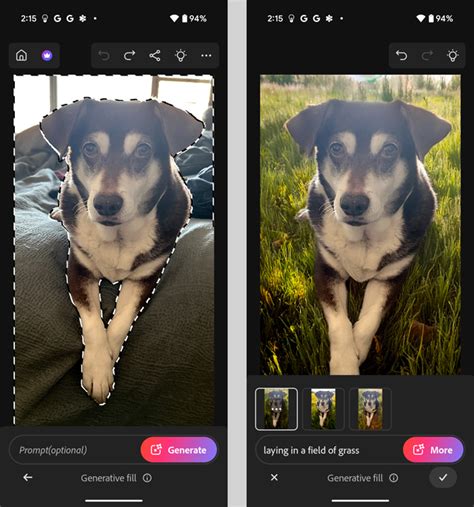
The all-new Android application integrates Photoshop’s renowned image editing and design functionalities. This includes powerful tools such as layering, masking, and the highly acclaimed Generative Fill, which is powered by Adobe's Firefly AI. This mobile integration is engineered to expedite the process for the next generation of creators, enabling them to commence their Photoshop journey with ease and efficiency.
Feature-Rich Editing Tools at Your Fingertips
Photoshop for Android delivers a comprehensive suite of tools designed to enhance and transform images. The application is packed with features that empower users to refine their photos with precision and creativity. For instance, the Spot Healing Brush is available for touching up imperfections, allowing for quick and effective removal of blemishes or distractions. The app also supports the use of layers, a fundamental aspect of professional editing, which facilitates the combination and manipulation of multiple images or elements to create complex compositions.
A standout feature is Adobe's Tap Select tool. This innovative function is designed to automatically identify and select individual parts of an image, such as subjects or backgrounds, making them ready for precise movement or editing. During demonstrations, the Tap Select tool has shown its versatility by allowing users to isolate specific objects within a photo, such as a car, and then apply targeted adjustments like color corrections or other enhancements. The selection made by Tap Select can be further refined using Photoshop's familiar Brush Tool, enabling users to add to or subtract from the selection if the automatic detection isn't perfectly accurate. Crucially, these edits operate within Photoshop's robust layering system, meaning changes can be modified at any stage of the editing process, offering unparalleled flexibility.
The Power of AI: Generative Fill and Beyond
A significant draw for the Photoshop Android app is its integration with Adobe's cutting-edge AI technology, particularly Firefly. This generative AI powers features like Generative Fill, which allows users to transform elements of an image by simply providing a text prompt. Whether it's replacing subjects, altering backgrounds, or adding entirely new elements, Generative Fill offers a powerful way to bring imaginative ideas to life. Early demonstrations have showcased its ability to remove unwanted objects, like parked cars from a scene, and replace them with entirely different elements, such as palm trees, with multiple generated options to choose from.
While Generative Fill is a powerful tool, users are allocated a limited number of credits each month for its use. This limitation is a consideration, especially for extensive or experimental editing. However, the AI processing, or at least a significant portion of it, appears to occur on Adobe's servers, which explains the app's requirement for a stable internet connection for complex tasks. This offloading of processing power makes sense, as even high-end smartphones may not possess the dedicated hardware to run such advanced AI models locally. The app's demand for a substantial amount of RAM (6GB, with 8GB or more recommended for optimal performance) further underscores the computationally intensive nature of these features.
Introduction to Generative Fill | Adobe Photoshop
Accessibility and User Experience
Photoshop for Android is designed with both novice and experienced users in mind. The interface, while familiar in its toolset, presents a layout that differs from the desktop version to accommodate a touchscreen environment. Editing tools are typically located at the bottom of the screen, with the main display area at the top. When a tool with additional options is selected, the interface expands to provide more screen real estate for those specific controls.
The app includes a variety of tools familiar to Photoshop users, such as the Healing Brush, Clone Stamp, and Remove Tool, alongside selection tools like the Magic Wand, Object Select, and the aforementioned Tap Select. The implementation of these tools on a touchscreen requires a period of adjustment. Navigating and manipulating images often involves two-finger gestures for zooming and repositioning, and palettes like the Layers palette are often hidden until actively invoked, at which point they expand to fill the screen.
Despite the learning curve, the skills acquired using the desktop version of Photoshop are largely transferable. The naming conventions for tools and features remain consistent, ensuring that users won't be left guessing about the function of various blending modes or adjustment layers. However, it's acknowledged that some highly precise, pixel-level manipulations that are easily achievable with a mouse on a desktop may be more challenging on a small touchscreen. This has led to an increased emphasis on automated selection tools.
Integration and Community
Photoshop for Android aims to create a seamless workflow by allowing users to work on the same files across both the mobile and web versions of Photoshop. This interconnectedness enhances productivity and flexibility. Furthermore, the app encourages connection with the broader Photoshop community through Adobe Community Forums. These forums serve as a platform for users to share their work, receive feedback, offer support, and find inspiration from fellow creators.
The app also provides access to Adobe Stock assets, offering a vast library of images, textures, and other design elements that can be commercially used. This integration is particularly beneficial for mobile users who may not regularly utilize these assets on their desktop but can see the value in easily incorporating them into their on-the-go projects, such as adding text with a wide selection of fonts to an image.
Availability and System Requirements
Photoshop for Android is currently available in beta on the Google Play Store. It is compatible with devices running Android 11 software or higher. A minimum of 6GB of RAM is required to run the application, with 8GB or more recommended for optimal performance. Early testing on devices like the Google Pixel 9 has shown the app to perform well for quick image editing tasks.
It's important to note that the app's availability can be selective, and some devices may not be able to install it, potentially due to optimization for smartphones. The user experience is further enhanced by the ability to easily share edited images directly to social media platforms, making it a complete solution for social media content creation.
A Free Beta and Future Prospects
During its initial beta period, Adobe is offering all features of the Photoshop Android app for free as a gesture of appreciation to its beta community. However, this free access is stated to be for a "limited time only," with the expectation that a subscription will be required once the app moves beyond its beta phase. This transition is anticipated within the next few months.
When Photoshop mobile launched on iPhone, users had to subscribe immediately to access the full feature set. This subscription typically involves a mobile and web plan costing around $7.99 per month or $69.99 per year. It is highly probable that Adobe will implement a similar subscription model for the Android version. Subscribers to desktop Photoshop plans might find the mobile app included in their existing subscription, mirroring the arrangement for the iPad app. For those who are not yet subscribers, the beta period offers an invaluable opportunity to explore the app's extensive capabilities without charge.
The journey of Photoshop on Android began with earlier attempts, such as the discontinued Photoshop Touch app in 2015. This new iteration, however, represents a significant advancement, bringing a more robust and feature-rich editing experience to Android users. It bridges the gap between the power of desktop Photoshop and the convenience of mobile editing, empowering a new wave of creators to produce stunning visual content wherever they are.