Large editing jobs can be a real drag, especially when you're a solopreneur navigating a multitude of tasks. Finding the right balance can be tricky, but thankfully, Picsart's Batch Editor is here to streamline your workflow. This powerful feature allows for simple image edits to be applied simultaneously to a large number of photos, up to 50 at a time. By leveraging this tool, you can significantly cut down on repetitive tasks, freeing up valuable time for other creative endeavors and ensuring a consistent, professional look across all your visual content.
The Power of Simultaneous Editing: What Batch Editor Offers
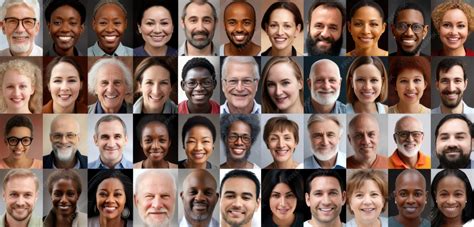
The Batch Editor in Picsart is designed to tackle the time-consuming nature of editing multiple images. It's a game-changer for those who need to apply the same adjustments across a series of photos, whether for a social media campaign, an e-commerce store, or a personal project. The core benefit lies in its ability to perform "light edits to a number of photos at a time," saving you from the tedious process of editing each picture individually. This is particularly useful for marketers and brand owners who are pressed for time but have a considerable number of product images to prepare.
The main benefit of using this tool is the sheer amount of time that is saved. This tool allows you to cut corners and fly through tasks that would otherwise take up valuable time. It's also a key way of making sure that your images all have a consistent and professional look to them. By using the impressive technology this editor provides, you can make sure that everything matches. You can guarantee that even the smallest details of the editing process are mirrored perfectly between the individual images.
Key Functions within the Batch Editor
Picsart's Batch Editor is equipped with several functions that allow users to alter various elements of their imagery efficiently. Understanding these functions is key to unlocking the full potential of this feature.
Adding Watermarks for Brand Protection
One of the most common needs when sharing branded or copyrighted content is the addition of watermarks. The Batch Editor makes this process incredibly simple. You can separately design your watermark (Picsart is a great place to do that 😉) and then select it when you utilize the Watermark tool within the Batch Editor. This ensures that all your shared images are consistently branded, protecting your intellectual property without requiring individual application on each photo.
Image Resizing for Diverse Platforms
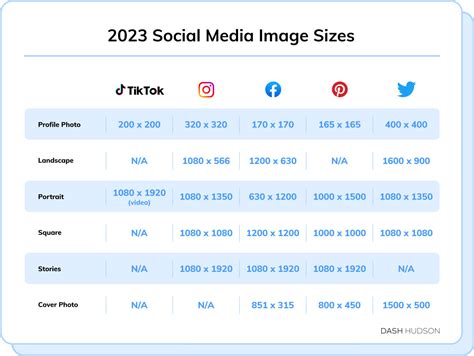
In today's digital landscape, images often need to be optimized for various platforms, from social media sites to selling platforms like Etsy. The Batch Editor simplifies image resizing by offering a wide selection of predetermined sizes that work for different applications. You can choose from these presets to ensure your images fit perfectly without distortion. Furthermore, you are even able to select a color to fill in any empty space that might result from the resizing process, maintaining a clean and polished aesthetic.
Cropping for Precision and Composition
Similar to the resizing tool, the Batch Editor allows for precise cropping of your images. You can select from pre-created size guides to crop your image down to whatever dimension you like. This is invaluable for focusing on specific elements within a photograph or for adhering to strict aspect ratio requirements for different publishing platforms. The ability to crop multiple images simultaneously ensures consistency in composition across your visual assets.
Background Removal for Professional Product Shots
A more technical yet incredibly useful feature of the Batch Editor is its ability to remove backgrounds from images. With a simple click on "Remove BG," the tool automatically detects and deletes the background of your pictures. This is particularly helpful for product photography, where you might want to showcase an item against a clean or striking background.
The option to then add a color or a new background to the image you have just edited further enhances its utility. Why not feature the item you are selling in front of a striking color instead of something simple? This capability can transform ordinary product photos into eye-catching marketing materials, helping your products stand out.
AI Enhance for Crystal Clear Results
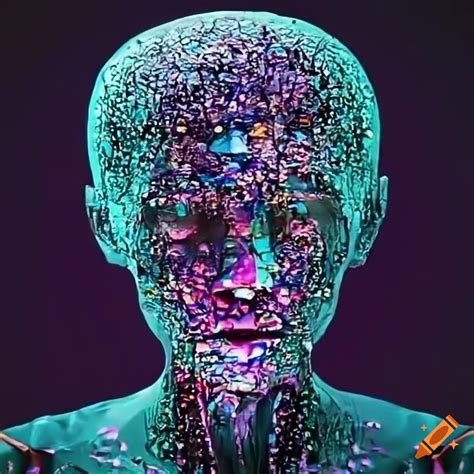
The final, yet perhaps most impressive, function available through the Batch Editor is the legendary AI Enhance tool. With just the click of a button, your selected images can receive a significant "glow-up," resulting in crystal clear visuals. Simply click on the AI Enhance button and watch as your images begin to shine. You can even alter the level of enhancement to control how much the effect is applied, allowing you to see the before and after effects clearly. This tool is perfect for revitalizing older photos or ensuring that new ones have a professional, polished finish.
How to Utilize the Batch Editor: A Step-by-Step Guide
Getting started with the Batch Editor is straightforward, making it accessible even for those new to photo editing.
- Open Picsart: Launch the Picsart application or navigate to the web editor.
- Select Batch Edit: Locate and click on the "Batch Edit" option.
- Upload Images: Upload the images you wish to edit. Remember, you can select up to 50 images at a time.
- Choose Features: Click on the specific features you want to apply to your pictures. You have the flexibility to select different options for different images within the same batch, allowing for nuanced editing even in bulk.
- Apply Edits: Once you have selected your desired tools and settings, apply the edits.
- Save and Export: Save your edited images.
You're all done! The process is designed to be intuitive, ensuring that even users with limited editing experience can achieve professional-looking results efficiently.
Beyond the Batch Editor: Picsart's Extensive Editing Capabilities
While the Batch Editor is a standout feature for efficiency, it's important to recognize that Picsart itself is a vast digital creation platform offering limitless possibilities for photo and video editing. Picsart is the world’s largest digital creation platform. Its AI-powered tools give creators of all levels the ability to design, edit, draw and share photo and video content anywhere. It’s used by consumers, marketers and content creators for both personal and professional design, and is available to businesses via API partnerships and integrations.
For those new to photo editing, the sheer number of options can seem intimidating. However, starting with the basics and gradually exploring more advanced features is the key. Picsart provides a comprehensive ecosystem of free-to-use content, powerful tools, and creator inspiration. With over a billion downloads and more than 150 million monthly active creators, Picsart has established itself as the world's largest creative platform.
Complementary Tools for Enhanced Editing
Beyond the Batch Editor, Picsart offers a suite of tools that can complement your editing workflow, even when not used in a batch context. These include:
- Background Remove Tool: As mentioned, this is invaluable for isolating subjects or creating clean product shots. It's helpful if you've captured a lot of photos in one setting but want them to look different when posting online.
- Color Replace Tool: This tool is perfect for those who want to alter the appearance of specific colors within an image. It’s incredibly useful if you’d like to change your outfit color to match something in the background or if you’d like a model’s outfit to match your brand colors. This is another useful tool for those who do batch photography.
- AI-Powered Retouching Tools: For portraits, Picsart offers an entire suite of AI-powered retouching tools. Whether you want to explore a different hair color, remove red-eye, whiten teeth, adjust eye bags and blemishes, or add makeup, it's easy to do.
- Blurring Tools: Learning how to blur photos is an essential photo editing hack. Blurring allows you to change the focus of a photo, helping you guide the viewer’s eye to your subject. You can blur the background, blur a face to protect someone’s identity, use motion blur to add a sense of movement, or radial blur to add velocity.
Leveraging Templates and Workarounds
While Picsart doesn't have a direct "batch editing" feature in the traditional sense outside of the dedicated Batch Editor for specific tasks, its versatile toolkit offers creative workarounds to achieve similar results for other types of edits. Picsart’s template feature lets you design once and reuse layouts. Add text, stickers, or effects. Yes! While how to batch edit in Picsart isn’t straightforward for all functions, these workarounds let you replicate edits efficiently. Use templates for social media, save favorite effects for quick styling, or reuse project layers for watermarks.
The Impact of Batch Editing on Workflow and Consistency
Batch editing is one of the most useful tools in a photo editor’s arsenal because it allows you to quickly do light edits to a number of photos at a time. Not only does batch editing save you time, it also helps you see all of your final photos together in one place. This is very useful for marketers and brand owners who are low on time but have a number of product images to edit.
The ability to apply edits simultaneously ensures a high degree of consistency across your visual assets. This is crucial for maintaining a strong brand identity and presenting a polished, professional image to your audience. When every image shares the same subtle enhancements, color grading, or resizing, it creates a cohesive and harmonious collection that is more pleasing to the viewer and more effective in conveying your message.
Long gone are the days of spending hours editing individual pictures. With Picsart's Batch Editor, you can spend more time on other tasks and less time stressing about getting edits done! This efficiency allows creators to focus on the strategic aspects of their work, such as content creation, marketing, and audience engagement, rather than getting bogged down in the minutiae of repetitive editing tasks.
Picsart has collaborated with major artists and brands like BLACKPINK, Taylor Swift, the Jonas Brothers, Lizzo, Ariana Grande, Jennifer Lopez, One Direction, Sanrio: Hello Kitty, Warner Bros. Entertainment, iHeartMedia, Condé Nast, and more. This widespread adoption and endorsement highlight the platform's effectiveness and appeal to a broad spectrum of creators, from individual artists to global brands. Download the app or start editing on web today to enhance your photos and videos with thousands of quick and easy editing tools, trendy filters, fun stickers, and brilliant backgrounds. Make sure to check out this great tool for all of your editing needs.