The world of photography is often punctuated by moments of intense anticipation. For dedicated photographers, these moments are not limited to the unveiling of new camera bodies from industry giants like Nikon and Canon, or the excitement surrounding Apple's latest technological advancements. A significant, albeit perhaps less widely publicized, event in the photographer's calendar is the release of new Adobe software. For those who prioritize in-app functionalities and seamless mobile integration, a dedicated section within this review will cater to your specific interests. However, before diving into those details, it is crucial to address a fundamental question that resonates with every photographer: the availability and nature of Lightroom 6.

Adobe has made a clear distinction with its latest offerings. Lightroom 6 is available as a standalone, traditional application, purchasable for a one-time fee of $149. This is distinct from Lightroom CC, which is part of a subscription-based plan. For photographers seeking comprehensive creative tools, the Creative Cloud Photography plan offers Lightroom CC bundled with Photoshop CC for $9.99 per month. This subscription also includes access to Adobe's robust mobile applications, including Lightroom Mobile and Photoshop Mix. Throughout this review, "Lightroom 6" will be used to refer to the update that directly follows Lightroom 5, a straightforward designation for clarity. The visual distinction between the Lightroom CC logo and the standalone Lightroom 6 logo is subtle, with the former featuring rounded edges, reminiscent of iOS application icons, while the latter maintains a more traditional, angular design.
The Performance Revolution: Unleashing the Power of the GPU
For many photographers, the question of "greener pastures" beyond Lightroom has been a persistent, often disheartening, inquiry. The landscape of photo editing software that also offers comprehensive cataloging, tagging, and sharing capabilities has historically been a rather bleak and sluggish domain. This sentiment is deeply rooted in personal experience. My own journey with Lightroom 5 was consistently marred by frustratingly slow performance, even on a high-end, fully-loaded 15” i7 Retina MacBook Pro equipped with a speedy SSD, a dedicated video card, and 16GB of RAM.
The "Loading" process, as Lightroom so aptly termed its delays, would typically take around 5 seconds in the Library module, and this was after the application had been running for a few minutes, as initial startup times were somewhat faster. Transitioning to the Develop module was another exercise in patience, often requiring several additional seconds. This inherent sluggishness made the critical process of culling images an arduous and time-consuming task, hindering efficient workflow in either module.
Lightroom 6 represents a significant leap forward, finally harnessing the full potential of Graphics Processing Units (GPUs) - also known as video cards or graphics cards - to deliver tangible performance improvements to the entire editing experience. While the exact timings can fluctuate, the perceived and actual time savings are undeniable, largely attributable to Adobe's strategic decision to leverage the processing power of the video card. In practical terms, many of the previously time-consuming operations have seen their durations reduced by as much as two-thirds. For instance, switching between files in the Library module now takes approximately two seconds for the newly selected image to load.
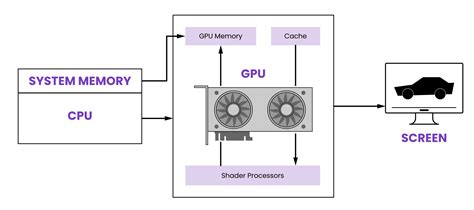
The most striking improvement, however, is in the editing process itself. Editing in Lightroom 6 is, quite simply, fast. This recaptures a sense of the "instantaneous" editing experience that was a hallmark of the original Lightroom, a memory that, while potentially colored by nostalgia and the limited alternatives of its era, now feels remarkably present again. Lightroom 5 had become excessively slow and choppy, particularly when manipulating sliders, a persistent issue that, despite numerous support tickets, remained unaddressed. Lightroom 6, in contrast, delivers that coveted instant responsiveness, making the editing process smooth, fluid, and genuinely enjoyable, much like the program was in its prime.
These newfound speed enhancements have reignited an appreciation for features like sharpening, which are now perfectly suitable for most everyday uses. The same can be said for noise reduction and a host of other adjustment tools that were previously avoided due to the frustrating wait times. While it's difficult to definitively state whether the algorithms themselves are inherently more powerful or yield superior results, the overarching benefit is a dramatic increase in efficiency. Culling, in particular, benefits immensely. Consider the scenario of reviewing 1000 images, each requiring a 3-second load time in Lightroom 5; this would equate to a staggering 50 minutes of waiting. Lightroom 6 slashes this time to a more manageable figure of under 17 minutes.
It is important to temper this enthusiasm for performance gains with a critical eye. While Lightroom 6 marks a substantial improvement, there remains room for further refinement. The speed at which images load, even to the point of appearing sharp, still doesn't quite match the near-instantaneous performance of applications like Photo Mechanic, a tool widely adopted by news agencies for its unparalleled speed in culling, adding EXIF data, and uploading images. In an era defined by milliseconds, where even subtle delays in user interface animations can create a perception of lag, the multi-second loading times for images in Lightroom can still feel dated and contribute to significant time loss over a week of intensive work.
New Frontiers in Image Merging: HDR and Panorama
High Dynamic Range (HDR) photography has, at times, been maligned for its potential to produce unnatural and over-processed results. However, at its core, HDR is a reasonable and effective technique for capturing highlight and shadow detail that more closely mirrors the dynamic range perceived by the human eye. Adobe has now integrated an incredibly user-friendly HDR Merge feature directly into Lightroom 6.
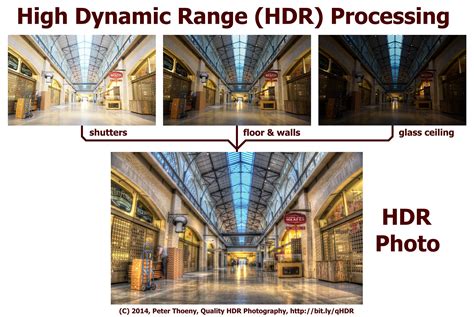
The process is remarkably straightforward: select a few images intended for merging, adjust anti-ghosting settings to mitigate artifacts caused by movement in elements like people or trees between exposures, and then execute the merge. A key recommendation from Adobe is to avoid overusing the number of images; often, two or three exposures are sufficient, as merging a larger number can increase the likelihood of ghosting and other artifacts, potentially degrading image quality. The most significant advantage of the HDR Merge feature is that the resulting images are saved as full, 16-bit raw DNG files, preserving maximum editing flexibility.
Similarly, the Panorama Merge feature offers an exceptionally intuitive way for any user to stitch together multiple images into a seamless panorama. This long-awaited functionality finally brings panorama creation capabilities directly into Lightroom, eliminating the need to switch to Photoshop. This not only streamlines the workflow by reducing application hopping but also negates the necessity of creating duplicate files solely for the purpose of panorama stitching. Furthermore, there's no requirement for perfectly edited source images, as Lightroom 6 automatically handles exposure matching during the photomerge process. Users can choose from three distinct panoramic merging treatments - spherical, cylindrical, and perspective - catering to a wide range of scenarios, from expansive landscapes to architectural shots where maintaining straight lines is crucial. An auto-crop feature further enhances the ease of creating polished panoramic images. These merging tools have proven to be remarkably effective and robust in practical application.
What is a HDR Image in Photography?
Enhanced Organization and Workflow: Facial Recognition and Filter Brush
Lightroom 6 introduces a notably effective, perhaps even "too effective," facial recognition system. For many, including myself, facial recognition has been a primary reason to utilize applications like Apple's Photos (formerly iPhoto) for personal photo libraries captured on mobile devices. The widespread adoption of facial recognition is long overdue, and its implementation in Lightroom 6 is, for the most part, highly commendable.
The system excels at finding faces, even in challenging conditions, such as detecting faint reflections of faces in windows. However, while the preview of a recognized "face" often accurately depicted a human visage, there were instances where it presented a preview of an unrelated part of the image, such as a wall. While the software correctly identified the person present in the image, the visual representation of the "face" was misleading, leading to confusion. This phenomenon, where the algorithm misinterprets textures or patterns as faces, can be frustrating. Adobe acknowledges that the application may misread certain areas, a common challenge for any facial recognition technology. Nevertheless, the accuracy of the "guess" for the actual person, despite the incorrect preview, suggests a sophisticated underlying algorithm, albeit one with occasional visual bugs.
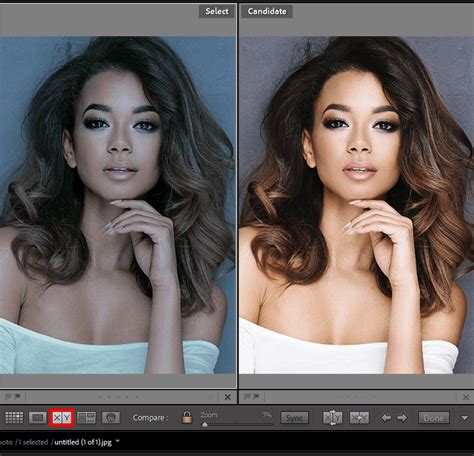
When Lightroom fails to automatically detect a face, particularly in profile shots, a convenient icon in the Library module's toolbar allows users to manually draw a box around the face and assign a name. This manual process, while more labor-intensive, ensures accuracy. A further helpful feature is Lightroom's ability to group similar images, aiding in the confirmation of identified individuals. Ultimately, the Facial Recognition feature is poised to become an invaluable tool for both current and future photo management.
The Filter Brush, a seemingly simple yet essential addition, addresses a common frustration encountered when applying graduated or radial filters. Previously, if the horizon line was interrupted by a foreground object (such as a person or a rock), the graduated filter would inadvertently affect that object, even if only a small portion extended above the horizon. The Filter Brush acts as an eraser for these filters, allowing users to precisely remove or add filter effects from specific areas of an image. This granular control is incredibly useful for refining edits, particularly in complex scenes.
Mobile Integration and the Evolving Ecosystem
Lightroom 6 operates in concert with the Lightroom Mobile app, facilitating the synchronization of multiple collections across devices. New collections can be created, copied, or deleted from either the desktop application or the mobile app. The synchronization process relies on syncing Smart Previews, which ensures that edits and downloads are swift and consume minimal storage space. Adobe's web service further extends this connectivity, allowing collections to be synced, shared, and viewed in a web-based platform from any computer. While the web portal may not be a primary workflow tool for all, it offers an additional convenient method for uploading, sharing, and viewing images. For those who prefer direct control through their preferred social media platforms, images can be exported and saved to a device's camera roll (iOS) or gallery (Android) for direct upload. Despite a currently moderate three-star rating on the App Store, it is anticipated that this will improve as more users discover and utilize the app's capabilities.
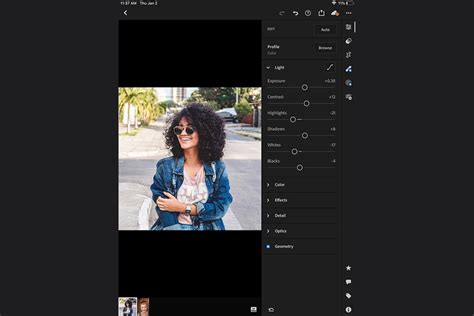
The mobile integration offers two significant advantages. Firstly, basic culling operations can be efficiently performed on mobile devices using intuitive swipe gestures for flagging or rating images. While advanced editing tools like brushes and complex color adjustments are not available on mobile, the core functionality of the Develop module's Basic dialog, along with cropping, is accessible, enabling foundational image tweaks. Secondly, the feature for automatic import of mobile photos into a catalog is a significant convenience.
A noteworthy aspect of Adobe's implementation is that even though certain adjustments like Split Toning, Lens Corrections, and Graduated Filters cannot be directly edited within Lightroom Mobile, their settings and visual effects are still synced. This means users can view, copy, and paste these adjustments within the mobile app if they were originally applied on the desktop. Similar to copying settings in the desktop application, users can select specific types of adjustments to be copied, including more advanced ones.
Adobe is also leveraging the release of Lightroom 6 to promote its Slate and Voice applications, which empower users to create interactive and professional-looking visual or narrated slideshow presentations with ease. While these applications have garnered significant popularity and high ratings, some photographers will undoubtedly continue to prefer creating slideshows through their own blogging platforms or dedicated video editing applications.
The Standalone vs. Subscription Conundrum
The release of Lightroom 6 has brought to the forefront a long-standing debate within the creative software industry: the shift from perpetual licenses to subscription-based models. For years, photographers have expressed a desire for a standalone version of Lightroom, a sentiment that Adobe has acknowledged by continuing to offer Lightroom 6 as a perpetual license. This approach appeals to users who are hesitant about the long-term financial commitment of a subscription, especially for software they may not use constantly.
However, the Creative Cloud model, with Lightroom CC at its core, offers continuous updates, including support for newer camera models and evolving features, a benefit that the standalone Lightroom 6 may not fully receive. This raises questions about the long-term viability and feature parity of the perpetual license. While Adobe has stated no immediate plans to move entirely to a subscription-only model for Lightroom, the industry trend suggests a continued push towards cloud-based services.
The argument for the subscription model hinges on the accessibility of cutting-edge features and ongoing support, mirroring the way many consumers readily pay for streaming services. Conversely, the objection lies in the principle of paying in perpetuity for the ability to access and edit one's own archive of images. The concern is that a subscription model could eventually lead to a loss of access to critical tools if payments cease, impacting the long-term usability of a photographer's meticulously curated library.
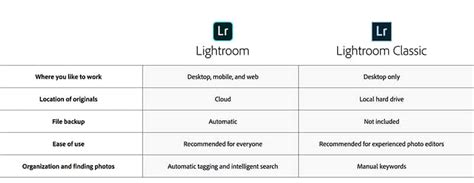
The standalone Lightroom 6, while offering immediate value and ownership, may eventually lag behind its subscription counterpart in terms of feature set and compatibility with the latest hardware. This creates a strategic decision for photographers: invest in the immediate ownership of Lightroom 6, or opt for the continuous evolution offered by the Creative Cloud subscription.
Performance Benchmarking: A Look Back Through Versions
To gain a deeper understanding of the performance improvements, a comparative analysis of different Lightroom versions was conducted. This involved testing image import, 1:1 preview generation, and image export times across various iterations of the software, from Lightroom 2.7 to the latest Lightroom 6.6.1 / CC 2015.6.1. The tests were performed on a Windows 10 PC with 32 GB of RAM and Intel SSDs, using a consistent set of 823 RAW images converted to DNG format to ensure camera compatibility across all versions.
The results revealed interesting trends. While image import times have generally remained consistent, with Lightroom 4 introducing a significant improvement, the latest versions do show a slight slowdown, likely due to increased catalog complexity and added features. The generation of 1:1 previews, however, presented a more significant area of concern. From Lightroom 3.6 onwards, preview generation times have steadily increased, with Lightroom 6.6.1 / CC 2015.6.1 taking approximately 47 minutes for the same task that took around 21 minutes in version 2.7. This substantial increase in preview generation time can significantly impact the culling process, making it less efficient.
What is a HDR Image in Photography?
On a more positive note, the export process has seen slight improvements in the latest version, returning to performance levels comparable to Lightroom 2 and 3. Running multiple export jobs simultaneously can further accelerate this process.
CPU and RAM usage also varied across versions. While all versions utilized available CPU cores, later versions appeared to cap CPU usage around 50% during preview generation, compared to 60-75% in Lightroom 3. RAM consumption, however, saw a notable increase starting from Lightroom 4, with the latest version exhibiting higher memory demands. It is important to note that intensive tasks like panorama stitching can drastically increase CPU and RAM usage, sometimes exceeding 100% CPU and 10+ GB of RAM, depending on the panorama's size. Adobe's software is also known for potential memory leaks, where RAM usage can remain high even after a process is completed, sometimes necessitating a restart of the application.
Conclusion: A Powerful Tool with Evolving Considerations
Adobe Lightroom 6 stands as a testament to Adobe's commitment to providing a comprehensive, all-in-one post-processing and photo management solution. The performance gains, particularly the acceleration through GPU utilization, are a welcome and significant improvement over previous versions, making the editing experience smoother and more efficient. The addition of HDR Merge and Panorama Merge features directly addresses long-standing demands from the photography community, particularly landscape, architecture, and real estate photographers. Facial Recognition and the Filter Brush further enhance the software's organizational and editing capabilities.
The choice between the standalone Lightroom 6 and the subscription-based Lightroom CC presents a strategic consideration for photographers. Lightroom 6 offers perpetual ownership, while Lightroom CC provides continuous updates and deeper integration with the Adobe ecosystem. The performance benchmarks, while highlighting areas of concern like 1:1 preview generation, also underscore the overall advancements made over the years. As Adobe continues to refine its software, the balance between feature richness, performance, and user accessibility will remain a key factor in its evolution. The ongoing development of Lightroom, whether through standalone releases or cloud-based subscriptions, solidifies its position as a cornerstone application for photographers worldwide.