In the dynamic world of social media, keeping your photo editing game fresh and on-trend can be quite challenging. You'll find all kinds of edits and aesthetics across social media, so it's important to find unique ways to stand out from the virtual crowd. Mirror images are a tasteful and easy way to spice up your feed. We have the perfect twist to bring to your images, PicsArtists. Mirror effect images are back and trendier than ever. We’re seeing everything from flipped landscapes to artsy double trouble selfies. We have a tutorial to show you just how to achieve your perfect mirror effect edit. You’re ready to flip, reflect and turn your images around!
Understanding the Mirror Effect
Mirror images consist of two components: a regular version of an image and a flipped version. These are then combined to create a beautiful mirror image. You can do either a horizontal flip or a vertical flip to create mirror images. If the image is flipped horizontally, you will need to combine the photos side by side. While the process is pretty easy, not many people know how to do it.
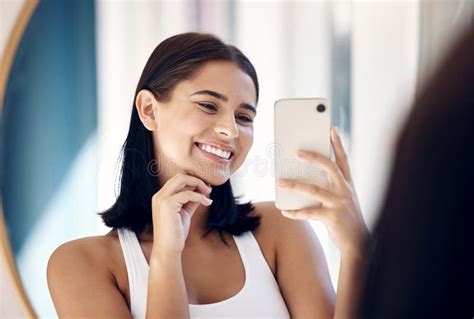
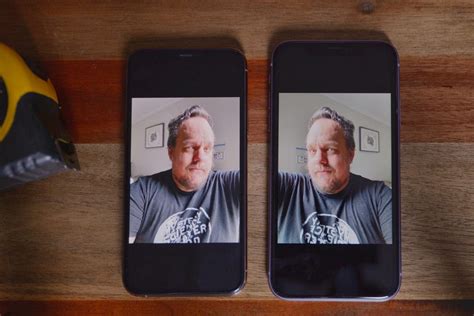
The concept of flipping images is closely related to how our front-facing smartphone cameras operate. Have you ever wondered why your phone’s front camera flips your selfies? The short answer is, your phone is trying to show you how other people see you. First, your front camera imitates the way you generally see yourself, as if through a mirror. Interestingly enough, not a lot of people like the flipped version of themselves. We usually react more favorably to things we see more often, and in this case, it happens to be the mirrored versions of ourselves. Since we are so accustomed to seeing our own reflections in the mirror, it’s completely natural to be weirded out by seeing ourselves from a different perspective. So if you want to give your selfies a breath of fresh air, try flipping them and see if anyone notices in your feed. Unfortunately, there is no way to stop your phone’s front camera from flipping your photos.
Achieving the Mirror Effect with PicsArt
PicsArt photo editor, collage maker and sticker maker is a totally new kind of creative community, with over 100M+ monthly users. PicsArt has collaborated with brands like Dior, Jared Leto’s band Thirty Seconds To Mars and Lindsey Stirling. Supermodels Izabel Goulart, Doutzen Kroes, and Natalia Vodianova have shared PicsArt remixes on their social media.
Now that you have the flip and rotate down, let’s talk mirroring. Picsart provides a variety of options for creating mirror images, from vertical to horizontal to even quadrant reflections. The best part is that the app covers all parts of the editing process, so there’s no need to use anything else.
Picsart mirror reflection photo editing | Mirror effect | Reflection photo editing
Step-by-Step Mirror Selfie Tutorial
To achieve your perfect mirror effect edit using PicsArt, follow these simple steps:
- Open the PicsArt App: Begin by opening the PicsArt application on your mobile device.
- Tap the Plus Icon: Locate and tap the plus (+) icon at the bottom of the screen to start a new project.
- Select Your Photo: Choose the selfie you want to edit from your device's gallery.
- Enter the Editor: Tap on the pencil icon to open the Editor. This will bring up the editing tools.
- Access the "Tools" Menu: Within the editor, find and tap on the "Tools" option.
- Select "Flip/Rotate": From the Tools menu, choose the "Flip/Rotate" option.
- Apply Mirror Effect: You will see options for horizontal and vertical flipping. To create a mirror effect, you'll typically want to duplicate your image and then flip one of the copies.
- For a Horizontal Mirror: Select your image, tap "Flip Horizontal," and then position the flipped image next to the original.
- For a Vertical Mirror: Select your image, tap "Flip Vertical," and then position the flipped image above or below the original.
- Quadrant Reflections: PicsArt also offers more advanced mirroring options, allowing you to create four-way reflections (quadrants). Experiment with these for a unique, kaleidoscopic effect.
- Adjust and Combine: Once you have your flipped image, you can adjust its position, size, and opacity to seamlessly blend it with the original. You might need to use the "Add Photo" feature to bring in the flipped version if you're not working with a direct duplicate.
- Refine and Save: Make any final adjustments to ensure the mirror effect looks natural and aesthetically pleasing. You can use other editing tools within PicsArt to enhance the overall image, such as adjusting brightness, contrast, or adding filters. Once you are satisfied, tap the "Apply" button, and then save your masterpiece.
And there you have it. Your perfectly mirrored selfie is ready to impress!
Pro Tips for Mirror Selfies
- Consider Your Background: A clean or visually interesting background can enhance the mirror effect. Avoid cluttered backgrounds that might distract from the reflection.
- Golden Hour Magic: Double down on that golden hour landscape shot you’ve got? The mirror effect can amplify the beauty of natural light, creating stunning reflections.
- Portrait Perfection: Pro tip: If you’re unsure which option to pick, note that the horizontal mirror effect goes well with portraits or selfies, creating a symmetrical and pleasing composition.
- Experiment with Quadrants: For a truly avant-garde look, explore the quadrant reflection options in PicsArt. This can transform a simple selfie into a piece of abstract art.
And just like that, you’re an expert in mirror imagery. Want to take it up a level?
PicsArt: More Than Just Mirror Effects
Picsart is a full ecosystem of free-to-use content, powerful tools, and creator inspiration. With a billion downloads and more than 150 million monthly active creators, Picsart is the world’s largest creative platform. Picsart has collaborated with major artists and brands like BLACKPINK, the Jonas Brothers, Lizzo, Sanrio: Hello Kitty, I am a Voter, Bebe Rexha, Maroon 5, One Direction, Warner Bros. Entertainment, iHeartMedia, Condé Nast, and more.
Download the app or start editing on web today to enhance your photos and videos with thousands of quick and easy editing tools, trendy filters, fun stickers, and brilliant backgrounds. Whether you're looking to create a simple mirror selfie or a complex artistic composition, PicsArt offers the versatility and creative power to bring your vision to life.