In today's visually driven world, where smartphones are ubiquitous and capable of capturing high-definition images, the demand for sophisticated photo editing tools has never been higher. While the act of simply clicking photos is no longer sufficient for many, the need to further refine these images has given rise to a plethora of photo editing applications. However, the inconvenience of downloading separate software solely for the purpose of removing an image's background is a common concern. This is precisely where Wondershare PixCut emerges as a powerful and user-friendly solution.
PixCut is a versatile, web-based image background remover that also offers a desktop application and various integrations, catering to a wide range of user needs. It is designed to be accessible, offering a free tier for basic usage alongside flexible pricing plans for those who require advanced features without limitations. The tool's core strength lies in its minimalistic yet gorgeous design, which prioritizes user-friendliness and intuitive navigation.

Upon visiting the PixCut website, users are immediately greeted with a prominent 'Upload Image' tab. This serves as the primary gateway for initiating the automatic background removal process. For added convenience, users can also drag and drop their image files directly into this designated area. Scrolling down reveals a concise, three-step tutorial that clearly explains the underlying AI-assisted background removal mechanism. Beyond its flagship feature, PixCut also introduces users to its other capabilities, including bulk background removal, watermark removal, and image enhancement. Activating any of these functions seamlessly redirects the user to a dedicated workstation where further editing and refinement tasks can be performed on the image.
The Power of AI in Background Removal
The most significant and compelling aspect of Wondershare PixCut is its unique selling proposition (USP): its advanced utilization of modern Artificial Intelligence for automatic background removal. This AI-powered approach sets it apart from many other tools, enabling it to accurately detect and erase backgrounds from virtually any type of image.
The process is remarkably straightforward. Users upload or drag and drop their image onto the designated 'Upload Image' section. For those with a paid subscription, the processed image with a transparent background can be downloaded in high quality, specifically 2000x1502 pixels. Free users can still obtain the processed image, albeit in a standard quality of 576x433 pixels.

Beyond simply removing the background, PixCut offers the flexibility to add a custom background to the image before downloading the final file. This functionality redirects the user to a dashboard where a large preview of the edited image is displayed on the right, while a selection of background samples is available on the left. Once satisfied with the edits, users can easily locate and click the download button positioned in the top-right corner of the screen. The entire process is characterized by its simplicity and impressive speed.
Streamlining Workflows with Bulk Processing
For individuals and businesses dealing with a large volume of images, PixCut's support for bulk image background removal is a game-changer. This feature allows users to process multiple images simultaneously, significantly enhancing efficiency and saving valuable time. The tool is capable of removing backgrounds from up to 30 images at a time.
To gauge the effectiveness of this feature, a test involving the upload of five images was conducted. The results were met with pleasant surprise, as the tool demonstrated remarkable speed and accuracy in detecting and removing the backgrounds from all five images. This capability is particularly beneficial for e-commerce businesses, marketing agencies, and content creators who frequently handle numerous product photos or promotional graphics.
Beyond Backgrounds: Additional Editing Features
PixCut's utility extends beyond its primary background removal function. The tool also offers a competitive advantage through its ability to easily remove watermarks from images. This feature is invaluable for users looking to clean up existing photos or repurpose content without the distraction of embedded watermarks. The watermark removal tool typically utilizes a brush, which comes with a default size of 10px, but can be adjusted according to the user's specific needs and the complexity of the watermark.
Furthermore, the desktop software version of PixCut expertly mirrors the AI-powered background removal capabilities of its web-based counterpart. Testing the desktop version involved uploading three high-quality JPG images and removing their backgrounds. The edited images are automatically saved in a dedicated folder created by PixCut on the user's desktop, though users also have the option to specify a different destination path for saving their files. The desktop software is designed for broad compatibility, running smoothly on both 64-bit Windows and macOS systems.
Expanding Accessibility: Mobile, Plugins, and API
Wondershare is committed to making PixCut accessible across various platforms. While the mobile application is still under active development, an early access version is currently available to Android users. This mobile iteration allows for background removal on the go, providing a convenient solution for users who need to edit images while away from their desktop.
🔥 This Tiny Printer Makes AMAZING Stickers — Liene PixCut S1 Full Tutorial!
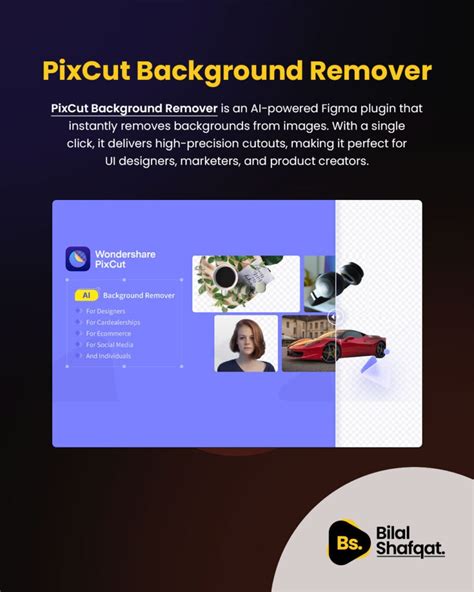
For designers and developers, PixCut offers specialized integrations that further streamline workflows. A PixCut Plugin for Figma significantly simplifies the UI design process on the Figma platform. This plugin allows users to remove backgrounds from up to 60 images without any cost.
For online store owners operating on Shopify, PixCut provides an exclusive Shopify plugin. This plugin is specifically designed to assist in removing or altering the backgrounds of product images, a crucial aspect of e-commerce visual merchandising.
Moreover, PixCut offers API keys, empowering developers to integrate the tool's powerful background removal capabilities into their own applications with minimal coding effort. Obtaining an API key typically involves purchasing credits through PixCut's personal or business plans.
Understanding PixCut's Pricing and Plans
PixCut operates on a freemium model, offering a free-to-use option that allows users to remove backgrounds from images and download them in standard quality. The free version also includes an image enlargement feature, though this comes with an added watermark on the output.
For users requiring more advanced features and higher quality downloads, PixCut offers flexible subscription plans:
- Personal Plan: Available as a monthly subscription, starting at $6.99 USD for 50 credits.
- Business Plan: Priced at a monthly subscription, beginning at $169.99 USD for 2000 credits.
These credits can be utilized for various functions, including downloading high-definition images, using the image enlarger without watermarks, and accessing other premium features.
PixCut vs. Traditional Editing Tools and Alternatives
Wondershare PixCut is lauded as an easy-to-use image background remover that leverages cutting-edge AI to achieve precise results. Its broad range of applications makes it suitable for diverse purposes. Photographers and graphic designers, in particular, can benefit from its ability to rapidly remove backgrounds, making it a robust alternative to more complex and time-consuming traditional photo-editing software like Adobe Photoshop. While Photoshop offers extensive editing capabilities, the process of removing unwanted objects or backgrounds can be unnecessarily complicated for users seeking a quick and efficient solution.
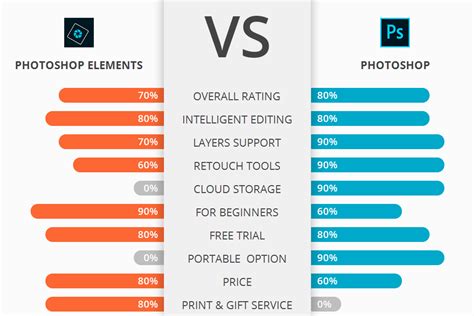
Traditional tools like Photoshop, while powerful, often require a steeper learning curve and specialized skills. Features such as the 'Pen' tool or 'Quick Selection' tool in Photoshop can be used for background removal, but they demand manual effort and precision that can be time-consuming, especially for large batches of images. The process might involve selecting the desired object, inverting the selection, and then deleting the background, or using techniques like 'Layer Via Copy' for more controlled edits.
In the landscape of online background removal tools, PixCut faces competition from several other notable platforms. AnyMP4 Free Background Remover Online, for instance, also boasts an AI-powered, one-click background removal process and offers options for changing background styles and colors, including solid colors or uploading alternative images. Remove.bg is another strong contender, renowned for its AI-driven precision in background removal, though free users often face limitations on download resolution. Apowersoft Background Eraser provides a blend of automatic and manual editing options, catering to a wider spectrum of user needs, and includes features like an HD enhancer and color picker.
Despite the availability of alternatives, PixCut distinguishes itself through its comprehensive feature set, user-friendly interface, and the seamless integration across multiple platforms, including web, desktop, and API. Its commitment to continuously improving its AI algorithms ensures that it remains at the forefront of automated image editing technology.
Conclusion: A Powerful and Accessible Background Removal Solution
Wondershare PixCut has firmly established itself as a powerful and accessible solution for image background removal. By harnessing the capabilities of advanced AI, it simplifies a often tedious task, making professional-quality edits achievable for users of all skill levels. Whether you are a professional designer, an e-commerce entrepreneur, a student, or a hobbyist photographer, PixCut offers a compelling combination of efficiency, accuracy, and ease of use. Its free tier provides a valuable entry point, while its flexible pricing plans and diverse integrations cater to the evolving needs of a modern digital creative landscape. The tool's ability to automate complex editing processes not only saves time but also empowers users to focus on the creative aspects of image manipulation, ultimately leading to more engaging and impactful visual content.
tags: #pixcut #background #remover