In today’s digital age, content creation has become more accessible than ever before. One tool that has been gaining traction is Kapwing - a web-based video editing platform that offers a range of features for creating and editing videos, images, and GIFs. However, it also has its downsides. Let’s explore the pros and cons of Kapwing to see if the online video editor is right for you, along with an alternative.
Kapwing is an online platform that allows you to create and edit multimedia content, such as videos, images, and GIFs. It provides a range of tools and features for creating and customizing visual content, including video editing, meme generators, image resizers, subtitles, and more. The platform is designed to be user-friendly and accessible to individuals with little to no experience in graphic design or video editing. For that reason, it is popular among content creators, social media managers, and marketers who need to create engaging visual content quickly and easily.
Key Features of Kapwing
Kapwing offers a comprehensive set of features that make it a popular choice among content creators. Some of the key features of Kapwing include:
- Drag-and-drop video editing: You can easily drag and drop your media files into Kapwing's editor and start editing right away.
- Text, image, and audio customization options: Kapwing offers a wide range of customization options, including the ability to add text, images, and audio to your videos.
- Ability to add subtitles and captions: You can add subtitles and captions to your videos to make them more accessible and engaging.
- Various video editing tools: Kapwing offers a variety of video editing tools, including trimming, cropping, filters, and more.
- Support for popular video file formats: Kapwing supports a wide range of video file formats, making it easy to work with your existing media files.
These features make it easy to create highly engaging, polished videos that can be tailored to your individual needs and style.
Navigating the Kapwing Interface and Tools
With its user-friendly interface, Kapwing has quickly become a go-to tool among content creators and social media platform users alike. In fact, Kapwing has received mostly positive reviews from user reviews, with many praising its ease of use and functionality. Users appreciate the fact that Kapwing is accessible from anywhere with an internet connection and offers a free version. However, some users have reported glitches and issues with the software.
If you're ready to start using Kapwing, the first step is to create an account and log in to the platform. Once you've created an account, you can log in at any time to access the platform's features and tools. You'll be taken to the main dashboard, where you can start creating your first video. The dashboard is easy to navigate, with clearly labeled menus and buttons that make it easy to find the tools you need.
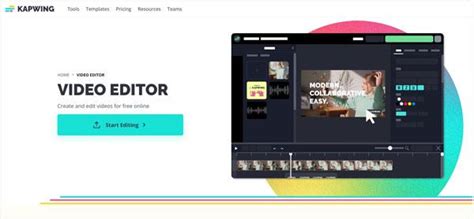
The Kapwing interface is designed to be simple and straightforward, with clearly labeled menus and buttons that make it easy to find and use the editing tools you need. The main editing screen is divided into three sections: the media library, the canvas, and the editing panel. You can upload your media files to the library, drag and drop them onto the canvas, and use the editing panel to customize the content.
The media library is where you can upload your video, audio, and image files. You can also access stock media from the library if you need additional content for your project. With Kapwing's real-time transcription feature, you can also easily transcribe your podcasts or other audio content to add captions or subtitles to your videos. This enhances accessibility and engagement for your audience. The canvas is where you'll see your video as you edit it, and the editing panel is where you can make changes to the content, such as adding text, trimming the video, applying filters, or adjusting the video's settings. With Kapwing's one-click screen recorder, you can even capture your iPhone screen directly and incorporate it into your video creation.
Essential Editing Tools in Kapwing
Kapwing offers a variety of editing tools that can help you achieve your specific video editing goals. If you want to trim and cut your video, you can use the Trim tool. If you want to add text or images, you can use the Text and Image tools, respectively. Additionally, Kapwing offers a variety of filters and effects that can help you enhance your video's visual appeal.
- Trimming and Cutting Videos: The Trim tool allows you to remove unwanted sections from your videos, such as long pauses or unnecessary footage. With Kapwing's intuitive interface, you can perform real-time trimming, ensuring precise edits that maintain the flow of your video.
- Adding Text, Images, and Audio: Kapwing offers several customization options that allow you to add text, images, and audio to your video. You can add captions or overlay text to provide context or emphasize key points. With the remove background feature, you can remove unwanted elements from your images or videos, creating a seamless and professional result.
- Applying Filters and Adjusting Video Settings: If you want to give your video a specific look or feel, you can apply filters and adjust the video's color, brightness, contrast, and saturation. These tools allow you to fine-tune your video's visual elements to ensure that it meets your creative vision. Kapwing's extensive filter library lets you experiment and find the perfect visual style for your videos.
- Creating Transitions and Animations: Transitions and animations can help your video flow smoothly from one scene to the next and keep your viewers engaged. Kapwing offers a variety of transition and animation effects that you can apply to your video with just a few clicks. These dynamic elements add a professional touch to your videos and make them visually appealing.
Kapwing Tutorial For Beginners 2023 | How To Get Started with Kapwing
Kapwing isn't just for video editing. You can also use it to create memes, design graphics, and even make collages. The collaborative video editing feature of Kapwing allows you to invite others to work together on the same project, making it a great tool for team collaborations, whether you're working on podcasts, social media campaigns, or other video projects.
Kapwing: Pros and Cons
To take a further look at the advantages and disadvantages of the video maker, let’s break down the pros and cons.
Kapwing Pros
- Pricing: One of the biggest advantages of Kapwing is its pricing. The platform offers a free version, which includes basic features, and a paid version, which offers more advanced features. Kapwing Pro costs $16 per member per month billed annually or $24 per member per month billed monthly.
- User-Friendly Interface: Kapwing is incredibly intuitive. Many users report that their marketing teams were able to get on the platform and use it right away with little to no instruction. It’s easy for anyone to pick up, especially if you've learned graphic design with Canva, you can learn video editing with Kapwing.
- Browser-Based Editing: The completely browser-based editing allows you to use Kapwing without installing anything on the operating system, eliminating the need for downloads or installations. It just works.
- Automatic Subtitle Generation: The automatic subtitle tool gets better and better every week, it's rare that a word needs correction. It can autogenerate subtitles for video in almost any language, which is a significant benefit for accessibility.
- Accessibility: Kapwing is accessible from anywhere with an internet connection.
Kapwing Cons
- Glitches and Issues: Some users have reported glitches and issues with the software, which can be frustrating when working on a project. Sometimes it will bug out and lag the computer, though this could be a RAM issue on the user's end.
- Non-Customizable Resolution: The inability to customize the resolution of the video can be a major drawback for advanced creators who require specific dimensions to meet certain quality standards. The free plan includes HD (720p) exports.
- File Size Restrictions: Kapwing has a limit for large files, which can be frustrating for those working with high-resolution videos or images. For example, the free plan only allows up to 250MB files, and the paid plan only allows up to 6GB files.
- No Mobile App: One thing to keep in mind with Kapwing is that it is 100% designed for online use and does not have an iOS or Android app at the moment. Editing on a phone can be difficult.
- Free Plan Limitations: Kapwing’s free plan restricts users to 7-minute watermarked 720p videos. Free users have time and length restrictions. The export speed in the Free plan, especially for longer videos, can be frustrating when working with very tight deadlines. The Free plan includes a watermark in the edited videos, and this watermark is quite prominent, making it difficult to use the videos in certain contexts.
- Limited Potential for Advanced Editing: For advanced video editing processes (for example, keyframing), Kapwing offers less potential than other competitors. The many layers of content could be a bit tough to manage when placing text over video and sound.
Kapwing vs. Alternatives: Finding the Right Fit
Kapwing is not the only video editing software available online, but it does offer several distinct advantages over competitors. Based in San Francisco, Kapwing has garnered positive reviews for its user-friendly interface and powerful features. Unlike traditional editing software that requires a considerable amount of time and effort to learn, Kapwing makes the video editing process intuitive and accessible to users of all skill levels.
While other tools may require complex setups or manual processes, Kapwing simplifies the creation process with its one-click features, such as the screen recorder. With its affordable pricing plans, Kapwing ensures that video creation is accessible to individuals, content creators, and businesses alike.
However, as you have probably surmised, Kapwing is a solid entry-level tool, but it simply doesn't offer the same power or polish as modern desktop apps. If you want real power, you cannot expect to get it from a browser-based tool. You need something installed on your machine that will take full advantage of its power.
Speechify Video Studio: A Powerful Alternative
Speechify Video Studio offers a comprehensive set of video editing tools that can help users create high-quality video content quickly and easily. The platform’s user-friendly interface allows users to upload their video footage and begin editing immediately, without the need for extensive technical knowledge. Users can easily trim and cut footage, adjust playback speed, and crop or resize their videos to fit specific dimensions or aspect ratios.
Speechify Video Studio also offers a range of visual effects and filters that can be applied to videos, helping to enhance the overall look and feel of the content. In addition, users can add text overlays, graphics, and other visual elements to their videos, providing greater customization options. Additionally, Speechify Video Studio’s advanced audio editing tools allow users to adjust volume levels, add background music, and even add AI voiceovers indistinguishable from human voices to their videos.
Compared to other video editing platforms like Adobe Premiere, InVideo, and Clipchamp, Speechify Video Studio is highly regarded among users for its ease of use. Many user reviews rave about how easy it is to create great videos with Speechify Video Studio, even if you have no prior experience with video making. Furthermore, Speechify Video Studio supports offline editing, timeline layering, AI-enhanced features, and 4K exports, offering more advanced capabilities than browser-based tools.
When to Choose Kapwing and When to Look Elsewhere
Kapwing is a solid pick if:
- You are a beginner with little to no video editing experience.
- You need to create short, engaging content for social media quickly.
- You value accessibility and the ability to edit from anywhere.
- You need to add subtitles or captions to videos easily.
- You are looking for a free or affordable entry-level tool.
You are better off with an alternative if:
- You require advanced editing features like keyframing or complex timeline layering.
- You frequently work with very large, high-resolution video files.
- You need to export videos in custom, high resolutions beyond 720p or 1080p.
- You prefer to work offline or on a dedicated desktop application.
- You want a platform with a clear growth path for more complex video production needs.
Trustworthiness and Performance of Kapwing
Kapwing is a legitimate and trustworthy platform for creating and editing videos, images, and other digital content. The company was founded in 2017 and has since then gained a significant following among content creators and social media marketers. Since its introduction in October 2017, more than 30 million videos have been generated using Kapwing.
Kapwing is an online platform that relies on internet connectivity and browser performance to function smoothly. If you are experiencing lag while using Kapwing, it could be due to a variety of factors, such as slow internet connection, browser performance issues, or computer hardware limitations. While the performance is stable on a modern browser like Chrome, Opera, Safari, or Firefox on a mid-to-high-end PC, editing is fast for short content but slows down proportionately to the length of the video.
The company is built on user feedback, and they are constantly working to improve their product. Their mission has been to make content creation easier and more accessible for everyone, aiming to build an ethical, sustainable, and mission-oriented business. They welcome all feedback and comments to make Kapwing better for all their users.
Conclusion
Overall, Kapwing is a powerful and accessible video editing tool that offers a wide range of features and customization options, particularly for beginners and those focused on social media content. Its ease of use, browser-based accessibility, and generous free plan make it an attractive option for many. However, for users requiring more advanced features, higher export quality, or offline editing capabilities, exploring alternatives like Speechify Video Studio might be more beneficial. The choice ultimately depends on your specific needs and the complexity of your video creation projects.