T-shirts are a fundamental element of everyone's wardrobe, celebrated for their comfort, style, and as a versatile canvas for creative expression. This comprehensive guide delves into the essentials of crafting compelling t-shirt designs, from the initial spark of an idea to practical execution, with a specific focus on utilizing Photoshop for precise dimensioning and design elements. We will explore the critical aspects of defining your purpose and audience, setting accurate design dimensions for printing, selecting appropriate color palettes and typography, and examining various design examples to inspire your own creations.
Defining Your Purpose and Audience: The Foundation of Effective Design
Before embarking on the design process, it is crucial to establish the fundamental "why" behind your t-shirt. Understanding the core purpose of the design-whether it's to promote a business or brand, announce an event, or convey a powerful message-will guide every subsequent creative decision. A well-conceived t-shirt design should not only serve its primary objective but also be an appealing garment that individuals will be enthusiastic to wear. For promotional endeavors, particularly for events or brands, eye-catching designs are paramount. Such designs act as potent marketing tools, encouraging curiosity and conversation, thereby transforming a simple t-shirt into a valuable marketing opportunity.

A thoughtfully designed t-shirt does not necessitate an overwhelming use of bold colors or intricate patterns. By keeping the intended purpose and the target audience at the forefront of your mind, you are already well on your way to achieving a successful t-shirt design. For instance, if you are conceptualizing a design for a food festival, it is logical to incorporate the festival's theme, its official logo, and branding elements, while maintaining a design that is both simple and impactful. Engaging in empathy by considering the perspective of the person who will wear the shirt is a vital step in the design thinking process.
Furthermore, when conceptualizing a t-shirt design, consider the context in which the shirt will be displayed. T-shirts intended to promote a business or brand will typically feature a distinct logo treatment. Conversely, a t-shirt designed for retail sale might not require such specific brand-centric elements, allowing for broader creative interpretation. The placement and visibility of the design on the shirt itself also play a role; a design intended for the front of a shirt might differ in composition and scale compared to one intended for the back or a sleeve.
Setting T-Shirt Design Dimensions for Print Precision
When preparing your t-shirt design for the printing process, it is imperative that all design elements are provided in their correct dimensions and file sizes, as specified by the chosen print shop. Accurate sizing is non-negotiable for ensuring the final printed product matches your creative vision. Working with precise measurements from the outset will prevent costly errors and design compromises later in the production cycle.
Full Shirt Design (Front or Back) Dimensions
The size of your design will vary depending on the type and intended fit of the t-shirt. Standard dimensions for full-front or full-back designs are typically provided in both inches and pixels to accommodate various printing methods and software requirements.
| T-Shirt Type | Size (inches) | Size (pixels) |
|---|---|---|
| Adult Men's | 11-12.5 wide | 1056-1200 |
| Adult Women's | 9-11 wide | 864-1056 |
| Youth | 9-10.5 wide | 864-1008 |
These pixel dimensions are often based on a standard print resolution, commonly 300 DPI (dots per inch), which is crucial for achieving sharp, high-quality prints. For example, a 12-inch wide design at 300 DPI would require an image resolution of 3600 pixels wide. It is always best practice to confirm the exact DPI and pixel dimensions required by your specific printer.
Sleeve and Pocket Design Dimensions
Smaller design elements, such as those intended for sleeves or breast pockets, require significantly different dimensions. These areas offer less space, demanding more concise and impactful designs.
| T-Shirt Type | Size (inches) | Size (pixels) |
|---|---|---|
| Adult Short Sleeve or Pocket | 4 x 3 | 384-288 |
| Youth Short Sleeve or Pocket | 3 x 2 | 288-192 |
| Long Sleeve | 2.5 x 14 and 3.5 x 15 | 240-1344 and 336-1440 |
When using graphic design software like Adobe Photoshop, you can set up your canvas with these exact dimensions. For example, to create a design for an adult short sleeve, you would set your Photoshop canvas to 4 inches in width and 3 inches in height, at a resolution of 300 DPI. This ensures that the digital file accurately represents the physical print area.
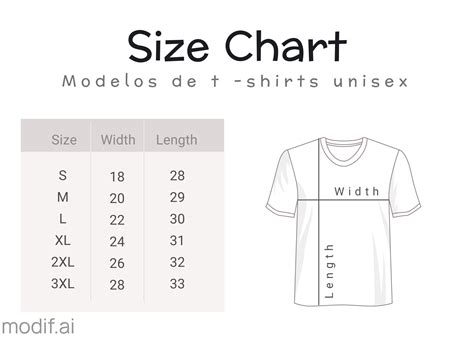
If you are initiating your t-shirt design process within software like Adobe Photoshop, begin by creating a new document. You have the flexibility to choose from pre-defined templates if available, or you can manually enter your desired dimensions in the document setup window. This meticulous approach to sizing is fundamental for a professional and flawless printed product.
Selecting a Color Palette and Typography: Enhancing Visual Impact
In the realm of t-shirt design, the principle of "less is typically more" holds significant weight. Whether the t-shirt's purpose is to promote a brand, advertise an event, or simply convey a message, the most effective designs often utilize one to three colors and a maximum of three distinct fonts. Simplicity is key to creating a design that is both aesthetically pleasing and easily digestible.
How to Not Suck at Color - 5 color theory tips every designer should know
Your brand's established color scheme, if applicable, and a thorough understanding of your target audience should serve as guiding factors in the creative treatment of your t-shirt design. A t-shirt promoting a local coffee shop, for instance, will naturally feature a drastically different color palette and font style compared to a t-shirt designed to express a message of love and unity. It is beneficial to consider the psychological impact of the colors you select for your t-shirt, ensuring they align harmoniously with the design's purpose and resonate with the intended audience.
While vibrant and bold colors might initially seem appealing and aligned with a particular brand or message, it is important to acknowledge that many t-shirt wearers prefer more versatile and universally appealing colors. Common choices include white, black, various shades of blue, and cream. Therefore, it is advisable to refine your color palette judiciously. Additionally, carefully consider the color of the t-shirt itself onto which the design will be printed, as certain color combinations can clash or fail to achieve the desired visual effect.
When selecting font styles, prioritize readability above all else. Opting for clear and legible font styles, such as sans-serif or serif fonts, is generally the best approach. Think of a t-shirt as a mobile billboard; individuals wearing them are often seen in motion, and it is impractical for passersby to stop and decipher complex or overly stylized text. Therefore, the chosen typography must be instantly recognizable and easy to read from a distance.
Mastering the art of font pairing can significantly elevate your t-shirt designs. Experimenting with different font combinations, such as pairing a bold sans-serif with a more delicate script font, can create visual interest and hierarchy within your design. Resources dedicated to font pairing can provide valuable insights and inspiration for achieving professional and harmonious typographic arrangements.
Exploring Inspiring T-Shirt Design Examples and Photoshop Techniques
To further illustrate the principles of effective t-shirt design and how to achieve them using tools like Photoshop, let's examine several distinct design styles. Each example highlights specific techniques and considerations that can elevate a simple garment into a statement piece.
1. Arched Text T-Shirt Design
Arched or curved text is a popular and effective design element for many t-shirts. This style is particularly well-suited for short phrases, such as concise motivational quotes or text that succinctly describes a brand or business. To achieve a balanced composition, consider incorporating horizontal text positioned at the bottom of the arch, creating a visually pleasing contrast.

In Photoshop, creating arched text involves utilizing the "Type Tool" and then applying specific transformation or warp effects. After typing your text, you can select the text layer and navigate to Edit > Transform > Warp. From the warp dropdown menu, you can select "Arc" and then adjust the curvature using the controls provided. Experimenting with different arc styles and bend percentages will allow you to achieve the desired effect, whether it's a subtle curve or a full circular text arrangement. This technique allows text to elegantly wrap around graphics or other design elements, adding a dynamic and impactful dimension to otherwise simple typography.
2. Retro Barbecue T-Shirt Design
Retro styles consistently experience resurgences in popularity, and for good reason. They offer a classic aesthetic that is especially impactful when printed on t-shirts, evoking a sense of nostalgia in a positive and appealing way. To create a truly eye-catching t-shirt with a retro theme, consider a single-color design that strongly communicates your brand or message, complemented by retro-style fonts and a simple illustration.
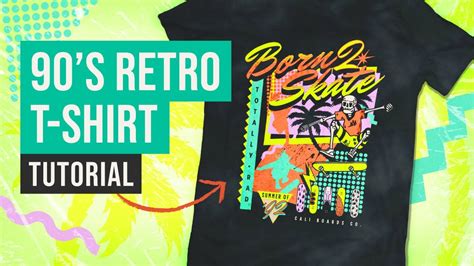
Achieving a retro look in Photoshop often involves selecting fonts that harken back to specific eras, such as bold script fonts or classic serifs. Combining these with a clean sans-serif font for secondary text can create a balanced and visually interesting typographic hierarchy. For graphic elements, consider using distressed textures or halftone effects to further enhance the vintage feel. Photoshop's extensive filter gallery and layering options allow for the creation of aged or weathered looks. For example, applying a subtle noise filter or a texture overlay can add depth and character to your graphics, contributing to an authentic retro aesthetic.
3. Bright Quote T-Shirt Design
T-shirts serve as an excellent medium for expressing quotes or phrases that resonate personally with the wearer. Whether the message is motivational, positive, or a catchy slogan, quotes can forge a connection with the wearer and effectively promote a brand. Highlighting these textual elements in a visually engaging manner will undoubtedly capture the attention of passersby, as well-crafted typography is universally appreciated.
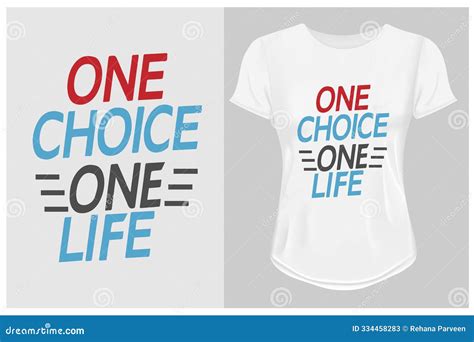
In Photoshop, you can create impactful quote designs by experimenting with font sizes, weights, and colors. Utilizing Photoshop's text effects, such as drop shadows, outlines, or bevels, can add dimension and make the text pop. For a "bright" and energetic feel, select vibrant color combinations and consider using contrasting colors for the text against the t-shirt background. Arrangement is also key; explore different text layouts, such as stacked text, asymmetrical arrangements, or text that interacts with graphic elements. Creating a visually interesting arrangement of words can transform a simple quote into a compelling design.
4. Layered Shapes T-Shirt Design
Not every element of a t-shirt design needs to consist solely of solid shapes and text. Creativity can be further enhanced by exploring how different design elements interact with each other, particularly through the use of blend modes. The subtle overlay of shapes, as seen in some contemporary designs, can result in unexpectedly cool and sophisticated aesthetics.

In Photoshop, blend modes are a powerful tool for creating unique visual effects. After placing multiple graphic elements or shapes on your canvas, you can select an individual layer and experiment with the various blend mode options available in the Layers panel (e.g., Multiply, Screen, Overlay, Soft Light). Each blend mode interacts with the layers beneath it in a different way, affecting color and luminosity. Layering transparent shapes or graphics and applying different blend modes can create depth, texture, and complex color interactions without the need for intricate illustration. This technique allows for a more abstract and artistic approach to t-shirt design.
5. Minimalist T-Shirt Design
Adhering to the "less is more" philosophy, a minimalist approach to t-shirt design can effectively enhance a brand or message while consciously eliminating superfluous design space. Not every t-shirt design needs to be entirely filled to be considered a masterpiece. If your brand identity calls for simplistic imagery and branding, or if you aim to break away from conventional visual representations, adopting a minimalist route is often the most ideal strategy.
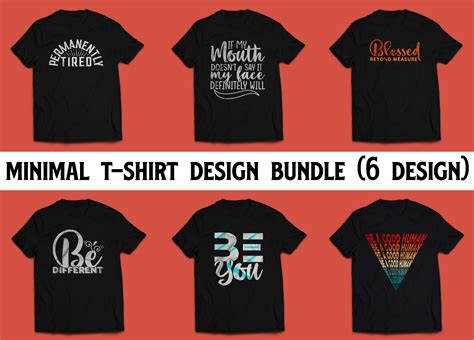
Creating a minimalist design in Photoshop often involves focusing on a single strong graphic element or a very concise typographic statement. The power of minimalism lies in its restraint. Select a simple, clean graphic or a well-chosen font and ensure ample negative space surrounds it. The color palette for minimalist designs is typically restricted, often using only one or two colors. Photoshop's shape tools and vector capabilities are excellent for creating clean, geometric graphics. When selecting graphics, look for simplicity in form and avoid overly detailed or complex elements. The strategic use of white space is as important as the design elements themselves in conveying a sense of calm, sophistication, and focus.
Ultimately, crafting the perfect t-shirt design for your brand, message, or event does not have to be an arduous or complicated undertaking. By understanding the foundational principles of design, precise dimensioning in software like Photoshop, and drawing inspiration from diverse styles, you can create compelling and effective t-shirt graphics.