Capture One is a sophisticated photography software suite renowned for its exceptional image quality, advanced editing tools, and robust workflow capabilities, particularly for professional and commercial photographers. Originally developed by the camera manufacturer Phase One, the software department evolved into its own entity, Capture One A/S, in 2019, with both companies remaining under the majority ownership of the private equity firm Axcel. This lineage from a high-end camera maker imbues Capture One with a deep understanding of image capture and processing, setting it apart in the competitive landscape of photo editing software.
The software is designed with a focus on efficiency, finesse, and superior image output, making it a powerful business investment for those who rely on high-caliber results and streamlined workflows. While accessible to advanced amateurs, its core strengths lie in catering to the demanding needs of studio, commercial, and fashion photographers.
Comprehensive Camera Support and Tethering Capabilities
A cornerstone of Capture One's utility is its extensive support for RAW image files. The software boasts custom support for RAW files from over 650 different camera models, ensuring that photographers can work with the native data from a vast array of digital cameras. This broad compatibility is crucial for maintaining the highest possible image quality straight from the camera.
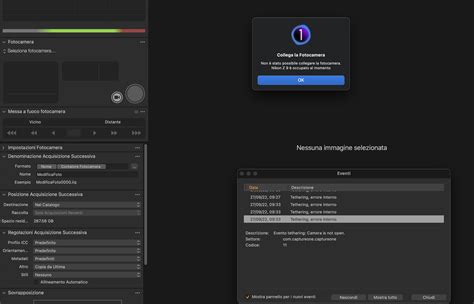
Beyond file support, Capture One is a leader in tethering, offering remote camera control for over 200 camera models. This feature allows photographers to connect their camera to a computer via USB, network cable, or Wi-Fi, enabling them to view, select, and edit images in real-time as they are captured. This is an indispensable tool for studio work, client reviews, and ensuring critical focus and exposure during shoots. The software's tethering capabilities have seen continuous improvement, with specific enhancements for Fujifilm and Sony cameras.
The evolution of Capture One's product offerings has also seen the introduction of specialized versions. While Capture One Pro is available as both a subscription and a perpetual license, other variants like Studio and Enterprise are exclusively offered as subscriptions. These tiered products cater to different user needs, from individual professionals to larger studio setups. For instance, the Studio SKU includes features like AI Crop and multiple viewer windows, alongside improvements to tethering.
Evolution of Capture One: From Phase One to a Standalone Powerhouse
The journey of Capture One began as an internal project within Phase One, a company synonymous with high-end medium format cameras. The initial iterations of the software were closely tied to Phase One's digital backs. The year 2002 marked a significant development with the launch of the Phase One H20 and the renaming of the older "Lightphase" back to H5 / H10, showcasing early advancements in digital capture technology that the software supported.
As the software gained prominence and a dedicated user base, its strategic importance grew. In 2019, the software department was spun off into its own independent company, Capture One A/S. This move allowed Capture One to focus exclusively on software development and expand its reach beyond the Phase One hardware ecosystem. Despite the separation, Phase One and Capture One A/S share a common majority owner in the private equity firm Axcel, suggesting a continued synergy and shared vision.
This evolution has allowed Capture One to aggressively develop its software, introducing new features and improving existing ones at a rapid pace. The company has a history of releasing regular updates, with release notes for versions like 16.7.4, 16.6.0, 16.6.6, 16.5.0, 16.5.11, 16.4.0, 16.4.6, 16.3, 16.3.8, 16.2.6, 23, 22, 21, 20, 12, 11, and 10 illustrating a consistent commitment to innovation and refinement.
Product Variants and Licensing Models
Capture One offers a range of product variants to suit different professional needs and budgets:
- Capture One Pro: This is the flagship product, available as a subscription or a perpetual license. It offers the most comprehensive set of features for professional photographers. The perpetual license is a significant upfront investment, priced around $317 / £317, and requires upgrade fees for future major versions. Subscription plans offer a more flexible and cost-effective way to access the latest features and camera support as they are released.
- Capture One Studio: This variant is exclusively available as a subscription and builds upon the Pro version, often including features geared towards studio environments and advanced workflows. It may offer enhanced tethering options, particularly for Fujifilm and Sony cameras, and features like AI Crop, multiple viewer windows, and support for specific camera models like the Fujifilm GFX-100S II and Fujifilm X-T50.
- Capture One Enterprise: Also subscription-based, Enterprise is designed for larger organizations and e-commerce studios. It includes all features of Studio, plus additional functionalities for managing teams, multi-user access, and streamlining e-commerce specific workflows. Features for managing users and multi-user access management are critical here.
- Capture One for iPad: Introduced in 2022, this mobile version offers a subset of features from the desktop application, allowing photographers to edit and manage images on their iPad. It aims to extend the Capture One workflow to on-location shooting and client collaboration.
- Capture One Live: This cloud-based collaboration platform allows for real-time feedback and image sharing, enhancing the client review process. It's a valuable tool for remote teams and clients who need to provide input on shoots.
Historically, Capture One also offered brand-specific versions like "Capture One Express" for Fujifilm, Nikon, and Sony cameras. However, these were discontinued in January 2022, with the company shifting its focus to its core Pro and Studio offerings. The "Capture One Express" product itself was also slated for discontinuation as of December 2023. This strategic shift underscores Capture One's commitment to providing a unified, high-performance platform for all professional photographers, regardless of their camera brand.
User Interface and Workflow Philosophy
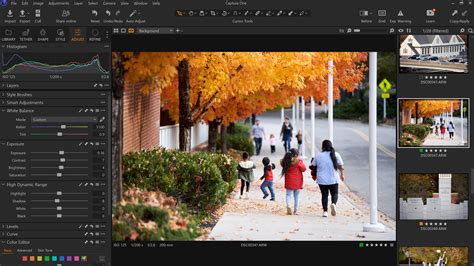
Capture One features a distinctive single-window layout, a departure from the multi-module approach of some competitors like Lightroom Classic. Tool tabs are consolidated in a left sidebar, covering a comprehensive range of functions from browsing and filtering to adjustments and lens corrections. An optional Browser window can be positioned to the right or below the main viewer, allowing users to keep thumbnail previews visible while working on an image.
The interface, while potentially daunting for absolute beginners due to its depth, offers immense efficiency and customizability once mastered. Users can create custom tool tabs, rearrange panels, and even detach them to float as palettes on screen. This flexibility is a key aspect of Capture One's professional-oriented design, allowing users to tailor the workspace to their specific needs and shooting style.
Two primary workflow paradigms are supported:
- Catalogs: Similar to Lightroom, Catalogs are designed for managing large, permanent image collections. Capture One offers both a federated approach (where images remain in their original folders) and a ‘managed’ approach, where images are imported into the catalog itself. This managed catalog system is often compared to the former Apple Aperture's approach, providing a robust way to safeguard and organize extensive archives.
- Sessions: This workflow is particularly lauded for its efficiency in studio and on-location shooting. Sessions work with images stored in live session folders on the computer, facilitating rapid editing, culling, and client approval. This "sessions" based workflow is perfect for speedy client work and is a significant strength for fast-paced professional environments. Sessions can also serve as a "live" browsing alternative for all files, though with more limited search and cataloging capabilities compared to full Catalogs.
Image Processing and Editing Prowess
Capture One's reputation for exceptional image quality is largely attributed to its sophisticated RAW processing engine. It is particularly noted for being "kinder" to images from smaller sensor cameras (APS-C or Micro Four Thirds) compared to other RAW converters. It excels at rendering fine detail and controlling noise simultaneously, often producing superior results where other software might yield coarser noise patterns. This ability to extract maximum detail and maintain clean images, especially from challenging sensor formats, can be a decisive factor for discerning photographers.
Color adjustments in Capture One are praised for their strength and subtlety. The software is capable of smooth tonal transitions in color editing that can be difficult to replicate in other applications. Its dedicated Black and White panel also produces excellent conversions, offering subtle and effective toning options.
Advanced Masking and Adjustment Layers
Capture One's masking tools and adjustment layers are a significant advantage, working much like Photoshop's adjustment layers. This system is often found to be more intuitive than Lightroom's mask management. Each adjustment layer in Capture One provides access to the full suite of editing tools, unlike the more limited subsets found in some competing software. Masks can be created using various methods, including linear and radial gradients, freehand brushes (with auto-masking), and increasingly sophisticated AI subject-detection masks. The ability to subtract from masks further enhances precision.
Capture One has also rapidly developed its AI masking capabilities. These tools can intelligently identify subjects, backgrounds, objects, and areas with remarkable accuracy. The masks are typically well-blended, and a dedicated "Refine" tool helps smooth out any edge effects.
Styles vs. Presets
While Lightroom uses "Presets" for applying stylistic looks, Capture One employs "Styles." Although Capture One's native Styles might be less numerous than Lightroom's presets, users can save their own custom Styles, offering a personalized approach to applying looks.
AI Tools and Limitations
Capture One incorporates AI masking tools, allowing for efficient subject and background selection. However, it does not offer features like Adobe's AI Enhance noise reduction, which integrates directly into Lightroom. Furthermore, Capture One does not bundle a Photoshop equivalent, meaning tasks involving layers, type, or complex design work still require separate software like Photoshop or Affinity Photo. The software also eschews extensive "Insta-friendly" effects or generative AI tools, focusing instead on core image quality and professional workflow enhancements.
Capture One Sessions Explained (And Why They’re so Powerful)
System Requirements and Performance
Capture One is available for both macOS and Microsoft Windows. The system requirements are designed to handle its computationally intensive tasks:
- Processor: Intel or AMD with 4+ cores for Windows; Apple Silicon (M1 or newer) for macOS.
- Operating System: Windows 10® 64-bit 22H2 or Windows 11® 22H2 or newer; macOS 13 or newer.
- RAM: 16GB or more is recommended for optimal performance.
- Storage: 10GB of free space is required, with an SSD recommended for faster loading and processing.
- Monitor: A resolution of 1920 x 1200 or higher is recommended.
Capture One is known for its speed and flexibility, providing a responsive editing experience even with large RAW files. The efficient rendering of local adjustments and overall image processing contributes to its professional appeal.
Value Proposition and Alternatives
Capture One is clearly positioned as a premium professional tool. Its pricing reflects this, with the perpetual license being a substantial investment. Subscription prices are more accessible for ongoing users who value continuous updates and support. The value proposition lies in its superior image quality, advanced tethering, efficient workflow tools, and robust RAW processing, which can translate into tangible benefits for professional photographers, such as saving time and impressing clients.
While Capture One is an excellent tool, it faces competition from several fronts:
- Adobe Photography Plan: For a slightly higher subscription cost, the Adobe plan offers a broader ecosystem, including Lightroom Classic, Lightroom mobile, Photoshop, and 1TB of cloud storage. It is a more comprehensive package for photographers who require a wider range of creative tools and cloud integration.
- DxO PhotoLab 9: This software takes a different approach, offering strong basic cataloging tools but excelling in lens corrections and RAW processing, particularly with its DeepPRIME noise reduction technology. It is geared more towards ultimate image quality and control than complex professional workflows.
- ON1 Photo RAW: This alternative provides non-destructive editing tools, including advanced features like borders, bokeh effects, AI denoising, upscaling, and layered composites. While it may not match Capture One's slick cataloging or session-based workflow, it offers a rich feature set at a competitive price point.
For photographers who prioritize image quality, advanced tethering, and a highly customizable, efficient workflow, Capture One remains a top-tier choice. Its focus on professional needs, rather than broad consumer appeal, ensures that it continues to deliver powerful tools for those who demand the best from their images and their workflow. The software's ability to render fine detail and control noise simultaneously, combined with its precise color adjustments and powerful masking capabilities, solidifies its position as a leader in professional imaging software.