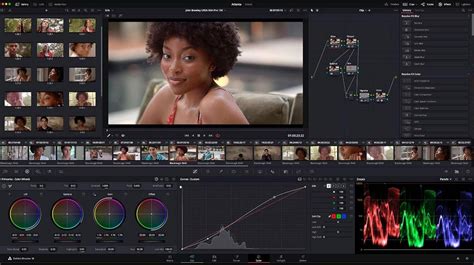
DaVinci Resolve has long been recognized as a powerhouse in the post-production industry, offering a comprehensive suite of tools for editing, color correction, visual effects, motion graphics, and audio post-production within a single, integrated application. This all-in-one approach is a cornerstone of its appeal, allowing professionals to work faster and maintain higher quality by eliminating the need to switch between multiple software programs. The elegant, modern interface is designed to be both accessible to new users and powerful enough for seasoned professionals, ensuring a smooth workflow from ingest to final delivery. DaVinci Resolve is the world’s only solution that combines editing, color correction, visual effects, motion graphics and audio post production all in one software tool!
High-end professionals working on feature films and television shows use DaVinci Resolve more than any other solution! That’s because it’s known for incredible quality and creative tools that are light years beyond the competition. The introduction of DaVinci Resolve 20 marks a significant leap forward, building upon this solid foundation with over 100 new features, many of which are driven by cutting-edge Artificial Intelligence. This release aims to streamline workflows, enhance creative possibilities, and deliver unparalleled results, solidifying its position as the industry standard.
Revolutionizing Workflows with AI
DaVinci Resolve 20 introduces a suite of powerful AI tools designed to assist users at every stage of the post-production process. These intelligent features automate complex and time-consuming tasks, allowing creators to focus more on the creative aspects of their work.
One of the most groundbreaking AI additions is AI IntelliScript. This feature enables users to create entire timelines based on a text script. By transcribing clips and pairing them with a script, Resolve can generate a timeline, intelligently selecting and stacking takes. This drastically reduces the initial assembly time for projects, especially those with extensive dialogue or narration. The AI’s ability to handle variations in takes ensures that even if the script isn't followed exactly, relevant options are still presented.
Another significant AI-powered tool is AI Animated Subtitles. This feature automatically animates words as they are spoken, creating dynamic and engaging subtitles that enhance viewer attention, particularly for social media and educational content. This eliminates the laborious manual process of timing and animating text overlays.
For multicam editing, AI Multicam SmartSwitch offers an intelligent way to assemble camera angles. Based on speaker detection, the AI automatically switches between camera angles in multicam timelines, a massive time-saver for interviewers, documentarians, and event videographers.
The AI Audio Assistant is a game-changer for audio post-production. It analyzes audio tracks and intelligently creates a professional audio mix, organizing tracks and leveling dialogue. This feature can significantly streamline the audio mixing process, especially for those who are not audio engineers.
Furthermore, AI Dialog Matcher automatically matches the tone, level, and room environment of dialogue from different clips. This is invaluable for achieving audio consistency across a project, even when audio has been captured in disparate environments or with different microphones. The AI Music Editor can automatically adjust a music track's length to fit a video, analyzing the audio and extending or shortening it to match a specific time or using a live trim option. It offers multiple versions and visual edit indicators, allowing for fine-tuning before decomposing the edit into the timeline.
8 Mind-Blowing DaVinci Resolve AI Tools
Enhancements Across All Pages
DaVinci Resolve 20 brings substantial improvements not only through AI but also through significant updates to its core "pages," each dedicated to a specific post-production task.
Cut and Edit Pages: Precision and Speed
The Cut and Edit pages have been enhanced with the introduction of a dedicated keyframe editor. This provides finer control over parameter animation, allowing users to sculpt animation curves and customize animation shapes with ease. Complementing this, updated voiceover palettes on the Cut page allow for direct recording into the timeline with quick access to voice isolation and dialogue leveling tools. The Cut page now also features a full audio mixer with professional loudness metering, providing comprehensive channel strip controls including pan, fader, solo, mute, EQ, dynamics, and FX.
For multicam workflows, the Cut page now includes a Sync Bin with a multiview, allowing for fine-tuning edits from the original live production or replacing shots. Multi Source provides a multiview screen of live cameras or clips with common timecode, enabling quick selection and editing to the timeline, or even live playback. The ability to drag directly in the viewer for live overwriting of camera angles on the Cut page, and opening a timeline in the Source viewer on the Edit page for reviewing and editing between two timelines, further boosts editing efficiency. A new safe trimming mode on the Cut page prevents accidental overwrites, and trimming points can be quickly adjusted to fill gaps.
Fusion Page: Advanced Compositing and Motion Graphics
In Fusion, users can now explore advanced multi-layer compositing workflows. Version 20 introduces a new deep image compositing toolset, allowing access to depth data within deep image EXR files. A range of new nodes enables merging, transforming, resizing, cropping, recoloring, and generating holdouts. Fusion now supports multi-layer images across all nodes, including reading multi-layer EXRs or Photoshop files, previewing layers, and manipulating them within nodes.
New optical flow vector tools like Vector Warp, Vector Transform, and Vector Denoise enable intricate temporal effects by leveraging motion vectors. Updates to Fusion’s PanoMap, spherical stabilizer, LatLong patcher, 3D VR camera, and the 3D viewers now support 180-degree field of view for immersive content creation. The enhanced Dome light simulates natural ambient lighting in 3D scenes using 360 HDRI images for accurate reflections and global illumination. The uVolume tool allows direct import of volumetric VDB files into Fusion, eliminating conversion times and offering creative control over effects like smoke, fire, and explosions. The MultiPoly tool displays all masks in a single list, streamlining rotoscoping.
Color Page: Refined Grading and New Tools
The Color page continues its reign as Hollywood’s most advanced color corrector, with DaVinci Resolve 20 bringing further refinements. The Color Warper now includes Chroma Warp, offering intuitive adjustment of color and saturation with a single motion. The Magic Mask and Depth Map have received substantial updates, performing faster and with improved accuracy. The new Depth Map effect can instantly generate a 3D depth matte of a scene, allowing for quick grading of foreground and background elements separately.
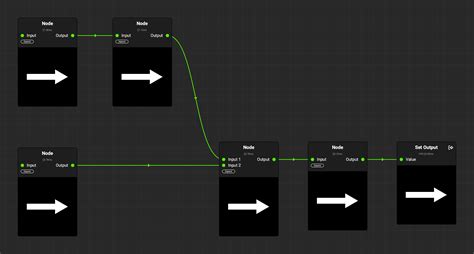
UltraNR, a new DaVinci AI Neural Engine driven denoise mode in the spatial noise reduction palette, dramatically reduces digital noise while preserving image clarity. The Film Look Creator allows users to add cinematic looks by replicating film properties such as halation, bloom, grain, flicker, gate weave, and vignetting. The ColorSlice palette utilizes subtractive color processes to adjust image color density, saturation, and hue, producing rich filmic colors. Corrector nodes in the color page node editor now feature composite modes, allowing for more flexible blending of node values without the need for a layer mixer. The viewer now supports marker overlays and annotations for timeline and clip markers, enabling users to leave written notes alongside visual feedback.
Fairlight Page: Advanced Audio Post-Production
The Fairlight page is a full-blown digital audio workstation, and DaVinci Resolve 20 enhances its capabilities further. IntelliCut AI is designed to identify and remove silence, and intelligently switch between speakers, significantly streamlining dialogue editing. The AI Audio Assistant analyzes audio and intelligently creates a professional audio mix.
Clip EQ now features 6 bands on the Cut, Edit, and Fairlight pages, offering more tonal control at the clip level. Two new clip processing options allow users to match a target clip’s audio to a reference clip’s level or tonal spectrum using EQ match. Users can now build Chain FX to group favorite plugin combinations with customized settings, saved as presets. Fairlight features per-channel automation mode selection for greater flexibility in mixing. The IntelliTrack AI point tracker automatically generates precision audio panning by tracking on-screen subjects in 2D and 3D spaces, enhancing immersive audio experiences. The AI-based dialogue separator FX allows rebalancing of dialogue against background sound and room ambience. The ducker track FX enables one track to automatically adjust the level of another. Fairlight also supports full sphere Ambisonic surround soundtracks.
Collaboration and Cloud Integration
DaVinci Resolve 20 emphasizes collaborative workflows with robust Blackmagic Cloud integration. Users can host project libraries and sync media, with cloud folders allowing easy sharing of clips, images, or graphics. Cloud content appears as virtual clips until used, after which it's synced locally. Clients without a Blackmagic Cloud account can review projects through shared Presentation links. The Organizations web app allows larger companies to define single organizations or companies within Blackmagic Cloud, creating groups or teams for efficient project sharing and license management.
The Blackmagic Proxy Generator App automates the creation and management of proxies from camera originals, with watch folders for automatic conversion to H.264, H.265, or ProRes. This accelerates editing workflows, and users can switch between camera originals and proxies with a single click. URSA Cine and PYXIS cameras can now upload proxy files, followed by camera originals, to Blackmagic Cloud for automatic sync with DaVinci Resolve projects.
Hardware Integration and Accessibility
DaVinci Resolve's ecosystem extends beyond software, with dedicated hardware designed to enhance workflow efficiency. The DaVinci Speed Editor and DaVinci Resolve Editor Keyboard offer QWERTY keyboard layouts with color-coded shortcut keycaps and dedicated edit function keys, designed for faster editing. The DaVinci Resolve color panels, ranging from the portable Micro Panel to the comprehensive Advanced Panel, provide tactile control for precise color grading. Similarly, Fairlight hardware consoles, from the Desktop Console to the multi-bay Studio Console, act as natural extensions of the software, streamlining audio mixing workflows.
Crucially, DaVinci Resolve remains accessible through a robust free version. This allows aspiring professionals to learn and utilize the same industry-leading tools used in Hollywood. For those requiring advanced features like multiple GPUs, 4K output, motion blur effects, temporal and spatial noise reduction, multiple AI-based tools, HDR tools, and more, the DaVinci Resolve Studio version is available.
Future-Proofing and Compatibility
DaVinci Resolve 20 is built with the future in mind, supporting emerging technologies and workflows. The inclusion of the latest version of Dolby Vision ensures HDR viewing on supported monitors. The DaVinci Wide Gamut and Intermediate log grading environment provides a universal internal working color space, larger than what most cameras can capture, ensuring compatibility with any source media and allowing delivery to all current projection, monitoring, and archiving standards. For remote monitoring via Blackmagic Cloud, SRT streaming ensures high-quality, low-latency video.
The AI Set Extender creates scene extensions to fill entire frames based on text prompts, automatically generating missing regions caused by limited clip angles or cropping. New tools and parameters are being added to support Apple Immersive workflows, including spatial audio. DaVinci Resolve also supports 8K digital negative debayering and editing in real-time.
With its continuous innovation, extensive feature set, and commitment to both professional and accessible post-production solutions, DaVinci Resolve 20 solidifies its position as an indispensable tool for creators worldwide.