Drawing tablets have become essential tools for artists, offering enhanced control and precision for creating digital masterpieces. The question of what constitutes the "best" drawing tablet often hinges on individual needs and budget constraints. This guide aims to explore the key factors to consider when selecting your next drawing tablet, with a specific focus on the offerings from XP-Pen, a brand recognized for its innovative and accessible digital art tools.
Understanding the Core Components of a Drawing Tablet
A drawing tablet is more than just a digital canvas; it's an extension of an artist's creativity, designed to enhance expression and workflow. Evaluating several critical elements will help you determine the usability, reliability, and overall suitability of a tablet for your artistic endeavors.
The Screen: Your Digital Canvas
The size of the screen is often the first feature an artist notices, but it's crucial to look beyond dimensions. The screen is the primary interface for your artwork, directly impacting the ability to create precise and vivid pieces.
Panel Type and Color Reproduction: Different panel types offer distinct advantages in color reproduction, refresh rates, and viewing angles. IPS panels are a popular choice for drawing tablets due to their superior color accuracy and consistency, ensuring that the colors you see on screen closely match your intended palette.
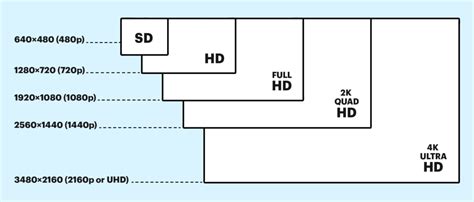
Resolution and Detail: For detailed work, high-resolution displays such as 4K or 2.5K are highly beneficial. A higher pixel density allows artists to work with intricate designs without suffering from noticeable pixelation, preserving the crispness of fine lines and subtle details.
The Stylus: Your Digital Brush
The stylus is the primary tool for interacting with a drawing tablet, and its quality significantly influences the overall drawing experience.
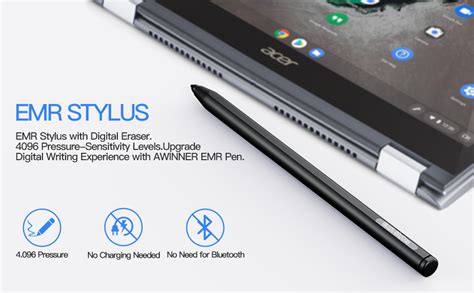
EMR Technology: Modern styluses often utilize Electromagnetic Resonance (EMR) technology, a feature prominent in many XP-Pen products. This technology offers a natural drawing feel, and unlike battery-dependent styluses, EMR pens are lightweight and do not require charging, making them more portable and reliable for extended drawing sessions.
Pressure Sensitivity and Tilt Support: When choosing a stylus, prioritize a high pressure sensitivity level, ideally 8,192 or 16,000 levels. Greater pressure sensitivity translates to more precise control over line weight and opacity. Tilt sensitivity is another valuable feature, allowing artists to simulate traditional shading techniques used with pencils or brushes by varying the angle of the stylus.
Software Compatibility and Driver Support
A drawing tablet's effectiveness is amplified by its compatibility with various operating systems and creative software. Robust driver support ensures seamless integration and optimal performance. Popular software such as Adobe Photoshop, Illustrator, CorelDRAW, and Clip Studio Paint are common choices for digital artists, and ensuring your tablet works harmoniously with these applications will significantly streamline your workflow and enhance the quality of your output.
Essential Accessories for an Enhanced Experience
Many brands, including XP-Pen, enhance the user experience by including useful accessories with their drawing tablets.
Drawing Gloves: A drawing glove reduces friction between your palm and the tablet's surface, preventing smudges and improving precision, especially when paired with a matte screen protector.
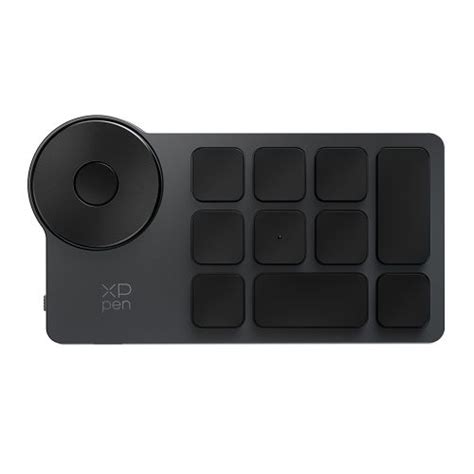
Shortcut Remotes: Wired or wireless shortcut remotes, featuring customizable programmable buttons, can drastically improve efficiency. These can be programmed for frequently used functions like undo, zoom, layer switching, and more, minimizing the need to switch between the tablet and keyboard.
Pen Holders and Stands: A dedicated pen holder protects the stylus nib from damage and dust. Tablet stands are crucial for ergonomic comfort, allowing you to adjust the drawing surface's angle and height to prevent strain during long working sessions and mitigate issues like back pain.
After-Sales Service: Peace of Mind
A often-overlooked yet critical aspect of purchasing any electronic device is the quality of after-sales service. This includes warranties, responsive customer support, and repair services. A solid warranty period, such as XP-Pen's standard 18-month coverage, provides significant peace of mind. The availability of replacement parts and reliable repair services is also essential for long-term usability.
XPPen Drawing Tablet Recommendations
XP-Pen has established itself as a reputable brand, offering innovative and high-quality drawing tablets that cater to a wide range of artists. Their commitment to integrating advanced technology, such as the X3 Pro Smart Chip with 16K pressure levels and Calman-certified IPS displays enhanced by XPPen ColorMaster, positions them as a strong contender in the market.
XPPen Artist Pro 24 (Gen2) 4K: For Demanding Professionals
The XPPen Artist Pro 24 (Gen2) 4K is designed for artists who require top-tier specifications and performance. Its expansive 24-inch Calman-certified 4K display ensures exceptional color accuracy, making it suitable for even the most complex creative projects. With a 99% Adobe RGB color gamut, the visual fidelity is outstanding. This tablet supports the X3 Pro Smart Chip stylus, offering unparalleled precision with its 16K pressure levels and customizable shortcut keys to optimize workflow.
XP-Pen Artist 24 Pro Gen 2 Review(s)
XPPen Artist Pro 22 (Gen2): A Balanced Powerhouse
For digital artists seeking a balance between screen real estate and quality, the XPPen Artist Pro 22 (Gen2) is an excellent choice. This 22-inch tablet boasts a 2.5K display that delivers vivid visuals and sharp details with a wide color gamut for accurate color reproduction. When paired with an X3 Pro Smart Chip stylus, it provides smooth and precise strokes, making it a strong performer akin to its larger sibling.
XPPen Artist 15.6 Pro V2: Portability Meets Performance
The XPPen Artist 15.6 Pro V2 is an ideal option for artists who prioritize portability. Measuring around 11mm thick, it is easy to transport alongside other devices. This tablet doesn't compromise on features, offering high performance suitable for freelance artists and students on the move. A customizable shortcut key further enhances workflow by allowing quick access to frequently used functions.
XPPen Deco Mini7W: Budget-Friendly Brilliance
For those on a tighter budget, the XPPen Deco Mini7W offers remarkable features for its price point. Its wireless connectivity provides freedom and comfort during use. This tablet is a compelling choice for beginners and experienced artists alike, thanks to its high pressure sensitivity and a decent 5080 LPI resolution. The lightweight design makes it highly portable, and the battery-free stylus ensures extended usage times without interruption. The customizable shortcut key is another valuable addition for streamlining workflow.
XPPen Magic Drawing Pad: The All-in-One Creative Solution
The XPPen Magic Drawing Pad stands out as an innovative and convenient device for creators. Unlike traditional drawing tablets, it operates on its own Android-based system, functioning as both a standard Android tablet and a high-performance drawing tablet. Key features include the X-Paper Display, the X3 Pro Slim Stylus with 16K pressure levels and tilt support, and integrated EMR Technology. This makes it a hassle-free, high-performance solution for sketching, digital art, and note-taking, whether at home or on the go.
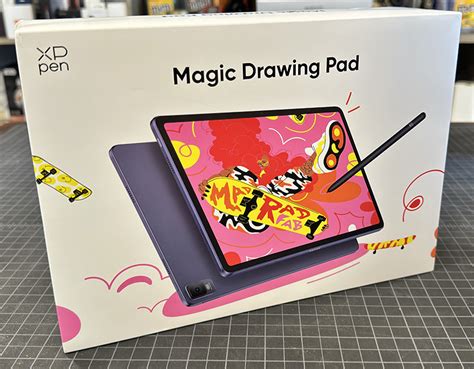
The XPPen Magic Drawing Pad is a strong contender against devices like the iPad, offering a more tactile drawing experience due to its micro-textured display that mimics the feel of paper. Its 3:2 aspect ratio and 12.2-inch display provide ample drawing space, and its lightweight, slim design (6.9mm thin, 599g) enhances portability. The display boasts a resolution of 2160 x 1440, 109% sRGB, 82% Adobe RGB, and 77% NTSC, with a brightness of 300 nits. While it doesn't offer the same app ecosystem as iPadOS, its Android-based system provides access to a wide range of creative apps, and it comes bundled with useful software like ArtRage Oils and a subscription to ibisPaint X. The stylus, while lacking tilt support in early versions, offers an impressive 16K pressure levels and a responsive drawing experience. The integrated stand and included accessories like a drawing glove and extra nibs further enhance its value proposition.
XPPen Artist 12 (3rd Gen): A Refined Entry-Level Display
The XPPen Artist 12 (3rd Gen) represents a subtle yet significant evolution in XP-Pen's affordable pen display range. It's the first model to feature the new X4 Smart Chip Stylus, a redesign promising faster response times, enhanced precision, and a lighter touch. This tablet combines a slimmer, magnetically equipped body with features inspired by higher-end models, making professional-grade drawing more accessible for hobbyists and students.
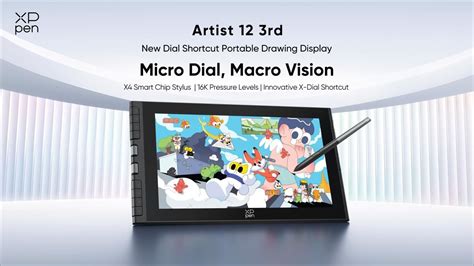
The Artist 12 (3rd Gen) includes the X4 Smart Chip Stylus, ten spare nibs, a nib replacement tool, a drawing glove, a cleaning cloth, a foldable stand, and both USB-C to USB-C and 3-in-1 cables. Its lightweight design (719g) and compact dimensions (327.2 x 189.1 x 12mm) make it highly portable. The 11.9-inch Full HD (1920 x 1080) laminated display offers impressive color fidelity with 99% sRGB, 97% Adobe RGB, and 97% DCI-P3 coverage. The screen's AG nano-etched glass and AF coating reduce glare and provide a subtle paper-like texture. A notable design addition is the integrated magnetic stylus holder, which securely snaps the stylus into place.
The X4 Smart Chip Stylus boasts 16,384 pressure levels, a low activation force of 2g, and a first-stroke response time of just 30ms. This translates to exceptional precision for capturing the lightest taps and micro-pressure changes. The stylus's new nib structure reduces wobble, ensuring steady and natural lines. While its lightweight design might not appeal to everyone, it offers a comfortable drawing experience with accurate tilt recognition up to 60°. The laminated screen effectively minimizes parallax, ensuring strokes align cleanly under the nib. Despite the functional yet slightly clunky driver app, once configured, the tablet performs reliably. For its price, the Artist 12 (3rd Gen) delivers a bright, color-accurate screen and an impressive stylus, making it an excellent choice for hobbyists, students, and traveling creatives seeking professional drawing capabilities at an accessible price point.
Considerations for Choosing Your XP-Pen Tablet
When selecting the best drawing tablet, careful consideration of screen quality, stylus technology, compatibility, and included accessories is paramount. XP-Pen's diverse lineup offers compelling options that excel in these areas, ensuring that artists can find a device tailored to their specific needs, whether for portable sketching or detailed studio work. Investing in the right drawing tablet can significantly elevate your creative process and help you produce stunning, professional-grade artwork.
User Feedback and Real-World Performance
While specifications are important, real-world user experiences provide valuable insights. Reviews for XP-Pen products indicate a generally positive reception, with many users praising the value for money and innovative features. For instance, the XPPen Artist 15.6 Pro is noted as a superb budget alternative, offering portability and versatility, though some professional artists might find minor limitations in features and build robustness compared to higher-end models. The stylus performance on this model is often highlighted as fantastic for its price range, with 8,192 pressure levels and good tilt sensitivity.
However, some users have reported issues with driver stability, connection drops, and customer service responsiveness, particularly with certain models like the Artist Pro 24 Gen 2. These concerns underscore the importance of checking for the latest driver updates and understanding the warranty and support policies. For example, a user mentioned that after a software update, their Pentablet became unusable, and the support team was unhelpful.
Conversely, many users express high satisfaction. The XPPen Artist 16 (2nd Gen) is praised for its smooth drawing feel, responsive pen, and lack of lag, representing great value. The XPPen Pro 14 tablet is described as having amazing build quality, ease of use, and an awesome pen that closely mimics a traditional pencil, with the controller being an essential and highly valued component.
The XPPen Magic Drawing Pad has also garnered positive attention, with users appreciating its versatility, performance, and value, often comparing it favorably to iPads for artistic creation, especially for outdoor sketching. Despite early versions lacking tilt support for the stylus, its overall user experience, larger display, and natural drawing feel are highly recommended.
Balancing Features and Price
XP-Pen consistently aims to strike a balance between advanced features and affordability. Models like the Deco Mini7W are specifically designed to be budget-friendly entry points, offering high pressure sensitivity and wireless connectivity without a significant financial outlay. This approach makes digital art more accessible to aspiring creators.
For artists looking to upgrade from simpler graphics tablets or seeking a more portable solution, models like the Artist 15.6 Pro or the Artist 12 (3rd Gen) offer a compelling middle ground. They provide a direct drawing-on-screen experience with improved stylus technology and display quality, often at a fraction of the cost of premium competitors. The Artist 12 (3rd Gen), in particular, focuses on nailing the essentials: a bright, color-accurate screen and an impressive stylus, all while maintaining an accessible price point under $300.
When evaluating XP-Pen products, consider the trade-offs. While some models might not feature the absolute highest-end build materials or the most advanced screen technologies found in significantly more expensive Wacom or Huion devices, they often compensate with superior stylus performance or innovative integrated features, like the Magic Drawing Pad's standalone functionality. The key is to align the tablet's strengths with your primary artistic needs and budget.
The brand's commitment to innovation is evident in features like the X3 Pro Smart Chip, offering up to 16K pressure levels, and their continued development of screen technologies like the X-Paper display, which provides a more natural, paper-like drawing sensation. These advancements, coupled with their competitive pricing and extended warranty periods (often 18 months), make XP-Pen a strong contender for artists at all levels.