Adobe Photoshop Elements 11 marked a significant evolution for the popular consumer photo-editing software, ushering in a complete redesign and a host of new features aimed at both hobbyist and serious amateur photographers. This version represented a substantial leap forward from its predecessors, offering a more streamlined, intuitive, and powerful editing experience. For those looking to elevate their everyday snapshots into something more sensational, Elements 11 provided a compelling suite of tools, bridging the gap between basic enhancements and professional-level manipulation, all at a fraction of the cost of its more advanced sibling, Photoshop CS.
A Revamped Interface for Enhanced Usability
One of the most immediately noticeable changes in Photoshop Elements 11 was its entirely new user interface. Moving away from the darker, grey-on-grey aesthetic of previous versions, Elements 11 adopted a fresh, light grey theme with more readable text and clearer tool icons. This visual refresh was more than just skin deep; it was part of a larger re-engineering effort by Adobe to make both the Organizer and the Editor faster, more efficient, and crucially, easier to use.
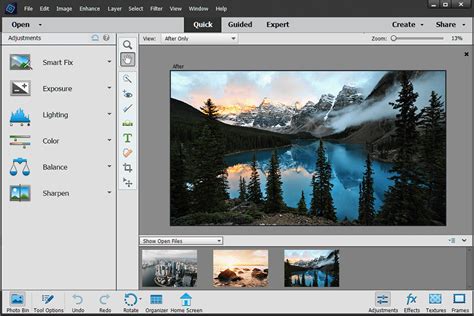
The interface was designed to cater to a spectrum of user abilities, offering three distinct editing modes that users could smoothly switch between: Quick, Guided, and Expert. This tiered approach allowed the program to adapt to the user's skill level, making it less intimidating for beginners while still providing the depth required by more experienced users. This flexibility was a key aspect of the redesign, ensuring that users could learn, use, and improve their skills without feeling overwhelmed. The move of the options bar from the top to the bottom of the screen, while initially requiring adjustment for long-time users, presented tool settings in a clear and understandable manner. While these changes might seem superficial, they collectively contributed to a significantly different and more approachable feel for Elements 11 compared to its predecessor.
The Organizer: Streamlining Photo Management
Photoshop Elements 11's Organizer served as the central hub for cataloging, retrieving, printing, and filing images. It was designed to help users navigate their photo folders, regardless of where they were stored. The Organizer offered a range of techniques to simplify the management process, including facial recognition, geo-tagging, and calendar-based searches. While the facial recognition feature could sometimes be hit-or-miss, frequently misidentifying objects as faces, it was a step towards more intelligent photo organization.
Within the Organizer, users could perform routine image enhancement tasks with one-click shortcuts. These included single-button effects to sharpen images, adjust contrast, and enhance color. However, the control over these automatic fixes was limited, operating on an all-or-nothing basis. For more precise adjustments, it was almost always recommended to transfer selected images to the Editor for more granular control. The Organizer and Editor worked well together, with files being transferred between them for more in-depth editing. Even tasks like creating calendars and photo books, initiated in the Organizer, were processed by the Editor, ensuring a seamless workflow.
The Editor: Powerful Tools for Creative Expression
The Editor was the core of Photoshop Elements 11, housing the majority of its powerful image manipulation capabilities. It was divided into three distinct working sections: Quick, Guided, and Expert, each catering to different user needs.
Quick Mode: Effortless Enhancements
Quick mode offered a simplified view with a limited set of essential tools, including selection, redeye removal, tooth brightening, text, and healing. Here, one-click effects like Smart Fix, Exposure, and Color adjustments were presented with a grid of three variations, allowing users to quickly choose the best result. These adjustments, while simple, offered a surprising degree of user control, with options to target specific aspects like saturation, hue, or vibrance, alongside an Auto button. For beginners, Quick mode provided access to most everyday editing needs without being intimidating.
Guided Mode: Step-by-Step Creative Assistance
Guided mode was designed to act as a virtual assistant, guiding users step-by-step through various creative processes. All tools and panels were hidden, replaced by a single panel presenting options for Touchups, Photo Effects, and Photo Play. This mode made complex tasks accessible, such as creating the "perfect portrait," adding vignettes, or producing reflections. New guided effects in Elements 11 included Tilt-Shift, Hi-Key, and Low-Key effects, which could be created with remarkable ease and convincing results. The Guided mode was particularly effective for learning, as it demonstrated the power of Photoshop Elements 11 without overwhelming new users. The process of creating an effect in Guided mode allowed for simple controls at each step, making it almost foolproof.

Expert Mode: Advanced Control and Flexibility
Expert mode provided the full Photoshop Elements 11 experience, offering access to all filters, adjustments, and techniques. A significant benefit of moving from Guided to Expert mode was the revelation that the image being worked on was presented as a series of layers, masks, adjustments, and filters, mirroring the process of direct creation in Expert mode. This feature was invaluable for editing previously created effects, fine-tuning results, adjusting layer modes, and repainting masks. It also served as an excellent learning tool, allowing new users to understand how specific effects were constructed.
Beyond the interface improvements, Expert mode in Elements 11 benefited from several new filters that were not available in Photoshop itself. These included a powerful Lens Blur effect, as well as new Comic, Graphic Novel, and Pen and Ink filters. These filters were designed to create hand-drawn looks with a high degree of realism, offering a unique and entertaining creative outlet.
Standout New Features in Elements 11
Photoshop Elements 11 introduced a number of key features that significantly enhanced its capabilities, making it a more powerful and versatile editing tool.
Refine Edge: Mastering Complex Selections
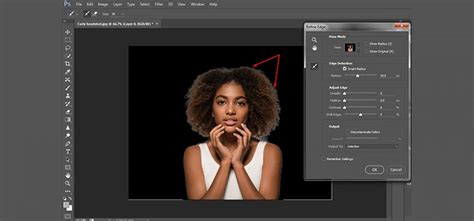
A star of the show in Elements 11 was the new Refine Edge feature, directly inspired by Photoshop CS5. This tool revolutionized the process of making complex selections, particularly for subjects with fine details like hair. Previously a challenging task, Refine Edge made it as easy as using a paintbrush, allowing users to isolate intricate areas with far greater ease and precision than ever before. The ability to modify cutouts with a Selection brush further added to its power.
Enhanced Camera Raw
Elements 11 included a slimmed-down version of Adobe Camera RAW, bringing its noise reduction options up to par with Photoshop and Lightroom. While it still lacked the advanced local adjustment tools found in Lightroom, the improved noise reduction was a welcome upgrade for photographers shooting in low light conditions.
Actions Panel: Automation for Efficiency
The new Actions panel in Elements 11 made loading and playing Actions significantly easier. While it didn't include the ability to record new Actions within Elements itself, it allowed users to leverage the automation capabilities built in Photoshop, streamlining complex series of effects with a single keystroke.
Magic Extractor: Isolating Elements with Ease
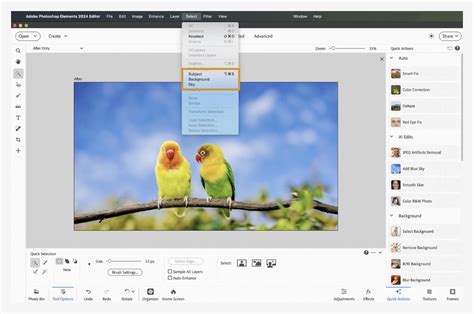
The Magic Extractor was another highly praised feature, enabling users to easily select and extract specific elements from a photo. It worked best with high-contrast subjects but performed remarkably well in tests, even with more challenging items. This feature allowed for greater flexibility in combining elements from different photos, creating composite images more cleanly than before.
Photo Book and Scrapbook Creation
Elements 11 continued to offer robust tools for creating photo books and scrapbook pages. With professionally designed templates and the ability to customize every aspect of the creations, users could easily showcase their memories in a personalized and visually appealing manner.
Photoshop Elements: Easily Create a Photo Book
A Program for the Hobbyist Photographer
Photoshop Elements 11 was priced at around $100, positioning it squarely for the hobby photographer. Its blend of powerful features and user-friendly design made it an attractive option for those looking to move beyond basic photo enhancements without the steep learning curve and cost of professional software. The program was available for both PC and Mac, and typically included discs for both operating systems in the box, along with the ability to install on up to two machines. Free trials were also available, allowing users to install and run alongside previous versions without interference.
The program's ability to perform 90% of what many users needed from Photoshop, at approximately 10% of the cost, made it an exceptional value. While previous versions of Elements had seen some rather modest updates, Elements 11 represented a significant leap forward, demonstrating Adobe's commitment to its target market of amateur and serious amateur photographers. The redesign and the inclusion of advanced features ensured that Elements 11 was far from just a "toy" program, offering a mature and sophisticated image editing experience.
Accessibility and Learning Curve
For new users, the redesigned interface and the tiered editing modes of Elements 11 significantly lowered the barrier to entry. The Organizer's ability to manage photos and the Editor's Quick and Guided modes provided accessible starting points. For those familiar with previous versions, the changes did require a period of adjustment, as many features were relocated. However, the intuitive layout and the seamless switching between modes quickly made users feel at home. The Expert mode, while offering advanced control, also served as a valuable learning environment, demystifying the creation of complex effects by revealing their layered structure.
Ultimately, Adobe Photoshop Elements 11 was a well-thought-out program that prioritized approachability and genuine usability. It eschewed overly flashy, superficial changes in favor of substantive improvements that empowered users to transform their everyday snapshots into sensational photos with confidence and ease. The program's continued success as the world's #1 selling consumer photo-editing software was a testament to its ability to meet the needs of its broad user base.