Adobe InDesign, a cornerstone application for graphic designers and layout professionals, consistently evolves to meet the dynamic demands of the creative industry. Recent updates, particularly the highly anticipated InDesign 21.0 release, introduce a suite of powerful features and enhancements designed to streamline workflows, foster collaboration, and unlock new creative possibilities. These advancements aim to empower users, from seasoned professionals to those just beginning their design journey, with tools that adapt to changing content and facilitate more efficient project management.
Activation and Service Requirements
Before delving into the exciting new functionalities, it's crucial to understand the foundational requirements for activating and utilizing Adobe InDesign. A stable internet connection is a prerequisite, as it facilitates the activation process and ensures access to various online services. An Adobe ID is also necessary, serving as your unique identifier within the Adobe ecosystem and enabling seamless integration across Creative Cloud applications. Furthermore, the acceptance of the product's license agreement is mandatory for its activation and subsequent use. It is important to note that this product may integrate with or allow access to certain Adobe or third-party hosted online services. These applications and services are not universally available in all countries or languages and are subject to change or discontinuation without prior notice. For instance, InDesign Server requires activation before it can be used. It is also worth noting that Adobe services are available only to users aged 13 and older and require agreement to additional terms of use and the Adobe Privacy Policy.
Innovations in Layout and Content Adaptation
The InDesign 21.0 update prominently features Flex Layout, a groundbreaking tool designed to create designs that seamlessly adjust and remain flexible as content evolves. This capability is particularly transformative for responsive design, where layouts must adapt to various screen sizes and orientations. Flex Layout empowers designers to build more dynamic and resilient layouts, ensuring that their creations maintain their integrity and aesthetic appeal regardless of content fluctuations.
Beyond Flex Layout, InDesign continues to leverage the power of Adobe Sensei, its artificial intelligence and machine learning platform, to automate complex tasks. One such feature is Auto Style, which allows users to style their text with a single click. Powered by Adobe Sensei, built-in Style Packs can intelligently read and apply different styles to various sections of text, significantly reducing the manual effort involved in typographic consistency.
Another significant enhancement driven by Adobe Sensei is the ability to intelligently wrap text around subjects in an image. This feature allows designers to wrap text around the contours of a subject directly, eliminating the need for intricate workarounds such as Alpha Channels or Photoshop paths. This dramatically simplifies the process of integrating text and imagery for a more polished and professional look.
Streamlining Collaboration and Feedback
Collaboration is a cornerstone of modern design projects, and InDesign 21.0 introduces features to facilitate smoother interaction between designers and stakeholders. Users can now share their designs with stakeholders for review, receive feedback, and manage these feedback comments directly within InDesign. This integrated feedback loop minimizes the need to switch between applications, keeping the review process centralized and efficient.
InDesign and LucidLink: Design Workflow
Enhanced Document Management and Output
The update also addresses practical aspects of document creation and management. The ability to add a page number marker to a master page is a small yet significant improvement that enhances the efficiency of creating multi-page documents. This feature ensures consistent pagination across a document without requiring manual intervention on each page.
For those working with image-heavy layouts, the Generative Expand feature offers a powerful solution for filling any space around an image. This AI-powered tool allows designers to seamlessly extend image boundaries, providing creative flexibility in composition and layout.
The platform also offers robust tools for PDF export, though it's important to be aware of potential issues. A range of issues at the document or system level could prevent a user from printing or exporting a document as PDF. This can include factors such as corrupted InDesign preferences, which can manifest as strange behavior and are fortunately easy to replace. Additionally, if a document utilizes fonts with special characters in their names, InDesign could potentially crash during launch or when the Type tool is engaged, highlighting the importance of font management and careful selection.
Installation and Licensing
Understanding the installation and licensing of InDesign is also important for users. A user can install InDesign and other Creative Cloud apps on up to two computers. If installation on a third computer is required, the user must deactivate the application on one of their previous machines. This licensing model provides flexibility for users who work across multiple devices.
Troubleshooting and Support
While InDesign is a robust application, users may occasionally encounter issues. Adobe provides a comprehensive suite of troubleshooting resources. These include Adobe’s support knowledgebase, the Adobe Support Advisor, and various community forums where users can seek assistance and share solutions. For non-technical inquiries such as product information, sales, and registration, Adobe Customer Service is available to provide support.
For those eager to explore the latest advancements, trying out InDesign 21.0 and providing feedback is encouraged. Users can share their thoughts and experiences within the Adobe InDesign Community. Feedback, often expressed through mechanisms like an "Upvote" icon, is invaluable in helping Adobe improve the user experience and refine future updates.
The continuous development of Adobe InDesign, with releases like 21.0, underscores Adobe's commitment to providing designers with cutting-edge tools that enhance creativity, efficiency, and collaboration in the ever-evolving landscape of graphic design. The focus on AI-powered features, adaptive layouts, and integrated collaboration tools positions InDesign as an indispensable asset for professionals seeking to produce high-quality, impactful designs.
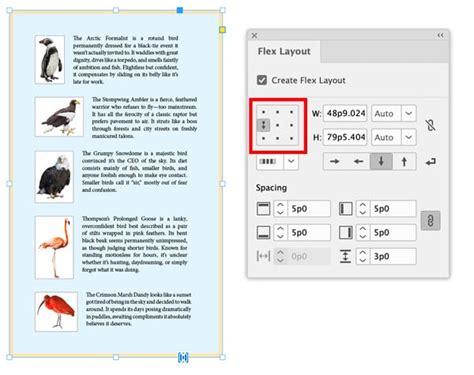
The exploration of advanced features such as Flex Layout, Auto Style, and intelligent text wrapping signifies a move towards more intuitive and automated design processes. These tools not only save time but also empower designers to focus on the creative aspects of their work rather than getting bogged down in technical intricacies. The ability to seamlessly integrate feedback and manage review processes directly within the application further solidifies InDesign's role as a central hub for design projects.

Furthermore, the continuous improvement of foundational aspects like PDF export and font handling demonstrates Adobe's dedication to a stable and reliable user experience. While potential issues can arise, the availability of extensive support resources ensures that users can find solutions and continue their work with minimal disruption. The ongoing dialogue with the user community, facilitated by platforms like the Adobe InDesign Community, plays a vital role in shaping the future direction of the software, ensuring it remains aligned with the practical needs of designers worldwide. The emphasis on flexibility and adaptability in design is a key takeaway from recent updates, reflecting the broader trend towards dynamic content delivery across multiple platforms.