The digital creative landscape is rapidly evolving, and standing out among a sea of talented individuals requires more than just innate skill. Adobe Certified Professional (ACP) certifications offer a tangible way to validate proficiency in industry-standard software, and for those focused on visual communication, the Adobe Photoshop certification is a cornerstone. This certification demonstrates a mastery of Adobe Photoshop, a powerful application essential for graphic design, digital imaging, and a myriad of creative workflows. Understanding the cost associated with this certification, alongside its inherent value, is crucial for anyone looking to advance their career in the digital media industry.
What is an Adobe Certified Professional?
An Adobe Certified Professional is an industry-recognized credential that signifies a candidate's proficiency in a specific Adobe Creative Cloud application. Beyond just software skills, these certifications also encompass foundational knowledge vital for a successful career in digital media. Each certification is achieved through a rigorous, 50-minute proctored examination. This exam is a comprehensive assessment, comprising practical tasks performed directly within the Adobe software and selected-response questions, all meticulously developed and validated by industry experts. These exams are exclusively accessible through Certiport and its extensive global network of authorized testing centers.
The program was formerly known as Adobe Certified Associate (ACA). In June 2021, all valid ACA certifications earned through live-in-the-app exams (for CC 2018 versions or later) were automatically converted to the new Adobe Certified Professional title, remaining valid for the remainder of their three-year eligibility period. New Credly badges and certificates are now available for download via Certiport.com accounts. Certifications obtained through simulation-based exams (CC 2015 or earlier) retain the Adobe Certified Associate designation. To achieve the Adobe Certified Professional status, candidates must pass a live-in-the-app exam.
Determining the Right Certification Path
For individuals aspiring to become Adobe Certified Professionals, the first step is identifying the certification that best aligns with their career goals and existing skill set. Adobe provides comprehensive exam guides and a detailed list of available offerings to assist in this decision-making process. Reviewing these resources can help determine which Adobe Certified Professional exam is the most suitable starting point.
Understanding Certification Expiration and Renewal
Once earned, an Adobe Certified Professional certification is valid for three years from the date of issue. This validity period is designed to ensure that certified individuals remain current with the latest features and capabilities of Adobe applications. It's important to note that certifications are not directly tied to specific software versions, but rather to the overall proficiency in the application's core functionalities. To maintain an active certification beyond the three-year mark, individuals will need to retake and pass the relevant exam.
The Cost of Adobe Certification Exams
The cost of an Adobe Certified Professional exam can vary significantly for individuals, influenced by factors such as the chosen delivery method and geographical location. Each Certiport Authorized Testing Center sets its own pricing for exam vouchers and proctoring services. These centers may also offer bundled packages that include additional benefits like exam retakes, learning materials, or training sessions.
For exams delivered online via Certiport's OnVUE remote proctoring platform, the cost is dependent on the candidate's location and the prevailing currency. For instance, in the United States, the price for a single exam is US$150. It is important to note that volume purchasing and site licenses are available for educational institutions and testing centers. For detailed information on these options, interested parties are encouraged to contact Certiport’s global sales team.
Available Adobe Certified Professional Certifications
Adobe offers a range of certifications catering to various Creative Cloud applications. Currently, there are seven distinct certifications available, including:
- Adobe Certified Professional - Visual Design Using Adobe Photoshop
- Adobe Certified Professional - Graphic Design & Illustration Using Adobe Illustrator
- Adobe Certified Professional - Digital Video Using Adobe Premiere Pro
- Adobe Certified Professional - Web Design & Development Using Adobe Dreamweaver
- Adobe Certified Professional - Print & Digital Media Publication Using Adobe InDesign
- Adobe Certified Professional - Motion Graphics Using Adobe After Effects
- Adobe Certified Professional - User Experience Design Using Adobe XD
For detailed information on specific exam versions and language availability, candidates should visit certiport.com/adobe.
What is Adobe Creative Cloud?
Adobe Creative Cloud is a comprehensive suite of professional-grade applications that are considered the industry standard for creative professionals worldwide. Achieving certification in these tools serves as a powerful testament to an individual's skills, significantly enhancing their visibility and appeal to potential employers. Earning an Adobe Certified Professional credential signifies a candidate's ability to leverage Creative Cloud applications to effectively address real-world creative challenges, thereby providing a distinct advantage in job applications, internship pursuits, and freelance opportunities.
Taking the Adobe Certification Exam
There are two primary methods for accessing and taking Adobe Certified Professional exams:
Option 1: Online via Certiport’s OnVUE Solution
This option allows candidates to take their exams remotely from a location of their choice, provided they meet the technical requirements for online proctoring. To book an OnVUE exam, candidates need to follow specific instructions available through their Certiport.com account. Currently, this online delivery method is available in English only.
Option 2: In Person or Online Through a Certiport Authorized Testing Center
Candidates can also opt to take their exams at a physical Certiport Authorized Testing Center (CATC). A locator tool, the CATC locator, is available to help find public testing centers that offer the desired exam. For individuals outside North America, regional Solution Providers can be contacted for assistance in locating a testing center. Many academic institutions also function as private Certiport Authorized Testing Centers, and students and educators are strongly encouraged to inquire with their institutions about potential free or discounted exam opportunities before booking through OnVUE or public centers.
Become a Certiport Authorized Testing Center
Exam Structure and Content
Adobe Certified Professional exams are designed to assess practical skills and foundational knowledge. Each 50-minute exam incorporates two main components: a "Questions" section featuring selected-response items, and a "Tasks" section that requires candidates to perform live-in-the-app activities within the respective Adobe software. Detailed information regarding the exam format can be found in Certiport documentation.
Language Availability for Exams
Yes, Adobe Certified Professional exams are available in multiple languages. For instance, the Adobe Photoshop exam alone is offered in 12 different languages. When scheduling an exam with a Certiport Authorized Testing Center, candidates should inquire about the specific languages they can accommodate. For exams outside North America, contacting the relevant Certiport Solution Provider in that country or region will provide more information on language options.
Administering Exams for Students or Customers
Organizations interested in administering Adobe Certified Professional exams to their students or customers can do so by becoming a Certiport Authorized Testing Center. This involves meeting specific requirements and understanding the process for onsite and online exam delivery. Information regarding volume purchasing options is also available for CATCs.
Passing Score and Retake Policy
To achieve Adobe Certified Professional status, candidates must attain a passing score of 700 out of a possible 1,000. A comprehensive outline of the skills, knowledge, and abilities assessed in each exam is available in the Objective Domains. In the event that a candidate does not pass the exam, information about the retake policy can be found on the Certiport website.
Discounts and Financial Assistance
Discounts for Adobe Certified Professional exams may be accessible through various channels, including special promotions, educational institutions, or authorized training centers. Students and educators, in particular, are advised to check with their schools or universities regarding the availability of free or discounted exams. Regularly visiting the Adobe Certified Professional page is also recommended for updates on current offers and eligibility criteria.
Preparing for Your Certification Exam
Learning Curve for Creative Cloud Apps
The time required to master a Creative Cloud application varies depending on the individual's prior experience and learning pace. Adobe provides a wealth of resources, including tutorials and sample projects, to assist users of all skill levels in getting started with the more than 20 applications available in Creative Cloud.
To reach the level of proficiency necessary to pass an Adobe Certified Professional exam, candidates are generally advised to have approximately 150 hours of hands-on experience and dedicated instruction. The exams themselves are designed to be completed within a 50-minute timeframe.
Accessing Exam Guides and Study Materials
Comprehensive exam guides are available to help candidates understand the specific objectives and skills that will be assessed. These guides are invaluable for structured preparation. For the Adobe Photoshop certification, the exam guide outlines objectives such as "Working in the Design Industry," "Project Setup and Interface," "Organizing Documents," "Creating and Modifying Visual Elements," and "Publishing Digital Media." Each section details key concepts, terms, and relevant resources, including tutorials and practice exercises.
Preparing Students for Certification as an Educator
Educators play a vital role in preparing students for Adobe certification. This preparation can be integrated into various course structures, from year-long and semester-long programs to intensive bootcamps. Certiport offers a range of learning products specifically designed for educators, such as practice tests, courseware, and textbooks, to facilitate the integration of certification exams into curricula. Furthermore, the Adobe Education Exchange provides a broad spectrum of free learning resources for educators.

The Value of Adobe Certification in the Job Market
Earning an Adobe Certified Professional credential provides a significant competitive edge for individuals in the digital creative field. It serves as concrete proof of practical design and digital media skills, which are highly sought after by employers, clients, and hiring managers. Adobe Certified Professionals stand out because their abilities have been validated through certification in some of the world's most powerful applications for graphic design, video editing, and more. In essence, gaining education and certification boosts credibility and confidence, while simultaneously assisting organizations in identifying and training the talent they require.
Strategic Placement of Certification on a Resume
Including an Adobe certification on a resume can significantly enhance its impact. There are several strategic locations to consider:
- Next to your name: A prominent placement at the top of the resume.
- In a summary section: Briefly highlight your certified skills in an introductory paragraph.
- Near the top in a "Special Certifications" section: A dedicated area to showcase your credentials.
- Under your work experience section: Associate your certifications with relevant past roles.
Utilizing Adobe Certified Professional Digital Badges
Upon achieving certification, individuals are awarded digital badges through Credly. These badges are shareable and should be prominently displayed on resumes, portfolios, and any online professional profiles. This allows potential employers to easily verify the badge's authenticity and validate the certified individual's abilities. Additionally, a PDF version of the Adobe Certified Professional certificate can be downloaded and printed, featuring a unique code for validation via verify.certiport.com.
Specialty Credentials: Expanding Your Expertise
Adobe also offers "specialty credentials" in areas like Visual, Video, Web Design, or Marketing Design. These are automatically awarded to individuals who complete an eligible pair of certifications, demonstrating proficiency in two products that are frequently used in conjunction within the industry. For example, obtaining certification in Premiere Pro and then passing either the Photoshop or After Effects exam will result in a Video Design specialty credential. Both required certifications must be earned through live-in-the-app exams (version 2018 or later).
Customer Support and Resources
For candidates facing technical or customer support issues related to their Adobe Certified Professional exams, Certiport's dedicated support page is the primary resource. Similarly, for Certiport Authorized Testing Centers requiring support, the same page provides guidance.
Rescheduling or canceling an exam is subject to the specific policies of individual Certiport Authorized Testing Centers. Candidates are advised to contact their CATC directly for these matters. For Certiport OnVUE exams, rescheduling can be managed through the "My Exams" section within the "My Certiport" tab of the candidate's Certiport.com portal.
Qualified Credential Exams
It's worth noting that Certiport also offers "Qualified Credential" exams, which are free and on-demand. While these do not confer full certification status, they do provide a shareable badge as proof of validated skills. Participation in the Adobe Digital Experience Community is also encouraged at any stage of the learning or certification journey, offering resources and support for skill development.
The Photoshop Certification Exam in Detail
The Adobe Certified Professional Exam for Photoshop is specifically designed to evaluate a candidate's skills in visual communication and digital imaging using Adobe Photoshop. The exam objectives are meticulously outlined, covering critical areas essential for professional use of the software.
Key Exam Objectives for Visual Design Using Adobe Photoshop
The exam objectives are structured to cover a broad spectrum of Photoshop functionalities and industry knowledge. These include:
Working in the Design Industry: This section delves into essential concepts for collaborating with colleagues and clients, understanding legal and technical requirements, and possessing crucial design-related knowledge. It covers identifying the purpose and audience for preparing images, communicating design plans effectively, understanding copyright and licensing, defining digital image terminology (resolution, file types, color modes like CMYK and RGB), and applying fundamental design principles (space, line, shape, color, typography, photographic composition).
Project Setup and Interface: This objective focuses on setting up the application for an efficient workflow and ingesting digital assets. It includes creating documents with appropriate settings for web, print, and video; navigating, organizing, and customizing the Photoshop workspace (including panels, menus, and preferences); utilizing non-printing design tools like rulers and guides; importing assets from various sources; and managing colors, swatches, and gradients.
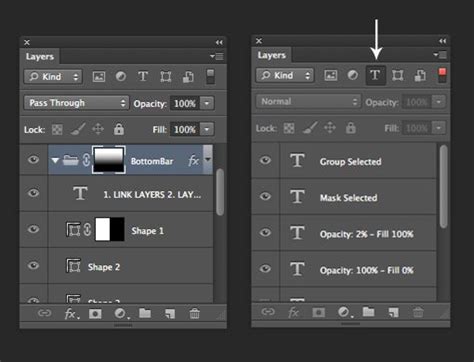
Organizing Documents: This crucial section addresses document structure and efficient workflow management through layers. It covers using the Layers panel to manage visual content, organizing layers in complex projects, understanding different layer types (pixel, adjustment, type, Smart Object, etc.), and modifying layer visibility using opacity, blending modes, and masks (layer and clipping masks). It also emphasizes the importance of differentiating between destructive and nondestructive editing techniques.
Creating and Modifying Visual Elements: This objective covers the core tools and functionalities that directly impact the visual outcome of a document. It includes creating and editing raster and vector images, adding and manipulating text with appropriate typographic settings, making and managing selections using a variety of tools (Quick Selection, Lasso, Magic Wand, etc.) and refining them, transforming digital graphics and media, and applying basic reconstructing and retouching techniques. Furthermore, it covers modifying the appearance of design elements using filters and layer styles.
Publishing Digital Media: This final objective focuses on the process of saving and exporting documents and assets. It includes preparing images for export to web, print, and video by checking for errors and project specifications, and saving in appropriate image formats for intended purposes (e.g., .psd, JPEG, PNG, TIFF). It also covers exporting project elements like layers and selections.
Preparation Resources
To aid candidates in their preparation, Adobe offers a range of resources:
- Exam Guides: Detailed guides outlining exam objectives are available for each certification.
- CertPREP Practice Tests: Powered by GMetrix, these practice tests offer a realistic simulation of the in-app exam experience, helping candidates assess their readiness.
- Adobe Press Textbooks and eBooks: Comprehensive, easy-to-follow study materials with integrated videos, activities, and downloadable files.
- Free Adobe Tutorials and Projects: A wealth of online tutorials to learn basics, refine workflows, and find inspiration.
By understanding the cost, preparation requirements, and the significant value proposition of Adobe Certified Professional certifications, individuals can make informed decisions to invest in their professional development and elevate their standing in the competitive digital creative industry.
tags: #adobe #photoshop #certification #test #cost