Photoshop CS6 Extended represents a significant leap forward in digital imaging software, building upon its established reputation as the industry standard for professional graphics worldwide. This iteration introduces over a dozen key new features, alongside substantial refinements to existing tools, all designed to streamline workflows, enhance creative possibilities, and boost performance. From a completely overhauled user interface to powerful new editing capabilities, Photoshop CS6 Extended aims to empower both seasoned professionals and aspiring creatives.
A Revitalized User Interface and Workflow Enhancements
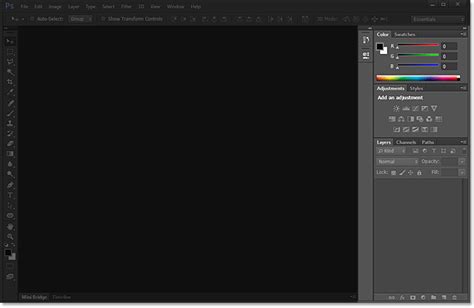
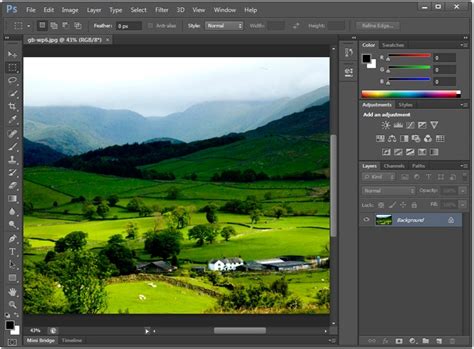
One of the most immediately striking changes in Photoshop CS6 Extended is its completely overhauled user interface. Defaulting to a darker, more muted color scheme, the new interface prioritizes the image itself, pushing tools and menus to the background. This design choice, while a departure from previous versions, is intended to reduce eye strain and improve focus on the creative work. For those who prefer the familiar lighter tones, the interface is fully customizable, offering several color themes, including the classic light grey, accessible via Edit -> Preferences -> Interface. Beyond aesthetics, the UI has undergone a functional redesign, with thousands of elements, including radio buttons, icons, and sliders, meticulously reworked for uniformity, consistency, and pixel-perfect precision.
Workflow efficiency is further enhanced by several key improvements. The Blur Gallery offers three distinct photographic blur effects: Field Blur, Iris Blur, and Tilt-Shift Blur. These effects can be previewed live, powered by Adobe’s Mercury Graphics Engine, provided a compatible graphics card is installed. For older systems, the software seamlessly switches to CPU mode. The Crop tool has been entirely reimagined, becoming a nondestructive tool that allows for greater speed and precision through multiple overlays. Users can now change image formats faster and with greater accuracy. Furthermore, the ability to straighten an image simultaneously with cropping eliminates the need for separate operations. Background auto-saving is another significant time-saving addition, ensuring that work is continuously preserved even in the event of unexpected program closures.
Advanced Retouching and Content-Aware Technology
Photoshop CS6 Extended expands upon its industry-leading retouching capabilities with two powerful new features leveraging Content-Aware technology. The Patch tool now includes a Content-Aware mode, allowing users to select an area, drag it to a cleaner part of the image, and have Photoshop intelligently blend the texture and lighting to fill the original gap. Complementing this is the Content-Aware Move tool, which offers two modes: Move and Extend. This tool enables users to select an object, move it to a new location, and have Photoshop seamlessly fill the vacated space, or to extend existing elements within an image by intelligently generating new pixels based on the surrounding content. While these tools are remarkably effective, it's important to note that they do not always yield perfect results and may require manual refinement, particularly in complex scenarios.
The Adaptive Wide Angle filter is another notable addition, specifically designed to correct distortion in images captured with wide-angle or fisheye lenses. This filter analyzes lens profiles and image metadata to automatically straighten curved objects, making them appear more natural. Users can also manually define straight lines within the image to guide the correction process, which is particularly useful for panoramas created with Photomerge that exhibit wavy distortions.
Enhanced Imaging and Creative Tools
The Blur Gallery provides a suite of sophisticated tools for manipulating depth of field and creating photographic blur effects. Field Blur allows for the creation of a gradient blur by setting multiple pins with varying sharpness levels across the image. Iris Blur creates an elliptical or circular region of focus, with the blur radiating outwards. Tilt-Shift Blur simulates the miniature effect often achieved with specialized lenses, by creating a narrow strip of focus that makes objects appear smaller and toy-like. These blur effects can be further refined with Bokeh brightness and color controls, adding artistic flair to the final image. The on-image controls are intuitive, with a central pin defining the sharpest point, and the ability to add or remove pins to customize the blur's spread. Holding down the Option (Mac OS) or Alt (Windows) key provides even more precise control over the transition between sharp and blurred areas.
Create a Miniature Tilt-Shift Effect in Photoshop
For graphic designers and illustrators, the introduction of Vector Layers is a significant enhancement. These layers allow for the creation of shapes, lines, and objects that can be independently manipulated and styled with custom strokes and fills, including gradients and patterns. This brings a level of vector-based design capability directly into Photoshop, reducing the reliance on other applications like Illustrator for certain tasks. The new Paragraph and Character Style panels, similar to those found in InDesign, offer advanced typesetting capabilities, allowing for the creation and application of styles for consistent text formatting throughout a document. A built-in Lorem Ipsum text generator further aids designers in mock-up creation.
3D, Video, and Performance Advancements
Photoshop CS6 Extended significantly reworks its 3D capabilities, offering a vastly simplified user interface for creating and editing 3D artwork. On-canvas and in-context scene editing streamline the workflow, allowing for more intuitive manipulation of 3D objects. While 3D features are not supported on Windows XP, users with compatible systems can explore new creative directions, including the creation of 3D logos and text. For high-quality rendering, the RayTracer engine is recommended, though Photoshop utilizes its fastest rendering mode for general interaction. Matte painters and texture artists will find the ability to paint directly on 3D objects and see immediate results particularly beneficial.
The video editing interface has also been completely reworked, providing a more accessible and powerful toolset for motion graphics artists and editors. Users can now perform basic audio edits on separate tracks and add simple transitions between video clips. Crucially, all the familiar Photoshop filters and effects can be applied to video layers, opening up a vast array of creative possibilities for enhancing moving images.
The performance gains in Photoshop CS6 Extended are largely attributed to the Mercury Graphics Engine (MGE). This engine harnesses the power of the GPU (Graphics Processing Unit) to accelerate a wide range of tasks, from image manipulation to complex filters. This hardware acceleration means that operations that previously required significant processing time can now be performed in real-time, including adjustments in tools like Liquify, Puppet Warp, and Transform. This results in a much smoother and more responsive user experience, especially when working with very large images, such as the 254-megapixel geological survey data mentioned, where previous versions would have struggled with basic panning and zooming. The ability to liquify massive images without perceivable slowdown is a testament to the MGE's impact.
RAW Processing and File Management
Adobe Camera Raw (ACR) has received substantial updates with the introduction of the PV 2012 processing engine. This new engine employs a "tone-mapping algorithm" that significantly improves the rendering of RAW files, particularly in the highlights and shadows, often without the undesirable halo effects. The controls have been streamlined, with sliders for Shadow, Highlight, Whites, and Blacks replacing older options like Recovery and Fill Light. These new sliders offer more intuitive control over image tonality and are synchronized with Lightroom 4, ensuring a seamless round-trip editing workflow. ACR also now includes advanced local correction options for the Adjustment Brush and Graduated Filter, such as White Balance, Moiré reduction, noise reduction, and targeted shadow and highlight adjustments.
File management is also improved with the return of the Contact Sheet II plugin and PDF Presentation, features that were previously moved to Adobe Bridge. Furthermore, the Layers Panel now features powerful search and filtering capabilities. Users can filter layers by type (images, text, adjustments, vector, smart objects), name, effect, mode, attribute, and color, which is an invaluable time-saver for complex documents with numerous layers. Preferences can now be imported and exported, simplifying the process of transferring custom settings, brushes, and actions across multiple computers or after upgrades.
Extended Edition: Specializations for Professionals
The distinction between Photoshop CS6 and Photoshop CS6 Extended lies in the latter's inclusion of specialized tools catering to professionals in fields such as 3D design, scientific imaging, and advanced video production. The 3D Layer toolset in Extended offers more intuitive HUD (Heads-Up Display) controls for manipulating 3D objects, including twists, shadows, bevels, and vanishing point filters. Users can paint directly on 3D objects and composite them into photographs.
For those involved in scientific and technical imaging, Photoshop CS6 Extended provides advanced measurement and counting tools to extract quantitative data from images. This capability is crucial for fields like microscopy, manufacturing quality control, and forensic analysis, where precise measurements and counts are essential.
The support for 10-bit monitors in Photoshop CS6 Extended is another professional-oriented feature, offering a wider range of color depth for more accurate color representation and grading, particularly important for high-end video and photography work. When resizing layers using the Free Transform tool, users now have the option to choose from different bicubic interpolation modes, allowing for optimized image scaling based on the content.
Photoshop CS6 Extended continues to be the comprehensive solution for virtually any imaging task, from basic photo retouching to complex 3D rendering and scientific analysis. Its blend of enhanced core functionalities and specialized tools makes it an indispensable asset for creative professionals across diverse industries.