Adobe Photoshop Elements 8, released in late 2009, represents a significant step forward in making sophisticated photo editing accessible to home users. This iteration of the popular software package, which includes both an Organizer and the main editing program, introduces a range of new features designed to streamline workflow, improve image quality, and simplify the process of managing a digital photo collection. The core philosophy remains consistent: to provide powerful tools in a user-friendly interface, allowing individuals to organize, correct, enhance, and generally get the best out of their digital photos with ease and enjoyment.
Revolutionizing Image Capture and Correction
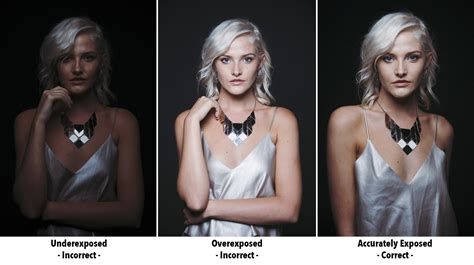
One of the most impactful additions to Photoshop Elements 8 is the Photomerge Exposure feature. This tool addresses a common photographic challenge: capturing a scene with a wide dynamic range, where bright backgrounds can overpower shadowed subjects, or vice versa. Instead of relying on complex in-camera techniques or extensive manual editing, users can now take two or more shots of the same scene - one exposed for the subject, and another for the background - and let Elements 8 intelligently combine them. The software automatically aligns these multiple exposures, creating a single, well-balanced image that retains detail in both the highlights and shadows. While optimal results are achieved when the camera and subject remain as still as possible between shots, the program offers manual alignment and designation of over- and under-exposed areas for greater control. This feature is particularly brilliant for spontaneous moments, such as capturing a friend's portrait against a sun-drenched landscape, where a quick flash on and flash off approach can yield superior results later in the editing process. Even better outcomes can be achieved with three or more alternative shots, though maintaining similar composition across these shots is key to avoiding peculiar-looking composites.
Beyond exposure, Photoshop Elements 8 also tackles compositional challenges with the Recompose function. This innovative tool allows users to eliminate unwanted background elements or adjust the spacing between subjects without distorting their appearance. Imagine a photograph of two people standing too far apart; Recompose enables you to bring them closer together seamlessly. If the automatic adjustments aren't satisfactory, users can manually define which parts of the image to preserve and which to remove. This function is particularly useful for repurposing photos for different aspect ratios or print sizes, ensuring that key subjects remain intact. While the software generally produces surprisingly seamless backgrounds after recomposition, removing elements can sometimes lead to slight skewing or twisting of the affected background areas. Nevertheless, the freedom this feature offers to salvage or refine compositions is a significant enhancement for casual photographers.
Photoshop Elements 8 Review - Recompose Tool
Intelligent Organization and People Recognition
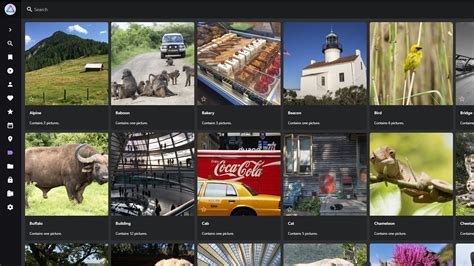
The Elements Organizer has always been a cornerstone of the Photoshop Elements experience, providing a powerful utility for previewing and sorting photos and other media files. In version 8, this Organizer receives significant upgrades, including the introduction of Auto-Analyzer and People Recognition. The Auto-Analyzer is a highly impressive tool that scans an entire photo library, automatically tagging images based on various criteria. It can discern high-quality shots from blurred ones, identify photos containing multiple people versus single subjects, and more. This automated tagging process is a marked improvement over less intuitive methods like tag clouds, which often encourage repetitive tagging. Auto-Analyzer, conversely, makes valuable judgments on each picture, effectively making the computer "smarter" in its organization capabilities.
The People Recognition feature aims to take organization a step further by identifying individuals within photos. Users initiate this by enabling the feature in the Organizer and naming faces in several initial images. The program then analyzes the rest of the photo library, theoretically identifying and tagging individuals accordingly. While this feature works reasonably well for clear, full-face photos with good color and clarity, it can struggle with lower-quality or less well-defined images. In practice, it often prompts the user with "who is this?" questions, requiring manual input. Despite its limitations, People Recognition is considered by some to be on par with, if not superior to, similar features found in competing software like Apple's iPhoto. The integration of these automated analysis tools significantly eases the burden of manual sorting and tagging, allowing users to find specific photos or groups of photos much more efficiently.
Streamlined Editing and Creative Possibilities
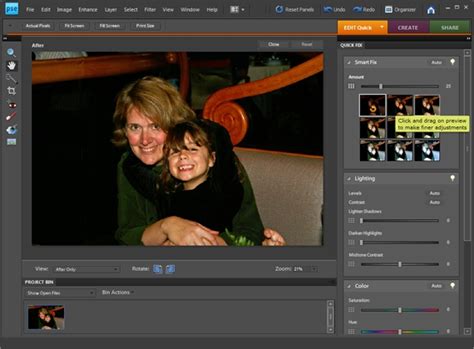
Photoshop Elements 8 introduces several enhancements to the editing process itself, focusing on speed and user intuition. The Quick Fix tasks now benefit from adjustment previews. Instead of simply seeing a thumbnail of potential adjustments, users are presented with full-size previews of alternative "fixed" versions of their image. This allows for a much more informed selection of the desired outcome before committing to further tweaks, saving considerable time. This visual approach to editing helps users quickly identify the best color, contrast, and lighting adjustments.
For users looking to expand their creative output, Elements 8 includes an updated set of templates for creating photo books, greeting cards, and other projects. While these templates are generally of good quality, it's worth noting that clicking the "Create" button can sometimes lead to prompts for paid services from third-party providers like Shutterfly and Kodak Gallery. This can be slightly irritating for users who prefer alternative services or have pre-paid credits elsewhere, highlighting a desire for an ad-free version of the software.
The Recompose tool, as mentioned earlier, also offers creative possibilities beyond simple resizing. By intelligently preserving key subjects while allowing elements to be removed or the image to be scaled, it opens up new avenues for artistic expression and practical photo manipulation. For Mac users, Photoshop Elements 8 offers additional creative tools such as Scene Cleaner, which allows for the removal of unwanted elements like tourists or cars from a series of photos to create a perfect scene. The Smart Brush tool enables users to apply complex effects to specific areas of a photo with a single stroke, while Touch-Up brushes simplify common tasks like whitening teeth or enhancing blue skies.
Accessibility and Value
Photoshop Elements 8 is positioned as an accessible yet powerful photo editing solution. It offers a friendly interface that seamlessly blends automated and manual tools, allowing users to easily switch between Quick Fixes and more detailed manual adjustments within the same workspace. This integration enhances the user experience and makes working with photos remarkably straightforward.
The software was available for around £75, with a bundle option including Premiere Elements 8 for approximately £115. For Windows users, an optional "Plus" version was available, offering additional benefits such as 20GB of online storage for automatic backup and sharing (up to 15,000 photos or four hours of video), along with regular deliveries of tutorials, seasonal artwork, and interactive online templates. For Mac users, Photoshop Elements 8 was designed to complement iPhoto, providing advanced editing capabilities for those who wish to go beyond basic photo management.
System requirements for Photoshop Elements 8 were relatively modest by contemporary standards, reflecting its target audience. For Windows, a 1.6GHz processor with SSE2 support, Windows XP (SP2 or SP3), Vista, or Windows 7, 1GB of RAM, and 2GB of free hard drive space were recommended. Mac users required an Intel multi-core processor, Mac OS X 10.4.11 up to 10.6, 512MB of RAM (1GB recommended), 64MB of video RAM, and 2GB of hard drive space. These requirements underscore the software's design for widespread accessibility across common home computing setups of the era.
Verdict
Adobe Photoshop Elements 8 presented a compelling upgrade for users of previous versions, particularly those prior to version 7. The enhanced Organizer, coupled with the intuitive main editing program, made managing and refining digital photos easier than ever. While owners of version 7 might have found the upgrades less revolutionary, Elements 8 maintained its strong position in the market through its friendly interface and effective combination of automated and manual editing tools. In comparison to free alternatives, even those with advanced features like those found in Windows 7, Photoshop Elements 8 offered a level of polish, reliability, and integrated functionality that set it apart, solidifying Adobe's reputation for effective and dependable software. The ability to seamlessly integrate photo and video editing with Premiere Elements further enhanced its value proposition for a comprehensive digital media workflow.