A business logo is far more than just a mark; it is the cornerstone of a company’s visual identity. It's the initial impression, the lasting memory, and the silent ambassador of a brand's essence. In today's visually driven world, a well-designed logo is not just beneficial, it's indispensable for establishing credibility and fostering recognition. Tools like Adobe Photoshop have long been the go-to for graphic design, particularly for web applications, and understanding its capabilities is crucial for any aspiring logo designer. While Adobe Illustrator is often favored for its vector capabilities in logo creation, Photoshop remains a powerful and versatile tool for many aspects of the design process, from initial concept manipulation to adding intricate effects.
Understanding the Foundation: Client Brief and Conceptualization
Before a single pixel is placed, the most critical step in logo design is to thoroughly understand the client and their field. This involves extensive research and communication to grasp the company's mission, core values, target audience, competitive landscape, and desired brand attributes. As creative director Sarah Giffrow suggests, "I like to gather visual examples to see what resonates with them." This collaborative approach ensures the logo will authentically represent the brand. Developing a mood board, as Giffrow recommends, serves as a shared reference point throughout the entire design process, curating a collection of logos, images, colors, visual cues, and typography that align with the client's vision.
Once armed with insight and inspiration, the sketching phase begins. It's essential to create rapid iterations and a high volume of them. Designer George Bokhua advises, "Don’t show clients sketches; it can be hard for clients to imagine the potential or final product." A highly effective strategy during this stage is to work exclusively in black and white. A strong design will inherently possess visual integrity, functioning effectively regardless of color. After generating a selection of promising logo concepts, the next step is to refine a few of these into fully developed options for client presentation. Presenting two or three well-crafted concepts is generally recommended, as Bokhua notes, "Don’t overwhelm the clients with options."
The Art of Simplicity: Minimalism in Logo Design
Logos, by their very nature, lend themselves to minimalism due to the limited space available for conveying a message. Flat logo design, a two-dimensional approach devoid of perspective, is a popular strategy for maintaining a minimalist profile. The iconic Nike Swoosh serves as a prime example of this principle.
Simplicity should also extend to color usage. Much like monochromatic palettes often seen in interior design, logo design benefits from a restrained approach to color. Bokhua emphasizes, "I try to use clean, geometric shapes and stick to 45- or 90-degree angles." In contrast to more illustrative styles, minimalist logos typically employ neat and proportional shapes. Graphic designers frequently utilize basic geometric forms like rectangles, triangles, and ellipses to achieve this proportionality.
"Space is so important in minimalism," states Giffrow. By minimizing the number of elements, an airy and uncluttered feel is maintained. With restricted design real estate, negative space becomes an indispensable element in minimalist design. The areas between and around the primary elements are as crucial as the filled spaces, offering opportunities to maximize both meaning and visual appeal.

Typography's Crucial Role in Brand Identity
Beyond the pictorial mark, typography plays a pivotal role in logo design, capable of making or breaking a logo's effectiveness. Most brands incorporate a wordmark or lettermark - essentially the company name - as an integral part of their logo. Giffrow observes, "I see a lot of good logos paired with generic text that doesn’t look harmonious with the artwork." Minimalist logos often utilize sans-serif fonts, as serifs can introduce detail and impart a more traditional aesthetic. However, there are instances where a serif typeface may be more appropriate for a brand's name and identity.
Leveraging Adobe Photoshop for Logo Creation
While vector software like Illustrator is often preferred for its scalability, Adobe Photoshop offers a robust suite of tools for logo design, particularly for creating unique raster-based graphics, applying complex effects, and for designers who are more accustomed to its interface.
The Text Tool: A foundational element for any logo that includes text is the Text Tool, readily identifiable by the "T" icon in Photoshop's left-hand palette. This tool allows designers to input the company name directly onto the canvas. Once the text is in place, it can be manipulated in terms of size, font, color, and placement.
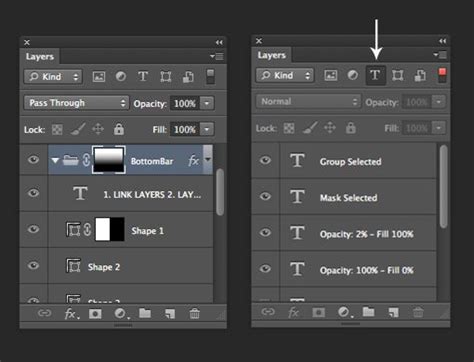
Layer-Based Editing: Photoshop's layer system is indispensable for logo design. It enables the modification or movement of specific elements while preserving others. Layers can be managed through the Layers menu, typically found on the lower right of the program's interface, allowing designers to select and work on individual components of the logo.
Adding Effects: Photoshop provides a vast array of effects that can elevate a logo's visual appeal. These include, but are not limited to, bevels and embosses for a sense of depth, drop shadows for separation from backgrounds, and color gradients to add subtle transitions and richness. Experimenting with different effects allows designers to explore various stylistic options and discover what best suits the brand's identity.
Saving Your Work: A crucial step in the workflow is saving the file appropriately. It is recommended to save the project in Photoshop's native format (*.psd) to retain all layers and editing capabilities for future modifications. Additionally, saving a flattened version as a *.jpg is essential for web use and general sharing. For logos requiring transparency, saving as a *.png is the preferred format.
Exploring Diverse Logo Design Tutorials and Techniques
The wealth of online resources offers numerous tutorials for logo design using Adobe Photoshop and Illustrator. These tutorials cover a wide spectrum of styles and techniques, catering to beginners and experienced designers alike.
Foundational Principles: Many courses and tutorials emphasize the fundamental principles of effective logo design. These include an understanding of color theory, the impact of typography, and the importance of composition. Developing a strong brand identity through logo design and visual storytelling is a key learning objective.
Specific Design Styles:
- Retro Logo Effects: Tutorials exist for recreating vintage or retro logo aesthetics, often involving specific filters and layer styles to achieve an aged or nostalgic feel.
- Reflection Logos: Learning to create realistic reflections, whether for text or graphical elements, adds a dynamic dimension to logo design.
- Origami-Inspired Designs: Some tutorials explore creating logos that mimic the folded paper aesthetic of origami, often using Illustrator to build the geometric shapes.
- Logotype Tutorials: These focus specifically on the design of text-based logos, emphasizing font selection, kerning, and overall typographic harmony.
- Chalk Logo Effects: This unique style aims to replicate the appearance of chalk art on a blackboard, offering a charming and artisanal feel.
- Metallic Logos: For a more contemporary and edgy look, tutorials demonstrate how to create metallic textures and effects, often suitable for music bands or technology-focused brands.
- Vector Crest Logos: These tutorials delve into creating elaborate logos that often incorporate mascots or significant symbolism, building complex designs with multiple integrated elements.
- Grunge and Blended Logos: Often seen in music-related industries, these styles utilize textured elements and blended effects to convey a sense of raw creativity.
Illustrative Examples from Online Resources:
- Abduzeedo: Known for its insightful tutorials, Abduzeedo offers guidance on creating unique logos, often starting with simple geometric shapes.
- Corey Harris (YouTube): A popular tutorial by Corey Harris demonstrates how to create a clean and professional logo in Photoshop, achieving a polished result.
- Aviva Directory: This long-standing resource provides tutorials across various Photoshop categories, including specific guides for logo creation.
- Spoon Graphics: Chris Spooner offers a range of tutorials, including those focused on retro designs and the process of creating a logo from concept to completion, often advocating for vector software.
- Udemy: This online learning platform features numerous Photoshop logo design tutorials, including those aimed at creating modest yet effective business logos.
- Tutsplus: Tutsplus provides in-depth tutorials, such as those focusing on vector crest logos and recreating iconic designs like the Batman logo using a combination of Photoshop and Illustrator.
The ONLY Logo Design Tutorial You'll Ever Need! (Professional Reveals All)
The Iterative Process and Client Collaboration
Creating a unique and impactful logo is an iterative process that requires significant time and dedication. It involves extensive background research, numerous design iterations, and continuous refinement. The goal is to arrive at a design that not only is visually appealing but also effectively communicates the brand's core message.
The workflow for logo design, especially for freelancers and contract workers, is paramount. This involves understanding the entire process, from initial client consultation to final delivery. David Pache, in a guest post on Web Designer Wall, shares insights into his personal logo design process, offering adaptable ideas for other designers.
The Importance of Scalability and Versatility
A critical consideration in logo design, regardless of the software used, is ensuring the logo's scalability and versatility. A well-designed logo must remain clear and recognizable when scaled down for small applications like favicons or social media profile pictures, and equally impactful when displayed at large sizes, such as on billboards or signage. This is why many designers advocate for creating logos that can be reproduced effectively in single colors. The ability to scale without losing integrity is a hallmark of a strong, enduring logo.
Adobe Express: A Streamlined Approach to Logo Making
For those seeking a more streamlined and user-friendly experience, Adobe Express offers a powerful and accessible solution for logo design. The platform provides a vast library of customizable logo templates, allowing users to start with a pre-designed structure and adapt it to their specific needs.
Key Features of Adobe Express for Logo Design:
- Extensive Template Library: Choose from dozens of professionally designed templates that align with various brand identities and aesthetic preferences.
- Drag-and-Drop Editing: Easily add icons, graphics, and shapes to personalize your logo and inject personality into the design.
- Brand Kit Integration: Upload your own branded assets and fonts, and create a unique color scheme to ensure brand consistency across all your designs.
- AI-Powered Features: Adobe Express incorporates AI-assisted design tools (powered by Adobe Firefly in some regions) that can generate graphics, text effects, and color variations, speeding up the creative process.
- Font Selection: Access thousands of free Adobe Fonts directly within the editor, with curated font recommendations to suit your project.
- Animation Styles: Apply dozens of animation styles to text or images for dynamic logo presentations.
- High-Quality Downloads: Download your completed logo in high-quality file formats, including PNG, JPG, and PDF, optimized for both digital and print use.
- Free Availability: Adobe Express offers a free plan with many core features, making professional logo design accessible to everyone.
Whether you're using the advanced capabilities of Photoshop or the intuitive interface of Adobe Express, the fundamental principles of effective logo design remain constant: understanding the brand, prioritizing simplicity, leveraging strong typography, and ensuring the final design is memorable, versatile, and representative of the company's identity. The journey from a client brief to a finished logo is one of creativity, strategy, and meticulous execution, ultimately shaping how the world perceives a brand.