Adobe Photoshop Elements has long been a go-to solution for individuals seeking to enhance their digital photography without the steep learning curve often associated with professional-grade software. This program masterfully blends power with simplicity, enabling users to elevate their photos, share them in innovative ways, and efficiently manage their entire collection of images and video clips. The core philosophy behind Photoshop Elements is to democratize photo editing, making sophisticated tools accessible to a broad audience, from casual hobbyists to budding enthusiasts.
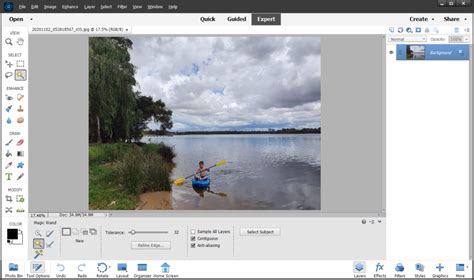
Unveiling the Photoshop Elements Demo Download Experience
For those eager to explore the capabilities of Adobe Photoshop Elements before committing to a purchase, the demo download offers a valuable opportunity. The process for obtaining and installing a trial version is designed to be straightforward. Typically, users can initiate a 7-day free trial if no valid license is associated with their Adobe ID. This trial period allows ample time to delve into the software's features and assess its suitability for personal or professional needs.
The trial download experience is often initiated through Adobe's official website. Once the download is complete, the installation process begins. For older versions, such as Photoshop Elements 2024 and earlier, activation of the full version is achieved using a serial number after installation. This serial number is crucial for unlocking the complete functionality of the software.
Installation: Navigating the Setup Process
The installation procedure for Photoshop Elements, especially for physical media like DVDs, requires attention to detail. It's important to ensure that a DVD drive (not a CD drive) is connected to your computer. In some cases, to facilitate a smooth installation, it's recommended to temporarily disable firewalls, antivirus software, and other third-party security software. These programs can sometimes interfere with the installation process by flagging executable files as potential threats.
If the AutoPlay feature doesn't initiate the installation automatically, or if your security settings prevent it, you can manually start the setup. On Windows, this involves browsing to the DVD using Windows Explorer and double-clicking Setup.exe located within the relevant Adobe Photoshop Elements folder (e.g., Adobe Photoshop Elements 2022). For macOS users, the process typically involves navigating to the Adobe Photoshop Elements 2022 folder and launching Install.app.
Locating Your Serial Number and Redemption Codes
A critical component of activating Photoshop Elements, particularly after a trial period or when installing from physical media, is the serial number. For DVD installations, the serial number is usually found on the bottom of the DVD sleeve. Adobe provides resources, such as "Find the serial number of your Elements products," to assist users in locating this vital piece of information.
In instances where a redemption code is provided instead of a direct serial number, this code needs to be converted into a serial number first. This conversion process is typically handled through Adobe's website or a dedicated portal. Once you have a valid serial number, you can proceed with activating the full version of Photoshop Elements. After a successful conversion to the full version, a pop-up screen will appear, prompting you to select "Get Started."
How to Download Installer for older versions of Adobe Photoshop Elements & Adobe Premiere Elements
Core Features: Transforming Your Photos with Ease
Adobe Photoshop Elements 6, and its subsequent iterations, are built around the principle of empowering users to achieve professional-looking results with intuitive tools. The software offers a tiered approach to editing, catering to different skill levels and desired outcomes.
One-Click Fixes and Guided Edits: Instant Improvements
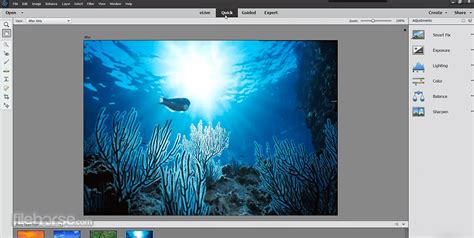
For immediate enhancements, Photoshop Elements provides one-click fixes that can instantly improve common photographic issues like exposure, color balance, and sharpness. This is particularly useful for users who want quick adjustments without delving into complex settings.
Beyond single-click solutions, the program excels in its step-by-step editing assistance. These "Guided Edits" are a cornerstone of the Photoshop Elements experience, offering clear instructions and visual cues to help users learn and apply various editing techniques. The software boasts an extensive library of these guided tutorials, covering a wide spectrum of enhancements. For example, users can learn essential photo editing techniques through 59 Guided Edits, which are specifically designed for fixing color and lighting, improving composition, and adding unique effects to their images. This makes it an excellent learning platform for aspiring photographers and editors.
Advanced Options: For Finer Control
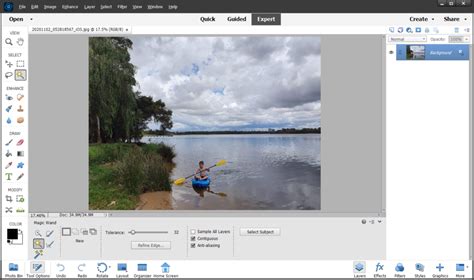
While simplicity is a key selling point, Photoshop Elements doesn't shy away from offering advanced options for users who require more granular control over their edits. These tools allow for finer adjustments, enabling users to fine-tune every aspect of their images, from intricate retouching to complex compositing. This duality ensures that the software remains relevant and useful as users' skills and ambitions grow.
Innovative Compositing: The Power of Photo Blending
One of the standout features introduced in later versions of Photoshop Elements is its advanced photo-blending technology. This innovative feature allows users to effortlessly combine the best elements from a series of photographs, particularly useful for group shots. Imagine a group photo where one person blinks in one shot, another has their eyes closed in another, and a third has a great smile. With this technology, users can select the perfect facial expressions and body language from each individual in the series and composite them into a single, flawless group photograph. This capability significantly simplifies the often-tedious process of creating perfect group portraits.
Organizing and Sharing Your Memories
Beyond editing, Photoshop Elements places a strong emphasis on managing and showcasing your photographic collection. The software aims to consolidate all your photos and video clips into one easily accessible location.
Smart Albums and Visual Curation
Finding specific photos within a large library can be a daunting task. Photoshop Elements addresses this by introducing "Smart Albums." These intelligent collections automatically gather photos based on criteria that are most important to the user. This could be based on dates, keywords, faces, or even specific editing actions. This automatic curation significantly streamlines the process of organizing and retrieving images.
Furthermore, the program offers a variety of viewing options and supports visual keyword tags, allowing users to sort and find photos based on their content rather than just file names or dates. This visual approach to organization makes navigating through extensive photo libraries much more intuitive and efficient. Automatic tagging, curation, and face recognition further enhance this capability, ensuring that users can find photos fast.

Beyond Traditional Slideshows: Imaginative Sharing
Photoshop Elements empowers users to move beyond the limitations of traditional slideshows. The software provides the means to share photos in a choice of animated web galleries, offering a more dynamic and engaging way to present visual stories. This feature allows for creative storytelling and can be particularly effective for sharing memories online or with friends and family.
Additionally, users can showcase their pictures in Photo Reels and collages. The integration with Adobe Express provides access to thousands of free templates, which can be used to create stunning social posts, engaging videos, eye-catching posters, and much more. This integration bridges the gap between photo editing and social media content creation, making it easier than ever to produce polished and shareable visual content.
Technical Considerations and Installation Tips
When preparing to install Photoshop Elements, several technical points are worth noting to ensure a smooth experience.
System Requirements and Compatibility
While the provided information mentions specific versions like Photoshop Elements 6 and 2022, understanding the system requirements for the version you intend to download or install is crucial. Newer versions will generally require more recent operating systems and hardware specifications. It's always advisable to check Adobe's official website for the most up-to-date system requirements for the specific version of Photoshop Elements you are interested in.
Managing Multiple Versions
An interesting aspect of Photoshop Elements is the ability to have more than one version installed on a single computer simultaneously. This can be beneficial for users who need to maintain compatibility with older projects or who wish to compare features across different releases. However, it's essential to manage these installations carefully to avoid conflicts.
Security Software Interference
As mentioned earlier, temporarily disabling firewalls, antivirus software, and third-party security software during installation is a common recommendation. These security layers, while vital for day-to-day computer use, can sometimes misinterpret the installation process as a threat, leading to interruptions or failures. It is important to re-enable this software once the installation is successfully completed.
Advanced Capabilities: Expanding Creative Horizons
Photoshop Elements provides a robust suite of tools that allow users to go beyond simple photo enhancements and engage in more creative image manipulation.
Backgrounds, Composites, and Enhancements
The software makes it remarkably easy to generate all-new backgrounds and images. Users can seamlessly add virtually anything to their photos, creating imaginative scenes and compositions. This opens up a world of possibilities for digital art and creative expression.
Restoring damaged pictures is another significant capability. Whether dealing with old, faded photographs or images with physical imperfections, Photoshop Elements offers tools to bring them back to life. Erasing distractions â unwanted objects or individuals that detract from the main subject â is also a straightforward process, allowing users to refine their images to perfection.
Photo Reels and Adobe Express Integration
The ability to create Photo Reels and collages is a testament to Photoshop Elements' focus on presentation and sharing. These features allow users to compile multiple images into dynamic visual narratives. The synergy with Adobe Express further amplifies this, providing access to a vast library of professionally designed templates. These templates are tailored for various platforms and purposes, including social media posts, short videos, posters, and more. This integration empowers users to create visually appealing content quickly and efficiently, even with minimal design experience.
Accessibility and User Experience
A key differentiator for Photoshop Elements is its commitment to user-friendliness, ensuring that individuals with no prior experience can achieve impressive results. The software is designed with a clear understanding that not everyone is a professional graphic designer.
"No Experience? No Problem."
This tagline encapsulates the software's philosophy. Photoshop Elements is engineered to be approachable. The guided edits, intuitive interface, and automated features are all geared towards lowering the barrier to entry for photo editing. Users can start making meaningful improvements to their photos from the very first session, building confidence and skill as they explore the software's capabilities.
Automatic Curation and Face Recognition
The automatic sorting and backup features, combined with automatic tagging and face recognition, are instrumental in making photo management a less burdensome task. Face recognition, in particular, allows users to tag individuals in their photos once, and the software will then identify that person in other images. This significantly speeds up the process of organizing large photo libraries by person.
In essence, Adobe Photoshop Elements demo download provides a gateway to a powerful yet accessible photo editing and management experience. It caters to a wide range of users by offering immediate solutions for quick fixes, guided learning for skill development, and advanced tools for creative exploration, all within an organized and user-friendly environment.