In the realm of digital photography, raw file formats offer unparalleled control and flexibility for post-processing. However, the landscape of these formats can be fragmented, with each camera manufacturer often employing proprietary extensions. Nikon's proprietary raw file format, NEF, is a prime example. To address the challenges posed by this diversity, Adobe developed the Digital Negative (DNG) format, an open standard designed to unify raw files. This article delves into the intricacies of converting NEF files to DNG, exploring the reasons behind this practice, the tools available, and the considerations involved.
The Genesis of Digital Negative (DNG)
The development of Digital Negative (DNG) was a direct response to a significant challenge in digital photography: the lack of a universally adopted, open standard for raw camera files. Each digital camera manufacturer historically created its own unique and proprietary raw file formats, leading to a fragmented ecosystem. This fragmentation meant that photographers often found themselves reliant on manufacturer-specific software to access and process their raw images, hindering interoperability and long-term archiving.
DNG was conceived to solve this problem by providing a publicly available archival format for raw files. The core idea behind DNG is to offer a single, consistent format that can store the "raw" data captured by a digital camera sensor. This data is the unprocessed information from the sensor before it undergoes any in-camera processing, such as compression (as in JPEGs) or conversion to TIFF. By using raw files, photographers gain complete control over conversion settings in post-processing software, including white balance, color profiles, noise reduction, and lens corrections, which are not applied by the camera but stored as metadata for the software to interpret.
The specification for the DNG format is freely available, which is a crucial aspect of its design. This openness encourages broad adoption and allows any developer to create software that supports and leverages DNG. Consequently, hundreds of software manufacturers, including major players like Apple and Google, have developed support for DNG. This widespread support enhances the longevity and accessibility of photographic archives.
Why Convert NEF to DNG?
The primary motivation for converting Nikon's NEF files to the DNG format stems from the desire for a more universal and accessible raw file standard. While NEF files contain the rich, unprocessed data from Nikon cameras, their proprietary nature can present limitations, particularly when it comes to software compatibility and long-term archiving.
One of the most significant advantages of DNG is its open specification. Unlike proprietary formats like NEF, the DNG specification is publicly documented. This means that software developers can create applications that reliably read and write DNG files without needing special licenses or reverse-engineering efforts. This open nature fosters better interoperability across a wider range of imaging software and hardware.
For photographers, this translates into several key benefits. Firstly, it simplifies cataloging and archiving. Instead of managing a multitude of different raw file types from various cameras, a photographer can consolidate their entire raw archive into a single, standardized DNG format. This makes it easier to organize, search, and access files in the future, regardless of the original camera model or manufacturer.
Secondly, DNG ensures greater software compatibility. As more software applications and operating systems offer robust support for DNG, photographers can be more confident that their archived raw files will be accessible and editable with future software versions. This is particularly important for long-term archival purposes, mitigating the risk of obsolescence associated with proprietary formats.
Furthermore, DNG can potentially offer advantages in terms of file size and metadata handling. While the exact behavior can vary, DNG can sometimes result in smaller file sizes compared to certain proprietary raw formats, especially when sidecar files are eliminated. Edits and changes made to DNG files can often be written directly into the file itself, eliminating the need for separate sidecar files that store editing instructions. This simplifies file management, as the primary image file contains all the necessary information.
The DNG format also allows for the inclusion of all the pixel information stored in current raw formats, as well as additional proprietary metadata that manufacturers may include. While the Adobe DNG Converter may, in some cases, ignore certain proprietary metadata to ensure broader compatibility, the DNG specification itself is designed to accommodate this wealth of information.
Tools for NEF to DNG Conversion
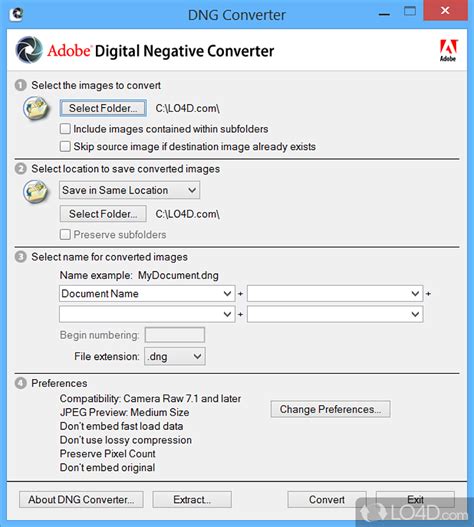
Adobe provides a free utility specifically designed for this purpose: the Adobe DNG Converter. This standalone application is available for both Windows and macOS operating systems and is a cornerstone of the DNG workflow. The installation utility for the DNG Converter is designed to also install a set of necessary color profiles that ensure the converter functions properly.
To use the Adobe DNG Converter, users typically launch it by double-clicking its icon, which can be found in their Programs (Windows) or Applications (macOS) directory after installation. An alternative and often convenient method is to drag and drop individual NEF files or an entire folder of NEF files directly onto the Adobe DNG Converter icon. The software then automatically sets the file extension to DNG for the converted files. Users simply need to click "Convert" to initiate the process.
The Adobe DNG Converter is capable of translating camera-specific raw files from a vast number of cameras, exceeding 700 supported models, into the more universal DNG raw format. This broad camera support makes it a highly versatile tool for photographers working with various Nikon models, including newer ones like the Nikon D500.
It's important to note that the DNG Converter is compatible with specific versions of Adobe software. For instance, DNG files created by the converter might be readable by Camera Raw 4.1 (Photoshop CS3) and later, and Lightroom 1.1 and later. As newer versions of the DNG Converter are released, the compatibility extends to more recent versions of Adobe's creative suite. For example, DNG files created by Camera Raw 13.2 and later are readable by Photoshop 22 and later, and Lightroom 10.2 and later.
While the Adobe DNG Converter is the most prominent free option, other software solutions may also offer NEF to DNG conversion capabilities. Some professional raw processing applications might include this functionality as part of their feature set. For example, DXO PureRAW is a commercial software that can convert raw files to DNG, and it also offers advanced noise reduction during the conversion process, though it comes with a cost.
Considerations and Nuances in Conversion
Moment: JPEG vs RAW vs TIFF - What's The Difference?
While the conversion of NEF to DNG offers numerous advantages, it's essential to be aware of certain nuances and potential considerations. One of the key discussions revolves around whether converting to DNG is always necessary or beneficial, especially if one isn't heavily invested in the Adobe ecosystem. Some argue that if you primarily use manufacturer-specific software like Nikon's NX Studio, there might be little reason to convert to DNG, as NX Studio can directly read and process NEF files and output them to universal formats like TIFF or JPEG.
A point of contention can arise regarding metadata. While DNG aims to preserve metadata, some users have reported that the conversion process, particularly with the Adobe DNG Converter, might strip out certain proprietary metadata that is present in the original NEF files. An example cited is the loss of focus point information, which can be crucial for some photographers and is accessible within Nikon's NX Studio. This means that while DNG offers a more universal format, it might not retain every single piece of data that the native NEF format holds.
Another aspect to consider is the editing workflow. Some standalone editing applications, like certain versions of Topaz Sharpen, might have been mistakenly believed to accept DNG files universally. However, the compatibility of these applications with DNG can vary, and it's often advisable to use TIFF files throughout the editing process and convert to JPG at the very end for final output. This ensures broader compatibility with a wider range of editing tools.
For users with older versions of Adobe software, such as Lightroom 6, there can be specific challenges. NEF files from newer cameras like the Nikon D500 might not be supported by older versions of Lightroom. In such scenarios, converting NEF to DNG using the Adobe DNG Converter becomes a viable workaround to import and manage these files within legacy software. However, it's also acknowledged that older software versions may eventually become inoperable due to hardware or software advancements.
When it comes to file size, there can be differing observations. Some users prefer DNG because it can lead to smaller file sizes on their drives and eliminates the need for sidecar files. However, others have noted that their DNG files, especially when generated by Lightroom with embedded previews or noise reduction data, can sometimes be larger than the original Nikon NEF files. This can be influenced by the specific conversion settings and the inclusion of JPEG previews within the DNG.
Finally, the choice between native NEF and DNG can also depend on the user's familiarity and comfort with different raw converters. For instance, if one is new to raw file post-processing, working with the native NEF format and using software that directly supports it, like NX Studio, might offer a more straightforward starting point. NX Studio has the advantage of displaying the file in a way that closely resembles the JPEG output from the camera, providing a familiar visual reference.
The Future of Raw Formats and DNG
The evolution of digital photography continues to bring advancements in camera technology and software capabilities. While DNG was developed to address a specific set of challenges related to proprietary raw formats, its adoption has been significant but not universally absolute. Hundreds of software manufacturers have embraced DNG, and its open specification remains a powerful enabler for interoperability.
Adobe continues to develop and support the DNG format, regularly updating the DNG specification and the DNG Converter to include support for new camera models. The company also provides the DNG SDK, which assists software developers in reading and writing DNG files, further encouraging its integration into various imaging applications.
The debate between using native raw formats and converting to DNG is likely to persist. Ultimately, the decision hinges on individual workflows, software preferences, and long-term archival strategies. For photographers seeking a standardized, open, and widely compatible raw format for their archives, the DNG converter offers a robust and accessible solution for transforming proprietary NEF files into a more universal standard. As imaging technology progresses, the ability to easily access and manage raw image data remains paramount, and DNG plays a crucial role in ensuring that photographers can continue to leverage the full potential of their images for years to come.